
- Microsoft plans to move most Enterprise Agreement customers to the Microsoft Customer Agreement.
- In-house counsel should check the new agreement and flag issues so they can be raised in negotiation.
- Counsel should plan regular reviews even after signing.
- Paralegal expertise can help discover the biggest issues quickly and avoid wasting time on details.
Finding the Most Common Pain Points
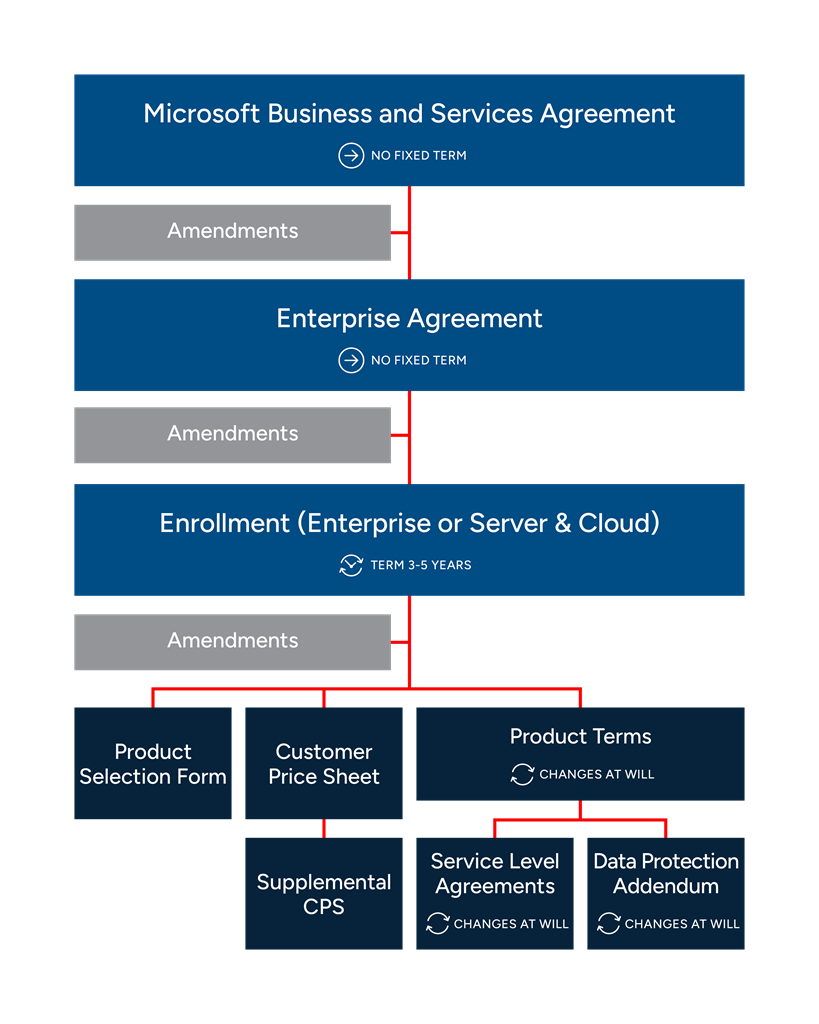
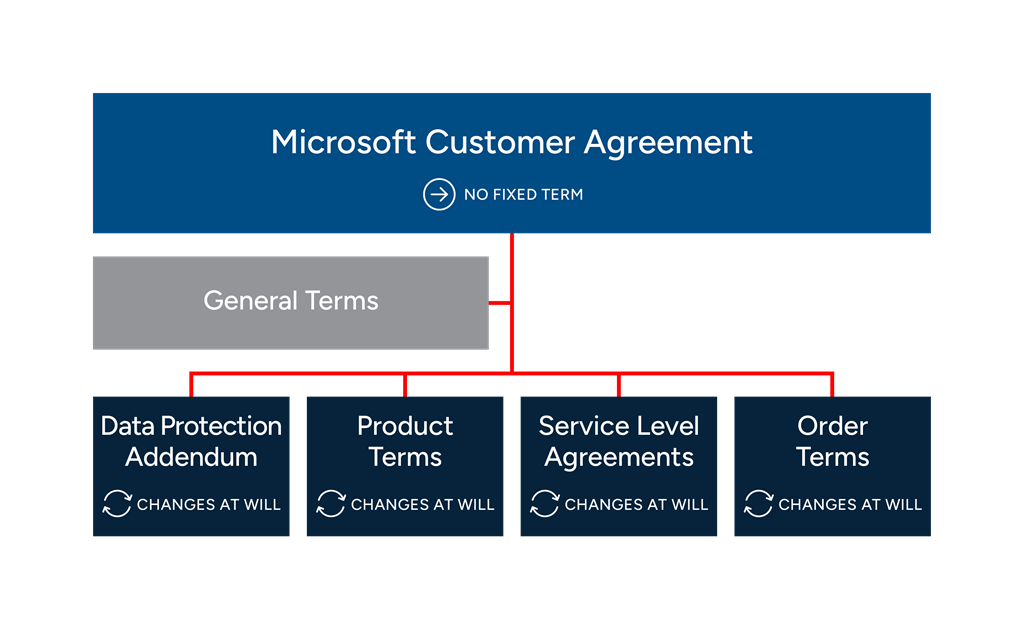
Comparing the EA contract stack (fig. 1) and the MCA stack (fig. 2) takes multiple weeks. Each organization needs its own comparison because every customer’s EA stack is unique, both in versioning and potential amendment portfolio. The customer’s in-house counsel will have to focus on specific areas, depending on the business and other factors. However, most organizations will have to review the areas of change discussed below.
Microsoft May Suspend Your Service at Any Time
In an EA, Microsoft has the right to end the contract and end service on 60 days’ notice for any reason, or on 30 days’ notice “for cause,” meaning in response to a customer breach.
In an MCA, Microsoft may also “suspend” service for cause without breaching the contract.
This suspension can happen without notice when the customer’s payment method is declined, or when Microsoft believes it must act to protect customer data or its own services. Otherwise, 30 days’ notice is required before service is suspended.
Suspension gives Microsoft a stick to move customers along. Customers who respond slowly in a license audit or other dispute may find crucial services cut until they comply. This unilateral provision could be used to hold companies’ access to e-mail and SharePoint repositories hostage in extreme situations.
Audits: Historic Penalties, More Hassle
In the MCA, audits—investigations by Microsoft or its partners to find unlicensed use or other violations of terms—carry more severe penalties for past underlicensing.
Auditors Can Mine the Past
In an EA, if an audit discovers unlicensed use, the customer must pay to remedy current unlicensed use. In practice, a customer buys enough licenses to cover current requirements, at a penalty rate (see fig. 3).
In an MCA, penalties also apply to any period of unlicensed use in the past. The difference in costs can be large when a subscription service is involved (see fig. 3).
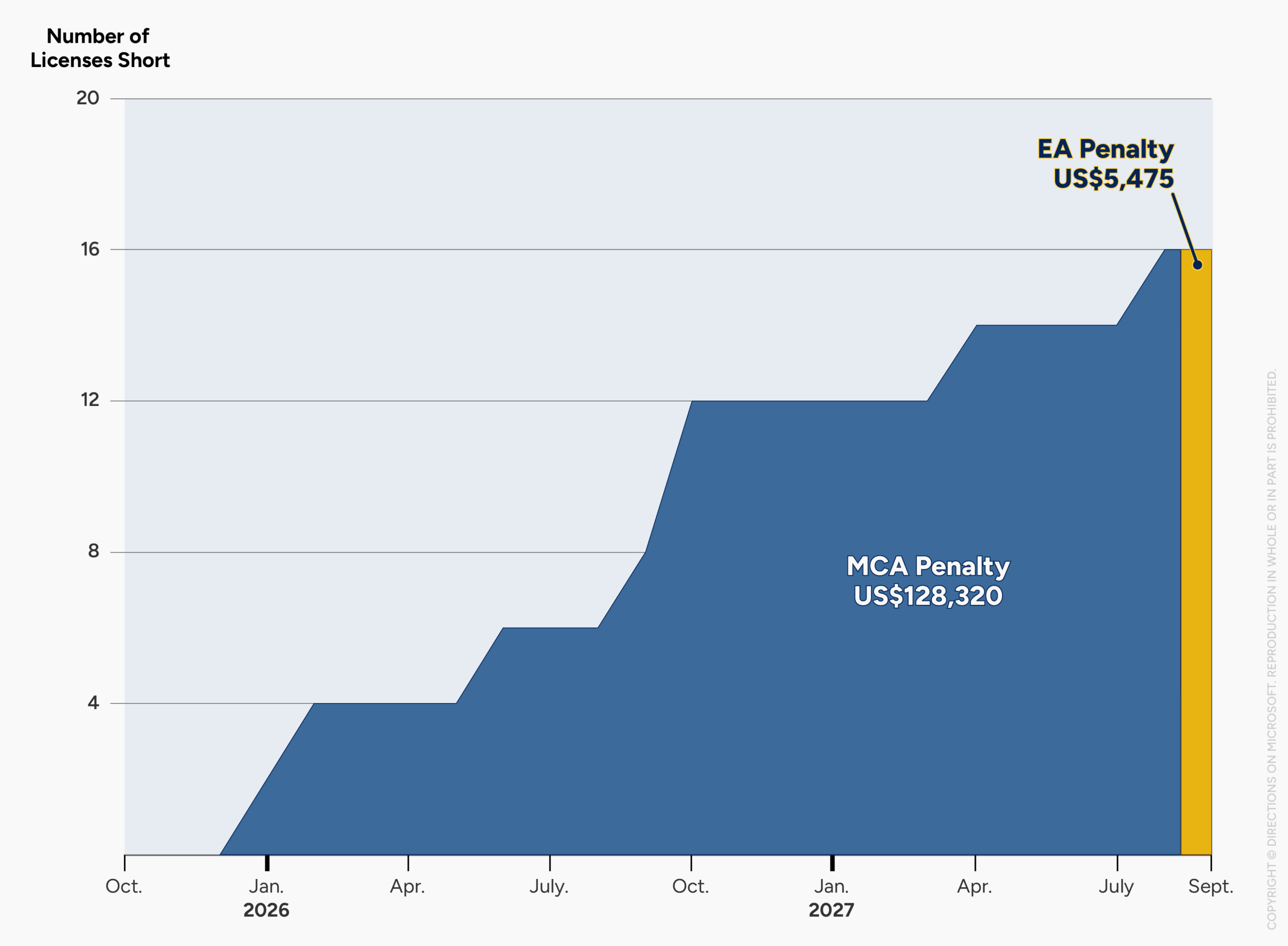
The customer here overused the benefit for 22 months, building up a 16-license shortfall. The EA contract stack implies that the customer should cover the current shortfall at a penalty rate. At SQL Server Azure pay-as-you-go rate plus a 25% penalty, the first month’s payment comes to US$5,475. The MCA, in contrast, suggests that the customer should pay for the entire period of underlicensing. At the same penalty rate, that would cost US$128,320.
Audits More Unfriendly
In an EA, audit procedures are limited by the Microsoft Business and Services Agreement (MBSA) or the older MBA, which set basic business terms for the EA contract stack. For example, they require auditors to do the following:
- Make “best efforts to not interfere with [ongoing business] operations”
- Limit frequency of audits (“Microsoft will not require Customer to engage in another verification for at least one year”)
- Keep confidential any customer information discovered in an audit.
In an MCA, most audit restrictions have been removed. This change opens up the potential for disruptive “fishing expedition” audits. The biggest source of trouble may not be Microsoft, but Software Asset Management (SAM) partners who audit customers on its behalf. These partners may use intrusive audits to improve their payouts.
Legal Terms Change at Any Time
In an EA, many legal terms were fixed for the enrollment term, typically every three years. Furthermore, some privacy and data residency guarantees were in the MBSA, which remained static for many years.
In an MCA, customers must accept new legal terms more frequently, even several times a month. For example, the privacy and data residency guarantees that were in the MBSA have moved to the the Data Protection Addendum (DPA), which changes several times a year. Other legal terms moved to the Product Terms, which can changes multiple times each month. The upshot: Documents that an in-house attorney might review every year (or even every three years) must now be reviewed at least quarterly.
Directions Recommends
Line up in-house counsel resources long before renewal. Historically, some customers have involved their legal departments heavily in EA negotiation, others much less. This time, corporate counsel will be heavily involved in comparing the two contract stacks for important issues, and continuing to monitor the MCA legal terms after signing.
Integrate legal issues into renewal negotiations as early as possible. Legal concerns need to be discovered—a long process—and then weighed against the larger list of issues for negotiation. For example, companies may need to accept some legal risk in return for business concessions like a longer agreement term, limits of liability, remedies for service disruption, and financial concessions such as price discounts. Customers who bring all issues to the table early have time to consider more options and improve their chances of finding the best deal.
Consider “paralegal” strategy. Licensing experts may not offer legal advice, but they can multiply the effectiveness of an organization’s own purchasing team and legal counsel. At Directions on Microsoft, for example, the company’s experts have compiled a comparison of 300+ pages of the two contract stacks and projected how each stack will affect organizaations, based on years of past negotiations with Microsoft. This kind of analysis can focus a company’s own counsel on the most important parts of the stack and highlight adverse changes quickly.
Resources
Advice for EA-MCA transitions and related services are outlined at “Microsoft Advisory & Negotiation.”
EA-MCA transition risks and strategy are previewed in the Directions podcast episode “Moving From EA to MCA? Watch Out for These Gotchas.”
The start of the EA-MCA transition is outlined in the Directions blog post “Mid-size orgs: Your Enterprise Agreement days are numbered.”
The EA-MCA transition of cloud services is summarized in the Directions blog post “Want to sign an Azure Consumption agreement? Soon, MCA may be your only option” and (for Directions members) the Directions report “Transitioning Microsoft 365 from an EA to an MCA.”
The basics of a traditional EA are reviewed at “Deep Dive: Microsoft EA Negotiation.”