Updated: April 10, 2026 (January 10, 2026)
Analyst ReportHow to Apply Azure Reservations and Savings Plans Effectively to Compute Workloads

- Spending on Azure compute is typically the largest percentage of an organization’s Azure spending, highlighting a need for optimization.
- Azure offers two options to save on long-term consumption of compute resources: Reserved VM Instances (RVMIs) and Azure Savings Plan for Compute.
- Understanding when and how to purchase either option can result in significant long-term savings without requiring any upfront financial commitment.
- However, purchasing without completely understanding existing spending patterns can result in significant waste.
Azure compute is typically the single largest cost category of resources that an organization will face in Azure spending. There are two potential ways to save if an organization understands its long-term low-water marks of consumption. By planning and following a careful timeline, the organization can apply reservations and savings plans effectively, without wasting money. However, doing so requires upfront planning, long-term analysis, and investment in processes to track both the spending on resources and the consumption of reservations and savings plans.
This report and the examples included focus on Azure VMs, but the concepts apply across all types of Azure compute resources including Azure App Service and Azure Container Instances, which depend on Azure VMs as a part of their architecture.
Azure Compute Discount Fundamentals
Two types of discounts are available to save on Azure compute resources:
Both offer a degree of discounting in exchange for the commitment to buy a one- or three-year quantity of compute resources but they differ in what must be specified at the time of purchase.
Reservations, like Reserved VM Instances (RVMIs) that are used for Azure VMs, specify the quantity of a particular resource consumed each hour over a month.
Savings Plans for Compute, in contrast, specify the dollar amount of all compute resources (not just Azure VMs) consumed each hour over a month.
(For more information on the differences between the two, see the sidebar Azure Savings Plans vs. Azure RVMIs.)
Savings Plan for Databases offers similar benefits to Savings Plan for Compute, for several Azure PaaS databases services, but only for a one-year period.
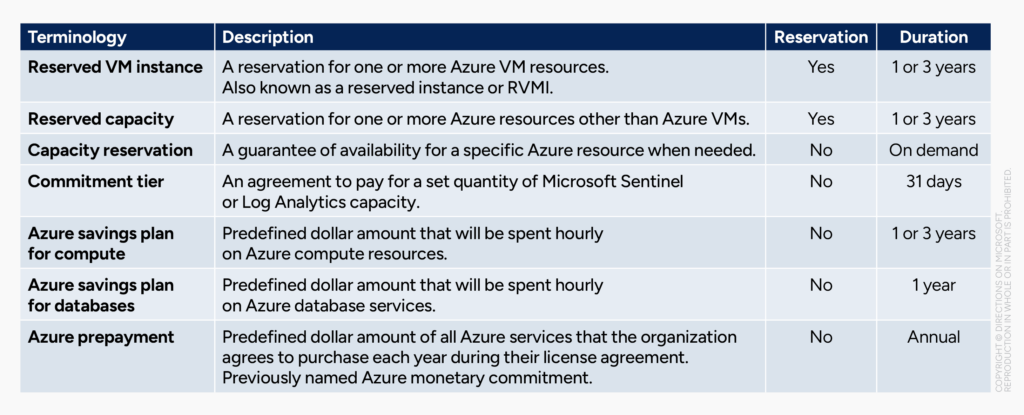
A range of Azure terms can be confused with reservations; only a handful are actually related (see fig. 1).
Potential Savings are Significant
If these Azure Discounts are applied effectively, the organization can significantly reduce costs in exchange for their commitment.
Two guidelines can help simplify and explain the complex potential financial benefit of each option:
- The longer the commitment a customer is willing to make, the larger the overall discount
- Reservations always offer the best savings but require precise purchasing when compared with Savings Plans.
Both reservations and savings plans can either be purchased upfront or monthly for the duration of that purchase. (There is no cost benefit, but accounting benefits may apply instead.)
Longer Commitments Offer Deeper Discounts
Three-year reservations and savings plans both offer discounts that are nearly double their one-year counterparts.
The resulting savings can be so significant that the organization may be able to run twice as many resource instances for less money than an individual instance of that resource would cost. (For example, running two Azure VMs for less than the cost of running one Azure VM over the same period of time.)
Reservations Offer Deeper Discounts
Reservations always offer the best savings but require precise purchasing.
Savings Plan for Compute offers a smaller percentage discount—particularly one-year plans—but requires very little up-front planning.
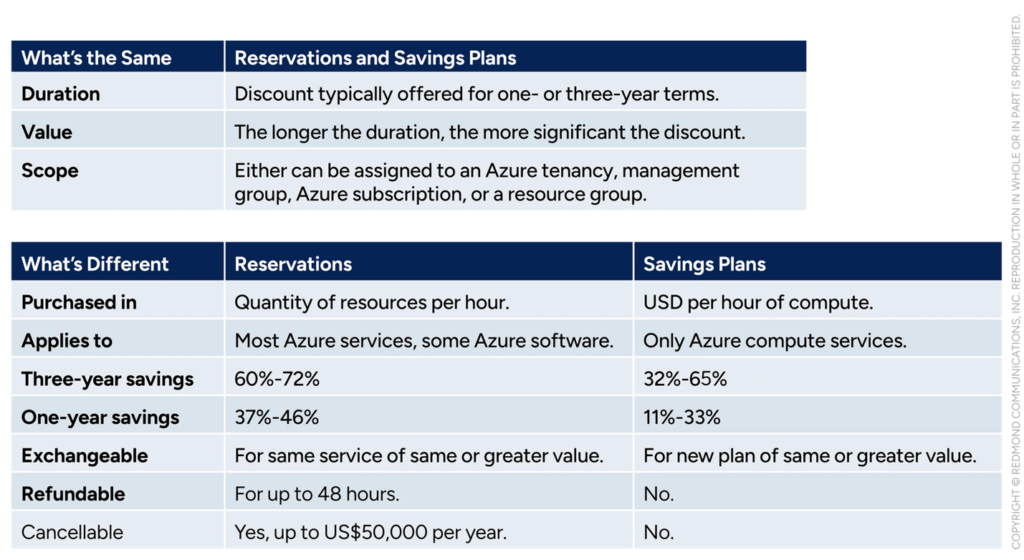
A three-year Savings Plan for Compute can net savings of up to 32%-65% off, while comparable RVMIs range from 60%-72% off.
A one-year Savings Plan for Compute can net savings ranging from 11%-33% off, while comparable RVMIs range from 37%-46% off.
Comparing reservations and savings plan is best done by looking at which aspects are the same, and which aspects are different (see fig. 2).
How Large Are the Actual Savings?
There is no formula for nor simple way to describe the precise discounts a particular resource will offer, because the discounts can vary depending on:
- The Azure region that the resource will run within (ex: West US 2)
- The series of host hardware it will run on (ex: M16-4ms)
- The age of host hardware it will run on (ex: v5.)
Region will not always affect savings but can, particularly with Savings Plan for Compute. Region affects both whether reservations or savings plans are available, and whether a particular VM series is available. The series of hardware chosen is most likely to affect the discounts available using reservations or savings plans. The particular version of hardware (a reflection of hardware generation and age) will also affect savings, though not in a predictable way.
For customers looking to calculate their potential savings prior to deploying resources in Azure, the Azure calculator includes comprehensive price estimates, including applicable savings plan for compute and reservation discount options. (Notably, the Azure calculator will also reflect any volume licensing discounts that apply to the organization, provided the user is authenticated to Entra ID with credentials permitted to see that data in the Azure portal.)
Customers looking to automate Azure price assessments—perhaps connecting it to Excel or Power BI for more regular analysis and reporting—can also consider using the Azure Retail Prices API. However, as the name implies, this unauthenticated service only returns retail pricing data and will not reflect any volume licensing discounts the organization may be eligible for as the Azure calculator can.
Discount Order of Operations
Organizations must treat the purchasing process with caution and care, because:
- Reservations and Savings Plan for Compute are “use it or lose it” once purchased
- Discounts begin applying immediately once purchased
- Both plans have few to no options for cancellation or refund.
(For steps customers can take to maximize their reservations and savings plans, see the sidebar Maximizing Reservations.)
Your Task for Year 1: Observe
Watch overall spend on Azure VMs that occurs directly through VMs and through other services. In general, it’s too soon to purchase a Savings Plan for Compute or RVMI, as your organization’s baseline costs are not understood.
Only consider resources that you know will be needed, as-is, for up to three years.
Year 2: Buy a Savings Plan
Purchase a Savings Plan for Compute that covers the average (or other meaningful low-water mark) monthly spend from the previous year.
Consider reservations only where costs are concrete and unchanging, and you know the series and size will not change.
Year 3: Expand, if Warranted
Potentially purchase a three-year Savings Plan for Compute if the low water mark of compute has not retreated from highs of year one & two.
Consider reservations for known-persistent resources that are not expected to change for up to one or up to three years. (Generally, it is best to have resources on a recent VM series to avoid potential issues.)
Year 4: Go for Longer Reservations if It Makes Sense
Look back strategically at compute use over the previous three years and determine the resources that have remained constant for at least two years.
Consider purchasing up to three-year reservations to cover those resources, if that pattern is anticipated to continue or expand.
Year 5: Optimize
Assess spending over years 1-4, determining the VM resources that were not covered by either Savings Plan or RVMIs:
- Consider choosing RVMIs where any resources are expected to stay constant (series of host hardware in particular)
- Consider choosing Savings Plan where the precise resources are unknown, but the overall compute spend is now understood.
Use other types of reservations for any other services that aren’t VMs and aren’t covered under the umbrella of Savings Plan for Compute.
See the same information about exchanges and currency discussed above, as they also apply to Savings Plan for Compute.
In addition to these two options, customers can also save on resource costs by choosing the most cost-effective combination of the following:
- Azure region (physical locale, age of region, and distinct features of a region can all affect cost)
- VM series (choose the lowest cost series that includes all necessary platform features)
- VM size (choose the smallest size VM that meets or marginally exceeds capacity requirements.)
Unlike purchasing reservations and savings plans that discount existing VMs, the three decisions above are typically made for the deployment of new VMs by DevOps staff, not IT or procurement (this can vary depending on the organization’s structure.) While reservations and savings plans could be handled by DevOps staff, it may be handled by procurement/licensing staff.
The cost of Azure resources is also affected by the underlying volume licensing agreement the organization has in place. For most large customers this is currently an Enterprise Agreement (EA).
Directions Recommends
Measure twice, cut once. Don’t buy Reservations or Savings Plans until your baseline spending is truly understood. For some organizations this might mean purchasing a Savings Plan for Compute in as little as three months of tenancy within Azure. For others, it might mean one to two years before significant purchasing of either option should take place.
Purchase a Savings Plan for Compute first. In general, the spending will be much more concretely understood, making savings plans more effective. In the long run, RVMIs may make sense, but the spending is rarely concrete enough in the first one to two years for RVMIs to not bring significant financial risk.
Build processes to ensure effectiveness. Microsoft makes little tooling to help organizations purchase and maintain reservations or savings plans effectively, and to gauge where the organization is overspending or losing out on potential savings. Due to the significant amount of money that can be involved in Azure compute spend, building robust processes around reservation and savings plan use can result in the most effective Azure procurement over time, and significant savings.
Resources
Azure Reservations and Azure Savings Plan for Compute, which can reduce Azure costs, are covered in the Directions report “Azure: Know Reservations.”
Azure VM costs are covered in the Directions report “Maximizing Discounts for Long-Running Azure VM Workloads“
Approaches to managing Azure costs are covered in the Directions report “Optimizing Azure Costs.”
The range of Azure reservations is described at https://learn.microsoft.com/azure/cost-management-billing/reservations/.
Steps for billing back the costs of Azure reservations are at https://learn.microsof.com/azure/cost-management-billing/reservations/charge-back-usage/.
Azure savings plan for compute is explained at https://learn.microsoft.com/azure/cost-management-billing/savings-plan/.
Steps for billing back the costs of Azure savings plans are at https://learn.microsoft.com/azure/cost-management-billing/savings-plan/charge-back-costs/.
The Azure pricing calculator is at https://azure.microsoft.com/pricing/calculator.