Updated: March 10, 2026 (February 9, 2026)
Analyst ReportMicrosoft 365 Backup Targets Exchange and SharePoint Online Using a PAYG model

- Microsoft 365 Backup enables backup and rapid restoration of Microsoft 365 service data—especially after a ransomware attack—using a PAYG model.
- The service provides backup and restores, but not archival or compliance storage, for Exchange Online, OneDrive, and SharePoint Online.
- Recent enhancements improve backup policies and management, with more flexible backup and recovery planned through 2026.
- Partner offerings built on the same underlying Microsoft 365 Backup Storage offer more features and may be preferable.
Microsoft 365 Backup provides backup of Exchange Online mailboxes, OneDrive for work accounts, and SharePoint Online sites to Azure storage using a pay-as-you-go (PAYG) model based on the amount of data being protected. It’s focused on protecting customer data from ransomware attacks on Microsoft 365 tenancies and enabling rapid, tenant-wide restoration of protected data while minimizing the risk of lost work. The service differs from the built-in versioning and “recycle bins” offered by SharePoint and other Office services, which are intended for casual undelete/revert of individual items, and also differs from eDiscovery and legal hold features, which let tenants “freeze” and export data but don’t provide data restoration services.
What Microsoft 365 Backup Does
Microsoft 365 Backup is intended to protect organizations against large-scale data loss, such as a ransomware attack, that require mass data recovery with a short recovery point objective (RPO) to minimize lost work. It also focuses on a short recovery time objective (RTO) to reduce business downtime (see fig. 1, below). The service could be useful for organizations that use Microsoft 365 services heavily and want additional protection against such attacks, as well as organizations that want to satisfy risk management and insurance requirements.
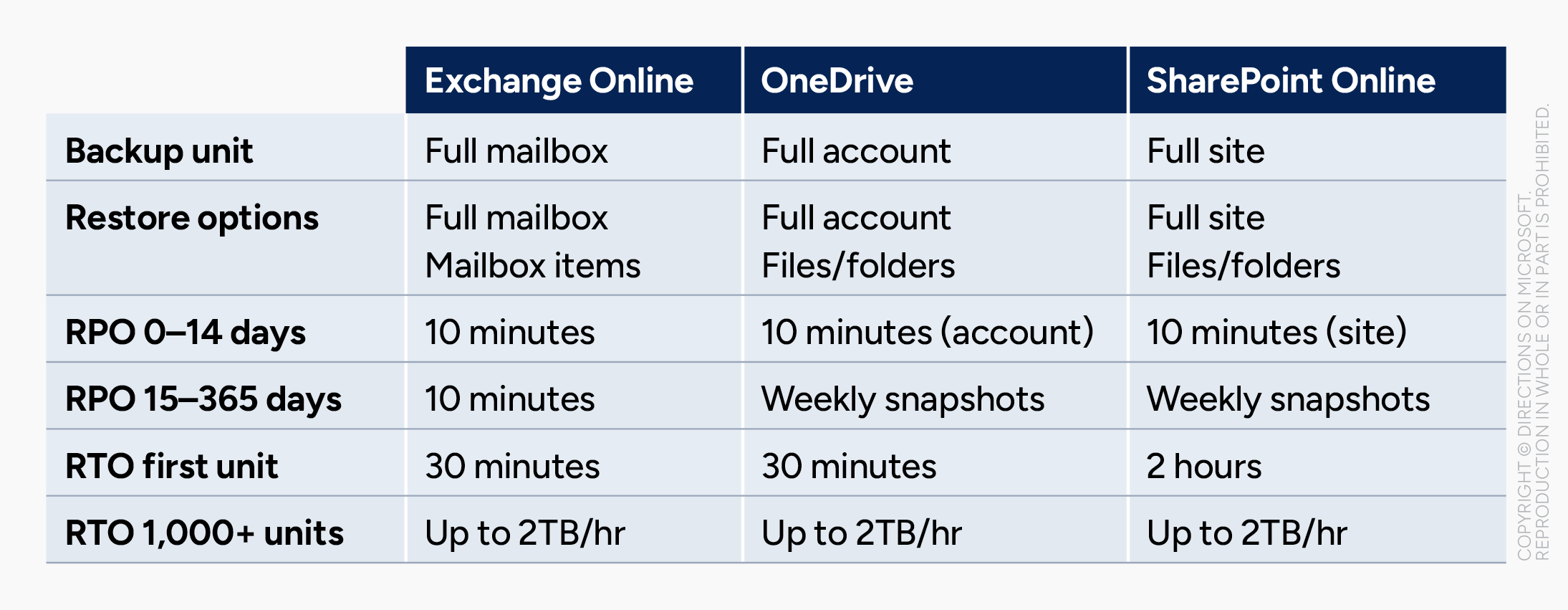
Microsoft 365 Backup leverages Azure storage to store backup data outside of the supported Microsoft 365 services rather than a “mirror version” of the live service. This prevents an automated attack against OneDrive, for example, from reaching the Azure-hosted snapshots. Backups are stored using append-only Azure Blob Storage with changes recorded in subsequent append blocks, making backups immutable. However, admins can offboard (remove) backups of specific sites, mailboxes, or users for General Data Protection Regulation (GDPR) compliance. Otherwise, backups are stored for one year, after which they’re automatically deleted.
Backup Policies
Backup policies are used to determine which Exchange user mailboxes, OneDrive accounts, and SharePoint sites (collectively referred to as units) are backed up. Units can be added to a backup policy manually, via Entra ID distribution lists or security groups, or by importing a list via CSV files. Backups begin when policies are created, and creation of initial restore points can take up to 15 minutes per 1,000 units. Backups are stored in the customer’s Azure tenancy in the geography for the given service being backed up.
Data Restoration
Restores are done on a per-service basis via the Microsoft 365 Backup admin portal. Admins select which units to restore and a target date and time from which data is to be restored. Backup data can either be restored in place or to a new location within the same tenancy, depending on the data source. For Exchange mailboxes, data can also be restored to a new folder within the mailbox. For OneDrive accounts and SharePoint sites, data can also be restored to a new SharePoint site. Admins are able to browse and restore individual files and folders from Microsoft 365 Backup; a capability that is currently in public preview and planned for general availability by May 2026. Microsoft 365 does not offer restoration of data to a different user account or different Microsoft 365 tenancy, preventing it from being used as a migration tool.
Enhancements for Policies and Management
Although Microsoft 365 Backup has changed little since its release to general availability in mid-2024, a few recent updates have addressed some more obvious gaps in the service.
Dynamic rules for backup policies. Admins can include distribution lists and/or security groups to select Exchange Online or OneDrive accounts to be backed up, and the service will reevaluate list and group membership daily to update the backup policy. Previously, lists and groups were evaluated only when added to a backup policy, and admins had to update the policies manually.
Protection unit offboarding. This allows admins to delete all backups of a specific user, account, or site with a 90-day grace period. Previously, all backups were retained for one year, which prevented customers from responding to GDPR deletion requests.
Dedicated Backup admin role. Management of Microsoft 365 Backup previously used existing tenant-level administrator roles (Global, Exchange, and SharePoint) to enable and restore backups. The Backup Admin role allows delegating the management of backup and restores without additional unnecessary permissions.
Additional updates. Other recent updates include the addition of PowerShell controls for scripting or command-line administration; an opt-in notification list of admins to be informed of any potentially dangerous or malicious action, like triggering offboarding or removing a site or user from the protection policy; and Government Community Cloud (GCC) availability (rollout began Jan. 2026).
Limitations of Microsoft 365 Backup
Although it’s named Microsoft 365 Backup, the service only offers backup of Exchange Online, OneDrive, and SharePoint Online accounts and sites. The service has other limitations that are inherent to its design and how it’s positioned with other Microsoft services for data protection and retention.
No data portability or migration. Microsoft 365 Backup is not a data export or migration service; backups cannot be used to populate on-premises applications such as Exchange Server or competing services like Google Workspace. Similarly, restoration is within a tenancy only; a backup from one tenancy can’t be restored to another tenancy.
Not a hold or archival solution. Data that exists solely in Microsoft 365 Backup storage (and no longer in the live service being backed up) can’t be queried by existing Microsoft eDiscovery tools. Similarly, retention and deletion policies of live data aren’t applied to backups; backups are retained for one year, even if retention or deletion policies in the live service state otherwise. Another service, Microsoft 365 Archive, provides archival for retired SharePoint Online sites.
Not a holistic backup. Microsoft 365 Backup focuses on user data stored within a service, not its configuration or integration with other services. Some scenarios are unlikely to ever be fully supported by Microsoft 365 Backup due to how service data is stored, and the architecture of the service being backed up. For example, Microsoft 365 is unlikely to support “single-click” restoration of a team in Teams because a team incorporates data from several different services (Teams chat, Microsoft 365 Groups, SharePoint, and OneDrive).
Partner Solutions
Microsoft 365 Backup is built on the Microsoft 365 Backup Storage platform, which is also available to partner ISVs like AvePoint, Commvault, Druva, and Veeam to use in their backup solutions. These solutions offer the same underlying capabilities as Microsoft 365 Backup and can provide additional capabilities like backup of other services (Entra ID, Teams), enhanced management, and integration with backup for on-premises data or data in other clouds. Customers who find Microsoft 365 Backup limiting or who are already using third-party backup solutions might want to consider using a partner solution instead.
Microsoft 365 Backup customers adopting an ISV solution can transfer control of their existing backups to the ISV. However, it’s a one-way move. ISV customers who want to go back to using Microsoft 365 Backup have to abandon their existing stored backups and start anew.
Microsoft 365 Backup Roadmap
Limited new capabilities are planned for Microsoft 365 Backup, with a set of near-term features expected in 2026 and additional features that lack a specified time frame.
Expected in 2026
Granular file-level browse and restore (public preview): Currently in public preview, this is scheduled for general availability by May 2026.
Multi-departmental billing (private preview): Connect multiple billing policies to Microsoft 365 Backup so that different departments can use their own Azure subscriptions to pay for their backup consumption.
Full-workload backup: Automatically back up all Exchange, OneDrive, and/or SharePoint users and sites in the tenant, with new users/sites automatically added to the backup policy.
Activity logging: Monitoring logs to track all backup policy configuration and restore related tasks, to assist admins with troubleshooting, monitoring, reporting and auditing capabilities.
Long-Term Roadmap
Improvements planned for Microsoft 365 Backup but lacking a set timeline include:
- Variable backup and recovery periods beyond the current fixed schedule and 12-month backup retention
- Backup and restore of Entra ID data
- Granular restore for end users, allowing users to restore their own data
- Backup and restore for Teams chat (this has been on the roadmap since Feb. 2024)
- Specialized role-based access controls (RBAC) for backup and restore operations.
Pricing
Microsoft 365 Backup is charged as a consumption-based PAYG service based on the volume of data protected (not cumulative backups) at the cost of US$0.15 per GB per month. This includes site collection recycle bins and versioned items. Backups are retained for one year, and customers are charged for the high-water mark of protected data storage during that rolling one-year period. For example, if a SharePoint Online site of 100GB is backed up, the customer will be initially charged for 100GB (US$15 per month) of protected data. If that site later shrinks to 50GB, the customer will continue to be charged for 100GB (the high-water mark) until a year has passed and the 100GB snapshot has expired.
Microsoft 365 Backup requires an Azure subscription to support the underlying data storage. Customers who use ISV offerings that leverage Microsoft 365 Backup will be billed directly through the service provider, not from Microsoft.
Directions Recommends
Consider Microsoft 365 Backup for high-value data. For customers concerned about data loss beyond what can be recovered from live-service features like the SharePoint Online recycle bin, Microsoft 365 Backup provides an effective backup and restoration solution for its target services of Exchange Online, OneDrive, and SharePoint Online.
Evaluate partners for extended capabilities and integration. If an existing third-party backup and recovery solution is already in place, explore if the provider also offers a solution that leverages Microsoft 365 Backup Storage to expand backup coverage while maintaining familiar management and administration interfaces.
Realize that Microsoft 365 Backup Storage might be under the hood. Expect more providers to use Microsoft 365 Backup Storage for their backup solutions, which could result in a more reliable and consistent service, but less differentiation among vendor offerings. Third-party backup solutions have relied on workaround measures to extract Microsoft 365 data in the absence of supported backup APIs, and Microsoft has been deprecating legacy access methods, like Exchange Web Services (EWS), in favor of its Graph APIs.
Resources
Microsoft 365 Backup is documented at “Overview of Microsoft 365 Backup” (Microsoft).
Partner ISV offerings are summarized at “Preferred Microsoft 365 Backup solutions” (Microsoft).
Microsoft 365 Archive, which archives retired SharePoint Online sites, is covered in the Directions report “Microsoft 365 Archive: Lower-Cost Storage with Compliance.”