
- Azure Copilot is enhanced with agents that reduce the effort and skill level required for operations performed by administrators and developers.
- Migration, deployment, monitoring, troubleshooting, and other Azure operations are eased with a natural language interface.
- An included optimization agent could help customers reduce Azure spend.
- Azure Copilot is in private preview; additional costs, which are likely, haven’t been announced.
The Azure portal has had a Copilot for more than a year, but it has not addressed all areas of Azure operation. A revamped Azure Copilot more thoroughly addresses all application life-cycle areas, but it relies on a fledgling agent architecture that is yet to be proven reliable.
Six Agents, One Chat UI
Azure Copilot, in private preview, is a chat UI primarily accessed in the Azure portal, although it is also available in PowerShell and the Azure command-line interface (CLI). Azure Copilot can be accessed in a new Azure portal UI called Operations Manager. (For an illustration, see “Azure Operations Center Centralizes Access to Life-cycle Management Services.”)
Azure Copilot’s single chat interface can call on six agents that each specialize in a specific aspect of Azure operation. The agents are grounded in the customer’s Azure deployment details and Azure documentation, including architectural guidance, such as the Well-Architected Framework (WAF).
Azure Copilot can return information and guidance, generate scripts and code, and perform tasks, such as creating and modifying deployments, after they are proposed to and approved by the user. Multiple chats with Azure Copilot can coexist and continue to run when they require longer execution time, and the user can return to previous chats to see their results or continue working with them.
However, Azure Copilot only has access to data to which the user has access via Azure’s role-based access control (RBAC) security scheme. This model keeps data secure if RBAC permissions have been appropriately set, but it could cause users to draw incorrect conclusions from Azure Copilot responses. For example, a user could ask the Copilot for information about spend across all VMs, and if that user only has access to spend data on a subset of the VMs, the Copilot’s response might mislead the user. Furthermore, if RBAC permissions are not appropriately set, Azure Copilot makes it easy for a user who has been granted access that is too broad to make deployment changes that could disrupt operations.
It is unclear how thorough, optimal, and viable the responses generated by Azure Copilot will be. Microsoft states several limitations on capabilities for the preview, but the company does not clarify which limitations will be removed by general availability. The Copilot’s grounding suggests that it will have all the information and data necessary to draw the best conclusions, but weaknesses with AI-based solutions persist, and the usual warning to “use with caution” is necessary, especially when dealing with critical production deployments. However, the most successful early use cases for AI chatbots and agents have been in developer scenarios (such as GitHub Copilot), and deployment and administration have similar characteristics, so they will likely experience the same quick success with AI.
Migration Agent
The migration agent assesses current deployments, including on-premises ones, and makes recommendations for how those deployments can be migrated to Azure. The agent provides similar capabilities to the Azure Migrate service, but it simplifies the experience with a natural language interface and AI reasoning.
The migration agent can also leverage GitHub Copilot agents to determine whether .NET and Java code will work with Azure services and suggest or make fixes to code for compatibility.
Deployment Agent
The deployment agent simplifies the creation of new resources and configurations. It can advise which services and SKUs (such as VM families and sizes) to use based on WAF best practices.
A full services stack for an application can be recommended and provisioned by the deployment agent. For example, the user could describe the requirements for a Web site, such as throughput, database, and a memory cache, and the agent might advise the deployment of Azure App Service, Azure SQL Database, and Azure Cache for Redis, including sizing parameters, naming schemes, and other settings.
The deployment agent, like all Azure Copilot agents, is grounded in the full Azure documentation set, so it would likely be capable of recommending any Azure service—and the most appropriate —depending on the completeness of the description provided by the user.
The deployment agent can generate Terraform templates that can be used to implement infrastructure as code (IaC), and it can create GitHub pull requests to merge the code into a deployment project. This capability reduces manual work and enables users without Terraform and GitHub knowledge to build IaC, which could then be reviewed and approved by appropriate staff.
Optimization Agent
The optimization agent can make recommendations for rightsizing, alternative services and SKUs, and other changes that can improve deployment performance and reduce costs. However, in the preview, the optimization agent only supports recommendations for VMs and VM scale set resource types. Its grounding includes purchasing option information, such as reservations and savings plan, so it could provide suggestions as to which of those is best for the customer’s deployment scenario, depending on which pricing and spend information the Azure Copilot user has permissions to view.
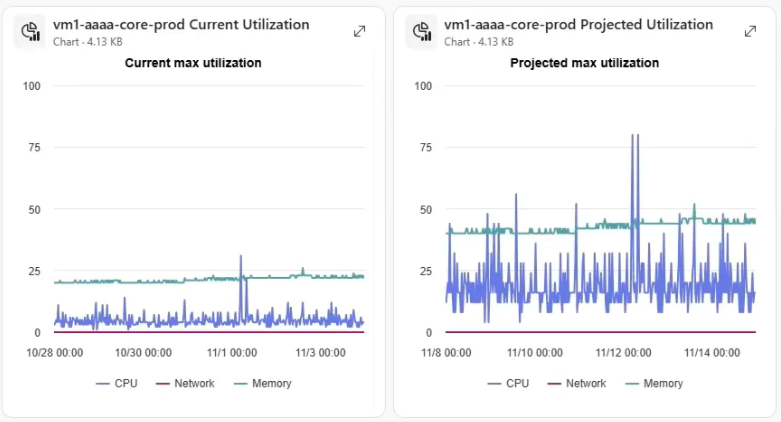
Responses in the Azure Copilot chat include the impacts of the optimization agent’s suggested changes (for example, before-and-after charts for CPU, memory, and network usage might be displayed, see fig. 1), and it can make the changes if the user approves.
The optimization agent’s capabilities are a superset of Azure Advisor’s, which has been offered for many years. The impact of using the optimization agent could prove it to be the most valuable component of Azure Copilot, because it could eliminate unnecessary costs and reduce ongoing efforts for customers to keep costs under control.
Observability Agent
The observability agent leverages a customer’s Azure Monitor alerts, metrics, and logs and application traces from Application Insights to automatically detect problems on an ongoing basis and recommend and apply fixes. The agent’s findings are published as Azure Monitor alerts, and the agent’s activity can be reviewed in the Azure portal.
The observability agent can supplement and reduce manual monitoring activities performed by administrators and developers. It can also eliminate the need to navigate through multiple Azure portal UIs and sift through and interpret alerts and logs. Furthermore, it reduces the skill level necessary for some monitoring duties.
Troubleshooting Agent
The troubleshooting agent is similar to the observability agent, but it is used interactively (via the Azure Copilot chat UI) to diagnose problems. The agent can do root cause analyses, determine fixes, and create support tickets.
The troubleshooting agent could cut time spent working with Microsoft support to work through problems while reducing the skill level needed for performing diagnoses and making fixes.
Resiliency Agent
The resiliency agent evaluates deployments for proper fault tolerance and resiliency, such as adequate backup and replication configurations and redundancy across Azure availability zones and regions. It can help determine recovery point and time objectives (RPOs and RTOs) so that administrators can see if deployments meet compliance requirements.
The resiliency agent can be used to find gaps in deployments that may go unnoticed in manual configuration and review efforts.
Governance
Azure Copilot provides governance controls including the following:
- Access to Azure Copilot can be assigned to specific users via RBAC
- Actions are not performed by Azure Copilot until explicitly approved by the user
- The security context of the user is never elevated; Azure Copilot can only access data and perform actions that are allowed by the user’s permissions
- Azure Copilot chat sessions can be stored in a Cosmos DB database (provisioned and paid for by the customer) for auditing; sessions could be reviewed to determine how the Copilot is being used in beneficial and detrimental ways.
Directions Recommends
Apply for access to the Azure Copilot private preview and run a pilot with select administrators and developers. Access to the preview can be requested in the Azure Copilot admin center in the Azure portal.
Plan how processes could be improved with Azure Copilot. For example, migration, troubleshooting, and cost optimization processes could incorporate Azure Copilot.
Ensure Azure RBAC permissions are set appropriately. Azure Copilot simplifies access to data and deployments via natural language. Security by obscurity is greatly reduced with Azure Copilot. Conversely, some users may need increased permissions to get the best results from Azure Copilot.
Watch for Azure Copilot licensing. Azure Copilot is free during preview, but Microsoft has not stated whether it will be a paid offering at general availability. Azure Copilot can require expensive Microsoft resources to do deep reasoning, and the company might employ usage meters to charge for certain types of use.
Resources
The original Azure Copilot and the GitHub Copilot extension for Azure are discussed in the Directions report “Two Copilots for Azure: Which to Use?”
Resources for optimizing Azure costs are listed in the Directions kit “Managing Azure Costs.”
The Well-Architected Framework is discussed in the Directions report “Azure Guidance Contains Gems, but Mining Required.”