
- Customer Lockbox for Azure allows customers to approve or deny access to their Azure data by Microsoft support personnel.
- There is no charge for Customer Lockbox for Azure, but customers must have an applicable Azure support plan to take advantage of it.
- Azure Lockbox could be useful for organizations to help ensure they’re meeting regulatory compliance requirements.
- While many Azure services are supported with Lockbox for Azure, not all services are.
Customer Lockbox for Azure (formally Customer Lockbox for Microsoft Azure) is a free feature that enables customers to review and either approve or deny access to their Azure tenancy by Microsoft support staff (and any applicable Microsoft sub-processors) when it’s required. This allows customers to get oversight into when Microsoft staff may require access to their data, control whether that access will be permitted, and ensure that a complete audit trail exists for access. There are limitations in terms of which Azure services work with Customer Lockbox for Azure, although most key services support it. Customers who use Privileged Identity Management (PIM) will need to handle requests carefully, as PIM elevations must occur prior to the request being granted. Lockbox can be useful for customers working with sensitive data that requires additional controls. However, there are also a handful of scenarios where Microsoft admits that Lockbox could be bypassed for emergency or legal reasons.
Understanding Customer Lockbox for Azure
While most operations and support that Microsoft provides to Azure customers don’t require access to that tenant’s data, certain situations will require that support staff be able to directly access data within the customer’s Azure tenancy. (Ideally, the proper implementation of Azure Key Vault and management of encryption keys will offer the maximum protection of their data and prevent inappropriate access, even by Microsoft staff.)
With Customer Lockbox for Azure enabled, Microsoft support staff will generate a just-in-time (JIT) access request if they do need to access a customer’s Azure data. This could come from the engineer troubleshooting the request or Azure support staff.
Depending on the scope of the request, permissions, and any necessary internal preapproval by Microsoft, the request may generate a Customer Lockbox for Azure request (see fig. 1).
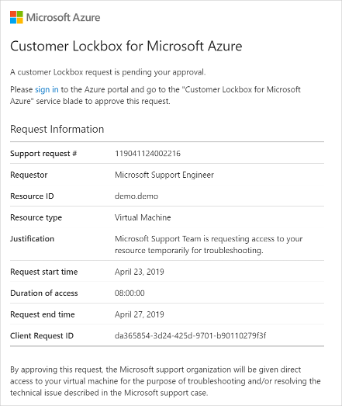
Predefined approvers within the organization will receive the Lockbox request, which can be scoped to the tenancy (tenant) level or subscription level. (This is important to both minimize potential “noise” requests and ensure the request is sent to someone who can respond to it promptly in an appropriate manner.) Depending on the scope, the request will either be sent to the owner of the Azure subscription (or another predefined approver for the subscription) or to the global administrators of the entire Azure tenancy.
After the request is received, an approver can review it and view additional details, view the originating support ticket by ID, and approve or deny the request.
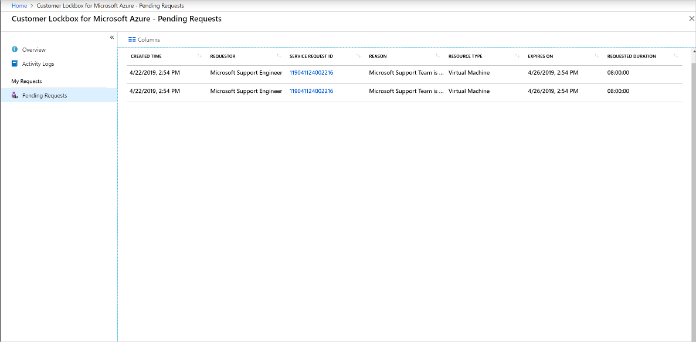
Denial immediately concludes the request for access, and approval grants access. All pending Azure Lockbox requests can be viewed within the Customer Lockbox for Azure console (see fig. 2).
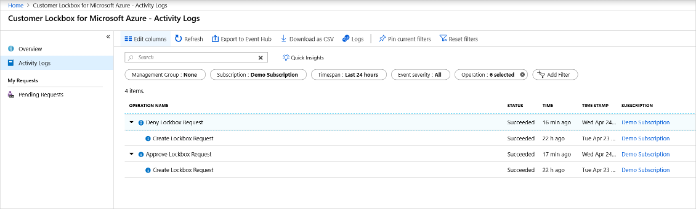
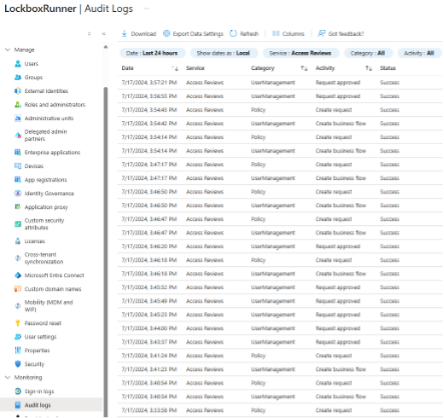
All events related to Customer Lockbox for Azure are written to logs; they’re written to the Azure activity log for subscription-scoped requests (see fig. 3) and to the Entra audit log for tenancy-level requests (see fig. 4). Customers need to consult these logs independently for auditing details.
Licensing, Requirement, and Limitations
Customer Lockbox for Azure has no licensing requirements, but customers need to understand both the technical requirements and the limitations of the feature.
Licensing
Unlike Customer Lockbox for Microsoft 365, there’s no charge or license for Customer Lockbox for Azure. However, customers must have an Azure-specific support plan or Unified Support to use Customer Lockbox for Azure. This could prevent customers with third-party Azure support from taking advantage of the feature.
Requirements
Customer Lockbox for Azure must be enabled at the tenancy level by a global administrator, it cannot be enabled only at a subscription level.
Limitations
Not all Azure services are supported by Customer Lockbox for Azure, but most key Azure services are, including Azure VMs, Azure App Service, Azure Logic Apps, Azure SQL Database, and Azure Monitor as well as Azure Storage and Azure OpenAI.
If PIM is in use to enforce just-in-time access, PIM elevations must occur prior to the request being granted, or the resulting access will fail.
Microsoft denotes several scenarios where Customer Lockbox for Azure may not generate requests to customers, but access can still occur. These include:
- Emergency requests (“break glass” events) that require urgent action to restore access or prevent loss of data
- Exceptions where a Microsoft engineer may accidentally be exposed to some customer data
- External legal demands—including government warrants—also don’t generate requests.
Directions Recommends
Directions Recommends
Use Azure Key Vault first. Customers should use Azure key vault and properly manage their keys and secret—ideally using at least a Managed HSM—for Azure infrastructure to prevent inappropriate access to privileged data. As with resiliency (ability to recover) and fault tolerance (ability to survive failures), customers should design in secure management of keys and secrets across their applications to ensure that their data stays secure, even if Microsoft accesses infrastructure within their Azure tenancy.
Beware of the limitations. Not all services support Customer Lockbox for Azure; customers should be mindful of these limitations when enabling the service and know where noncompliant systems are within their Azure infrastructure to ensure data access is still regularly audited.
Use Customer Lockbox for Azure to ensure auditability. Whether or not customers do use Azure Key Vault to its maximum potential, they should enable Customer Lockbox for Azure to provide additional logging and auditability for their Azure tenancy. Particularly since the service has no additional cost for customers with an existing Azure support plan, Customer Lockbox for Azure offers important features that could assist with ensuring regulatory compliance.
Minimize noise. Customer Lockbox for Azure should be properly configured to ensure only the necessary approvers receive them. This typically means enabling it across the tenancy as required but ensuring that subscriptions are implemented appropriately and assigned to a responsible owner or delegate to minimize alert fatigue from lockbox approval requests.
Resources
Customer Lockbox for Microsoft Azure documentation is at https://learn.microsoft.com/azure/security/fundamentals/customer-lockbox-overview (Microsoft).