
- Copilot Studio, Microsoft’s maker-oriented tool for building AI agents, continues to receive enhancements.
- Recent updates for agents built with Copilot Studio focus on security, governance, testing, and analytics.
- A “Computer Use” feature lets agents operate desktop and Web app UIs, similar to RPA, bringing compatibility with solutions that can’t be controlled with APIs.
- The improvements help administrators maintain better control over agents, make agents easier to build, and enable agents to address new scenarios.
Copilot Studio continues to receive frequent significant updates. The latest round arrived in Nov. 2025, and several of these remain in preview.
Microsoft’s Agentic Push—All Aboard or Still Waiting at the Terminal?
Microsoft is promoting and heavily investing in agentic tools and solutions that use AI to simplify and automate routine tasks. Agents can perform traditional tasks more efficiently and handle new scenarios with short development times. However, organizations must still address traditional software requirements, such as governance, security, and testing.
Early releases of Microsoft’s AI solutions have not thoroughly addressed these needs as the company (and competitors) rushed offerings to market to gain a foothold. Furthermore, customers have been asked to invest heavily and rapidly in AI solutions with promises backed only by glorified, carefully scripted demos of tools that don’t always behave as expected in real-world scenarios. Proving ROI continues to be challenging.
Copilot Studio is one of the company’s primary offerings for building, deploying, evaluating, and analyzing agents. The tool continues to evolve to attract more customers and address concerns of early customers.
New features are targeting shortcomings of initial releases, although they are not yet likely to convince all customers to fully bet on the paradigm shift. For example, an improved security posture, new testing tools, and a UI automation feature called Computer Use could plug high-priority gaps. However, new ROI tools based on ad-hoc heuristics aren’t likely to answer everyone’s questions about the return value of investing heavily in agents.
Security, Governance, Testing, Analytics
Several new features enable a better security posture, improve governance, support automated testing, and provide analytic insights for Copilot Studio agents, including the following:
Real-time security monitoring. Agent actions can be moderated using real-time monitoring tools such as Defender for Cloud Apps (in preview) and third-party and custom solutions. These tools can monitor agent actions and block them if necessary.
Entra Agent ID. Every agent runs under the context of an Entra Agent ID account (in preview) rather than a user account, which is more appropriate for a human user. Entra ID Agent accounts enable deployed agents to be inventoried. They also give each agent a mailbox so users can send them e-mail and share files with them instead of using chat UIs, which can reduce the learning curve for users to take advantage of agents.
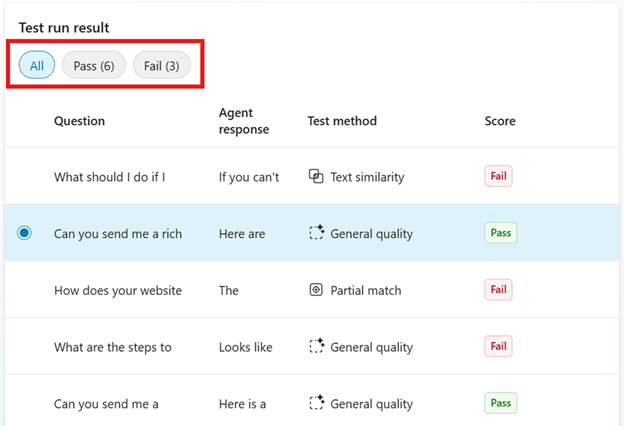
Agent Evaluations. Automated tests (in preview, fig. 1) check agent performance against maker-defined criteria. Responses are compared to expected results, and scores are assigned. The evaluations can be used to perform a repeatable suite of tests on agents as they are revised to identify improvements and deficiencies.
Agent usage themes. Copilot Studio Analytics includes a feature (in preview) that categorizes the prompts sent to agents into subject themes. The percentage of answered questions, the response quality (as determined by Copilot Studio), and the number of user likes and dislikes of responses is shown. These help makers tune which knowledge sources agents use.
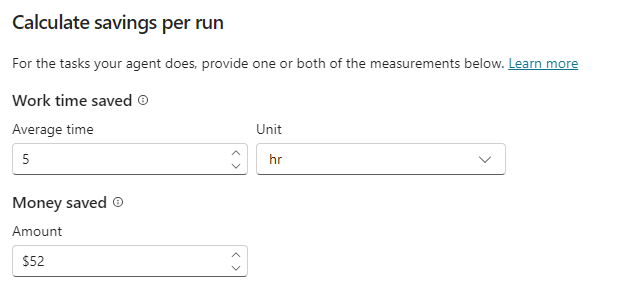
Time and dollars saved by agents. A Savings tool (generally available) in Copilot Studio Analytics helps estimate how much time and money is saved due to agent usage. However, the calculations are based on maker-specified savings amounts per task (fig. 2); the tool doesn’t determine these amounts automatically. Analytics also shows agent cost information, which could be used to calculate and create reports on agent ROI, although there is no feature that generates such reports.
Agent Enhancements and Improvements
Recent features added to Copilot Studio give agents new capabilities and improve the way they work.
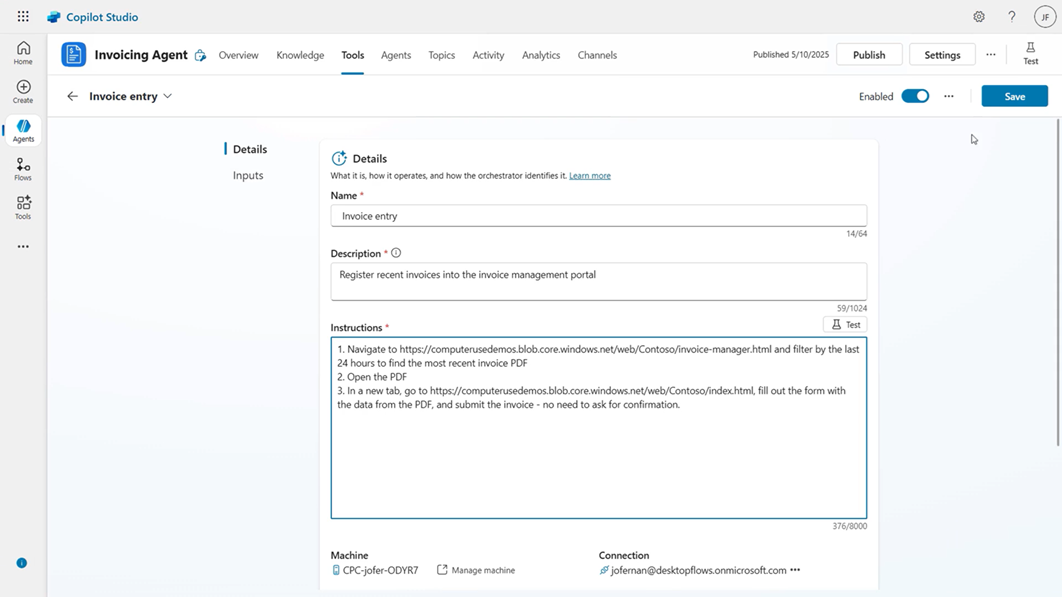
Computer Use. A new Copilot Studio tool (in preview, fig. 3) called Computer Use leverages Windows 365 for Agents and cloud PC pools to perform unattended automation that interacts with desktop and Web app UIs, similar to RPA. However, it uses computer vision (an AI model) to interpret and work with app UIs by simulating mouse and keyboard actions. Makers can watch videos of how the agent interacted with the UIs to confirm and tune the Computer Use tool. Computer Use could be less expensive and more powerful than alternatives such as Power Automate RPA for some scenarios.
Code interpreter. A new feature allows agents to generate and execute Python code to do things like interpret Excel, Word, PowerPoint, and PDF files, process Dataverse tables, and perform math and statistical calculations. The capability can improve agent responses by, for example, generating charts and providing reusable code.
Choice of large language model (LLM.) Makers can choose the (Microsoft-hosted) LLM used by an agent. Models from OpenAI and Anthropic are currently available. An agent can only use a single LLM, but separate versions of an agent using different LLMs can be deployed if the agent is used for tasks that are best performed by a mix of LLMs.
Improved RAG. The results of retrieval augmented generation (RAG, whereby agents use knowledge sources beyond those trained into the LLM) are improved, and agents deliver better responses.
Agents Created Within M365 Copilot
Agents can be built from within M365 Copilot Chat using a subset of Copilot Studio features. This capability is sometimes referred to as the lightweight Copilot Studio experience. Enhancements in this agent-building environment include the following:
Office document generation. Agents can generate Word, Excel, and PowerPoint files within responses, allowing makers to build agents that can integrate better with typical knowledge worker processes.
New knowledge sources. Agents can access Teams meetings, calendars, organizational directories, OneNote, and shared mailboxes as knowledge sources, giving agents more capabilities to interact with user data. However, makers and administrators should be cautious using this capability to ensure that sensitive data is not inadvertently exposed.
Shared agent discoverability. Agents that are shared to a user can be found in the so-called Agent Store found within M365 Copilot Chat. This exposure makes it easier for users to find agents that have been made available to them.
Agent recommendations. M365 Copilot can recommend agents based on what a user is trying to do. Recommendations might be included in a response, and they can be found in the Agent Store. Recommendations are only made for agents that are available to a user, and they help users discover the best agents for their needs.
Copy to Copilot Studio. Makers can migrate an agent created within M365 Copilot to Copilot Studio to continue work on the agent with the full capabilities of Copilot Studio. This feature could be used to enhance simple agents to address complex tasks by using tools, connectors, and additional knowledge sources offered within Copilot Studio.
Directions Recommends
Evaluate the new features. Especially those for security and governance, which help with agent management so that makers can contribute agent solutions while administrators can keep control over who accesses agents and what agents are allowed to do.
Consider whether the new Computer Use feature is better than alternatives such as Power Automate RPA. Agents that leverage Computer Use might be easier to implement and less expensive.
Keep aware of Copilot Studio updates. They come often and sometimes without upfront announcements. Some changes could improve deployments and enable new scenarios, but some could require training and bring unexpected UI changes.
Resources
New agent experiences in M365 Copilot are discussed in the Directions report “What to Use When: Copilot for Office, Agent Mode, and Agents in Office.”
Copilot Studio is discussed in the Directions reports “Copilot Studio Benefits and Risks,” “Understanding Copilot Studio,” and “Deciphering Copilot Studio Licensing.”
Defender for Cloud Apps is discussed in the Directions report “Defender for Cloud Apps Helps Protect Copilot Studio Agents.”
Entra agent features and Agent 365, a new platform for governing agents, is discussed in the Directions report “Agent 365: Microsoft Attempts to Herd Your AI Agents.”