Updated: March 23, 2026 (April 12, 2025)
Analyst ReportM365 Customers Can Keep Classic Outlook Until at Least 2029

- Customers have at least two years before new Outlook replaces classic Outlook in the Microsoft 365 Apps for enterprise suite.
- Enterprises can stay on classic Outlook until at least 2029 by downloading and deploying Outlook separately from the suite.
- Moving from classic to new Outlook will disrupt business processes if customers have not prepared.
Mar. 23, 2026: Opt-Out delayed to Mar. 2027 per a Microsoft Message Center announcement at https://admin.microsoft.com/MessageCenter/messages/MC949965 (requires reader permission).
Customers who license the Microsoft 365 Apps for enterprise Office suite will be switched to a radically different “new Outlook” sometime in the next few years. However, organizations will be able to keep using “classic” Outlook until at least 2029, as long as they are willing to download and deploy the app separately. New Outlook still lacks features and drops some much-used development technologies from the current classic Outlook on Windows, so the change could break business processes and confuse some users as well. Customers licensing Office in Microsoft 365 plans should get ahead of the change and understand their options.
What Is New Outlook and How Will It Affect Enterprises?
New Outlook is a completely new version of the Outlook app for Windows. The existing (classic) Windows Outlook app has long been an important enterprise client for e-mail, calendar, contact, and task management typically paired with Microsoft’s Exchange e-mail technology.
New Outlook was declared “generally available” (GA) on Aug. 1, 2024. It can be turned on from the existing classic Outlook in Microsoft 365 Apps for enterprise (M365 Apps), the Office suite for large businesses included in Microsoft 365 and Office 365. M365 Apps users can switch to and from the new Outlook, unless organizations disable the switch.
New Outlook brings a new architecture that requires Exchange Online (specifically the Outlook on the Web user interface). The user interacts with new Outlook through a native client component built on the Microsoft Edge browser technology. (See the illustration “New Outlook Relies on Web and Edge“.)
The architecture gives new Outlook some advantages over classic:
- Microsoft can send out updates more quickly to all new Outlook users, both for fixes and for new features
- The new Outlook user interface on Windows looks more like Outlook on the Web, which could help user training make switching easier
- New Outlook already has some new features missing from classic Outlook, such as Calendar answers, and classic Outlook is unlikely to get any significant new features long-term.
But the new Outlook also has disadvantages. Companies moving to it could run into compatibility problems and missing features.
Outlook client add-ins. New Outlook drops support for COM add-ins, the Office plug-ins that are widely used to integrate mail and customer relationship management (CRM), automate scheduling, capture project status data from the field, and do many other tasks.
Exchange Server. New Outlook will be supported for Exchange Server starting in the first quarter of 2026. However, it will only be supported through IMAP, a protocol that does not provide many Exchange and Outlook features.
Offline operation and other features. Numerous other classic Outlook features, such as offline operation and delegated access (often used by administrative assistants), are missing or only partially implemented in new Outlook. However, continual updates have closed some of the gaps. (See “Targeting Trouble Spots in New Outlook“)
Availability: How Long Does Classic Outlook Have?
Classic Outlook will remain part of the Microsoft 365 Apps for enterprise suite until at least 2029. (See “A New Outlook Rollout Scenario“)
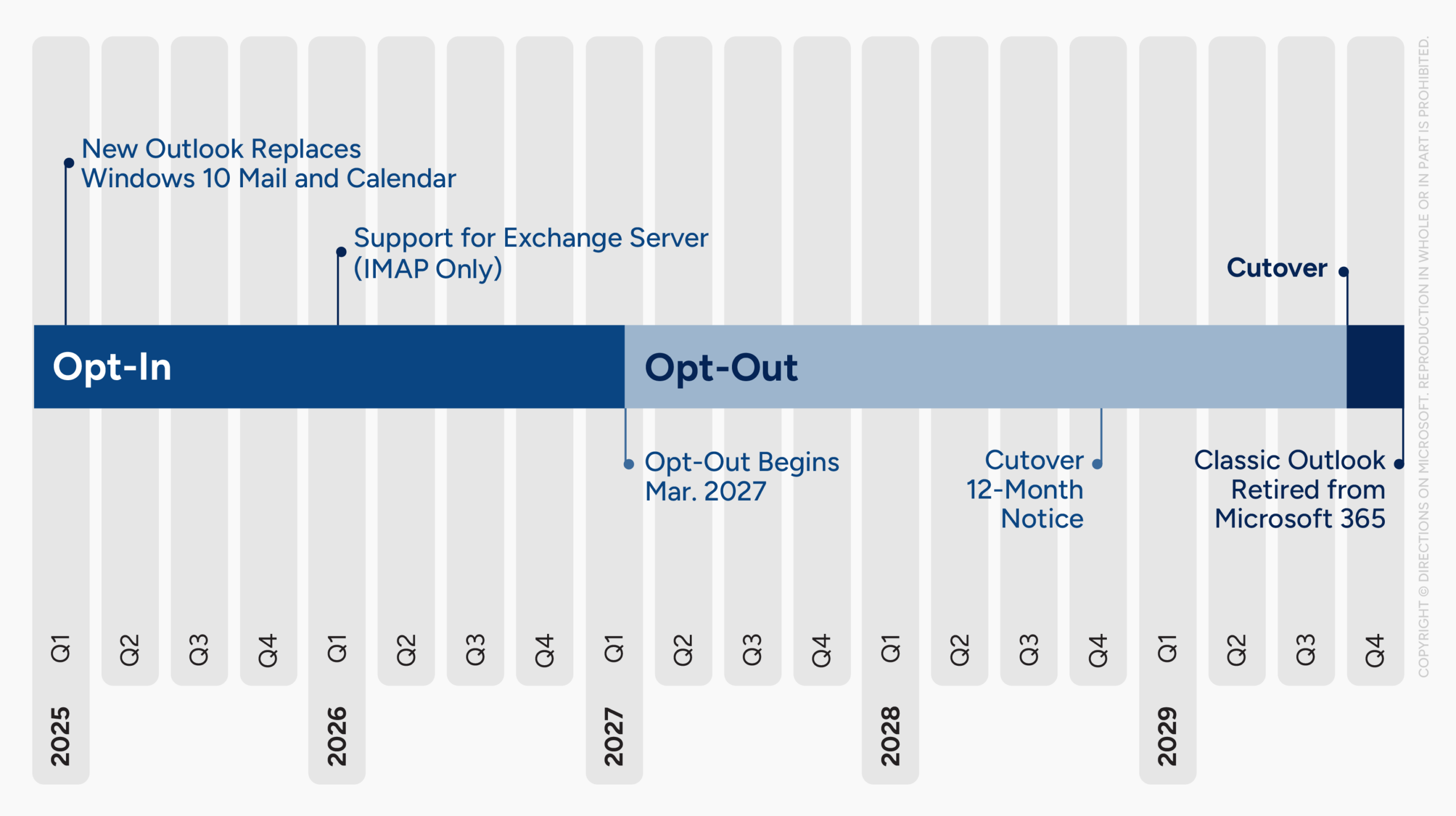
Timeline shows one Directions scenario for rollout of new Outlook.
The new Outlook currently is in the “Opt-In” phase. The next phase (“Opt-Out”) starts Mar. 2027, when Microsoft makes new Outlook the default for all Microsoft 365 Apps for enterprise users. In the final phase (“Cutover”), Classic Outlook will be removed from Microsoft 365 Apps for enterprise for all users. Microsoft promises at least 12 months’ notice before Cutover begins, which means it will start no earlier than Mar. 2028.
Organizations with Microsoft 365 Enterprise that want to keep classic Outlook after the Cutover phase will be allowed to download it and distribute it to their users separately. The solution is similar to what Microsoft offers for OneNote and the Skype for Business client today. According to a Microsoft spokesperson, “For customers with [a] Microsoft 365 subscription that includes desktop apps, new Outlook will be available to download for free and classic Outlook is available for download and will need to be downloaded separately. Customers will need a Microsoft 365 subscription (or license) that includes desktop apps.”
We verified with Microsoft that there will not be any extra licensing or fees required by qualifying enterprises to download classic Outlook. We were told as long as customers have Microsoft 365 suites that include rights to the downloadable Office apps, they will be able to get classic Outlook until at least 2029. (And since we asked, Microsoft has updated its original blog post to reflect the 2029 date for both perpetual and subscription customers.)
Microsoft has not announced a final shutdown date for classic Outlook. The company vaguely states that “feedback will guide prioritization of further releases.”
Office LTSC an Alternative in Rare Cases
Customers who want classic Outlook can also rely on Office LTSC (Long Term Servicing Channel) Standard, Professional Plus, or Mac suites. The suites, which are licensed per-device and offer a perpetual licensing option, deliver classic Outlook. Some Microsoft 365 Apps for enterprise customers already have limited rights to deploy Office LTSC Professional Plus without buying additional licenses.
However, Office LTSC also has disadvantages. The suites do not have all the features of Microsoft 365 Apps for enterprise, and do not offer full support for Microsoft 365 services such as Exchange Online. Microsoft has promised one more Office LTSC version after Office 2024, but has not said whether that next version will include classic Outlook, or any Outlook at all. So when Office 2024 leaves support in 2029, the last supported classic Outlook version could go with it.
New Outlook Replaces Windows Mail and Calendar
Customers who use Windows Mail and Calendar, simple consumer-grade applications that have come bundled within recent Windows releases, will get new Outlook sooner than business users. Microsoft is in the process of moving existing Windows Mail and Calendar users to the new Outlook for Windows. After the change, users will no longer be able to send and receive mail using Windows Mail and Calendar. Any local e-mails, calendar events, and contacts stored in Mail, Calendar, and People will remain exportable to new Outlook, however.
Directions Recommends
Start looking for COM add-in replacements: For IT leaders responsible for end-user computing and collaboration, there is one good opening move to prepare for new Outlook: find and replace (or work around) Outlook COM add-ins and Visual Basic for Applications (VBA) code. Enterprise architects should review business processes to locate unsuspected dependencies on classic Outlook, and update application architecture guidelines if they reference Outlook add-in technologies that will be retired.
Begin testing new Outlook now: Customers should ensure they have a good sampling of power users and IT experts in the Microsoft 365 Targeted release rings so they can get new Outlook previews as early as possible. Larger organizations that participate in the previews, give detailed reports, and document business impact can get their critical bugs and missing features addressed faster.
Form a plan to download and distribute the classic Outlook app where it is needed: Although classic Outlook will be available for download, companies will need a plan for making sure it is available to all users who need it for their work. This plan should include distribution, management, and updating of the downloaded classic app. Microsoft has not yet published guidance for this task.
Directions on Microsoft EA Negotiation Support and Expert Desk customers can contact their account managers to get specific guidance for their organizations.
Resources
Start of the Opt-Out phase in Mar. 2027 was announced in the Microsoft 365 Message Center post MC949965, “Toggle to new Outlook” (requires reader permission) at https://admin.microsoft.com/MessageCenter/messages/MC949965.
Microsoft’s timeline guidance for new Outlook availability is at https://techcommunity.microsoft.com/t5/outlook-blog/built-for-today-designed-for-the-future-the-new-outlook-for/ba-p/4205635.
Microsoft explains its rollout stages for new Outlook at https://techcommunity.microsoft.com/t5/outlook-blog/new-outlook-for-windows-a-guide-to-product-availability/ba-p/4078895.
New Outlook delivery to consumers is explained at https://support.microsoft.com/office/outlook-for-windows-the-future-of-mail-calendar-and-people-on-windows-11-715fc27c-e0f4-4652-9174-47faa751b199.
Microsoft 365 Apps rights to Office Professional Plus are covered in the Licensing Reference Set at https://www.directionsonmicrosoft.com/members/licensing/microsoft-365-enterprise#special-rights-office-professional.
Exchange Server SE support for new Outlook via IMAP is briefly announced under the heading “Exchange (on-prem and on-prem ADFS)” at “Feature comparison between new Outlook and classic Outlook” (updated Mar. 11, 2025).