October 29, 2026
BlogCompass Point: Azure Capacity Checklist, Agent Teammates, Sovereign Cloud


Welcome to the second installment of the monthly Directions on Microsoft Compass Point report, where we look ahead at emerging Microsoft technologies and product strategies that may impact your operations in the future.
Azure Capacity Constraints: Your Gotcha Checklist
Quick Take: If you hit the dreaded “AIlocationFailed” or “OverconstrainedAllocationRequest” error messages due to Azure Capacity constraints, you do have options, but not necessarily many good ones.
Another quarterly earnings call, another acknowledgement by Microsoft that Azure demand is still exceeding supply. In Q1 FY27, ending Sept. 30, Azure revenue rose to $33.2 billion in Q1 FY27, up from $10.8 billion a year earlier. But Microsoft’s capital expenditures continue at a rapid pace — $45.2 billion for the quarter and another $50 billion projected in Q2.
Across the world, organizations find themselves unable to obtain the Azure compute resources they need when they are required. This shortage includes virtual machines, the computing systems that matches their physical hardware requirements. Why is this happening? In part because companies must compete with Microsoft’s own first-party AI services and other key AI customers for the same resources. (Compute hardware and VMs, often including GPUs for use with AI, underlie numerous cloud services within Azure, so this isn’t just VM deployments that fail to be provisioned.)
Microsoft is not alone hitting this constraint bump. Earlier this month, Amazon acknowledged that AWS’s own cloud computing capacity is largely sold out through 2027, with significant commitments extending into 2028 due to growing AI infrastructure demands.
What are customers supposed to do? Sometimes, they can switch regions, accept alternate VM options, or reserve ahead of time for certain workloads. But these strategies all come with risks and downsides, as the Directions analysts have repeatedly cautioned.
With these ongoing constraints in mind, here’s our checklist for potential gotchas to look for when confronted with capacity issues:
1. No Visibility. There’s often no warning or insight from Microsoft before a particular resource runs out. This means your proactive projections may do you little good.
2. Reservations Not Guaranteed. Don’t assume that resources licensed via a Microsoft Azure Consumption Commitment or other reservation vehicle guarantee you access to the quantity and type of resource you specified when you need them. The fact is, when you purchase a capacity reservation for a resource you won’t need until a year from now, you are effectively paying an extra year for that resource. “Azure Future Capacity Reservations,” which Microsoft added to the Oct. 2026 Product Terms, may be an attempt to fix this. However, the documentation (which remains sparse) still does not guarantee access to resources when your org is ready to deploy for the first time.
3. Regions’ Resources Vary. Organizations typically establish themselves within a handful of cloud regions per provider to both ensure an adequate experience for end users and the applications running in the cloud, and to place related resources near each other to maximize performance. But all Azure regions are not created equal. The configuration of hardware used for a specific type of VM or cloud service may vary considerably between regions. You might have to accept older GPUs, CPUs, or storage options because that’s all that is available there.
4. No Pricing Consistency. Pricing is not consistent across all Azure regions, even in the same country. Example: A D16as v5 virtual machine that runs $68.80 per 100 hours in East US 2 runs $82.60 in South Central US. In some cases, the discrepancies can be traced to currency reconciliation when comparing regions in different geographies, but typically they just reflect different costs for operating the infrastructure within that Azure region.
5. Residency Issues Remain. Data residency is an ongoing concern. Some customers cannot or will not be willing to use data centers outside their own geographic or political boundaries for various legal and other reasons. This limits the available pool of resources.
Our recommendation: Be flexible and consider other options when cloud capacity issues arise, but don’t do so blindly.
A few more tidbits of potential interest to Microsoft enterprise customers from the Microsoft Oct. 28 Q1 earnings call:
- Microsoft’s $45.2 billion in capex spending for the quarter was actually less than the $50+ billion projected. In part, this was the result of the inability of some third
- Microsoft officials claimed “strong momentum” for Microsoft 365 E7 in Q1. CEO Satya Nadella said “thousands” of customers purchased the $99 per user per month M365 top-end offering.
- Microsoft did not provide an update this quarter as to the number of paying commercial customers for Microsoft 365 Copilot. In Q4 FY26, Microsoft said there were 30 million business customers paying for M365 Copilot (on a base of at least 450 million eligible users), which was up from 20 million in the previous quarter. Nadella did say, “Daily (Copilot) users are up nearly 50 percent quarter over quarter, and up more than 5X year over year.”
- Microsoft partner and customer OpenAI was responsible for $10 billion, or roughly 11 percent, of Microsoft’s revenues in Q1 FY27. Last fiscal year, that figure was roughly six percent of its revenues per quarter. As GeekWire noted, that $10 billion total includes revenue-sharing payments from OpenAI, as well as OpenAI’s use of Azure to train and run its AI models, among other factors.
Get Ready to Meet – and License — Your New Digital Teammates
Quick Take: Microsoft is starting to move forward with its plan to require some kinds of agents to be licensed like humans. But many details, including pricing, are still missing.
More than a year ago, Microsoft officials were hinting that at some point, customers were going to have to license agents the same way they do people — by giving them their own email, Teams accounts, and Microsoft 365 licenses. But it wasn’t until the past couple months that the timing and nature of these scenarios began to crystalize.
Microsoft’s “Scout” personal agent technology, which the company recently rebranded as “Autopilot,” was expected to be among the first type of agents to require human-like licensing. Autopilot is now in testing in the Frontier program.
In September, Microsoft posted to its Microsoft 365 roadmap an item (ID 570430) that said Copilot Studio would provide a feature for persistent identity for Copilot Studio Agents. The preview of this feature was slated for Sept. 2026 and a general availability target was listed as Nov. 2026. Agents would be governed as Microsoft 365 identities with their own mailboxes, Team presence, and Office access and would be managed by IT.
Earlier this month, Microsoft shared more specifics about these coming “Agent accounts” provisioned within Copilot Studio. In a blog post, officials said they believe there will be more types of custom agents — such as a budget coordinator agent or a project manager agent — that also will require their own credentials. Microsoft describes these as “managed agents for your business processes.”
Agents with their own accounts will have their own mailboxes for sending and receiving mail and will appear in Microsoft Teams and in an organization’s org chart/directory. They will also be a participant in M365 interactions and have their own Entra accounts and identities for governance and auditing.
Microsoft has not yet discussed how much it will cost to license non-human agents that require their own accounts. But officials have said that users won’t be able group multiple agents like these under a single license. Each agent will require its own license.
A Picture Is Worth 1,000 Agents
Quick Take: Struggling to keep track of the many, changing components around Microsoft’s family of agents? This diagram might help.
Keeping up with the ever-changing set of agents developed and orchestrated by Microsoft and other tech vendors seems impossible. Names, product scopes, and pricing mechanisms keep changing. Directions recently published a high-level overview of what agents are and how they operate in the Microsoft sphere. But there are so many types of agents coming from so many different teams at Microsoft — not to mention from customers and other vendors — that it’s tough to get a handle on all the moving parts.
Apparently, Microsoft’s own employees feel the same way. This blog post and diagram from the Microsoft Security Community Blog attempts to map out “Microsoft’s Agent Platform.” It just may help you.
The detailed diagram shows the different pieces of the Microsoft agent ecosystem across the company.
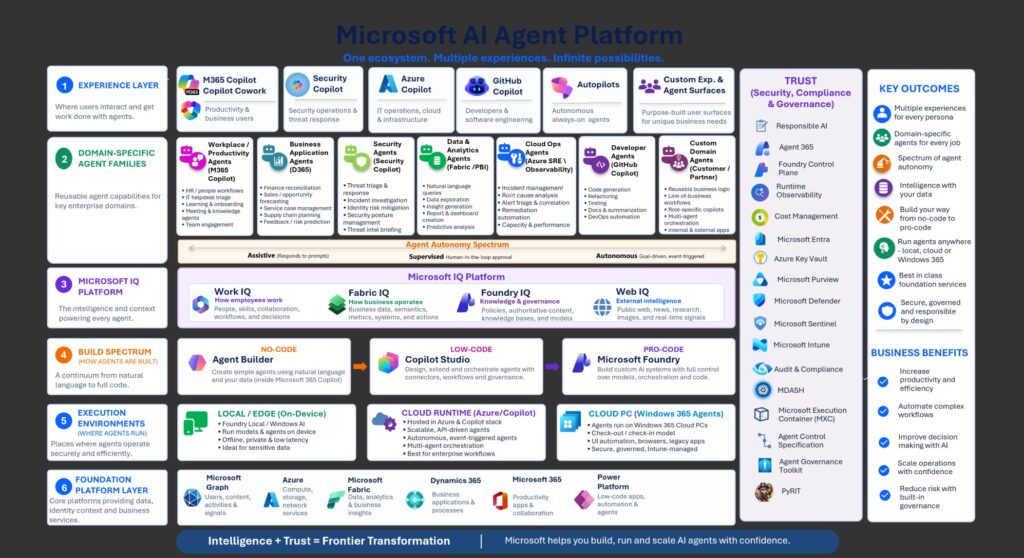
There is no single “Microsoft agent platform” that encompasses all the pieces shown here. However, the diagram offers a way to understand the many choices that users face across different pieces of the Microsoft tech stack.
Leaving the two right- hand columns aside for the moment and working from the bottom up, the agent platform layer cake includes:
6. The base infrastructure layer at the bottom encompasses the platforms that provide the data, identity, and business services that feed agents.
5. The “execution environments” layer shows where agents run — locally on device (PC, phone), in the cloud (Azure and the M365 back end), and on Cloud PCs with Windows 365.
4. The next tier up covers the continuum of developer platforms upon which agents are built, ranging from the no-code Agent Builder to low-code Copilot Studio to “pro-code” Microsoft Foundry.
3. The Microsoft IQ platforms — Work IQ, Fabric IQ, Foundry IQ, and Web IQ — deliver the intelligence and context for agents.
2. Microsoft’s growing set of domain-specific agent families are the next level and span the full spectrum of abilities. These range from “assistive” agents that respond to prompts to “supervised” agents overseen by humans to autonomous or event-triggered agents like the aforementioned Autopilot and managed business-process agents.
1. At the top is the UI/experience layer. Microsoft’s remaining Copilots reside here, including GitHub Copilot, Security Copilot, and the new Copilot “super app” that combines consumer and commercial entry points.
That’s a lot of moving parts. And remember: There’s no single cost model; every layer has a price.
Microsoft’s Sovereign Cloud Family: What’s New, Next
Quick Take: Microsoft has added more features (and is promising others) for its Sovereign Cloud customers.
Microsoft’s Sovereign cloud offering, launched in 2022 as a solution for highly regulated customers and government agencies throughout the world, has been morphing since its introduction. Microsoft now has a small set of Sovereign Cloud offerings aimed at specific workloads and scenarios: Sovereign Public Cloud; Sovereign Private Cloud, built on Azure Local and introduced last year; and the Sovereign Cloud Ecosystem.
Earlier this month, via a blog post, company officials provided an update on some of the new features coming to these sovereign offerings.
Microsoft’s focus on sovereignty is not just on where data resides. It extends to protections around who can access systems, how encryption keys are managed, the ways AI workloads are governed, and how operations can continue during disruptions.
For Sovereign Public Cloud customers, Microsoft is promising a new public preview of its Sovereign Control Panel in Azure in mid-November. External key management is now GA. Azure Confidential Clean Rooms are in limited preview.
For Sovereign Private Cloud customers – where new capabilities are running on Azure Local and customer-operated infrastructure — Microsoft is adding Azure Local multitenancy. Support for data services is expanding to include DocumentDB on Azure Local (public preview), and Blob Storage on Azure Local (also in public preview). Microsoft also is growing its development platform and AI platform capabilities for these users with GitHub Enterprise Local support (GA in November) and Foundry Local (generally available).
Directions analyst Andrew Snodgrass urged IT decision makers to proceed with caution.
“Microsoft is adding sovereignty controls and locally operated options in stages for non-American customers, although many are still in preview or are simply indicators of Microsoft’s aspirations. Microsoft’s strategy is to roll out just enough data and operational controls to hopefully keep non-American customers from abandoning Microsoft for regional cloud providers, which is a growing trend,” said Snodgrass.
“As always, customers should assess whether actual GA features meet their control needs rather than relying on Microsoft’s sovereignty promises,” he added.
Got any Microsoft technologies or strategies on YOUR radar that you’d like to hear more about? Drop us a note at compasspoint@directionsonmicrosoft.com and we can try to find out more and share it here.