
- Organizations should develop plans to migrate off SQL Server 2016/2017 before they reach the end of Extended support.
- The growth of cloud services, since their original release in 2016 and 2017, provides more options on where to migrate SQL Server workloads.
- A decision matrix that focuses on end goals (ease of migration, cost reduction, consolidation, move to the cloud, and others) is required.
- Customers should use this milestone event as an opportunity to support their long-term strategy, whether it is on-premises or in a cloud provider.
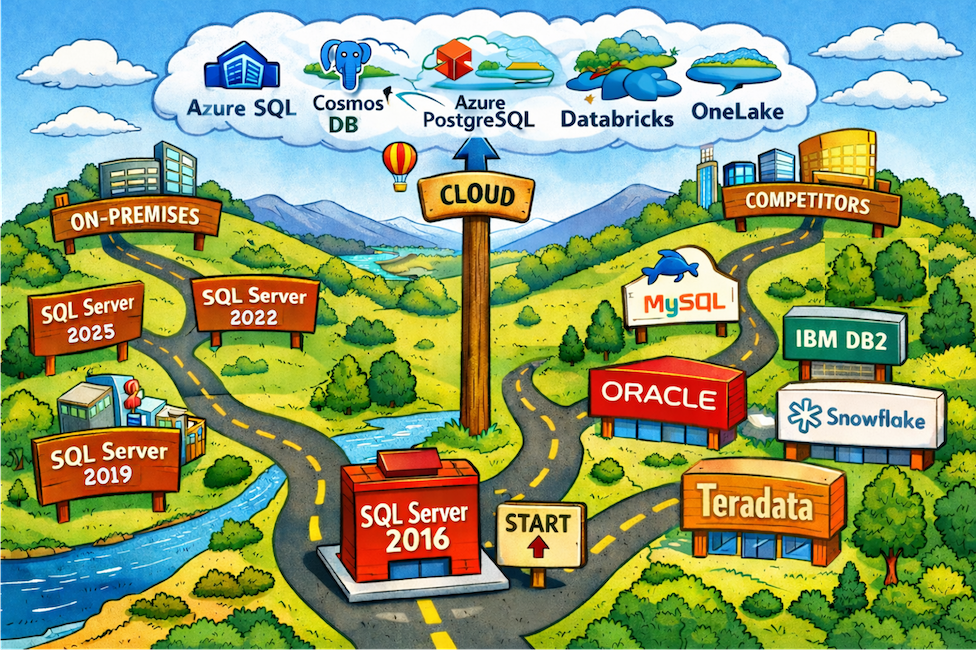
SQL Server 2016 and 2017 are leaving Extended support (in July 2026 and Oct. 2027, respectively) and customers need to plan their migrations, because the versions will become increasingly vulnerable to attacks. The challenge with upgrading SQL Server is that the product is used for more than managing databases, offering features including integration processes, sophisticated data models, and standard tabular business reports. The diverse use of SQL Server and how it supports enterprise applications means that it is difficult to upgrade in isolation. Often the dependent applications and hardware must be upgraded at the same time, adding to the cost and complexity of an upgrade. Avoiding an upgrade is possible by extending the life of a SQL Server version, but the options are expensive and rarely justifiable (see the end of this report).
This report is the first in a series that covers the migration and upgrade options for each of SQL Server’s main workloads, highlighting possible destinations, comparing the longevity of each, the level of migration effort, and where the opportunities and risks are.
- SQL Server 2016/2017 Migration Strategy: Risks and Opportunities (this report)
- SQL Server 2016/2017 Database Migration: The Most Complex Decision Matrix
- SQL Server 2016/2017 Reporting/BI Migration: All Roads Lead to Power BI (coming Feb. 2026)
- SQL Server 2016/2017 Integration Services: The Easiest Decision (coming Mar. 2026)
SQL Server is a multipurpose product, although it is most commonly used for databases. Part of the complexity of migration is that SQL Server has multiple components (referred to as roles) that can operate independently. For discussion purposes with your teams, it is important to know the names and purpose of these key roles.
Database Services is the main role and likely where most of your migration effort will focus. Many organizations have numerous (sometimes hundreds) of separate SQL Server installations (called instances), where each instance can have hundreds of databases.
Analysis Services is a role data specialists use to create data models (often called semantic data models) that gather data from various sources and combine the data into human-readable tables. These models are used by business professionals to look for trends and insights, and they are used to create reports.
Reporting Services is a role that supports the creation and running of tabular reports that are common in most organizations. For example, columnar financial reports, accounting reports, and sales reports. The role has some minor ability to create graphic reports, although more customers use other tools for those types of reports.
Integration Services is used to create processes (referred to as scripts or pipelines) that gather data, modify and combine the data, and store the changed data in a new location—a process referred to as extract, transform, and load (ETL). ETL workloads are extremely common in most organizations and are used to bring together data from different systems and locations to create a consolidated view of the data: for example, gathering sales data from multiple business units that use different systems into a central data warehouse or datamart.
Migration Prep
In general, the overall level of effort for migration will depend on the number of SQL Server instances deployed and the kinds of workloads: databases, ETL processes, data models, and reports. It is not unusual for an organization to have hundreds or thousands of databases and other processes running on SQL Server, and it may take several months to migrate everything off a retiring version.
Steps Before Migration
There are several steps the IT department and in particular architects and database administrators (DBAs) should perform first:
Create an inventory of all SQL Server instances. There are numerous Microsoft and third-party tools that can help organizations discover and inventory SQL Server environments across an enterprise, including on-premises, in Azure, and in third-party clouds. These tools will reduce the manual effort of searching for deployments and often help identify unknown (rogue) SQL Server environments that were deployed without IT approval. Some tools can also perform assessments and provide migration recommendations based on usage patterns.
Create or update the data architecture. Many organizations have a data architecture that can help with building a migration plan and reduce risk. This architecture shows the interrelationship between the various SQL Server instances, where they reside, and the applications and business functions they support. For organizations that lack a data architecture, this is a good time to build one because it will help build a migration plan that reduces potential disruption to business operations.
Plan the migration for each application. Rather than creating a single migration plan, best practice recommends developing multiple application-specific migration plans. These plans can help determine the optimal destination and configuration for each application and determine how to migrate the application’s databases, ETL processes, data models, and reports together. Once the separate plans are created, they can be staged based on priority to create an overall migration plan.
Communicate Business Drivers
Prior to deciding on the destination and version for each application, management needs to communicate their business goals for the migration, which often fall into the following categories:
Minimize costs. There are various ways to minimize costs. For example, a low cost and fast solution is to migrate to a newer SQL Server version on the same hardware if it is still supported. Another example is switching to a lower-cost open-source product like PostgreSQL that eliminates the SQL Server licensing costs. Cost reduction is possible, but the team will need boundaries to understand when a choice (discussed in the various reports) strays outside of IT norms or strategy.
Cloud adoption. Much has changed since SQL Server 2016 and 2017 were first released. Cloud adoption has accelerated, and cloud providers have released services based on SQL Server components that can replace on-premises deployments. The options vary from a direct lift-and-shift migration (that minimizes change) to using cloud-created services that provide most of the same functionality and include better scaling and faster deployment.
Better performance. Often a SQL Server instance holds databases for multiple applications that effectively all share the same compute resources. During this kind of migration, customers should look at the performance requirements of each application and determine if now is the time to rebalance and redistribute databases to other servers or cloud services. Traditional SQL Server instances, like those built on SQL Server 2016 or 2017, are created over years to support a variety of applications. This upgrade effort is a time to relook at the applications and decide if they should remain together or would perform better by being separated.
Key Migration Decisions
The two key decision points (based on the business drivers) come down to:
- Stay on SQL Server or select a competitive product
- Choose a destination: on-premises or a cloud offering.
Unfortunately, with the advent of cloud services, those decisions are not straightforward. Each of the SQL Server roles has multiple product replacements and destinations that are viable for migration.
Stay on SQL Server?
SQL Server remains a solid product with a significant installed base and available talent. There is no immediate need to move away from SQL Server for any workload. The various roles can be used with very little risk, although some have stronger futures than others. The latest version, SQL Server 2025, shows Microsoft’s commitment to the database and analysis roles and provides at least another 10 years of support.
Competitive Products?
There are numerous competitors to each of SQL Server’s roles that provide similar functionality and, in some cases, more capabilities and lower costs from open-source licensing. Overall, migrating to a new technology is a major effort that requires refactoring data and modifying all dependent applications. Choosing a different product should not be done lightly, but as part of a strategic long-term direction:
Database role competitors include PostgreSQL, MySQL, and Oracle Database. PostgreSQL, in particular, has advanced significantly in recent years and now provides options that surpass those of SQL Server and can be used to reduce licensing costs. Microsoft even offers multiple Azure PostgreSQL database offerings to accommodate different workloads, so it is possible to use PostgreSQL and still stay within Azure. Additionally, the data warehouse functionality, which creates a structured, monolithic data store for reporting and analysis, is seeing competition from more modern structured data lakes, called data lakehouses. Strong competitors in this area include Snowflake (available in Azure) and Microsoft’s own OneLake offering that provides a SQL data warehouse option based on open-source technology.
Integration role competitors include Apache Airflow (also used in Fabric Data Factory), AWS Glue, Informatica, and Oracle Data Integration.
Reporting role competitors include Oracle BI Publisher, Qlik, and Tableau. This area usually has the largest number of developers because business professionals often write their own reports, so moving to a competitive product is quite an effort.
Analysis and modeling role competitors include Apache Kylin, IBM’s Cognos, and SAP BW/4HANA. Similar to the reporting role, this area has more non-IT users, and models tend to be used for reports and analysis, so migration from here is also a challenge.
On-Premises or Azure?
Focusing on Microsoft offerings, the core SQL Server product is the only option for on-premises. All roles are available, although the reporting role uses Power BI Report Server starting with SQL Server 2025, but it has the same functionality and licensing, so it is not a concern.
In Azure, SQL Server is available in VMs with the same functionality and deployment options, which means migration from on-premises to Azure is mostly a lift-and-shift effort, minimizing disruption and rework, although there will be some redirection of workloads, new security settings, and other minor changes.
Azure also includes a host of SQL Server-based cloud services that provide one or more of the SQL Server roles. The benefit of the cloud services is that they provide fast deployment and scaling, offer multiregion distribution and failover, and remove the need to purchase, deploy, and manage the underlying server hardware and infrastructure. This benefit comes with a cost model that offsets any admin or depreciation savings of moving to cloud services. The functionality is mostly the same as SQL Server, although they all provide a subset of features, such as fewer deployment configurations, smaller database sizes, and lower memory than can be deployed on-premises with the full product. Additionally, being cloud services, they do not provide access to low-level server controls, which may be a blocker for some applications.
In general, there is no problem with breaking apart the various SQL Server roles and choosing a collection of Azure services to perform the same work. The services connect well with each other and perform as they would on-premises.
Cloud Licensing Considerations
When migrating to Azure, customers may be able to reuse SQL Server licenses through two options:
License Mobility through SA is a benefit that allows customers to reassign SQL Server licenses to VMs hosted on a service provider’s multitenant servers, including Azure. Customers can also apply License Mobility through SA to AWS, Google, and Alibaba dedicated hosting offerings. (In dedicated hosting, the entire hardware system [server] running in a cloud provider is dedicated to a single customer.) However, SQL Server 2019 and newer are governed by terms that significantly favor Azure over third-party providers, which may result in higher cost for customers using those third-party providers.
Azure Hybrid Benefit for SQL Server allows customers to use existing perpetual licenses with SA to receive a discount on fees associated with licensing SQL Server on a pay-as-you-go basis, and the discount often far exceeds the cost of maintaining SA. Azure Hybrid Benefit is available for SQL Server in Azure VMs and most Azure SQL Database and Azure SQL Managed Instance tiers.
Risks of Continued Use?
One of the first questions is whether an organization can continue using SQL Server 2016 or 2017 after it reaches the end of life. Technically, the answer is yes. SQL Server on-premises is purchased as a perpetual license, which means that customers can continue to use the licensed product indefinitely.
However, the risks—and potentially the costs—of running SQL Server 2016 or 2017 will rise after the end of Extended support. After a software version exits Extended support, Microsoft will generally not release patches for security vulnerabilities, incompatibilities, or other significant bugs in the version.
What Are the Security Risks?
Servers running the older version will become more vulnerable to attack after it leaves Extended support as new security issues are discovered and exploited by attackers, especially servers that share data externally or are connected to larger networks. It is not uncommon for attackers to withhold new attacks in the last year or final months of a version, waiting until Microsoft stops issuing security updates to release exploits.
Additionally, SQL Server components often connect to a range of other applications and devices, all of which may be exposed to risk through an unsupported SQL Server version. Older versions can also become a compatibility problem as other databases and applications in the organization are updated, making it harder for the older versions to share data, which could jeopardize the ability to run applications that rely on the database.
What About Isolation?
Organizations can address the risk by running SQL Server 2016 or 2017 in a more secure environment, such as in an air-gapped network or a stand-alone server that is not connected to the network. Isolating the servers may help secure and manage them, but should be used sparingly, as it introduces new manual data extraction and management requirements.
Extended Security Updates: Are They Worth It?
Microsoft has a program called Extended Security Updates (ESUs) for SQL Server and Windows Server that offers some security patches after a version leaves Extended support, typically for up to three years. ESUs only provide security updates, not technical support, but they can be used to extend SQL Server 2016’s life from July 2026 until July 2029. (Details for SQL Server 2017 ESUs are not available.)
However, the cost of ESUs is typically prohibitive:
For on-premises servers. ESU costs are 75% of the original purchase price in year one, increasing to 150% in year two, and 300% in year three. They also require the server to be covered with active Software Assurance (SA). A customer using ESUs for the full three years would effectively pay six times the original purchase price during that period. The case for using ESUs on-premises is difficult to justify, except in extreme cases where disrupting the server’s activities justifies the extra cost. For example, SQL servers running in a business unit that is being sold might qualify.
For Azure VMs. ESUs for older SQL Server versions running on Azure VMs are included at no additional cost. This option is attractive for workloads already in Azure because it can help delay the migration effort to a more convenient time. However, it is less viable for SQL Server deployments on-premises because it involves moving the workload to an Azure VM. It is more feasible to take the time to move the workload to a newer SQL Server version.
Directions Recommends
There are several things to know about the migration effort:
Migrate in stages. The most important thing is that there is no need for a slam dunk (a single migration of the whole server). A SQL Server deployment usually supports multiple applications that each could have numerous databases, integrations, semantic models, and reports. Migration teams should focus on one application at a time, move it to the new destinations, and validate the migration before moving on to the next application. This approach also reduces risk and disruption to the business.
Migrate is not the same as upgrade, which limits migration effort. SQL Server (and the associated Azure services) has a robust backward-compatibility feature that is unique to the product. When moving to a new version, such as migrating from 2016 to 2022, the new server can “act” like a 2016 server for individual databases that need it. This means the new deployment can manage and run the migrated database in its native 2016 format, removing the need to upgrade the database to the new SQL Server version. This is important because Microsoft occasionally changes data types, the query engine, and security features, which would normally require updating the database and applications to the new version. Currently, SQL Server 2025 (the latest version) supports databases that can date back to SQL Server 2008.
Use migration tools to find instances and migrate. Microsoft provides a broad set of free migration tools for SQL Server that can find SQL Server instances in an organization’s network, analyze the instances for potential upgrade issues, and perform automated migrations to newer SQL Server versions and Azure services. These tools are mostly for the database role, although they can help with some analysis efforts.
Resources
SQL Server 2025 is discussed in the Directions reports “SQL Server 2025 Gets Engine and AI Updates,” “Goodbye SQL Server Reporting Services and Hello Power BI Report Server,” and “SQL Server Adds Natural Language Search the Right Way.”
SQL Server is summarized in the Directions kit “SQL Server.”