
Microsoft offers Service Level Agreements (SLAs) on many of its online services, including Azure, Microsoft 365/Office 365, Dynamics 365, and Intune. There are separate SLAs published by Microsoft for more than 130 Azure services, but most use similar percentage thresholds, calculation formulas, and service credit tiers. SLAs are Microsoft promises of uptime and other qualities for these services. If specified levels are not met, customers can submit claims to the company and potentially receive credits (but not monetary compensation) toward future service usage.
Sounds relatively straightforward? Not really. Here’s what customers need to know about Azure SLAs, in particular.
There are many limitations on the type of service interruptions that can be claimed against Azure SLAs. There also are quite a few hoops that customers should be aware they need to jump through in order to make a claim for an unmet SLA.
“Customers often assume SLAs guarantee uptime for some ‘number of nines’ and when that uptime is interrupted, you aren’t charged, analogous to when your electric goes out, the meter stops running, and you aren’t billed during the outage. The reality of Azure SLAs is quite different: it’s up to the customer to determine whether SLAs are met, submit claims if not, and then at best, receive some future free usage of the same service,” explained Directions on Microsoft analyst Rob Sanfilippo. “Furthermore, some Azure SLAs only provide maximum service credits of 25% of the amount charged, even if the service never worked. “
Not every ‘outage’ qualifies
Not too surprisingly, Microsoft does not proactively notify customers when their SLAs have not been met. It’s up to customers to figure this out for themselves.
Not every “outage” qualifies as an unmet SLA. For example, Microsoft-planned maintenance time for services and downtime caused by non-Microsoft factors, such as network providers and equipment do not qualify. If an issue is caused by a customer’s own systems, processes, configurations, or methods of implementation or deployment, it also does not qualify.
Also outside the scope of what qualifies as an unmet SLA: Downtime caused by security breaches that could have been mitigated by the customer; natural disasters and government actions; downtimes in a single Microsoft datacenter where geo-resiliency could have headed off the problem.
Microsoft does not provide any services, tools, or automated processes that specifically track whether SLAs are met or to generate claims. Some customers deem it worth the time to try to keep tabs on historical Azure health data and health events and generate their own alerts.
However, organizations can end up facing costs for processes they use to track SLA adherence. For example, using a heartbeat monitor on a service could increase charges for the service depending on the heartbeat frequency.
There’s also the time factor. Customers have two months after an incident occurs to determine that an SLA was not met and submit a claim — and Microsoft has 45 days after that to process the claim. Even if customers do end up qualifying for service credits for unmet SLAs, service fees still accrue during downtimes, and Microsoft does not refund them.
It’s good that Azure SLAs exist. They vary considerably across Azure services (see the SLA for Cosmos DB, which is a major selling point for the service), and mostly don’t exist for preview services. If you’re trying to decide which of several overlapping Microsoft services to use in a system, SLAs could be a factor, as they indicate in which services Microsoft itself is most confident.
But customers should be aware SLAs don’t mean every Azure outage will mean money — or service credits — in their pockets.
Related Resources
Microsoft’s Azure SLA documents (published monthly)
Azure SLAs promise robustness, bring burden and limits (Directions members only)
Azure roadmap (Directions members only)
Cosmos DB has the most comprehensive SLA (Directions members only)

Most people familiar with Microsoft’s Azure platform know about its services such as Azure VMs, virtual networks, App Service, SQL Database, and Storage. Many also know about Cosmos DB, Azure Kubernetes Service, Monitor, Policy, Arc, and the AI services (which have recently been rebranded from Applied AI Services and Cognitive Services to just AI Services). Those that work more closely with Azure might know about Bastion, Front Door, Cache for Redis, HDInsight, Key Vault, and Logic Apps.
But wait. There are more Azure services. Lots more.
Fewer individuals have likely heard of Azure Lighthouse, Private MEC, SignalR Service,, System Center Operations Manager Managed Instance, Chaos Studio, Load Testing, and Web PubSub. And deep in the Azure crannies are services such as API Center (not API Management, but API Center), Spring Apps, Genomics, CycleCloud, Playwright Testing, Managed Confidential Consortium Framework, and Managed Lustre. By the time this column is published, there will likely be even more additions to the list.
Azure consists of lots of services. There isn’t a clear definition of service — some are subservices or features of other services. There are at least 60, and by some counts, more than 200. New services regularly arrive, and some depart, heading to deprecation and discontinuation.
Keeping up with the Azure services
How can orgs find out about Azure services in order to evaluate them and uncover new development opportunities or improve on current deployments? There are several ways.
You can refer to Directions on Microsoft, where we analyze and report on the Azure landscape extensively, especially in our semi-annual Azure Roadmap. You can scour Microsoft’s Azure products list for new entries (which aren’t easily spotted). You can keep tabs on Microsoft’s Azure updates feed or follow the company’s numerous blogs. You can watch Microsoft conference sessions. You can have a conversation about the topic with Copilot, ChatGPT, or your favorite AI.
A few less-talked-about Azure services
Even with all these tools, you still might not discover all the new Azure additions. Here are a few examples of what you could miss. (These aren’t all recent arrivals, further demonstrating that some Azure offerings live in stealth mode.)
API Center
Azure API Center, in preview, is a service that catalogs customer APIs for tracking, discoverability, inventory, and other governance. API Center gives organizations a central database of all their APIs, regardless of hosting location. This helps administrators audit APIs to, for example, ensure they are secure and compliant, and it helps development teams advertise and discover available APIs. The service does not publish APIs like Azure API Management, a separate service that could be confused with API Center.
Spring Apps
Azure Spring Apps is a service that allows deployment of Java Spring Boot applications on Azure. Spring Boot is an open-source framework often used for implementing microservices. Azure Spring Apps includes preview support for ASP.NET Core Steeltoe, which also focuses on microservices.
Genomics
Azure Genomics can help with genome research by performing analysis using the Genome Analysis Toolkit (GATK), which is a third-party tool for studying DNA. It also provides an implementation of the Burrows-Wheeler Aligner (BWA), which helps identify DNA variations for studying diseases and ancestry. Azure compute scalability speeds the performance of these solutions.
CycleCloud
Azure CycleCloud creates and manages high-performance computing (HPC) clusters. It offers flexibility for how jobs are performed, such as support for hybrid clusters and compatibility with third-party schedulers.
Playwright Testing
Microsoft Playwright Testing, in preview, is a managed implementation of the Playwright Node.js library, which can do cross-browser, cross-OS Web application testing. It can help development teams build automated tests, reducing manual efforts.
Managed Confidential Consortium Framework (CCF)
CCF is used to create blockchain networks. It uses confidential computing for transactions, which is processor hardware security that protects data “in use,” that is, the data remains encrypted in memory and is only decrypted as it is loaded into the CPU.
Managed Lustre
Lustre is an open-source parallel file system optimized for high performance computing (HPC) and AI workloads. Azure Managed Lustre leverages managed disks to offer Lustre as a managed service. The service integrates with Azure blob storage for data tiering to reduce costs when the Lustre system is not in use.
It pays to always be on the lookout for new (and old) stuff that has crept into Azure. Your organization may benefit with improved or novel ways to use the platform.
Related Resources
Azure Roadmap Report (Directions members only)
Kit: Migrating Compute Workloads to Azure VMs (Directions members only)

A while back, as an experiment, I took an extract of all the Directions on Microsoft content, indexed it using a separate instance of Azure AI Search, and then fed it to the Azure OpenAI service. The initial results proved promising, even exciting: I could ask it simple questions like “What is Microsoft Priva?” and more complex licensing questions like, “Explain the differences in E3 and E5 license tiers for eDiscovery” and I’d get concise, accurate answers.
Then I began to ask myself, “Is this the future of IT?” After all, a big part of any organization’s IT mission is to be able to answer questions: about business performance, about customer desires, about likely future outcomes, and so on.
More precisely, is the future of IT to take all the data in all the disparate IT systems, smoosh it all together so that a large language model (LLM) can crunch it, digest it, and then spit out answers in well-constructed sentences?
Well, maybe. But I don’t think so.
Back to the future (of IT)
As important as LLMs are (and it goes without saying they are transformational), we cannot and should not forget the fundamentals of IT — principles and practices established over decades.
Let’s remember:
Trustworthy data underpins everything you do. Many years ago (decades, now that I think about it) I led a project in Microsoft IT to create a single customer master database, that is, the authoritative source for Microsoft enterprise customer information: company name, address, billing and technical contacts, etc. With many different lines of business (Office, Windows, gaming, and so on) it was important all the various line-of-business (LOB) transactional systems used absolutely and verifiably correct information when communicating with customers.
Since companies relocate, get absorbed in M&A, change names, and so on, we had to ensure that the data was carefully structured, curated, and safeguarded, through both technical and governance processes. (Much easier said than done, incidentally.)
The point: This core, authoritative data underpinned businesses across Microsoft.
Data models, ultimately, define your business. Every organization — company, department, governmental agency — has an information architecture (whether they know it or not, and many don’t, somewhat horrifyingly). The building blocks for the information architecture are data models. How, precisely, do you define “customer?” Or “product?” Within these models — whether they are explicitly defined via Entity Relationship Diagrams (ERDs) or are in people’s heads (for the love of IT, document them formally!) — are the details and the semantics that define what makes a customer valuable to you, and what makes your products valuable to them.
For example, many retailers track a Customer Lifetime Value, that is, the projected worth of a customer over time and correlate buying habits and history to try to maximize their value. In essence, that’s the company’s business model. But it’s not the only one: other retailers base revenues on annual subscriptions, which drives different sorts of business behaviors.
Data models ultimately reflect a business’ competitive differentiation. The more precisely defined the data model, the more finely tuned the business strategy.
Care and feeding of mission-critical relational databases is as important as ever. I doubt any right-thinking CFO would want to base a 10-K on anything but a database with rigorously enforced relational integrity constraints, that has high availability, robust backup with well-defined recovery time objective (RTO) and recovery point objective (RPO) parameters — along with a periodically tested restore function and disaster recovery capabilities.
It’s here where the effort put into data models yields enormous value. Microsoft 365 Copilot could generate some of the boilerplate text in a 10-K, and otherwise enrich it with data from other sources, but the core data must be rock-solid, accurate, and defensibly so. No CFO wants a restatement that can have both reputational and possibly legal consequences.
Your data estate is a living ecosystem. All this does not diminish the need for or value of different data management architectures such as NoSQL databases: it’s not efficient or cost-effective to maintain, say, clickstream data or IoT telemetry in Azure SQL when Cosmos DB might be a more scalable and cheaper option. These sorts of data, when joined with data from relational systems to connect clickstream history with purchases to predict future buying habits, or to predict when an IoT device needs replacing, are hugely valuable. Fabric and Power BI give us the opportunity to query immense amounts of data of different types to give insights on-demand visualizations which can speed decision making and predict the future.
Scaffolding matters
But to get the most value from your data, remember that all these new capabilities don’t replace the systems upon which we’ve built our businesses. Rather, AI, data lakes and lakehouses, and visualizations depend upon, and scaffold upon, the trustworthy data and systems that represent the core of IT.
Disagree? Will Large Language Models utterly sweep away the old and usher in an entirely new era of IT? Drop me a line at bbriggs@directionsonmicrosoft.com and tell me what you think.
Related Resources
Directions on Microsoft podcast: A deep dive into all things data
Use Your Own Data with Azure OpenAI (Directions members only)

In the early days of any given technology, such as PCs, the risk for buyers is that they will pay too much, particularly when there is the chance they will buy the wrong technology or technology from a company that won’t be around in the future.
Until recently, the risk of paying too much or buying the wrong PC was low, regardless of whether one was buying a desktop, laptop, or tablet, or which vendor supplied the processor, RAM, or solid-state memory. Therefore, buyers could think about the PCs they wanted in terms of the device’s speeds and feeds. How fast is the processor? How much RAM is there? A simple rule of thumb was to err on the side of more RAM versus more processor power, and to favor solid state memory over spinning disks.
Today’s Risk: Buying the Wrong Technology
Now, the risk when buying a PC is swinging back to high. For possibly the next year, you might again buy the wrong technology. It all started with Windows 11. Here, the risk increased when Microsoft changed the specification significantly so it could use hardware to enforce a level of security. No more 32-bit processors; it is now a 64-bit only world. A Trusted Platform Module (TPM) became a requirement rather than a nice-to-have option. These changed requirements created risk by suddenly obsoleting many devices and introducing the possibility of buying a new or replacement device that was still capable of running Windows 10 but was incapable of running Windows 11. Although there were hacks to trick Windows 11 to install on hardware that didn’t meet the requirements, this was never a good idea.
With Windows taking the first steps toward a future based on AI/machine-learning (ML), the risk of buying a device that is obsolete before you get it in the door is higher than it has been in a long time. Microsoft has already demonstrated Windows features that use locally installed Neural Processing Units (NPUs) to cancel noise and provide camera effects (background blurring and natural eye contact) for collaboration software such as Teams. At the time of these feature demos there was only one device capable of running Windows that could benefit from these features and it was ARM-processor based: Surface Pro 9.
Since then, Microsoft has announced the “Voice Clarity” feature that was unique to NPU-based Surfaces is now coming to all Windows 11 devices — no NPU required. And several Windows PC makers have announced plans to ship PCs with various types of NPUs this year.
Think Local
Now, large-language model (LLM) generative AI is here. Microsoft is bombarding us with Copilots and users can create their own copilots. Today, much of the heavy lifting for these LLM-based services is done in data centers and they can be accessed by any device from a smartphone to a tablet or laptop. But it is likely that soon users will wish to train AI on, or at least focus their AI prompts at data stored locally and to process such data locally on their device. But which NPU will speed this work up?
Microsoft and others are particularly silent on this point, even though lots of machines demonstrated at CES in January are promoting their NPUs. But an NPU from Qualcomm is not the same as one from Intel or AMD or Nvidia. This means we need something like DirectX for AI. DirectX in Windows allowed software — especially games — to work directly with a devices video and audio hardware. When games use DirectX, they efficiently utilize multimedia accelerator features built into hardware to enhance the overall multimedia experience.
Is a future or enhanced version of DirectML going to play a similar role for NPUs? Microsoft announced in early February a developer preview for DirectML 1.13.1, which supports Intel AI Boost NPUs. But until it is clear which vendors support some APIs such as DirectML, or some other standard there is a risk when buying an expensive NPU-enabled processor-based PC. And there is risk to continuing to buy PCs without an NPU — at least for those users who are really using LLMs or other ML.
Rather than simple speeds and feeds, what buyers looking at hardware today really need to think about are standards. Buyers need to determine what standards they think are going to be necessary to exploit the hardware in their devices. Maybe not everyone will need an NPU in their device, but who knows?
For example, instead of thinking about whether a device needs a TPM, one needs to know what version of a TPM is needed. One needs to know what biometric standards for authentication are needed so the device has the appropriate cameras or fingerprint readers to support Windows Hello or other authentication services. And the big stumbling block is whether developers are going to support DirectML or some other AI-, ML- or LLM-API standard? Or will there be different standards for different AI features?
On a related front, one needs to be aware of two other standards that affect printing. Mopria- and Universal Print-compatible printers are going to be needed.
Caveat Emptor
Ignoring standards and just buying a Windows device with Windows 11 installed on it, or any off-the-shelf printer will mean the device is obsolete as you walk in the door. This is especially true for organizations who are still working to upgrade hardware as they retire Windows 10 devices and replace them with devices capable of running Windows 11 but possibly not optimized for versions of Windows that may become generally available soon.
“Let the buyer beware” when selecting PC hardware has seldom been more in effect.
Related Resources
Microsoft blog: Developer preview of DirectML support for Intel AI boost
Before you buy a Windows 11 ‘AI PC’ in 2024, read this
Windows 10 vs. Windows 11 hardware requirements (Directions members only)
Accelerating ML: CPU, GPU, TPU, NPU, and Oh, My (Directions members only)
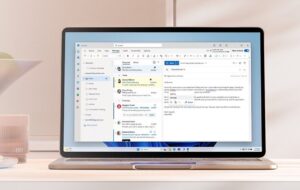
Microsoft is continuing its relatively slow march toward delivering the new Outlook for Windows. Last year, officials said the rollout would be gradual, taking years to go from preview to the final phase-out of the existing Outlook for Windows client. As of last week, we now know some commercial customers with classic Outlook will be able to hang onto the existing version of the app until at least 2029.
Microsoft has been working on consolidating its Outlook mail and calendar client apps for Windows since 2021, if not longer. The planned replacement, which was formerly codenamed “Project Monarch,” looks and feels a lot like the current Outlook web client for Windows.
Many features that are in the existing classic Outlook still are missing from the new Outlook for Windows. A lot of the public feedback on social media and various web sites about the new Outlook preview has been critical and negative, which makes the final phase-out date for classic Outlook being at least five years away not too surprising.
To date, Microsoft has released very few tangible dates as to when customers should expect the current Outlook app to be replaced by the new updated Outlook client. Last year, officials did say they planned to replace the Mail and Calendar apps built into Windows 11 with the new Outlook by the end of calendar 2024.
As of last week, we also know that Microsoft will “continue to honor published support timelines for existing version of classic Outlook for Windows until at least 2029,” according to “A Guide to Product Availability” blog post from the company. There are no other delivery dates in the post aside from the 2029 reference. Instead, officials reiterated the steps toward delivery they are planning.
On the new Outlook roadmap
Currently, new Outlook customers are only at the opt-in preview stage. The next planned milestone — for which the company still is not providing a date — is general availability. At GA, feature development will still be ongoing, but customers who are ready to move to the new Outlook will be “fully supported” by Microsoft.
Sometime after GA, Microsoft will hit the “opt-out” milestone, during which the new Outlook will be “on by default,” but customers can still roll back. The “cutover” stage, during which the switch back to classic Outlook will no longer be available for new deployments of Outlook from Microsoft 365 subscriptions, is slated for some time after that.
During cutover, “existing installations of classic Outlook for Windows through perpetual licensing will continue to be supported,” officials said. Microsoft has yet to publicly announce its next promised perpetual (non-subscription) release of Outlook and Office. In 2021, officials did say there would be at least one more perpetual Office release, and there have been sightings of what seemingly is Office 2024, which would be supported until 2029 if Microsoft offers a five-year support window.
Update (March 19): Microsoft announced that Office LTSC 2024 and Office 2024 will be available later this calendar year and both will get five years of support. Officials also said there will be at least one more perpetual version of Office after 2024.
“Outlook classic could disappear from Microsoft 365 Apps for Enterprise — the one you get with Microsoft 365 and Office 365 subscriptions — any time. Versions of that only live around 14 months, so that could be your lead time for migrating off classic Outlook,” warned Directions on Microsoft analyst Rob Helm.
Last fall, Microsoft officials said that while there was no exact cutover date for dropping the current classic Outlook client, the likely cutover milestone was roughly two years out (which would have put it at 2025) and ultimately would be determined by readiness of the product, as assessed by customers and Microsoft.
New Outlook still missing features
Over the past year, Microsoft has added to the new Outlook for Windows some of the missing features customers consider “must-haves,” including Gmail, Yahoo, iCloud and iMAP account support; ICS file support; Quick steps; sort by sender or subject line; and find related messages.
However, there are still a lot of gaps. Microsoft updated its list of “things we have in the works” for the new Outlook in late February 2024. At that time, the company listed offline support and Teams Chat in Outlook as starting to roll out in March. But still missing with no published ETA: POP3 account support, PST file support, S/MIME, and more.
A reminder: One feature from classic Outlook which will not be available at all with the new Outlook is COM add-in support. Microsoft officials said these add-ins are often unstable and don’t work cross-platform.
To try to appease customers who are dependent on tools and line-of-business apps that require legacy COM add-ins, Microsoft officials said they are “actively expanding” the capabilities of the web add-ins platform. They also said they will work directly with customers to figure out which add-ins are not supported. Microsoft officials maintain that most great add-ins are not just COM-based and exist in other formats, but not all customers seem to buy that claim.
“Some companies might want the new Outlook. I believe Microsoft is going to use it to quickly shim in newer collaboration technologies like Loop and Teams for the huge base of Outlook users, and some of Microsoft’s customers see those technologies as the long-term replacement for e-mail. But Microsoft’s announcement shows it sees that as a _very_ long term plan,” said Directions’ Helm.
“I hope that means it won’t mangle Outlook the way it did OneNote as it tries to drag it into the future,” he added.
Related Resources
Microsoft blog: New Outlook for Windows: A Guide to Product Availability
Microsoft’s updated list of features coming to the new Outlook for Windows
From 2023: Ready or Not: Microsoft’s new Outlook for Windows forges ahead
M365 Roadmap publishes some of the coming new Outlook features
Office 2024 is out there (somewhere)

The public relations push that Microsoft has generated behind their range of Copilot-branded technologies is seemingly unmatched in the company’s history.
As a result, the customer interest — and confusion — also seems to be unmatched. How are customers supposed to evaluate the technology for licensing or adoption, if there isn’t even a high-level way to describe each Copilot, what it does, what it integrates into, and the friction that it attempts to help the licensed end-user with? As a friend has suggested, we need a Copilot for Copilot licensing, because it’s impossible at this point to get your mind around what each of the Copilots does, and as soon as you understand most of them, something will change.
While customers should consider kicking the tires on Copilot-branded technologies that apply to their organization, it’s equally critical that they pace themselves in terms of any significant adoption of those services.
So when we consider Copilot, why, exactly should customers pace themselves, or potentially hold back entirely? Let’s consider a list of reasons:
1. Copilot is not consistent.
I’m not talking about the underlying LLM or inconsistencies in returned results. Instead, I mean that it isn’t clear what “Copilot” is even supposed to be. What Copilot in Bing does (summarize search) is completely different from what Copilot in Windows does (automate the Windows UI). What Microsoft 365 Copilot does depends on which piece of software or what service into which it has been integrated.
At a high level, Copilot helps users do things they would normally do, but faster or easier. But how it does them varies wildly depending on which Copilot we’re talking about, and what it is doing for you.
Microsoft has done themselves no favor by blurring the lines when it comes to which Copilot is which. How are customers supposed to evaluate the technology for licensing or adoption, if there isn’t even an elevator pitch to describe each Copilot, what it does, what it integrates into, and the friction that it attempts to help the licensed end-user with?
2. It’s very expensive (and expansive) yet offers unproven ROI.
This point is primarily about Microsoft 365 Copilot, which is so expansive, you can’t really easily define it. But at a simplistic level, Microsoft 365 Copilot takes tasks that a licensed user might need to perform and attempts to simplify them. But what it does, and how it does it, depends on the software or service it is integrated into, as discussed earlier. And each product team—in seemingly classic Microsoft form—has interpreted “integrate Copilot into your stack” in a completely different way.
I have seen a lot of customers curious about Microsoft 365 Copilot, and we’ve already seen many of them licensing it in some form. Given that it is so unfinished and lightly documented, it’s hard to see how a customer can look it in the eye and say it’s worth $30 per user each month at this point. What does it help a user do? It depends. How much does it save you annually on a per-user basis? It depends. Is Microsoft exaggerating the savings in their ROI documentation? You can bet on it.
3. It’s not done (and likely never will be).
Copilot isn’t done. Unlike legacy releases of Windows or Office distributed on shiny media, Copilots are never finished. If you adopt one or more Copilot-branded services, you’re on a Copilot journey with Microsoft.
Some of the already announced Copilot services are not even in preview yet. (See Copilots for OneDrive and SharePoint.) Some are still in private preview with no publicly announced ship target (see Security Copilot).
New Copilot features will arrive. Infrequently used features may disappear. User interfaces can and will change. Users will complain that their cheese has been moved, and they’ll want to know where it went. Your IT team needs to be prepared to train users and stay up to date on the Copilot technologies themselves (as much as they can). But at the end of the day, most Copilot technologies aren’t going to be well suited to users who aren’t comfortable with learning and re-learning on their own and aren’t comfortable with adapting to change.
4. It’s plagued by unstable requirements, branding, licensing, and packaging.
Branding for one Copilot, the service formerly known as “Bing Chat Enterprise,” has changed at least three times and will surely change again. At current writing, it’s now officially known as “Copilot with Commercial Data Protection.” This offering was initially limited to Microsoft 365 business customers, with a US$5 add-on for anyone else. But that approach was changed before the service became generally available in December and has changed again since.
Even without the constant change of Copilot, getting your head around what you must license for any single Copilot offering is an almost intractable task. Certain Copilot services are free. Certain Copilot services are free if you buy a specific other service. (You must be this tall to ride this ride.) And of course, some Copilot services/offerings, like Microsoft 365 Copilot itself, require specific —and very expensive — licensing per user. (Most Microsoft services in 2024 are licensed on a per user basis.)
5. It creates new regulatory compliance and security hurdles.
Copilot, which is described by Microsoft as “artificial intelligence” is based on the underlying large language model (LLM) technologies that Microsoft has licensed from OpenAI. As a result, it is trained on certain content (not your organization’s content). It can peruse your organization’s content and data to help users perform their work, depending on which Copilot we’re talking about.
Microsoft says, “Copilot automatically inherits your organization’s security, compliance, and privacy policies set in Microsoft 365.” And it’s important to note that it won’t help users bypass security permissions or legal hold settings for compliance, data residency settings to comply with GDPR, Priva privacy settings, etc. There are sure to be issues down the road where Copilot may lead to (or help discover) underlying security, compliance, or privacy issues. In short, organizations shouldn’t just shrug away concerns about security, compliance, data privacy and residency, etc. They must do research on topics that Microsoft hasn’t documented well, and that are subject to change.
Remember: It’s a marathon, not a sprint.
The intent of this post isn’t to keep you from investigating or even adopting any — or even most — of the Copilot-branded services. But it feels like Microsoft is working hard to reduce the due diligence organizations would have classically performed when they made decisions around upgrading from one version of Windows to another or migrating from legacy Office perpetual licensing on-premises to hosted Office 365/Microsoft 365 services.
My advice: Pace yourselves. Understand what you’re buying before you buy the Copilots for anything but a pilot project.
Also, if you’re confused or want a clearer story, licensing, pricing, or general strategy about “the Copilots”, I strongly encourage you to communicate with Microsoft and perhaps your reseller and push for it. However, note that many resellers and partners are already on board the same FOMO (fear of missing out) train that some Microsoft customers are clearly already on in terms of Copilot and Microsoft’s “AI” marketing push, and are ready to adopt and promote it at almost any cost regardless of the concerns I outlined above.
Related Resources
Directions on Microsoft’s Copilot tracker (downloadable reference sheet)
Directions on Microsoft’s Copilot Kit (Directions members only)
Copilot prerequisite: Proper data hygiene and controls are Essential (Directions members only)
Microsoft’s Copilot Super Bowl commercial
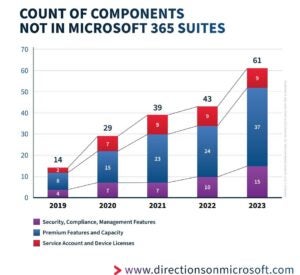
When your company shells out more than $700 per user per year for Microsoft’s top-of-the-line E5 subscription, you would assume it would include everything you’d need. If you did, you’d likely be wrong.
Microsoft is making more and more new features and apps available as paid add-ons for Microsoft 365 customers. And like many parents and kids discover the hard way, when the expected batteries aren’t included with your new, pricey toy, no one is happy.
Directions on Microsoft has long tracked all the extra-cost add-ons to Microsoft 365 plans. These add-ons include features, apps, and licenses that may be needed above and beyond what’s standard in the $36 (USD) per user per month Microsoft 365 E3 and $57 per user per month Microsoft 365 E5 subscriptions. Examples of the some of these add-ons:
- Capabilities that might be needed to meet security, compliance and management needs, such as Defender Vulnerability Management, Priva Privacy Risk Management, and Microsoft 365 Cross Tenant User Data Migration;
- Premium capabilities beyond the base features included in Microsoft 365 suites, such as Microsoft 365 Copilot, Power BI Premium, and Teams Premium;
- Licenses for devices and service accounts not covered by the Microsoft 365 suites, such as Exchange Online Plan 2 (for shared mailboxes; Teams Shared Devices
In December 2019, Directions counted 14 such available add-ons. By December 2023, we found 61.
Add-ons: More than just per-user costs
These add-on services are not cheap, especially when purchased by customers who need hundreds or thousands of seats.
Copilot for Microsoft 365 is $30 per user per month. Teams Premium is $10 per user per month. The Intune Suite add-on to Plan 1 that includes all Plan 2 features, and all existing and forthcoming à la carte features, is $10 per user per month. Defender Vulnerability Management costs $2 per user per month on top of Microsoft Defender Endpoint P2 or $3 per user per month when licensed alone to use with a third-party endpoint detection and response product.
Plus, there are additional costs beyond just the add-ons themselves.
In the case of security add-ons, for instance, “Microsoft has created a dilemma no one is talking about: Who’s going to evaluate, implement, and manage all these new security tools inside Microsoft customer organizations?” noted Directions on Microsoft analyst Michael Cherry.
“Microsoft and other cloud vendors promised the cloud would help reduce IT costs, not just in terms of on-premises hardware and software, but also in terms of IT headcount. It now seems that the cloud is the cause of significant new costs, at least for security. The main cost will likely be to acquire the expertise, either through training or new hires of people with the necessary skills to understand how-to use these tools effectively,”
With Entra, the service formerly known as Azure Active Directory, organizations may encounter other issues they hadn’t anticipated.
“With the identity governance add-ons, it’s almost impossible to describe what each does,” said Directions on Microsoft analyst Wes Miller. “But CxOs are still gonna buy them.”
Will E7 save the day?
Some of the Directions on Microsoft analysts believe the current growth trajectory for Microsoft 365 is unsustainable and Microsoft may soon release a new high-end Microsoft 365 subscription tier — something like an “E7” which would include some of the extra-cost features. At the very least, a new tier that includes Microsoft 365 Copilot bundled in, seems almost inevitable, given Microsoft’s current obsession with all things AI and Copilots.
But other Directions analysts believe that Microsoft may stay the course with E5 as the Microsoft 365 high-end for a while longer. Last time Microsoft released an official number, Microsoft 365 E5 was deployed by only 12 percent of the Microsoft 365 installed base.
By holding the price line with E5 and continuing to roll out more optional add-ons, Microsoft officials may believe they can maximize average revenue per user while publicly claiming they are trying to help customers “do more with less.” In January 2024, for example, Microsoft added several new add-on Entra and Defender SKUs targeted specifically at frontline workers, which could save some companies money by enabling them to deploy feature-specific add-ons, rather than having to buy the full P1/P2 SKUs.
Related Resources
Is Microsoft 365 E7 waiting in the wings?
Services Increasingly Expanding Beyond Microsoft 365 Suites (Directions members only)
Microsoft provides a frontline-worker price break
The hype around all the Microsoft Copilots is truly deafening, and it’s hard to know what to make of it. They can write code, prose, do presentations, analyze security logs, write emails, all automagically, all on your behalf. Microsoft (admittedly anything but an objective commentator) boasts that 70 percent of Copilot users claimed to be more productive.
Are Copilots all they’re cracked up to be? Even here, gathered at the Round Table at lofty Directions on Microsoft headquarters, our analysts express a very diverse set of views ranging from “Copilots are just the next Siri/Cortana/Alexa” to “they’ll revolutionize computing.”
But as a prudent, risk-averse, and cost-conscious executive you’re probably wondering: just how much should you invest in technologies which, on the one hand, may provide remarkable advances in productivity, and on the other, like all new technologies, come with risks?
The Promise
It’s seductive, isn’t it? Just open up Microsoft Word and it’s ready to help you write (incidentally, I did not use Copilot to write this blog post, so you know). It’s almost undeniable that Copilots could, in the best case, “amplify” your employees’ activities, to use the words of OpenAI’s CEO Sam Altman.
At minimum, Copilots can give you and your users a head start in drafting and organizing content. (How many times have you sat in front of Outlook trying to organize your thoughts for that organization-wide email? Tell Copilot to do it!)
Eyes Wide Open, Look Before You Leap (Etc.)
No doubt at least some of your employees are asking for Copilot licenses, and with their “real” general availability, it’s as easy as throwing a switch in the Microsoft 365 portal.
Before you do though, consider a few things.
Analyze the costs. Copilots aren’t cheap. $30 per month per user. If you have, say, three thousand knowledge workers in your organization, that’s around a million dollars per year, which, frankly, you could use to hire 3-4 FTEs. What’s the better use of your budget?
Train your employees. Artificial intelligence can get things wrong (insist to ChatGPT that “3+4=8” and eventually it’ll agree with you). It can plagiarize. While Microsoft has stated that it will indemnify Copilot customers against lawsuits, this has yet to be tested in court.
I always advise organizations to treat AI like junior workers right out of college: you have to check their work! Don’t put GitHub Copilot code directly into production, proofread and verify text that Copilot for Word generates before putting it on your website, etc. Consider creating a requirement that employees take training before giving them Copilot licenses.
Prepare your data. A Microsoft employee I know once said half-jokingly, “don’t give Copilot to your SharePoint admin.” He had a point. Copilots can ingest organizational data (like documents in SharePoint, email in Exchange Online, and so on) to formulate answers. Therefore, your data must be properly protected — permissions assigned, tagged with sensitivity labels, encrypted if necessary, and so on — so that a user’s Copilot can only see the data it’s allowed to. Given all the documents, emails, spreadsheets, presentations, and so on your organization undoubtedly possesses, ensuring they’re all protected can be a very big, and possibly labor-intensive, deal. (Microsoft states that it does not use your data in public training sets.)
Get your risk management teams involved. Copilots open up new ways to create and access content which means that users can inadvertently violate policies – or the law. Consider an employee who, for example, asks a Copilot to write a step-by-step approach to selling stock during a quiet period, or an employee who, perhaps without thinking, includes Personally Identifiable Information (PII) in a prompt. Your compliance organization needs to know about that!
The good news here is that Microsoft has recently implemented a ton of new features in Purview, its regulatory compliance suite, to cover Copilot activities. But your teams need to know how to use these features (and if they’re enough for your requirements).
What’s CIO To Do?
As an executive, you want to get the most business value (with the least risk) for your investment. Planning your Copilot deployment can help you and your teams get the productivity advances Copilot promises while avoiding possible pitfalls. And helping your teams understand how Copilot can be best be used – for example (remember that training I mentioned before?), teaching them how to craft effective prompts – can jumpstart your deployments, and your productivity.
Bottom line: It’s early days for Copilot. There’s still a lot to learn. While the promise is huge, tread carefully.
I’d love to hear about your experiences: drop me a line at bbriggs@directionsonmicrosoft.com.
Related Resources
Microsoft: What Copilot’s earliest users teach us about generative AI at work
Microsoft makes Copilot generally available to enterprise, SMB and consumer customers
Podcast: Generative AI – Where customers need to look before they leap
Copilot prerequisites: Proper data hygiene and controls are essential (Directions members only)

Microsoft basically phoned it in with the last few Windows Server releases, which included relatively few new or updated features. They seemed primarily designed to appease certain customers who still wanted and needed an on-premises server OS.
But the next version of on-premises Windows Server, which will be available to customers in the second half of 2024, looks to be something quite different.
Unsurprisingly, the next release will be named “Windows Server 2025.” And perhaps surprisingly to some, it will still be a “perpetual” software product with five years of Mainstream support and five years of Extended support, not one that forces customers to subscribe to get regular features or security updates. Microsoft officials also have said the system requirements for Windows Server 2025 have not changed, so customers can upgrade all their existing Windows Servers to the new version.
“Overall, many of the Windows Server 2025 features either come directly from or are based on things that were introduced with Azure Stack HCI or Azure Edition,” said Directions on Microsoft analyst Jim Gaynor. “This goes along with what Microsoft said when they killed the SAC (Semi-Annual Channel). These other server OSs and editions ‘receive innovation’ first, and features are brought to the LTSC (Long Term Servicing Channel) version if deemed worthy.”
Among the new features coming to Windows Server 2025, which Microsoft officials have shared publicly:
- Windows Server hotpatching (physical, virtual, even other clouds), but Microsoft will require Servers to be Arc-enabled and orgs will incur an additional Azure subscription cost.
- Server Message Block (SMB) over the QUIC always-encrypted protocol using TLS 1.3 for secure connections. This feature previously was in Windows Server 2022 Azure Edition only.
- New domain and forest level, new Active Directory (AD) features and security updates. Note that none of these will be backported to earlier AD; all your Domain controllers will have to be Server 2025 to take advantage.
- GPU partitioning for Hyper-V (allows multiple VMs to share portions of a GPU). But this capability is optimized more for AI functions and requires very new hardware.
- Native Non-Volatile Memory Express (NVMe) drivers for large performance increase with NVMe storage.
- New pay-as-you-go subscription option.
Microsoft also is adding a new option for Windows Insider testers who want to flight new Windows Server test builds. And, after first appearing in a late 2023 patch to Windows Server 2022, a “wizard” to make it even easier to install Azure Arc will be included with Windows Server 2025.
Related Resources
Microsoft Ignite: What’s New in Windows Server vNext
Windows Server vNext Ask Me Anything
Introducing Windows Server 2025
Windows Insider flighting on Windows Server

Microsoft spent most of 2023 announcing — and sometimes delivering — its rapidly expanding family of Copilot AI assistants. If you thought there were a lot of Microsoft Copilots, just wait: There will be many more announcements in 2024 and beyond.
GitHub Copilot, Microsoft’s AI assistant for developers, kicked off the Microsoft Copilot frenzy back in 2021. Throughout 2023, Microsoft unveiled plans for AI assistants across Bing Chat, Windows 10 and 11, Dynamics 365, Power Platform, Power BI, Microsoft 365, the Fabric data-analytics platform, Microsoft’s security platform, and more.
Microsoft officials have touted that they used the same orchestration and same design language/”Copilot Stack” across its varied Copilots. However, as we’ve said consistently at Directions on Microsoft, “Copilot” primarily is a Microsoft branding term. Different product groups at the company have implemented Copilots differently in terms of user interface, data set used for training and licensing and pricing.
In some cases, Microsoft has rebranded existing AI-centric features as “Copilots,” especially in the Dynamics 365 space. In others, it has applied the Copilot brush to already shipping products, such as Power Virtual Agents, which it christened in November 2023 as “Copilot Studio.” Microsoft also has created some brand-new AI assistants, such as the Copilots across its Microsoft 365 suite, and is slowly beginning to make them available to customers.
What’s next for Microsoft Copilots
Microsoft has been embedding AI functionality in various products for years. Before the debut of its partner OpenAI’s ChatGPT, however, Microsoft had a different focus with AI, as acknowledged by Executive VP of Experiences and Devices Rajesh Jha.
“Prior to generative AI, it was as if the human beings did all the work and the AI was the editor. It would show up in auto-complete, grammar check, spell check. But now it’s flipped. AI is doing the work. They’re doing the first draft, they’re doing the summarization, and the human beings are now editors. So it’s gone from AI being editors to now where it should be, which is the human beings are the editors and the AI is the assistant,” Jha said during a December appearance at the Barclays Global TMT conference in December.
In the near term, Microsoft is planning to add more OpenAI goodies to its Microsoft Copilot search tools formerly known as Bing Chat and Bing Chat Enterprise. On the near-term list for these two Copilots: Built-in integration with Open AI’s GPT-4 Turbo and DALL-E 3 imaging model; a new Code Interpreter capability for performing complex tasks such as more accurate calculation, coding, data analysis, visualization, and math.
Microsoft also is doing more to blur the lines between the shell, search and browser, Microsoft’s Jha acknowledged in his Barclays conference remarks. This integration could manifest as soon as 2024, starting with the rumored Windows vNext/”Windows 12″ release, some Microsoft watchers are speculating. Jha said the deep integration of natural language in the OS is key to “a new paradigm for user experiences.”
Microsoft also will be rolling out previews of its promised Copilot in SharePoint and Copilot in OneDrive in the first part of 2024, officials told me when I asked for an update on their whereabouts. A spokesperson described these as “additional application experiences” for Copilot for Microsoft 365. (No word yet on whether there will be extra charges or how these will be licensed.)
At some point in 2024, Microsoft is expected to make good on its previous promise to allow Microsoft 365 Business Standard and Business Premium customers to buy Copilot for Microsoft 365. Starting in January 2024, Microsoft will make Microsoft 365 Copilot available to faculty for purchase if they have Microsoft 365 A3/A5 subscriptions. Microsoft officials also have said Copilot for Microsoft 365 will be available to consumers, not just businesses, in 2024.
It’s not guaranteed smooth sailing for Microsoft’s Copilot family, however. Besides generative AI hallucinations and AI ethics and safety concerns, there are other factors which potentially could impact how Microsoft rolls out its Copilots in the coming months and years.
There are signs that Microsoft’s cozy relationship with OpenAI is triggering scrutiny by not just the UK Competition and Markets Authority but also U.S.-based regulators with the Federal Trade Commision, according to published reports. Microsoft has invested an estimated $13 billion in OpenAI and OpenAI runs its models exclusively on Azure. OpenAI’s decision to give Microsoft a non-voting, observer board position following the unexpected firing/rehiring of OpenAI chief Sam Altman seems to have increased regulatory concerns.
Copyright issues also loom large for OpenAI and Microsoft. In late December, The New York Times became the latest to sue for copyright infringement, claiming OpenAI copied millions of The Times’ articles to train the large-language models powering ChatGPT and Microsoft Copilot.
Everything you need to know about Microsoft Copilots
Our Directions on Microsoft members and customers have told us they’ve had challenges keeping up with all the Microsoft Copilots. They’ve had trouble determining which Copilots are still just previews (or even demo-ware) and which are generally available. They’ve been stymied when trying to figure out which Copilots Microsoft is bundling into products and often turning on by default, and which are only free to those with particular licenses.
The Directions on Microsoft analysts have been collecting information about the burgeoning Microsoft Copilot family, with the intent to bring some method to the AI madness. We’ve come up with a handy chart that lists the key Copilots the company has announced, descriptions of each, and as much pricing and licensing information as we can find. We will be updating and refreshing this chart on a regular basis, since Microsoft keeps adding new ones, changing branding and release dates, and adding new pricing and licensing wrinkles.
To download a free copy of the Directions on Microsoft Copilot infographic, go here.
Related Resources
Directions on Microsoft’s Copilots Kit (Directions members only)
Microsoft blog post: Continued AI Innovation in Copilot
Transcript of Microsoft EVP Rajesh Jha at Barclay’s (Dec. 7, 2023)
Microsoft’s OpenAI Investment Risks Scrutiny from US, UK Regulators
New York Times Sues OpenAI and Microsoft Over Use of Copyrighted Work
Copilots! A Directions on Microsoft Brainstorm podcast

It’s not every day — or, in fact, almost any day — that Microsoft gives customers a price break. But it looks as if that’s what Microsoft is doing with some newly announced additions to its Microsoft Defender line-up, specifically targeted at frontline workers.
As outlined in the Microsoft January 1, 2024, product terms, Microsoft added several new SKUs to its Defender and Entra (formerly Azure Active Directory) families. The newest members:
- Microsoft Defender for Identity F1 (User SL)
- Microsoft Defender for Cloud Apps F1 (User SL)
- Defender for Endpoint F1 (User SL)
- Defender for Endpoint F2 (User SL)
- Microsoft Defender for Office 365 F1 (User SL)
- Microsoft Defender for Office 365 F2 (User SL)
- Microsoft Entra ID F2 (User SL)
The move seems similar to an April 2020 announcement, when Microsoft added a more granular way for Microsoft 365 E3 users to gain access to E5-level regulatory and legal compliance features by adding new, less-pricey SKUs for F3 and F1 users. Microsoft documented and made these new SKUs available in June 2022.
There’s a key difference between the legal and regulatory SKU additions with the new security-focused Frontline ones unveiled this week.
“The weird twist is that the three individual compliance sub-SKUs for Frontline announced in 2020 required users to have M365 F1/F3. The security related pieces announced January 1, 2024, don’t,” said Directions on Microsoft analyst Rob Horwitz.
Horwitz speculated there could be some “corner-cases that Microsoft is trying to accommodate, such as retail devices protected by Microsoft Defender for Endpoint.”
“In some cases, the users might not even have a Frontline Suite,” he added. “And Microsoft is apparently trying to avoid any per device licensing.”
According to the January 2024 price list, these newly announced frontline security SKUs are approximately two-thirds the price of the P1/P2 SKUs. This is the same “discount” as Microsoft provided in June 2022 with the F5 compliance SKUs, Horwitz noted. The newly announced Microsoft Defender for Cloud Apps F1 (User SL) costs about $2.40 (USD) per user per month, rather than the $3.50 per user per month Microsoft charges for Defender for Cloud Apps P1, for example.
For some odd reason, when I asked Microsoft for comment on these new SKUs — specifically about their pricing and licensing reasons for introducing them — the company said, via a spokesperson that “Microsoft doesn’t have much to share on these questions.” (Actually, the spokesperson shared nothing.)
Cleaning up AIP Premium Plan 1 residuals
In other product term news from January 1, Microsoft announced it has removed all references to Azure Information Protection (AIP) Premium Plan 1 from its documentation. Microsoft dropped AIP Premium Plan 2 in 2020, with its functionality folded into various Purview sub-suites.
When I asked Microsoft for details on what will happen to the functionality that’s in AIP Premium Plan 1, a spokesperson said he could confirm the product is “being retired” on April 11, pointing us to this Microsoft blog post from April 11, 2023, that noted the AIP Unified Labeling add-in for Office will be retired this April. The spokesperson declined to provide more about the end of AIP Premium Plan 1.
This November 2022 Microsoft blog post, however, notes that the AIP Scanner capability in AIP Premium Plan 1 will be moving to the Purview compliance portal. AIP tools on Windows will be rebranded under Purview. The AIP Viewer for IoS will continue to be supported, but specifics have yet to be announced.
Related Resources
Microsoft Product Terms summary of changes
Retirement notification for the Azure Information Protection Unified Labeling add-in for Office
Update on the future of AIP features

Microsoft officials are reticent to admit proactively when products are on the deprecation, retirement or graveyard lists. But there are several signs customers can monitor to determine if Microsoft is likely to drop a particular product or service on which they were counting. One of these “omens of doom” is the perpetual preview.
We’ve already written (and podcasted) about several Microsoft on-premises products that could be in the discontinuation danger zone, including Access, Visio, Project. Office Professional Plus, and more. The rule of thumb: Don’t invest in a Microsoft product in which Microsoft itself is lessening its investment.
But it’s not just on-prem legacy products that have an uncertain future. In preparing our various Microsoft enterprise product and service roadmaps here at Directions on Microsoft, we monitor the duration of Microsoft product previews, especially those with few, if any prospects of moving to the general availability (GA) phase. We’ve found the longer a Microsoft preview, the less likely a technology will reach GA.
In the consumer product space, it often matters less whether a product falls into the perpetual preview category. Many cloud services, including Google Search, Bing, and Xbox Cloud Gaming (which is still in “beta”), remained in preview for years, without many users being wiser.
In the enterprise world, however, customers often are unwilling or not permitted to roll out broadly technologies that have not reached GA. Many times, the vendors behind these products don’t support them to the level required by organizations. A preview never has a Service Level Agreement (SLA) associated with it. There may be Microsoft licensing clauses explicitly warning customers they should not be relying on these preview services in production, and if they do, they do so at their own risk.
Further complicating matters, it’s not always an entire product or service that’s in preview, but only specific features within it that may be. This can be confusing because it’s not always clear when a feature is in preview; it might be noted with an easily missed label in the UI or only in documentation or a blog post. There’s no consistency. So, the overall service is marked as GA, and customers adopt it, but they don’t realize they’re using a preview feature.
In some cases, overly long previews can be attributed to strategy and priority changes at Microsoft. (These days at Microsoft, if there’s no AI angle to your Microsoft product, it seems less likely to get internal support or promotion.) Some company watchers also have wondered if Microsoft still releases previews that never become commercially shipping products to try to freeze a market, rather than concede it to a competitor.
“Long previews may occur because there are critical customers that have requested certain features and are using them, but Microsoft doesn’t feel comfortable enough to support those features for everyone. Other times, priorities change before a product reaches general availability, and teams could be dissolved or refocused,” said Directions on Microsoft analyst Rob Sanfilippo.
Perpetual previews: A few examples
Here are a few examples of Microsoft cloud services that were/are in overly long previews
Azure Internet Analyzer: Microsoft announced the public preview of Azure Internet Analyzer in November 2019. Internet Analyzer is a network modeling and measurement tool that collects performance data to help determine whether a different network configuration will offer application performance improvements. In September 2023, Microsoft posted an update to its Azure Updates page acknowledging that Internet Analyzer will be discontinued and all customer data in the service deleted on March 15, 2024. In that update, Microsoft admitted “this tool didn’t achieve the level of customer traction we had hoped for.” Azure Monitor Network Insights seems to be the Microsoft-preferred replacement for Internet Analyzer.
Azure Service Shared Plan: Azure App Service has two base tiers — free and shared — which run an app on the same Azure VM as other App Service apps. These tiers were intended to be used only for development and testing purposes. After many years in preview, we asked Microsoft a while back when the Shared Plan would go GA. The answer: Never (although Microsoft still does charge users for shared CPU compute for the preview.)
Azure Blueprints: Microsoft launched a preview of Azure Blueprints in 2018. The idea behind Azure Blueprints was to enable IT to define a repeatable set of Azure resources that could be applied across an organization. In a note on the Microsoft Learn page about Azure Blueprints, Microsoft acknowledged on July 11, 2026, the Blueprints preview will be deprecated. Microsoft’s guidance is to migrate existing blueprint definitions and assignments to Template Specs and Deployment stacks.
One tool which could be used to monitor the state of Microsoft previews was a Microsoft-developed Web app called Azure Charts. Azure Charts helped track the availability status of various Azure services. But it seems the app is no longer functional due to “budget restrictions” as of just a week or so ago.
Does GA really mean anything anymore?
As we’ve noted, some orgs are unwilling and unable to deploy Microsoft products and services until Microsoft grants them the official GA label. But increasingly, the Directions on Microsoft analysts have been wondering what GA means anymore — especially when Microsoft seems willing to deem a product or service GA after seemingly little testing.
A prime example here is Copilot for Microsoft 365. After a few months of private testing by about 500 to 800 paying selected customers, Microsoft announced Copilot for Microsoft 365 was GA on November 1. On that date, it was available to a small subset of Microsoft’s customer base: Those with Microsoft 365 E3 or E5 who were willing to pay $30 per user per month for 300 seats (minimum) and who purchased it through their Microsoft reps, since it was not on the company price list. There was and is no public beta or free trial for the product. As of today, Microsoft has not gone public as to when it plans to broaden general availability.
Windows is another area where the GA label seems next-to-meaningless anymore. New features are rolled out to customers who aren’t protected by enterprise policies and services after relatively little testing by self-designated Insider testers. The first wave of unmanaged-device customers then test Windows 11 features for a few more weeks or months before Microsoft deems a feature update as ready for business deployment.
Related Resources
Podcast: When should you walk away from a Microsoft product
Microsoft’s Azure updates and changes feed
Azure App Service Shared preview details
What’s next for Azure Blueprints
Goodbye, Azure Charts. We hardly knew you
Ten things you need to know before buying Microsoft 365 Copilot
Duration of Azure Tech Previews Can Indicate Risk (Directions members only)
Azure Roadmap (Directions members only)

On January 16, Microsoft will expand availability of its $30 per user per month Copilot for Microsoft 365 so that more enterprise and business customers have the option to buy it.
Microsoft is enabling Office 365 E3 and E5, as well as Microsoft 365 Business Standard and Premium customers — not just Microsoft 365 E3 and E5 ones — to buy Copilot for Microsoft 365. It also is removing the 300-seat minimum requirement. In addition, Microsoft is launching today a version of Copilot for Microsoft 365 Family and Personal consumers for $20 per user per month.
“It’s great that Microsoft is opening up this powerful new technology (Copilot for Microsoft 365) to all customers, including businesses and consumers. The wide availability will create better user awareness and provide more feedback to find creative ways to use the Copilot and find weaknesses that can be addressed,” said Directions on Microsoft analyst Rob Sanfilippo.
The Copilot matrix continues to morph
Microsoft has been changing its branding and availability plans for its various Copilot AI assistants over the past year.
Until just before November 1, Microsoft officials had pledged to make Copilot available to Microsoft 365 E3 and E5 users, as well as Business Standard and Premium small- and midsize business (SMB) users on November 1. Subsequently, Microsoft dropped plans to make Copilot for Microsoft 365 available to anyone other than M365 E3 and E5 customers willing to buy 300 seats minimum and who went through their Microsoft reps to purchase (as Copilot for Microsoft 365 wasn’t on the price list). At the time, Microsoft officials declined to say when Business Standard or Premium customers would get their chance to buy Copilot for Microsoft 365.
However, for the past couple of months, Microsoft has been testing Copilots privately with select SMB customers and some consumers. As of today, Microsoft is making Copilot for Microsoft 365 available to customers via its Cloud Solution Provider (CSP) channel. It also is enabling individuals with Microsoft 365 Personal and Family subscriptions to add “Copilot Pro” for $20 per user per month.
Copilot Pro will be available via the Microsoft Store, and possibly other channels. Copilot Pro will work with Word, Excel (currently in preview and English only), PowerPoint, Outlook, and OneNote on PC, Mac and iPad. (There’s no word so far if and when it also will work with Android and if the consumer version of Teams and Clipchamp will be added to the mix.) Copilot Pro also will be getting at some point “soon” a Copilot GPT builder, which will allow customers to build their own customized Copilots tailored for a specific topic.
Microsoft will continue to offer plain-old Copilot — the product formerly known as Bing Chat — for no additional charge.
It seems Microsoft also will continue to offer the other Copilot — the product formerly named Bing Chat Enterprise. (I’ve asked Microsoft to confirm but no word back yet.) Bing Chat Enterprise is Bing Chat with commercial data protection added for customers who sign in with their Entra ID accounts.
At one point, Microsoft announced that the Bing Chat Enterprise version of Copilot would only be free for those with Microsoft 365 E3, E5, Business Standard or Business Premium or for $5 (USD) per user per month as a standalone commercial product. But Microsoft quietly dropped its standalone SKU plans and instead said the enterprise Copilot would be available to any organization using Microsoft Entra ID at no additional cost.
Until today, Microsoft had blocked Office 365 E3 and E5 users from the group of those eligible to buy Copilot for Microsoft 365 for $30 per user per month for no apparent technical reason. There’s been speculation that Microsoft did so to convince more Office 365 users to upgrade to Microsoft 365.
Microsoft officials said they are extending the Semantic Index for Copilot to Office 365 users who have a paid Copilot license. The Semantic Index is meant to work with the underlying Copilot system and Microsoft Graph to create a map of the data and content in an organization to help Microsoft 365 Copilot create more personalized and relevant responses.
Need help tracking the Microsoft Copilots? We’ve got you
Microsoft has announced over two dozen Copilots so far and more are on the way. Directions on Microsoft has created an infographic that pulls together basic facts for 27 Copilots organized into four categories:
- Office and Windows
- Azure and Developer
- Data and Analytics
- Business Applications
Our chart provides an at-a-glance understanding of each Copilot, detailing use scenarios; training and customer data used; licensing costs; and dependencies on other Microsoft products.
Get your free copy of this cheat sheet here (for Directions members).
Related Resources
Microsoft broadens paid Copilot availability
Microsoft Copilots: The year in review and the year(s) ahead
Practical365.com: How Microsoft is Using Copilot to Drive Customers to Microsoft 365
Copilots! A Directions on Microsoft Brainstorm podcast
Ten things you need to know before buying Microsoft 365 Copilot

Microsoft finally is going public on November 15 with one of the industry’s worst-kept secrets. For years, Microsoft has been rumored to be developing its own chips, including some based on the Arm architecture. Today at the company’s annual Ignite conference, officials are talking about what they’ve built and how Microsoft expects to use these chips to improve its own and its customers’ performance — and, hopefully, at some point, reduce both of their costs.
On Day one of Ignite, Microsoft is showing off its “Azure Maia” AI accelerator chip designed for cloud-based training and inferencing for AI workloads, as well as its “Azure Cobalt” chip based on Arm, meant to improve performance, power efficiency, and cost for general-purpose workloads. These chips will be incorporated into Azure’s infrastructure in 2024.
Officials said the in-house designed Cobalt 100 CPU, the first of a planned series, is a 64-bit 128 core chip that delivers up to 40% performance improvement over current generations of Azure Arm chips. Company officials said Cobalt 100 already is being used, in test, to run parts of Teams, Azure Communications Services, and Azure SQL Database.
Besides using Cobalt 100 in-house, Microsoft plans to make the ASIC Cobalt VMs available to customers for their own use some time in 2024, officials said. Microsoft has offered Arm-based VMs to Azure customers since 2022 via a deal with startup Ampere Computing, but these VMs were designed to run Windows 11 and various Linux distributions, specifically.
Microsoft execs said they have been testing Bing Chat (the consumer AI assistant service just rebranded to “Copilot”), Microsoft’s Phone AI services, as well as GitHub Copilot on the Maia 100 accelerator chips. Plans call for Microsoft to support not just first-party workloads, but third-party ones, like OpenAI’s ChatGPT 3.5 Turbo, and more on Maia, officials said.
More than just chips
In addition to showcasing its own silicon, Microsoft is making generally available as of today its Azure Boost system that is designed to speed up storage and networking by moving those processes off host servers onto customized hardware and software. It also plans to add AMD MI300X accelerated VMs to Azure that are designed to speed up AI workload processing, and it is delivering a preview of the NC H100 v5 VM series built for NVIDIA H100 Tensor Core GPUs, meant to improve mid-range AI training and generative AI inferencing.
Before Ignite this week, Microsoft already had been making numerous investments in Azure infrastructure that centered around the company developing its own chip, server, rack, networking and other physical components (rather than buying them off-the shelf). Years ago, it open-sourced its “Project Cerberus” cryptographic microcontroller, as well as its “ Project Olympus” datacenter server design.
In 2022, Microsoft bought Lumenisity, a British startup that was working on a new form of optical fiber, called “hollow core,” designed to improve long-distance data-transfer speeds. In 2023, it bought Fungible, a developer of data processing unit (DPU) technology which can be used for a variety of network interface card enhancements.
Microsoft also has been pioneering work in two-phase liquid-immersion cooling. Microsoft implemented this technology in its Azure datacenter in Quincy, Wash., starting in 2021.
In other Azure-related Ignite news, Azure AI Studio, which Microsoft originally announced at its Build conference in May 2023, is now in public preview. Azure AI Studio provides a UI to help create customized AI-enabled chats, including enhancing the chat with organizational data. Windows AI Studio, a complementary product “available in the coming weeks,” will allow developers to run their AI models on the cloud in Azure or on the edge, locally on Windows.
Related Resources
Ignite 2023: Microsoft introduces new chips, Azure infrastructure
Microsoft hardware acquisitions target its datacenter infrastructure (Directions members only)
To cool datacenter servers, Microsoft turns to boiling liquid
From 2022: Azure Virtual Machines with Ampere Altra Arm–based processors—generally available
From 2020: Microsoft is designing its own Arm chips for datacenter servers: Report

Microsoft will no longer provide support for Windows 10 after October 14, 2025. However, the company will make available a yearly subscription for critical or important security fixes for Windows 10 customers who can’t or won’t be off Windows 10 by that date. As was the case with Windows 7, these ESUs for Windows 10 will be available for purchase for three years.
In addition to making ESUs for Windows 10 available to businesses, Microsoft also plans to make them available to individuals who enroll their PCs in the paid Extended Security Updates (ESU) subscription program. Microsoft officials said they will provide more details on how this will work for both businesses and individuals “at a later date.”
As Microsoft announced earlier this year, Windows 10 22H2 is the final version of Windows 10. Customers running this version will get monthly security updates (and, on rare occasions, new features, such as Windows Copilot) through October 14, 2025. Those running Windows 10 IoT Enterprise and Windows 10 IoT Enterprise Long-Term Servicing Channel will remain in support longer as those editions have different life cycles.
Microsoft is encouraging customers with PCs that don’t support the hardware requirements for Windows 11 to buy new PCs now or subscribe to Windows 365/Cloud PC. Those subscribed to Windows 365 will be able to continue to use Windows 10 on their local devices with security updates provided for no additional cost three years beyond the October 14, 2025, support cutoff. Those running a Windows 10 instance in an Azure Virtual Desktop also will get ESUs for no additional charge.
ESUs will provide a Microsoft-chosen set of security updates designated as important or critical but will not include any customer-requested non-security updates or technical support.
Microsoft officials said they’d provide more licensing and pricing details closer to the Windows 10 end-of-support cutoff date. In the case of Windows 7 ESUs, Microsoft charged an annual per-device fee that doubled each year, starting at $50 USD per device for coverage from January 2020 to January 2021. Customers with Windows Enterprise User Subscription Licenses and those with active Software Assurance on Windows Enterprise Per-Device licenses got a 50 percent discount on these prices.
But What About ‘Windows 12’?
Microsoft is believed to be providing ESUs for Windows 10 because a substantial number of businesses and consumers are still running it. Whether it was due to Microsoft’s more stringent hardware requirements or change in UI/UX (or both) with Windows 11, adoption of Windows 11 is believed to be slow. Microsoft has not released any official numbers on how many PCs are running Windows 11 two years after its release. Windows Central reported in October 2023 that about 400 million PCs were running Windows 11, meaning more than half are still running Windows 10.
Microsoft officials didn’t offer any guidance today about what comes after Windows 11. There are growing rumors that Microsoft will release some kind of new version of Windows in 2024 — something which may (or may not) be called “Windows 12.” This could affect organizations’ Windows 10 upgrade plans, as some might think they can save a step by going straight from Windows 10 to Windows 12.
I asked Microsoft again this week if it would offer customers any guidance on whether a new version of Windows will ship next year and whether it will supersede Windows 11. A spokesperson said the company “has nothing further to share.” The latest Windows 12 rumors indicate that Microsoft could deliver a version of Windows tailored for “AI PCs” with neural processing units (NPUs). Could this mean the alleged new version of Windows might exist alongside Windows 10 and 11? Maybe?
Despite the availability of ESUs, Directions on Microsoft Analyst Michael Cherry recommends that organizations and people do not look at ESUs as a mechanism to extend the life of all the devices they have, but rather, use them sparingly for those devices that cannot be upgraded due to some critical or unique circumstance. There are risks and costs for not staying current that ESUs do not address, and organizations still need to watch that new devices they acquire can run Windows 11 as well as address coming features that may need additional processing power.
Related Resources
Microsoft: Prepare for Windows 10 End of Service with ESUs
Windows 10: T-24 and Counting (Directions Members Only)
How Microsoft Handled Windows 7 ESUs (Directions Members Only)
Report: Windows 11 is active on almost half a billion devices

We’re kicking off a new feature on our blog that we’re calling “Answer This.” We’ll be posting some of the many customer questions about Microsoft enterprise technology and licensing that we receive here at Directions on Microsoft, along with our analysts’ answers. If you want a chance to have one of your enterprise questions answered, fill out this form and we might tackle your query next.
Our second “Answer This” post pertains to Dynamics 365 licensing, particularly when multiplexing is involved. Customers often walk away from Dynamics because there are no reasonable solutions when it comes to licensing for multiplexing. The pricey reality, as Oprah might say: “You need a license; you need a license; everyone needs a license!”
Customer Question
We have a number of scenarios where we are wondering whether we need Dynamics 365 licenses. Several of these scenarios involve multiplexing. Is there a simple explanation as to when we do and don’t need some kind of Dynamics license for these scenarios?
Back Story
Multiplexing is how Microsoft makes sure that everyone pays to see the data. Their definition is that when internal users and devices use hardware or software to pool connections, reroute or indirectly access information, and/or reduce the number of devices or users that directly access a product, they are multiplexing.
In the Dynamics 365 ERP/CRM world, in particular, multiplexing is a big issue and comes into play when users are integrating their Dynamics data with other (often third-party and/or line-of-business applications). It is not uncommon for customers to use a Dynamics 365 CRM or ERP solution and want to feed that data into another company system. Like using the Dynamics 365 Sales application and feed new customer information and orders into an SAP or Oracle ERP solution.
In this case, the customer asked about using an automated process to export data from the Dynamics 365 Finance application to a third-party app they used for financial consolidation and reporting. They also asked about transferring the data into Azure Data Lake where they want to transform the Dynamics 365 data and feed it into a data warehouse for reporting and archive.
In both of these cases, the answer was pretty clear. Anyone who sees the Dynamics 365 data in the financial consolidation app (or reports generated from it) or in the Data Lake or Warehouse (or any reports generated from it) requires at least a Dynamics 365 Team Member license. It does not matter how many layers or systems the data goes through.
The Dynamics 365 multiplexing rules state that any time an automated process (called a pooling device in Dynamics licensing) electronically copies Dynamics 365 data to another location, anyone who sees that data still requires a Dynamics 365 license, regardless of how many systems it goes through and how it is transformed.
The only time multiplexing is not an issue is if the data is copied manually, which defeats the goal of “digital transformation.”
Don’t Forget
Multiplexing does not reduce the number of licenses a customer needs.
Customers who try to reduce the number of licenses for devices or users they need simply because the data they’re sending automatically to another location doesn’t come back to Dynamics are not compliant with Microsoft’s licensing terms. And because so many different systems are integrated with Dynamics, it’s often near impossible to figure out where a piece of data came from originally.
Our Recommendations
Don’t try to reduce required subscription licenses just because some users and devices are indirectly or automatically accessing Dynamics 365 data. Even if that data is read-only, users still need a Team Member license.
Power Apps Premium licenses are more expensive than Team Member licenses, but they are a less expensive alternative to full user Dynamics 365 licenses. Consider them when the following conditions apply:
- Your users are only going to access Dynamics data through custom Power App applications.
- The custom applications are being used to read and update Dynamics 365 data that is considered “non-restricted”, which is most of Dynamics data.
- Your organization plans to use Power Apps for other custom applications.
Related Resources
Microsoft’s Dynamics 365 Licensing Guide
Microsoft 365: When to Upgrade to a Full Power Platform Plan (Directions Members only)
Submit your own enterprise tech/licensing question to Directions on Microsoft here

This is a guest post from Directions on Microsoft analyst Michael Cherry, who covers Windows Client OS, corporate governance and more.
When some anniversaries come along, my immediate thought is there’s no way that event happened that long ago. Other anniversaries that I learn happened a long time in the past seem in my mind as if they occurred yesterday. That is how I feel about Oct. 14. While today I take Patch Tuesday for granted, I would not have guessed that I’ve been participating in Patch Tuesday for 20 years.
Initially, Microsoft attempted to honor its commitment to customers to only include patches that fixed issues, including security issues. But soon, just as it had with its commitment to only include fixes in service packs, features began to find their way into the patches delivered on Patch Tuesdays. It became necessary to at least examine a patch to see what impact it might have on problems that you knew or didn’t know about, and how the patch might change Windows in some way you didn’t necessarily want or need.
Looking back, those early Patch Tuesdays were simpler times.
Although there were threats, such threats were not on the order of the malicious software that has evolved to mostly be some form of ransomware. There did not seem to be any need to rush to apply the patches delivered on Patch Tuesday. Directions on Microsoft used to advise enterprises to let the patches age for at least a couple of days to ensure the patch fixed existing issues without creating new problems. This was because patches — even patches that were not mixed with features — are subject to the law of unintended consequences. This meant it was prudent to allow someone else to be the lab rat. If after a day or two I hadn’t heard or read of problems with the patches, I’d feel safe to go ahead and begin to roll them out to my devices and the devices I managed for Directions.
Today’s Patch Tuesdays aren’t like yesterday’s
But no more. Today, zero-day vulnerabilities and exploits that come under immediate attack mean that on the 20th anniversary of Patch Tuesday, the prudent approach is to patch quickly and live with the risk of problems, including whatever a “blue screen” is called today.
This change, more than any other, should be seen by Microsoft as reason enough for the company to slow the cadence of feature changes to Windows and stop co-mingling security fixes with new features on Patch Tuesday. People need to have a good known state with the Windows OS to assist in monitoring for malware that has made it past their defenses.
Although the technology to deliver, stage, and deploy patches has improved greatly from Microsoft’s investment in a software update and servicing infrastructure, at the end of the day, disciplining its release management system and its rules about what goes into the patch package remains the single most important element of building a safe and secure Windows environment — or as Microsoft once dubbed it — Trustworthy Computing. If only Microsoft were willing to put the trust back in “Trustworthy” by making the next 20 years of Patch Tuesdays exclusively about security fixes….
Michael analyzes and writes about Windows client OS, Office communication services, corporate governance. Before joining Directions on Microsoft in 2000, Michael worked at Microsoft for more than 10 years where he held a variety of technical and marketing positions, including program manager for Windows Embedded and Windows 2000 IntelliMirror.
Related Resources
Microsoft Security Update Guide FAQs
From 2003: Microsoft releases its first monthly security fixes
Marking ten years of Patch Tuesday
Windows Client OS Timeline (members only)

Many Wall Street analysts are tripping over themselves to find evidence in Microsoft’s quarterly earnings reports that Microsoft AI tools and services already are taking off. However, one of the company’s potentially biggest (and best demo’ing) AI assistant, Microsoft 365 Copilot, still is available to a very small set of paying preview customers and is a week away from general availability.
On November 1, Microsoft will make the first iteration of Microsoft 365 Copilot available for purchase by business customers for $30 per user per month. On that date, Microsoft 365 Copilot will be available for purchase only for those willing to commit to 300 seats minimum. There will be no free trial for Microsoft 365 Copilot. And from what I’m hearing, on November 1, Microsoft 365 Copilot will only be available to those with Microsoft 365 E3 and E5 subscriptions — not Business Standard and Business Premium ones (which Microsoft originally claimed it would).
Some components of Microsoft 365 Copilot and some of the related server copilots still will carry the “preview” tag on November 1. As detailed in the Microsoft 365 Roadmap, SharePoint Copilot will be in preview in November and not be designated as “generally available” until March. Microsoft 365 Copilot in Excel will still be in preview as of November and not declared “generally available” until February 2024.
The Viva Goals and Viva Engage copilots won’t start rolling out until December. It turns out that there will be copilot support not just for the new Outlook for Windows, but also the “classic” Windows version — at least with a “summarize by Copilot” capability — but it won’t be available in preview until January 2024 and generally available in March 2024, the Microsoft 365 Roadmap says.
A few of Microsoft’s already announced copilots are commercially available, including GitHub Copilot, Bing Chat and Bing Chat Enterprise (both recently renamed Microsoft Copilot), an early version of Copilot for Windows, and some of the Power Platform and Dynamics 365 copilots. Microsoft’s Security Copilot just entered a broader, paid Early Access Program (EAP) pilot last week.
This staggered rollout didn’t stop Microsoft CEO Satya Nadella from trumpeting the potential of the company’s copilots during the Q1 FY’24 earnings call on October 24. Nadella said a substantial number of workload starts on Azure were AI-related during the quarter.
“With copilots, we are making the age of AI real for people and businesses everywhere,” said Nadella. “We are rapidly infusing AI across every layer of the tech stack and for every role and business process to drive productivity gains for our customers.”
Azure AI growth as a leading indicator
During Microsoft’s Q4 FY’23 earnings call in July, Chief Financial Officer Amy Hood predicted that roughly two points of Azure growth would come from AI in the Q1 quarter. In fact, this ended up being three points, “primarily driven by increased GPU (graphic processing units) capacity and better than expected GPU utilization of our AI services, Hood said.
Azure revenues (which Microsoft still does not disclose publicly) were up 29 percent for Q1, which was better than company watchers were expecting. Nadella said 18,000 organizations are now using Azure OpenAI, Microsoft’s implementation of OpenAI, up from 11,000 announced in July.
Microsoft execs also have been encouraging customers to use Microsoft services such as Syntex, Fabric, Purview and Defender to get their data-storage and -access strategies in order before turning on its various copilots in order to try to reduce inadvertent data leaks.
The company’s overall “Microsoft Cloud” revenues (a category which includes Microsoft 365, Azure, Dynamics 365, GitHub, some LinkedIn revenues and other cloud-centric products) hit $31.8 billion, up 24 percent over the previous year’s quarter. Microsoft revenues for the quarter were $56.5 billion, and earnings hit $2.99 per share.
While AI exuberance is in the air among Microsoft management and many on Wall Street, it’s still worth asking whether Microsoft might be overinvesting in AI, either by spreading itself too thin or by completely ignoring necessary non-AI features in its products,” noted Directions on Microsoft analyst Barry Briggs.
“To put a finer point on it, could Microsoft actually fall behind competitively by directing too many resources at AI?” Briggs added.
Related Resources
Microsoft 365 Copilot: Coming to Office apps near you for $30 per user per month
Q1 FY’24 earnings call transcript

Today’s the day. After publicly showing the first public demos of Microsoft 365 Copilot in March, Microsoft is making it generally available for a subset of its commercial customers.
M365 Copilot is one of Microsoft’s AI assistant tools that coordinates large-language models, customer content in the Microsoft Graph and Microsoft 365 apps in a way meant to increase users’ productivity.
Here are a few of the key points you should consider when evaluating whether to wade into the M365 Copilot waters:
1. M365 Copilot — generally available as of November 1 for those in the Microsoft 365 Current Channel — requires a minimum purchase of 300 seats. (Those in the M365 Monthly Enterprise Channel will be able to take advantage of the M365 Copilot features starting in December 2023.) Microsoft is telling enterprise customers interested in buying M365 Copilot that they need to “call their Microsoft account rep” in order to purchase.
2. M365 Copilot costs $30 per user per month for an annual commitment. There’s no free trial and no volume discount at this point (as far as we know). Enterprise customers who buy M365 Copilot now are committed up until their next Enterprise Agreement contract anniversary, after which point, they can drop or renew M365 Copilot for 12 months.
3. Only M365 E3 and E5 commercial subscribers are eligible to purchase M365 Copilot right now. If you’re running Office 365 E3 or E5, you need to upgrade to Microsoft 365 E3 or E5 before buying M365 Copilot. Also: Even though Microsoft officials said earlier this year that M365 Business Standard and Business Premium subscribers also would be eligible to purchase M365 Copilot when it became generally available, this does not seem to be the case. Microsoft officials say they plan to make M365 Copilot available to Business Standard and Premium users but are not saying when.
Microsoft also plans to make M365 Copilot available for Government and Education customers but has not provided a date as to when. Some invited consumer and small-business M365 subscribers are testing M365 Copilot now in a private preview.
4. There are many different Microsoft copilots, not just one. Even though the growing family of Microsoft copilots use the same underlying architecture, they are built using different reasoning and data and are designed for different purposes. Some cost money and some are available for no additional cost for certain customer groups.
GitHub Copilot, which has been commercially available for more than a year, is up to 1 million paying subscribers, Microsoft says. Windows Copilot, which, at this point, is not much more than Bing Chat with a few custom capabilities, is in preview and just starting to roll out to Windows 11 customers now. The various Dynamics 365 and Power Platform copilots are coming online; some customers get these for no additional charge.
Microsoft 365 Copilot: Not the ‘E5 of Copilots’
5. M365 Copilot is not the “E5 of Copilots.” A M365 Copilot subscription does not include Microsoft’s other paid Copilot-branded and AI-related services. For example, Teams Premium remains an add-on license for Teams with its own $10/user/month subscription. Despite Microsoft’s proclamations of how well M365 Copilot and Team Premium work together, Teams Premium isn’t included in M365 Copilot nor is there any discount for buying both together.
6. Not all pieces of M365 Copilot are actually generally available as of November 1. Copilot for Excel is still in preview. Copilot for OneNote is only available right now on Win32 desktops; Microsoft is targeting sometime during its fiscal 2025 (!) for Web, Mac and mobile OneNote Copilot variants. The Copilot for SharePoint preview kicks off in November and Copilot for OneDrive in December.
7. M365 Copilot has been in very limited and tightly controlled testing up to this point. It has been tested inside Microsoft by some employees. It was available earlier this spring to a very small group of companies (around 50) as part of Microsoft’s “AIX00” program. It also has been in a paid, private, invitation-only Early Access Preview since July with hundreds of customers (800 at its high point). There has been and will be no public beta program.
8. Microsoft focused on certain key scenarios for this first iteration of M365 Copilot. These include content generation; “commanding” (how to use Microsoft’s own products like Excel and PowerPoint); comprehension (summarize, ask questions); collaboration (combining Copilot actions using M365 Chat); and proactive suggestions/notifications. In short, M365 Copilot enables Microsoft to expose capabilities that have existed in its products and expose them to people via natural language.
9. Microsoft is strongly advising customers to make sure their data storage and access strategies are in order before deploying M365 Copilot in order to lower the risk of data leaks. Microsoft has suggested customers use the company’s services and tools such as Intune, Defender, Syntex and Purview ahead of their M365 Copilot rollouts. Microsoft also is suggesting, but not requiring, customers to have Microsoft Unified Support in place before using M365 Copilot.
Admins will be able to assign licenses and onboard employees to M365 Copilot in the M365 Admin Center (under Billing > Licenses). Once a user is assigned a M365 Copilot license, s/he gets to use copilot across all the M365 apps; admins cannot assign users M365 Copilot for only certain Office apps.
10. There’s some new language in Microsoft’s November Product Licensing Terms (published Nov. 1) for M365 Copilot specifically around location of data processing:
Location of Data Processing
Notwithstanding the Location of Data Processing provision in the Universal Terms applicable to Microsoft Generative AI Services, when the Customer uses the Microsoft 365 Copilot, the Customer Data storage commitments applicable to Office 365 Services in the section of the Product Terms Privacy & Security Terms entitled Location of Customer Data at Rest for Core Online Services remain in effect.
This seemingly is in line with what Microsoft has stated previously: “Microsoft 365 Copilot doesn’t change existing data processing and residency commitments that are applicable to Microsoft 365 tenants. Microsoft 365 Copilot calls to the LLM (large language model) are routed to the closest data centers in the region, but also can call into other regions where capacity is available during high utilization periods. For European Union (EU) users, we have additional safeguards to comply with the EU Data Boundary. EU traffic stays within the EU Data Boundary while worldwide traffic can be sent to the EU and other countries or regions for LLM processing.”
This policy is different from the one associated with Bing Enterprise Chat, which uses global data center for processing and, according to Microsoft, “may process data in the United States. Optional, Bing-backed connected experiences don’t fall under Microsoft’s EU Data Boundary (EUDB) commitment.”
Microsoft plans to provide more information about M365 Copilot, including how enterprises should prepare for adoption; ways to customize it with line-of-business plug-ins and more, during its Ignite conference in mid-November.
Related Resources
Microsoft guidance on how to prepare for M365 Copilot
General M365 Copilot information on Microsoft Learn
Microsoft Copilot Adoption Center
Microsoft 365 Copilot architecture
November 2023 Product Terms: M365 Copilot added
M365 Copilot and the EU Data Boundary

It’s been a while since Microsoft announced a company-wide security initiative. Remember Security Development Lifecycle back in 2004, post-Blaster? Or Trustworthy Computing in 2002?
Microsoft’s newest imperative, unveiled both internally and publicly on November 2, is called the Secure Future Initiative (SFI). It’s focused on revamping how Microsoft designs, builds, tests, and maintains its services and software.
It’s probably no coincidence Microsoft is unveiling SFI after widespread outcry — and calls for government regulation — following the Storm-0558 China hack. Via that breach, bad actors infiltrated a number of business and government Outlook email accounts, all stemming from access to a Microsoft Account consumer key.
Storm-0558 is hardly the only big cybersecurity incident that’s hit Microsoft and its customers in recent months. Phishing, ransomware, malware as a service and other security issues are cropping up non-stop. And as more companies bring generative AI technology in-house, even more sophisticated security problems will, no doubt, be added to the mix. At the same time, big tech companies increasingly are finding themselves on the “failure to inform” end of a sharp legal stick, giving Microsoft even more incentive to be proactive in cleaning up its security act.
Unsurprisingly, AI plays heavily into Microsoft’s proposed security solution (as it does with every Microsoft announcement these days). Microsoft is working on an AI assistant tool called Security Copilot that is meant to help IT pros more quickly and easily see what’s happening from a security standpoint in their organizations. Microsoft recently broadened its private, paid testing program for Security Copilot ahead of its expected 2024 general availability.
As part of the SFI initiative announced today, Microsoft said it will improve its own software development and vulnerability remediation activities. Specifically, Microsoft execs said they will:
- Cut the time it takes to mitigate cloud vulnerabilities by 50 percent to speed up dramatically its vulnerability response and resulting security updates. As part of this, execs said Microsoft will “encourage more transparent reporting in a more consistent manner” across the tech sector, presumably by modelling full transparency and timely reporting of its own security incidents.
- Move to a new, fully automated consumer and enterprise key-management system that builds on Azure Hardened Security Module (HSM) and confidential computing infrastructure where the keys are not just encrypted at rest and in transit, but also during computational processes.
- Expand automated threat modeling against its code to try to head off and defeat future attacks. As part of this, the company is expanding its use of memory-safe languages like C#, Python, Java, and Rust to eliminate classes of traditional software vulnerabilities.
- Embed more security defaults into products, such as mandatory multi-factor authentication (MFA) and other on-by-default security settings over the next year and beyond.
“The Trustworthy Computing push happened because (Microsoft founder Bill) Gates recognized that security problems were slowing PC sales, which hurt Microsoft sales. It could be that it is seeing similar limiting effects in the cloud business, with customers so under siege that they can’t adopt new technologies,” said Directions on Microsoft analyst Rob Helm.
“And in that business, Microsoft can’t ignore the problems that a customer is having with security, because Microsoft is effectively a big part of the customer’s IT department,” Helm added.
Whatever happened to Trustworthy Computing?
Speaking of Trustworthy Computing, Microsoft’s last major cross-divisional security initiative, Directions on Microsoft analyst, Michael Cherry, wondered whatever became of it.
“The questions that should be asked of Microsoft is, ‘if you were doing Trustworthy Computing correctly, and this assumes you are still doing it, then what about your secure by design, secure by deployment, and secure by default isn’t working?’” Cherry said. After all, with Cloud based services Microsoft has responsibility for aspects of all three Trustworthy Computing pillars.
“If Microsoft was doing Trustworthy Computing — and there is no good reason that it would have ever stopped doing it — then one would think they should be on top of and adapting to new threats and threat actors. Is the reality that Microsoft, as an organization, doesn’t have the discipline to really address security and identity because the race to get products to market and meet the continual fast-pace of updates required to drive the Microsoft ‘As- a-Service’ subscription engine? If so, that means product teams have all abandoned secure by design, secure by deployment, and secure by default.”
“Maybe instead of a new initiative, Microsoft should just quietly get back to first principles of Trustworthy Computing and wait until it has the fundamentals down pat before adding AI,” Cherry said.
Related Resources
Announcing Microsoft Secure Future Initiative
Microsoft to broaden access to cloud security logs following China e-mail hack
Understanding Security Copilot (Directions members only)
Trustworthy Computing Report (Directions members only)
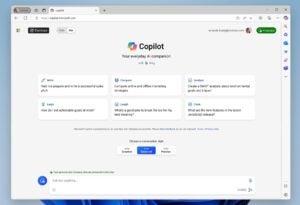
Microsoft has spent much of calendar 2023 announcing new Copilot AI assistants across its product line. At its Ignite 2023 conference, Microsoft continued this trend by announcing plans for several more Copilots, some of which are now in preview, and others still just promises.
Microsoft also used Day 1 of its annual conference for IT pros and business decision makers to try to solidify its Copilot branding. As the company indicated in September, officials are trying to promote the idea of a single “Microsoft Copilot” experience that works across its software and services. However, the reality of what Microsoft’s Copilots are and how they work is more complex.
At Ignite, Microsoft officials stated again that “Microsoft Copilot” is the brand it will use across the various AI assistants on the consumer side of the house. Bing Chat’s new official name is “Copilot.” Bing Chat Enterprise’s new official name also is “Copilot.” (Yeah, this makes no sense to us, either, as the two are different things.) Bing Chat Enterprise is not free and includes data protection that Bing Chat does not. Bing Chat Enterprise is available to those with a Microsoft 365 F3, E3, E5, A3/A5 (faculty only), Business Standard and Business Premium users for no additional cost and is US$5 per user per month for those without those licenses.
Microsoft officials also want to change the way people refer to its commercial Copilots such as Microsoft 365 Copilot and Dynamics 365 Copilot, too. The new branding: “Microsoft Copilot for Microsoft 365” and “Microsoft Copilot for Dynamics 365.”
Trying to simplify the complex can be good, but here’s the problem: There are multiple different Microsoft Copilots. And GitHub Copilot and the Copilots used in Windows or Microsoft 365 apps have very little in common.
“Each Copilot is trained on different data to perform different functions and has different security permissions. And the big one: Each has different licensing requirements,” said Directions on Microsoft analyst Andrew Snodgrass.
Bring on more Microsoft Copilots
Here’s a list of the new Copilots and Copilot-related services Microsoft is announcing at Ignite. (I’ve included any availability, pricing and licensing information I could find.):
Copilot for Fabric: Announced in May, includes several AI assistants, each using the Fabric analytics platform but designed for a different Fabric “experience” is now in preview.
Copilot for Azure: Now in preview, this AI assistant is meant to help Azure customers with designing, operating, optimizing and troubleshooting Azure apps and infrastructure.
Copilot for Cosmos DB: Focused on helping developers write NoSQL queries, this is embedded in the Cosmos DB Data Explorer. It’s free for developers.
Copilot for Service: Public preview coming in December 2023 and general availability in Q1 of calendar 2024. This new Copilot connect Office applications with third-party CRM and contact-center solutions. Pricing will be US$50 per user per month (including a built-in Copilot for Microsoft 365 license).
Copilot in Dynamics 365 Guides: This Copilot connects users wearing a HoloLens 2 AR headset with Dynamics 365 data to help field workers complete tasks.
Microsoft Copilot Studio: This low-code tool is meant to help customers build their own copilots and plug-ins to Microsoft’s Copilots by integrating business data in copilots for internal or external use. It works with connectors, plug-ins and OpenAI’s newly announced GPTs. It also includes Power Virtual Agents for developers connecting to Dataverse-based applications. Copilot Studio is included in Microsoft Copilot for Microsoft 365 licenses.
Microsoft Copilot Dashboard: Now in public preview, this dashboard is meant to help IT pros with Copilot in Microsoft 365 usage across apps, impact on productivity and the like. In early 2024, customers with Viva Insights licenses will get more advanced dashboard capabilities.
Copilot for Viva: Microsoft announced plans to provide copilots across its Viva employee experience suite back in April. These are finally starting to arrive for testing:
- Copilot in Viva Insights (preview early 2024)
- Copilot in Viva Goals (preview in Dec. 2023)
- Copilot in Viva Engage (preview in Jan. 2024)
- Copilot in Viva Learning (private preview for joint Viva and SAP SuccessFactors customers by end of 2023)
- Copilot in Viva Glint (private preview Jan 2024)
Microsoft is using Ignite to continue to try to whet customers’ appetites for its various Copilots by talking up a bunch of features that are coming soon. For example, in early 2024, Copilot in Teams will add the ability to give “Copilot a seat at the meeting table” in Teams meetings by taking notes or capturing specific content. And in December this year, intelligent recap will be added to Copilot in Teams, as well.
Just a reminder: Copilot for Microsoft 365 may be designated by Microsoft as “generally available,” but it’s actually only purchasable right now by a fairly small set of users. To get it, customers must have a Microsoft 365 E3 or E5 license, buy it through their Microsoft account rep (since it’s still not on the price list), purchase a minimum of 300 seats, and pay $30 per user per month for it on top of their M365 license fees.
Related Resources
Introducing Microsoft Copilot Studio
Ten Things You Need to Know Before Buying Microsoft 365 Copilot
September 2023: Microsoft takes a first stab at ‘Microsoft Copilot’ rebrand
Copilot Brand Expands, Not a Cohesive Toolset (Directions members only)
Copilot Plugins Bring Customer-Specific AI

Timed with the HLTH 2023 conference this week, Microsoft is taking the wraps off some of its coming healthcare-focused AI and data offerings. The company’s Fabric unified analytics platform, announced in May, is at the heart of a number of these offerings.
Microsoft officials said they are working on industry-specific data solutions in Fabric, and the healthcare data solutions — now available in preview — are the first of these.
Microsoft says these solutions will help customers avoid having to try to integrate the currently disconnected set of health data sources, including text, images and video. Sources like electronic health records, Picture Archiving and Communications Systems (PACS), lab systems, claims systems and medical devices, which support structured, unstructured, imaging and medical device data, can all be stored using open data standards in Fabric’s OneLake. These new healthcare solutions will be part of Microsoft’s Cloud for Healthcare bundle.
“Fabric has lots of interesting analytics and productive capabilities, but customers should tread lightly, because most the features in preview and some components (especially Fabric security) is still under construction and won’t be generally available until the middle of next year,” cautioned Directions on Microsoft analyst Andrew Snodgrass.
Nonetheless, today’s announcements show that “Microsoft’s next big push, after AI and Copilot calm down, is pushing customers to Fabric,” Snodgrass noted.
New Azure AI additions
As part of its HLTH 2023 announcements today, Microsoft announced new models for its Azure Cognitive Service API called Azure AI Health Insights (formerly Project Health Insights). Three new models are now in preview, including patient timeline; clinical report simplification; and radiology insights. There’s also a new preview capability in the Azure AI Health Bot that uses answers from a healthcare organization’s own content sources plus publicly available sources to customize and connect to existing healthcare organization’s workflows.
Microsoft also is continuing to build on technologies it acquired via its Nuance Communications in 2022. In late September, Microsoft announced general availability of the Dragon Ambient eXperience (DAX) Copilot (the product formerly known as DAX Express, and not to be confused with Power BI’s DAX). One of Microsoft’s growing family of Copilot AI assistants, the DAX Copilot uses voice and generative AI to help physicians more quickly and easily create medical documentation.
Microsoft isn’t the only one of the big enterprise cloud companies to be focused on applying AI and data resources to healthcare workloads. On October 9, Google announced plans for new AI-powered search capabilities aimed at pulling clinical information from different types of medical records. The new features will be for health and life sciences organizations using Google’s vertex AI Search platform. And AWS and AWS customer Medisafe announced on October 5 plans to collaborate on AI-powered medication-management built with AWS’ Bedrock AI platform.
Related Resources
Microsoft introduces new data and AI solutions for healthcare organizations
Microsoft Fabric Components: A technical overview (Directions members only)
Microsoft Cloud for Healthcare explainer (Directions members only)

Microsoft is updating its OneDrive for Business service with user-interface tweaks, support for a Copilot AI assistant, and IT pro admin tools. Microsoft’s goal with this update is to make it easier for customers to access the files they’ve created, as well as files shared with them, Microsoft officials said.
Microsoft announced most of the next-generation OneDrive UI updates back in early May, but business customers are just starting to see them now (at least in OneDrive for Business) in early October. Copilot support for OneDrive is slated for December, and other new features for file access and creation are “coming soon,” officials said on October 3.
A new OneDrive home experience for OneDrive for Web; Meeting View; People View; Shared View and simplified sharing are available to commercial customers now. The ability to open any file in the appropriate Office desktop app; an updated OneDrive Files app in Teams; and a OneDrive app for Outlook for Windows and Outlook for the Web are all slated for December 2023.
Support for offline file access and sync via Files On-Demand for Web and offline mode are both early 2024 deliverables, according to the company.
Copilots scheduled to land later this year
Officials said this week that those with a Microsoft 365 Copilot license (which costs $30 per user per month on top of certain Microsoft 365 business plans) will be able to use Copilot to manage files in OneDrive and SharePoint. Support for Copilot in OneDrive is slated for December 2023. According to the Microsoft 365 Roadmap, the Copilot for SharePoint rollout will begin in November 2023. (Microsoft 365 Copilot is going to be generally available for purchase on November 1, 2023, Microsoft officials said.)
Initially, Copilot functionality in OneDrive will be limited. But Microsoft officials said in the future, Copilot in OneDrive could handle tasks, like showing users all relevant files, suggesting that they get added to a new folder, recommending possibly related files, generating summaries to include with shared links, etc.
“Copilot for OneDrive appears to be a natural language version of existing search capabilities. Customers will have to decide whether it’s worth licensing their entire estate for Microsoft 365 Copilot to get these capabilities,” said Directions on Microsoft analyst Joshua Trupin.
Microsoft officials highlighted OneDrive management tools that are part of the SharePoint Advanced Management (SAM) add-on for security and governance. These tools will be able to fine-tune conditional access policies; blocking people from accessing shared files by limiting group access; moving OneDrive accounts across tenants and more.
SAM is a part of Microsoft SharePoint Syntex content processing and management product. To use SAM, customers must have a license for each user in their organization. (It’s not required for guests.) Users must also be licensed for SharePoint K, P1, or P2 via standalone or a Microsoft 365 suite.
“Microsoft’s planned set of administrative features could help secure content, but will involve several controls and a learning curve,” Trupin noted.
Related Resources
October 2023: Unveiling the Next Generation of OneDrive
May 2023: Microsoft announces plans for the ‘New OneDrive’
Microsoft outlines plans to refresh SharePoint’s UX and add Copilot AI capabilities
We’re kicking off a new feature on our blog that we’re calling “Answer This.” We’ll be posting some of the many customer questions about Microsoft enterprise technology and licensing that we receive here at Directions on Microsoft, along with our analysts’ answers. If you want a chance to have one of your enterprise questions answered, fill out this form and we might tackle your query next.
Our first installment is timely, as it focuses on the Extended Security Updates (ESUs) that Microsoft is making available to Windows Server 2012 and 2012 R2 customers that will provide them with important security updates even after the October 10, 2023, end-of-support date for those products.
Customer Question
Can legacy virtual machines (VMs) running in on-premises Windows Server version 2012/R2 — regardless of the underlying Windows Server licensing — be licensed individually with extended security updates (ESUs)?
Back Story
Windows Server 2012/R2 leaves extended support on October 10. For on-premises scenarios, customers must purchase security patches in the form of ESU core licenses. The open question is “how many ESU core licenses do I need?” The answer: It depends… based on which Microsoft source you consult and how you interpret it.
In October 2022, Microsoft changed Windows Server licensing rules. Prior to that date customers needed to cover all the physical cores in a server (typically via Windows Server Datacenter core licenses). Starting October 2022, customers could instead use an alternative “license-by-VM” option (typically using Standard edition core licenses). That means customers have two options for allocating Windows Server core licenses.
Up until October 2022, Microsoft’s official ESU licensing rule was that if a customer ran ESU-patched workloads on a server, they had to purchase the same number (and edition) of ESU core licenses as they did for Windows Server core licenses for that physical server. At that time, Microsoft didn’t bother to amend its policy to clarify whether changes to the underlying Windows Server licensing had any effect on ESU licensing (since the then-active ESUs for Windows Server 2008/2008 R2 were on their way out and were already prepaid by customers).
It wasn’t until recently that ESU licensing rules resurfaced as an issue. On Oct. 10, 2023, Windows Server 2012 and 2012 R2 are exiting support and ESUs become available for purchase. Many organizations are curious if — since they can choose between two Windows Server core license allocation options — can they also choose between parallel ESU options? Or is it the case that they must only use the option chosen for Windows Server as the one they use for ESUs?
Why is this question material? In certain cases, an inability to mix options makes a monumental difference in ESU licensing costs. Customer datacenters commonly comprise Windows Servers clustered together allowing the VMs to move across servers for load balancing. Each physical core in the cluster is licensed with Windows Server Datacenter. Having to purchase an ESU Datacenter license for each physical core in the cluster can be 50 or more times as expensive as licensing the small set of Windows Server 2012/2012 R2-based VMs requiring ESUs using the license-by-VM option.
There’s another problem: Microsoft’s own documentation around this is ambiguous. In some places, the company indicates that customers can mix and match when licensing ESUs (although possibly only when registering their servers with Azure Arc and paying a monthly fee, rather than the traditional ESU annual fee).
From a September 2023 Microsoft blog post marking general availability of the Windows Server 2012/R2 ESUs: “Customers can mix and match Standard and Datacenter licensing, and virtual core and physical core models, eliminating the need to match SKUs with their underlying host.”
Don’t Forget
Whether mixing options or not, ESUs are extremely expensive — basically the equivalent of buying the full Windows Server license all over again for each of the three years of ESU coverage. Further, ESUs are cumulative, meaning you must buy all preceding years (if you buy in year 2 you must also buy year 1, if you buy in year 3, you must buy years 1 and 2).
Customers could try to reconfigure their IT setups on-premises and reallocate licenses to try to save money when matching their physical licensing with ESUs. But that process is going to take significant IT resources, exactly what customers running legacy workloads want to avoid.
Customers who agree to migrate their VMs to Azure can get ESUs at no cost. However, moving from on-prem to Azure also soaks up IT resources and may be impractical for various reasons. And with the end-of-support timebomb looming, the Azure option may not be feasible in a timely manner.
Customers who connect their VMs to Azure Arc and subscribe to monthly ESUs do have flexibility. When purchasing and provisioning a set of ESU core licenses, the Azure Arc interface requires the IT administrator to specify either the license-by-physical-host or license-by-VM options. However, the interface has no way to know whether the underlying Windows Server core licensing matches.
Microsoft Says
We asked Microsoft for clarification on the ambiguity of its documentation. We also asked whether there are specific cases where customers can mix their licensing options when it comes to ESUs for Windows Server 2012/2012 R2 and for SQL Server 2012. We received a response we didn’t find to be overly enlightening.
What was far more helpful is the seemingly freshly updated FAQ to which Microsoft pointed us:
Directions’ takeaways from the FAQ
Monthly (Azure Arc) and annual ESUs are available via EA and CSP
For Windows Server
- With Monthly (Azure Arc), customers can choose licensing option (physical or virtual; whatever is the most optimal and cost effective), and the ESU selection doesn’t have to match underlying OS licensing option use (Implication: Only the WS2012 VMs that require ESUs are licensed).
- With Annual (via EA/CSP), ESU licensing must match (“align with”) underlying Windows Server licensing (Implication: same physical/virtual choice, same license edition, same license quantity)
For SQL Server
- With Monthly (Azure Arc), ESU licensing is always done by virtual (virtual cores), and the ESU selection doesn’t have to match underlying OS licensing option use (Implication: Only the SQL2012 VMs that require ESUs are licensed).
- With Annual (via EA/CSP), ESU licensing must match (“align with”) underlying SQL licensing (Implication: same physical/virtual choice, same license edition, same license quantity)
Our Recommendations
We still hope that Microsoft may, at some point, modify its licensing rule by allowing the individual VMs that require ESUs to be licensed regardless of how the underlying Windows Server is licensed.
If that doesn’t happen, customers will need to decide if they are willing to go the Azure Arc route for their ESUs for VMs. If they are not, organizations must evaluate whether they’ve got the funds and time to try to migrate VMs running Windows Server 2012/R2 to Azure or to reallocate their on-premises workloads to make purchasing ESUs for VMs more affordable.
The good news is that VMs eligible for disaster recovery, Visual Studio and dev/test benefits can receive ESUs at no additional cost.
Related Resources
Microsoft adds another way to get Windows Server 2012 and 2012 R2 Extended Security Updates
Microsoft’s Extended Security Updates Frequently Asked Questions
Generally Available: Windows Server 2012 and 2012 R2 Extended Security Updates enabled by Azure Arc
Extended Security Updates for Windows Server (Directions members only)
Submit your own enterprise tech/licensing question to Directions on Microsoft here

Even though only a subset of the many different Microsoft Copilot AI assistants are available to its commercial customers, Microsoft is trying to get ahead of some of the potential roadblocks facing customers adopting this new AI technology. The company went public one of its strategic weapons, its new Copilot Copyright Commitment, on September 7.
The Copilot Copyright Commitment builds on Microsoft’s IP indemnification coverage, company officials said, to include copyright claims connected to the use of its Copilots, including those for GitHub, Dynamics 365, Power Platform, Windows, Microsoft 365, Power BI, and its commercial Security suite of products, plus the related Bing Chat Enterprise assistant. Microsoft officials said this commitment includes the output these Copilots generate.
“Some customers are concerned about the risk of IP infringement claims if they use the output produced by generative AI. This is understandable, given recent public inquiries by authors and artists regarding how their own work is being used in conjunction with AI models and services,” Microsoft officials acknowledged in a blog post outlining the copyright commitment.
“As customers ask whether they can use Microsoft’s Copilot services and the output they generate without worrying about copyright claims, we are providing a straightforward answer: yes, you can, and if you are challenged on copyright grounds, we will assume responsibility for the potential legal risks involved,” the blog post added.
That means if a third party sues a commercial customer for infringing their copyright by using the various Microsoft business-focused Copilots or Bing Chat Enterprise, Microsoft will pay any legal damages.
Last year, Microsoft was hit with a class-action lawsuit over GitHub Copilot’s alleged code-scraping violations. And a number of authors and entertainers have sued OpenAI, Meta and others for allegedly using copyrighted material to train their AI language models.
Not so fast…
“But are these commitments outlined in a blog post enforceable before they are incorporated into the terms of service and other contractual agreements between Microsoft and its customers?” asked Directions on Microsoftanalyst Michael Cherry.
Microsoft’s latest changes to its service agreement, published in June 2023 and effective on September 30, include a section on “AI services to set out certain restrictions, use of Your Content and requirements associated with the use of the AI services,” but these terms were published prior to the announcement of the copyright indemnification.
Cherry also noted that a clause in Microsoft’s new commitment may act like a “Get Out of Jail Free” card for Microsoft. Microsoft officials said, “customers must use the content filters and other safety systems built into the product and must not attempt to generate infringing materials, including not providing input to a Copilot service that the customer does not have appropriate rights to use.”
Cherry explained: “Many times a person will not understand they don’t have a right to use some content—particularly under exceptions to copyright which are hard to interpret such as the concept of ‘fair use,’ of a small amount of material.”
In short, “copyright is hard,” Cherry said. That said, this new commitment by Microsoft “is likely enough to assuage most customer concerns. Customers simply may assume ‘we are indemnified; we can go ahead and use Copilot as much as we want,'” he added.
So many Copilots, so few generally available
Microsoft still has not rolled out all the Copilots it has announced and demonstrated and has not provided general-availability target dates, either.
The Microsoft 365 Copilot, which is slated to add assistive natural-language capabilities to Word, Excel, PowerPoint, and other Office apps, is still only in testing with 600 companies which are paying roughly $500 per user per year to test-drive the product. (That $500 number is based on information provided by some Microsoft customers during the various Ask Me Anything M365 Copilot sessions that Microsoft has held during the summer). Microsoft officials have said Microsoft 365 Copilot will cost $360 per user per year once it is generally available.
Microsoft’s Copilots for SharePoint and OneDrive don’t yet exist, as far as we know, although maybe there will be news on this front on October 3, given Microsoft’s tease for some major OneDrive AI-related news. And the Security Copilot that Microsoft announced in March is still only in very limited testing with roughly 20 customers. That preview program should expand substantially this fall, Microsoft officials have said.
Related Resources
Microsoft announces new Copilot Copyright Commitment for customers
The latest changes to the Microsoft Services Agreement, effective Sept. 30, 2023
Podcast: Generative AI – Where Customers Need to Look Before They Leap
Microsoft 365 Copilot and Bing Chat Enterprise pricing revealed
How Dynamics 365 CRM Is Adopting Copilot (Directions members only)
Microsoft, OpenAI still fighting Github Copilot copyright lawsuit

Directions on Microsoft analysts often use the phrase “batteries not included” to refer to features and functionality that one would assume to be in an E3 or E5 subscription bundle, but which instead are sold separately. The Directions analysts have noticed that in recent months, Microsoft is making more and more services available as add-ons rather than including them in existing bundles — which means customers’ overall subscription bills are going even higher.
Directions analyst Wes Miller’s theory is we’re approaching the day when Microsoft will introduce a new, high-end bundle which will include a number of these add-in services. If Microsoft sticks with its established naming convention, such a bundle could be called E7.
E7 could roll up all the features of E5, plus at least some add-ins, such as Entra ID Governance; Intune Plan 2 and Intune Suite and/or Microsoft Defender Vulnerability Management, suggested Miller.
These add-on services are not cheap, especially when purchased by customers who need hundreds or thousands of seats. Entra ID Governance, which is an add-on to either Entra ID (the service formerly known as Azure Active Directory) P2 or Entra ID P1. It costs $4 per user per month when added to Entra ID P2 and $7 per user per month when added to Entra ID P1. Defender Vulnerability Management costs $2 per user per month on top of Microsoft Defender Endpoint P2 or $3 per user per month when licensed alone to use with a third-party endpoint detection and response product.
Teams Premium is another add-on bundle Microsoft introduced this year. Teams Premium, which costs $10 per user per month on top of an existing commercial Teams subscription, includes several features which Microsoft had announced previously as being included in the current paid Teams offering for no additional charge.
Microsoft also could opt to fold its still-in-preview Microsoft 365 Copilot AI assistant technology into some kind of new bundle. Microsoft officials have said Microsoft 365 Copilot, whenever it goes GA, will cost $30 per user per month. (It currently is available to a small group of invited preview customers for a rumored $50 per user per month.) Microsoft officials haven’t said whether they’ll make volume discounted pricing available for M365 Copilot, but they could also/instead go with a subscription bundle of services that includes M365 Copilot.
The Counter Argument to an Imminent E7
Microsoft officials have not hinted or mentioned publicly anywhere I’ve seen that a new E7 SKU is waiting in the wings. In fact, its sales emphasis seems to be on driving more customers to go with E5, which costs $57 per user per month. Microsoft used its M365/O365 price hike for E3 earlier this year as a way to try to convince more customers to go with E5 (which didn’t get a price increase above the $57 rate).
Microsoft hasn’t revealed a recent number around what percent of its customer base is on E5. But in July 2022, Microsoft officials said the E5 SKU of Microsoft 365/Office 365 accounted for 12% of the commercial installed base. In 2021, that number was 8%. I’d assume Microsoft would try to grow the E5 percentage before introducing an even pricer E7, or possibly add some of the newer, separate add-ins to the existing E5 and up the price for E5 in the process.
Directions analyst Rob Helm said he didn’t expect Microsoft to roll out a new high-end M365 bundle until one of its competitors introduced something similar which would force Microsoft’s hand.
“The key signal to bundle is hearing footsteps from a more focused competitor like Slack,” Helm said. “Bundling made Teams ‘free’ for Microsoft 365 customers to head Slack off.”
“But without that competition, it can make sense to keep a focused product separate and maximize its own revenue. Look at Visio, which never got bundled until Web-based competitors started to look troublesome.”
Whether Microsoft rolls out a new subscription bundle in the naming of helping customers “do less with more,” or sticks with its current add-in launch madness, customers said they need some relief. The additional cost of services they assumed would be included in a premium SKU like E5 is causing their budgets to grow at an alarming rate.
Related Resources
Services Increasingly Expanding Beyond Microsoft 365 Suites (Directions members only)
Podcast: Fourteen Years of Microsoft Licensing Rule Changes – Looking Back and Forward
Microsoft concedes that some existing Teams features will become part of pricier Premium edition
July 2022: Microsoft says O365/M365 E5 is just 12 percent of its commercial installed base
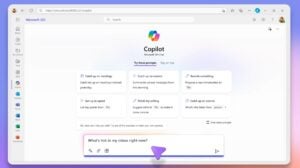
Microsoft officials announced at an event in New York City on September 21 that the company will make the Microsoft 365 Copilot AI assistant technology available for purchase by enterprises for $30 per user per month starting November 1. Microsoft 365 Copilot has been in a paid private test with 600 companies since June. There will be not be another beta or preview program before the product hits general availability, officials said.
Microsoft officials also announced the rebranding of some but not all of its various other Copilots that have been announced over the past year. The AI assistants in Windows, Edge and Bing will all simply be called “Microsoft Copilots,” going forward. But Microsoft 365 Copilot, the Dynamics 365 Copilots, Power BI Copilot, and GitHub Copilot will not be renamed to Microsoft Copilot. Even though all of these Copilots from Microsoft use the same underlying architecture, they are built using different reasoning and data and are designed for different purposes.
In other rebranding news, Microsoft officials also said the cross-Office-app AI assistant technology that is built into Microsoft 365 Copilot is being renamed to “Microsoft 365 Chat” instead of “Business Chat.” Microsoft 365 Chat is not a separate product. It is built into the base Microsoft 365 Copilot assistant.
Don’t forget the Microsoft 365 prerequisites
Microsoft 365 Copilot, which Microsoft announced in March 2023, is meant to work with Word, Excel, PowerPoint, Teams, the new Outlook for Windows (“Monarch”), Loop, OneNote and OneDrive. It will be available for purchase by customers running Microsoft 365 E3, E5, Business Standard and Business Premium. Microsoft 365 Copilot will not be available to customers running Office 365 E3 or E5; a move to Microsoft 365 is required as the price for entry, in addition to the $30 per user per month charge for the Copilot itself. There’s no word when or if Microsoft will provide volume discounts for Microsoft 365 Copilot.
Microsoft has cautioned customers that they need to make sure they have secured any sensitive corporate data in a way that won’t enable leaks of private company information once Microsoft 365 Copilot is implemented. This is no trivial task. Properly secured data means ensuring all users and the security groups are configured for minimal access and all data, especially sensitive data, has access controls defined. Copilots’ ability to access data stores is extensive.
I had heard from some who had seen the private preview of Microsoft 365 Copilot that neither Excel nor PowerPoint were working well (if at all). But a Microsoft official said today that the company had gotten Copilot in Excel and PowerPoint to a more stable, working place within the past two weeks. A number of testers seem to think that the Copilot capabilities in Teams, especially the ability to summarize happenings in meetings, could be the killer application of the Microsoft 365 Copilot technology.
Microsoft execs said this week that they have started privately testing Microsoft 365 Copilot with select consumers and small-business users. The consumer version of Microsoft 365 Copilot is not expected to be available until sometime in 2024. Microsoft officials have not discussed publicly how much the company will charge for Microsoft 365 Copilot for consumers and small businesses.
Copilot for Windows preview arrives soon for Windows 11 users
A preview of Microsoft Copilot for Windows will be available as of September 26 as part of a Windows 11 22H2 Update and will be part of Windows 11 23H2 when it starts rolling out in October 2023. Microsoft execs also said today that previews of Copilots for Paint (called CoCreator, for some reason), Photos, Snipping Tool, and the Shopping feature that is built into Bing and Edge also are coming soon. The Copilot for Windows feature will be on by default, but admins will be able to turn off access using Intune policies or Group Policy.
Copilot isn’t the only feature that will be part of the September 26 Update non-security feature update for Windows 11 22H2. Organizations also will get more passwordless security options. Specifically, they will be able to set a policy that enforces usage of phish-resistant credentials on Entra-joined devices. They also will get support for passkeys that are powered by Windows Hello for Business, giving them passwordless sign-in capabilities like face, fingerprint and/or PIN support on websites that support those features. And two new Windows 365 features will be part of the update, too: Windows 365 Boot and Windows 365 Switch.
Microsoft is expected to start rolling out the Windows 11 23H2 update in October, most likely on Patch Tuesday, October 10, and via the usual staggered release approach.
Related Resources
Announcing Windows 365 Copilot general availability
Microsoft: How to get ready for Microsoft 365 Copilot
Microsoft’s Copilot rebranding across its ‘most used’ consumer apps
How Microsoft is bringing Copilots to Microsoft 365 (Directions members only)
The next Windows 11 ‘moment’ update will feature Copilot (in preview) and more

On October 5, Microsoft is making a new virtual events experience known as Town Halls available in Teams for commercial customers. Teams Town Hall is replacing Teams Live Events, which will be discontinued fully by September 30, 2024.
Microsoft made the announcement about Town Hall replacing Live Events just a few days ago, on September 28, via a blog post. However, as Directions on Microsoft analyst Jim Gaynor noted in February this year, Microsoft already was moving away from hosting Live Events in Stream and Yammer in favor of Teams.
The move to Town Hall makes sense, Gaynor said. “Live Events were a Stream thing, Stream is no longer a service but a feature, and Live Events were already moving to Teams.”
Live Events are video broadcasts designed for simulcasting events like keynotes, announcements or all-hands addresses. They enable streaming of audio and video to audiences of up to 20,000 attendees (up to 100,000 when customers use Microsoft’s Live Events Assistance program).
Live Events were able to accommodate bigger audiences than Teams meetings and webinars, especially in the early days of Teams when meetings were limited to as few as 150 people, but this was accomplished by streaming the event video with interaction limited to text-based Q&A. Teams meetings are now able to accommodate up to 10,000 attendees. The Azure Media Services that support Live Events are being retired for customers in June 2024, squeezing Live Events out of the picture.
Some Town Halls features require Teams Premium
Town Halls in Teams are designed to host and deliver large-scale internal and external events. They feature advanced production capabilities and more attendee-engagement options. Town Halls in Office and Microsoft 365 will host up to 10,000 attendees (and up to 20,000 if an organization is using the $10 per user per month Teams Premium option). Events can last up to 30 hours and organizations can run up to 15 simultaneously hosted events across a tenant (and up to 50 concurrent events if using Teams Premium).
Town Halls supports RTMP-in and external encoders, enabling organizations to live-stream a custom RTMP source – similar to the current “Teams Encoder” capability in Teams Live Events. Using RTMP-out, customers can stream events out to a custom app or different endpoint outside Teams, allowing events to be viewed on LinkedIn, Twitter/X, Meta Workplace and more.
As of launch this week, Town Halls will not have full feature parity with Teams Live Events, specifically around event roles, external presenter support, DVR support and Viva Engage integration. Some of this missing functionality should be available in the coming months.
This shift from Live Events to Town Halls feels rather sudden. Just a month ago, Microsoft was extolling the capabilities of Teams Live Events in a blog post focused on using Live Events to stream virtual events, playing up its functionality vs. Teams Meetings and Webinars. However, Microsoft’s ambitions to build up a digital-events business and presence have been building since the COVID-19 pandemic began in 2020. Town Halls may be just another step in that direction.
Related Resources
Introducing Town Halls in Microsoft Teams
Live Events Leave Stream, Focus on Teams Broadcasting (Directions members only)
Microsoft blog post: 20 Tips for using Teams Live Events to deliver your virtual event
Azure Media Services Retiring in June 2024 (Directions members only)

Windows Server 2012 and 2012 R2 will no longer be supported after October 10, 2023. This means organizations still using these server editions won’t be eligible for security updates after that date — unless they acquire Extended Security Updates (ESUs).
ESUs provide up to three years of security updates rated “critical” or “important” by Microsoft. Until recently, customers had two options to buy ESUs for Windows Server 2012 and 2012 R2: Maintain Software Assurance (SA) and pay for each year of coverage or move their Windows Server 2012/2012 R2 workloads to Azure to get ESUs for no additional cost (beyond the costs associated with Azure).
Customers who want to run Windows Server 2012/2012 R2 on premises and in hosted environments are charged 100 percent of the full license price annually for each of the three years in addition to SA, which is a change from Windows Server 2008/2008 R2 which was 75%, 100%, and 125% for years one, two and three respectively. Customers interested in the Azure option can opt to use Azure VMs, Azure Dedicated Host, Azure VMware Solution or Azure Stack HCI.
In July, Microsoft added another option to get ESUs for Windows Server 2012 and 2012 R2. By enrolling their servers in Azure Arc, organizations can buy and activate their ESUs via the Azure portal and pay monthly rather than annually, if they choose. They also can manage the enrollment of ESUs in the Azure portal and forego keys to activate them.
A couple of caveats worth noting: This new Arc option requires customers to have Enterprise Agreements and active SA and is not available via the CSP program. Customers should also make sure that the ESU core licenses required match how the underlying Windows Server is licensed (in terms of physical cores or virtual cores).
Microsoft is advising customers to onboard their Windows Servers to Arc by September 2023 to be ready for the end-of-support date.
SQL Server 2012: Arc to the ESU Rescue
It’s not just Windows Server 2012/2012 R2 customers who have the option to get ESUs by going the Azure Arc route. SQL Server 2012 exited support on July 12, 2022. In July this year, Microsoft announced it would allow users still holding onto this version to purchase ESUs for year 2 onwards. The SQL Server 2012 ESUs are only available for download through Azure Arc, but connecting the SQL Server instance to Azure is not required.
With ESUs for Windows Server and SQL Server, Microsoft continues to add more reasons to use Azure Arc, and customers could find it increasingly difficult to avoid the Azure-connected service in the years to come.
Update (September 11): It looks like Microsoft has been making some quiet changes to its policies around how organizations can get ESUs. A spokesperson sent me this statement today when I asked whether Enterprise Agreement customers can still buy ESUs without going the Azure Arc route.
“Extended Security Updates enabled by Azure Arc is a new, primary offering we recommend for most customers. While the traditional, licensing ESU is no longer listed on the EA Price List, it is still available for sale directly through Microsoft for EA customers. Additionally, the licensing ESU will be made available via CSP, starting October 1, 2023, and the ESU enabled by Azure Arc has been available via CSP since September 1, 2023. The licensing ESU is recommended only for customers with workloads that need to be completely air-gapped or cannot connect to Azure Arc.”
Related Resources
New options for Extended Security Updates enabled by Azure Arc
Microsoft: Plan your Windows Server and SQL Server end of support
Windows Server 2012 and 2012 R2 ESUs available for purchase (Directions members only)
SQL Server ESUs Require Azure Arc, Not Azure Connection (Directions members only)
Extended Security Updates Depend on Hosting Platform (Directions members only)

Starting October 1, Microsoft will make available cheaper versions of its Microsoft 365 and Office 365 suites that do not include Teams as part of the bundle to customers in the European Economic Area (EEA) and Switzerland. Microsoft is doing this in the hopes of appeasing the European Commission, which is investigating the effects of Microsoft bundling Teams with Microsoft 365 and Office 365, based on a complaint filed by Slack in 2020.
Microsoft officials said they believe these changes will address two of the European Commission’s concerns: That customers should be able to choose a business suite without Teams for less than if Teams were included; and that Microsoft needs to do more to make interoperability easier between rival communication and collaboration solutions and Microsoft 365 and Office 365 suites.
Microsoft announced its updated pricing for the Teams-free suites on August 31. These Teams-free versions are available for purchase by customers with enrollments in EEA countries and Switzerland; from the EEA/Switzerland pricelists; and/or for deployment on EEA/Switzerland tenants out of datacenters in those geographic areas.
The Teams-free versions of Microsoft 365 and Office 365 will cost two euros less per month (24 euros less per year) for its core enterprise customers. Teams still will be available for new enterprise customers to buy standalone at 5 euros per month/60 euros per year.
Existing enterprise customers who already have a suite with Teams included can opt to stay with the version with Teams included or move to a Teams-free option. New commercial customers of M365/Office 365 business suites who still want Teams will need to purchase two SKUs: A version without Teams bundled along with a separate Teams EEA SKU. New small/mid-size business (SMB) customers in the EEA and Switzerland will have the option to buy the existing M365 Business Basic, Standard and Premium suites with Teams or the new EEA versions without Teams.
An updated price list for the various versions of Office 365, Microsoft 365 and the frontline suites is here. Education and consumer customers are not affected by these new policy/pricing changes, according to Microsoft’s Frequently Asked Questions (FAQ) guide.
Will Office Customers Bite?
“This is sure to be as relevant in time as the Windows N and K editions,” said Directions on Microsoft analyst Wes Miller. “It’s a pure regulatory appeasement move, although you might save a few bucks as a customer if you somehow don’t need Teams for your European employees.”
Windows N and K(N), for those needing a Microsoft history refresher, are the versions of Windows sold to European and South Korean customers which did not include certain bundled programs, including Messenger, Windows Media Player, Video, Voice Recorder and Skype. They were created to appease European antitrust regulators in 2004, and were not popular, to put it mildly.
Microsoft also will enable Windows 11 customers in the EEA to use their default browser to open links in Outlook and Teams chats. Currently, web links in Outlook and Teams chats open by default in Edge regardless of the default browser setting in the client OS. Microsoft is making this change because of requirements in the EU enforced by the Digital Services Act and the Digital Markets Act. Customers outside of these geographies will continue to have their links in Outlook and Teams redirected by Microsoft to open in Edge.
Related Resources
Microsoft announces changes to Microsoft 365 and Office 365 to address European competition concerns
New Teams-free M365/Office 365 price list
Microsoft bends to European regulators on browser links

As Microsoft continues to roll out more add-ons for its Microsoft 365 suites, the complexity of its product-licensing and support matrices continue to grow. The result? Microsoft needs to come up with new ways to try to guide its customers to the appropriate licensing documentation.
On the first of September, as the company does each month, Microsoft rolled out the latest set of new product licensing terms for its enterprise customers. The September terms didn’t include much new of significance. The company did, however, add a new section worth noting to its Product Terms site.
Microsoft Security Portfolio Product Terms mapping section, found under (and tacked onto) “Other Legal Terms” section of the Product Terms site. This new section groups Microsoft’s growing number of security and compliance product offerings by Microsoft’s brand families; Defender, Entra, Intune, Priva, and Purview, plus the E5, F5, and G5 Microsoft 365 suites. The applicable terms for the nearly 50 individual products listed are hot-linked within the chart.
Microsoft links quite a few of the listed security products and services into the sprawling “Azure” service terms bucket. And even in cases where products like Defender for IoT actually do have their own, distinct Product Terms entry, the chart still confusingly advises customers to look through the Azure section for the applicable terms.
At best, a ‘partial patch’
“I suspect Microsoft must have been getting beaten up regarding ‘where can I find the licensing terms for XYZ,’ especially for the ‘batteries not included’ stuff,” said Directions on Microsoft analyst Rob Horwitz. However, “the huge ‘Microsoft Azure” section has become a dumping ground, including for terms related to ‘batteries not included’ stuff for M365.”
In Directions on Microsoft parlance, “batteries not included’ refers to add-ons that one might assume would be included in a Microsoft E3, E5 or other licensing plan, but instead are available as separate paid add-ons. The not-included features are like the missing batteries in an appliance or toy; often discovered too late and resulting in some angry customers (and maybe even bawling children — or licensing managers).
The new Security Portfolio Product Terms mapping chart isn’t really a fix, Horwitz notes. “At best, it’s a partial patch.”
In other September product terms news, there are a couple of product name changes of potential interest.
Microsoft has rebranded the product formerly known as “Microsoft Viva Sales” to “Microsoft Sales Copilot.” Viva Sales/Sales Copilot provides Outlook and Teams add-in applications that help users add and update Dynamics 365 data without accessing Dynamics 365 separately or copying data manually.
Microsoft also has made changes to the Dynamics 365 services line-up by switching up what constitutes “Dynamics 365 Customer Insights.” The existing Customer Insights customer data capabilities are being relabeled “Customer Insights—Data,” while the real-time marketing capabilities (previously known as Dynamics 365 Marketing) now are called “Customer Insights—Journeys.”
Related Resources
Microsoft Product Terms main site
Microsoft Product Terms RSS feed
Microsoft Security portfolio Product Terms mapping
How Dynamics 365 CRM is Adopting Copilot (Directions members only)

Microsoft has been working on consolidating its Outlook mail and calendar client apps for Windows since at least 2021. The planned replacement, which was formerly codenamed “Project Monarch,” looks a lot like the current Outlook web client for Windows. Despite years of development, the new unified Outlook is still missing some key features, including offline support, PST support and a way of handling legacy COM add-ins.
Despite this, Microsoft is forging ahead. In September, Microsoft will begin auto-migrating those using the Mail & Calendar app that is built into Windows to the new Outlook — with an option to go back if they choose. Given the incomplete/still-in-development state of the new Outlook, admins may understandably be leery. But Microsoft officials this week published a new YouTube video that outlines the long and detailed rollout process planned for the new Outlook, possibly as a way to try to appease organizations’ fears.
Microsoft officials said that while there is no exact cutover date for dropping the current Win32/classic Outlook client, the likely date is roughly two years out and will be determined by readiness of the product, as assessed by customers and Microsoft.
Microsoft officials publicly have committed to replacing the built-in Mail & Calendar app in Windows with the new Outlook by late 2024. But that isn’t the date when the standalone Win32/classic Outlook will be phased out, Microsoft execs said in the September 5 YouTube video.
Currently, the new Outlook preview is at the “production opt-in” stage. Sometime relatively soon, Microsoft will provide customers with a formal “notification of disruptive change” via the Microsoft 365 Message Center, tenant admin dashboards and other channels. After that, Microsoft will launch an “opt-out” beta, then an opt-out preview. One or more years after the opt-out preview, Microsoft will drop the classic Win32 version of Outlook for Windows.
COM add-ins support: A no go
Despite the existence of such a detailed and lengthy rollout plan, enterprise customers still could be queasy and with good reason, says Directions on Microsoft analyst Rob Helm
“Missing features and lack of backward compatibility (especially lack of COM object model APIs) is going to break tools and processes for handling e-mail on the user’s desktop,” Helm said. “To minimize enraged support calls, you have to predict which desktops will get the New Outlook, when. That means figuring out what update channel is being used by every Outlook client device in the firm, and then work out when the New Outlook arrives in that channel for you and your users.”
In terms of COM add-in support, Microsoft has drawn a line in the sand and decided they will not be supported by the new Outlook. Officials said these add-ins are often unstable and don’t work cross-platform. To try to appease customers who are dependent on tools and line-of-business apps that require legacy COM add-ins, Microsoft officials said they are “actively expanding” the capabilities of the web add-ins platform. They also said they will work directly with customers to figure out which add-ins are not supported. Microsoft officials maintain that most of the really great add-ins are not just COM-based and exist in other formats.
Microsoft officials said they are continuing to work through customers’ top priorities for features that are still missing from the new Outlook. Third-party account support (beyond Gmail, Outlook.com); offline access; PST/OFT/MSG/ICS file support; and the ability to search folders are all “in progress,” Microsoft execs said. And the ability to open files in native apps; custom folder ordering; profiles; sharing with native apps and custom formatting are all on the “planned” list.
Related Resources
Microsoft 365 YouTube channel video on the state of the new Outlook
Microsoft’s New Outlook for Windows preview site
Microsoft 365 Roadmap entries for the new Outlook

The August 1 Microsoft product licensing terms are out. And they include a small but noteworthy concession for organizations stung by Microsoft licensing changes dating back to 2019 which made running Microsoft software on certain non-Microsoft clouds more expensive.
By design, Microsoft’s 2019 changes around its bring-your-own-license (BYOL) terms made contracts more expensive for those interested in running Microsoft software on anything but Azure. Microsoft designated AWS, Google and Alibaba as “listed providers.” And customers who ran Windows, Office, SQL Server and other Microsoft software on those listed providers’ clouds would need to pay substantially more than they would if they ran those same applications and operating systems on Azure.
A number of customers didn’t realize the extent of the impact until their contracts with Microsoft were up for renewal. Once they did, some customers and partners took to legal channels, both in the EU and the U.S., to try to force Microsoft to level the playing field.
Microsoft announced, with much fanfare, its European Cloud Principles in 2022, which Microsoft officials said would provide customers and partners who wanted to run Microsoft software on certain non-Microsoft clouds, with some concessions. But again, customers who wanted to use AWS, Google and/or Alibaba were left out.
This year, in the U.S., the Federal Trade Commission has been soliciting public comments on the business practices of cloud computing providers which could impact competition and security. Google, various trade associations, and a number of customers and partners used the commenting opportunity to complain about Microsoft’s licensing changes.
On August 1, Microsoft made public, as it does on the first day of each month, a number of licensing changes. And whether prompted by the FTC commenting process or not, Microsoft made a concession to those running Office on AWS. The change:
“Beginning August 1, 2023, users with specific licenses may run Microsoft 365 Apps for enterprise/business, Microsoft Project, and Microsoft Visio on Amazon WorkSpaces. The licenses that will be eligible under this revised policy include Microsoft 365 E3/E5/A3/A5 and Microsoft 365 Business Premium. If you currently have any of these licenses, starting from August 1, you will be able to utilize these Microsoft applications on Amazon WorkSpaces virtual desktop infrastructure.”
Directions on Microsoft analyst Wes Miller said, “this gives customers a very premium way to run ‘Office’ on WorkSpaces, partially addressing some issues with Microsoft on AWS.”
However, it’s still a pricey solution, Miller noted.
“You’ll need a Microsoft 365 E3 or E5 subscription for every user accessing Microsoft 365 Apps for enterprise (Office) on WorkSpaces,” he explained. “Not Microsoft 365 licensed separately. Not Office 365 E3. You need Microsoft 365 E3+, even if you don’t need EMS (Enterprise Mobility and Security). And you still need VDA (Virtual Desktop Access) for your WorkSpaces users.”
In short, Microsoft is still offering far better terms with Azure Virtual Desktop (AVD) or Windows 365 than they do for AWS, Google or Alibaba, Miller said.
What Options Do Customers Have?
What can and should customers affected by the 2019 licensing changes do at this point? Miller said most customers failed to act between 2019 to 2022, which was when they had any chance to contractually fight these changes during their Enterprise Agreement renewals. Currently, organizations can stay and pay more; leave and go to a hosting provider that isn’t a “listed provider” (but which still is likely more expensive than going with Microsoft); or do what Microsoft is hoping and move to Azure.
“The reality is that if an organization is staying on AWS, GCP, or Alibaba, they should have a software asset management process in place for all of their Microsoft software in those three clouds, understand what the rules are today, be prepared to pay more to stay there, and have evidence to show Microsoft that they’re staying above board,” Miller advised.
Customers running Microsoft software on Microsoft’s biggest competitors’ clouds should anticipate costs will rise significantly through 2025, Miller said. They also should expect confusion over how to do what’s right, as fewer people understand how to navigate “the old way,” and auditors don’t know how to get it right.
“After October 2025, Office, in particular, will get harder to obtain, as SPLA (Service Provider License Agreement) rules tighten again,” Miller warned.
Related Resources
Microsoft’s 2019 outsourcing rules changes explained (Directions members only)
October 2022: Microsoft makes some outsourcing and hosting concessions
Publicly submitted comments responding to the FTC’s request
Microsoft Product Licensing Terms Changes for August 1, 2023
Microsoft 365 Apps OK for Amazon VDI (Directions members only)

As of the week of August 17, Microsoft will be making a new Edge browser mode the default version of Edge for some of its business customers. Those who sign into Edge using Azure Active Directory (now known as Microsoft Entra ID) will be moved automatically to this new mode, known as Microsoft Edge for Business. Edge for Business will provide a separation of syncing and browser history between Edge personal and Edge work sites — something which could bring privacy and possibly security benefits to organizations that rely on the Edge browser.
The Edge for Business mode, which has been available in preview for the past couple of months, will be part of Edge Stable Version 116 browser release, which is scheduled to begin rolling out the week of August 17. Additionally, the new Edge for Business mode will be coming to macOS and Linux; I asked Microsoft when this would happen but have not heard back. Officials also said the Edge for Business mode will be available on mobile devices at some point in the future.
Update (August 14): A spokesperson said Edge for Business also would come to Mac and Linux as of Edge Stable Version 116, the week of August 17. It also will be available on mobile the week of the 17th, but the updated icon, automatic switching, and management via the Edge management service in the Microsoft 365 admin center will be available for mobile “in the future,” the spokesperson clarified.
Customers will know they’ve been automatically transitioned to the Edge for Business mode because the updated Edge icon will include a briefcase in the lower left corner. (Individuals will be able to change the briefcase to their work profile picture in Edge settings, if they’d prefer to do so.) Edge for Business also will support company branding and customization.
Customers should not experience any disruption from the addition of Edge for Business, Microsoft officials claim. Edge for Business is not a new browser; it’s just a mode in Edge. It will maintain the policies, settings and configurations previously set by an organization, Microsoft said.
How the new Edge for Business mode will work
When using Edge for Business, organizations will have the option to set separate work and personal Edge profiles between which customers will be switched depending on the type of URL they are accessing. For this to work, customers need to have at least one Azure Active Directory/Entra profile and one Microsoft Account (MSA) profile, whether existing or new. Switching from the personal browser window to the work browser window will be on by default, with users having the option to turn the feature off. Switching from the work browser window to the personal browser window will be off by default with users having the option to turn it on. “In a future release,” the switch from work to personal will be on by default, officials said.
Currently, Microsoft has enabled Edge for Business to recognize whether some sites are “personal” or “work.” For example, a log into Microsoft 365 apps and services would trigger the work profile, while an Amazon or Target log-in would trigger the personal mode. Right now, there is no group policy for organizations who want to customize the work and personal URL lists. Customers can go to Edge settings and choose preferred browser for sites to be turned off or to select a preferred profile (work or personal) for an applicable site, however.
According to Microsoft, IT will maintain control over the security and compliance of both regular Edge and Edge for Business and will be able to control which features are available to users. Edge for Business will support both managed and unmanaged bring-your-own-PC devices.
Microsoft officials maintain that Edge for Business will benefit customers in terms of privacy and security. The new mode ensures a separation of syncing and browser history between work and personal sites by maintaining separate caches ans storage locations for the two types of sites users access. In terms of security, Microsoft’s argument for Edge for Business is it could help companies from having to support multiple browsers, which increases the surface area for cyberattacks. Allowing users to switch between different profiles within a single browser lessens the risk, Microsoft officials said.

A week after disclosing that a China-based hacking group (“Storm-0558”) infiltrated some individual and government Outlook email accounts for a month, Microsoft announced it will broaden access to security logs to include Microsoft 365 customers who are not paying for pricey premium security services.
“In the coming months,” Microsoft plans to broaden access to cloud security logs for no additional cost, according to a blog post the company published on July 19. While this transition happens, Microsoft is advising customers to use Microsoft Purview Audit in order to see more types of cloud log data.
Log data doesn’t prevent customers from getting hacked, but it does give them a way to try to proactively respond to issues. Some customers and company watchers believe log data should not be considered a premium feature, as it is fundamental to security. But Microsoft is not going as far as to make logging data free for all business customers.
Microsoft officials said they decided on the newly announced strategy “in close coordination with” government and commercial customers and the Cybersecurity and Infrastructure Security Agency.
The company is going to enable Purview Audit Standard customers to see detailed logs of e-mail access, along with more than 30 other types of log data that previously were only available to Purview Audit Premium subscribers. Microsoft also will increase the default retention period for Audit Standard customers from 90 days to 180 days.
Under the revised plan, Purview Audit Premium customers with E5/G5 licenses still will maintain more audit logging access. This includes the ability to use Audit log search in the Purview compliance portal and the Office 365 Management Activity programming interface; longer default retention periods; and automation support for importing log data into other analytics tools.
Restoring trust
“In some ways Microsoft finds itself back where it has a trustworthy computing problem,” said Directions on Microsoft analyst Michael Cherry. “Its latest actions surrounding an incident by a sophisticated bad actor raises serious doubts. Can Microsoft Azure and Office 365 customers count on these services being secure by design, secure by default, and secure by deployment, as well as providing fully transparent communications about any vulnerabilities and steps companies must take to mitigate exposure? If Microsoft partitions its security services and information to entice customers to pay more for better or for full security, then is the answer no—maybe they shouldn’t be trusted? Full access to logs, and the tools to spot problems in the myriad of log entries would be a good starting point to begin restoring some trust.”
In the case of the recent China e-mail hack, logging information that would have allowed detection of the incident was only available to those Microsoft 365 customers who purchased the premium E5 plan. Those running E3 were unable to see the required logging information.
As The Wall Street Journal noted, executives with the U.S. federal government, including the State Department and Commerce Department, were victims of the attack, leading some government officials to call for Microsoft to make cloud logs more widely available.
Update (September 11) On September 6, Microsoft posted more information about how the bad actor Storm-0558 acquired a Microsoft Account (MSA) consumer key to get enterprise access to business/government accounts. But its technical investigation findings are unlikely to ease business customers’ worries.
“Microsoft is telling customers that they should examine logs between April 2021 and June 2023 to make sure they weren’t sideswiped too. But only customers with M365 E5 and Advanced Audit and who had configured logs correctly before April 2021 (or had started sending them all out to Splunk or Sentinel back in 2021) would even have all those logs to peruse,” noted Directions on Microsoft analyst Wes Miller. “E3 customers wouldn’t even be able to look back before June at this point. E5 customers would be able to look back to September 2022. “
Related Resources
Expanding cloud logging to give customers deeper security visibility
Microsoft’s latest email hack: M365 E3 subscribers beware
CISA: When Tech Vendors Make Key Logging Info Available for Free, Everyone Wins

Not a day goes by when we don’t hear about a new AI-based innovation in the Microsoft ecosystem: Copilots for everything, Azure ML, Azure OpenAI, to name a few.
But…amid all the AI hype has Microsoft deprioritized the thing many of us depend on every day?
Now before I go on: I use Microsoft software every single day. I’ve used Microsoft OS’s since DOS 1.0. I love Office. Adore Visual Studio. And I worked for Microsoft for nearly 14 years. I’m not at all a Microsoft hater.
That said…
Your C: Drive is a Mess
Recently I wrote about my year-long travails in updating my beast of a desktop to Windows 11. (TL;DR – it’s a 12-core i9-based Alienware/Dell machine with 64GB of RAM, a 256GB C: drive, and somewhere in the neighborhood of 12TB of storage on other drives.)
The crux of the problem boiled down to this simple fact: over the three years of owning this machine, so much flotsam and jetsam had accumulated on the C: drive that there was literally insufficient room to install Windows 11. And that was after doing all the obvious housekeeping tasks like clearing out temp files, and some not so obvious stuff like moving Visual Studio to another drive, and so on.
Ultimately a friend recommended this wonderful little utility called Wiztree which graphically shows what’s taking up space on your drive.
Wow.
Some amazing discoveries include:
-
- The
c:windowsinstallerfolder which holds installers and uninstallers for apps accounted for well over 30GB, over 10% of my C: drive! And you can’t just delete these: you may need them if you ever need to uninstall an application. On my system, almost half of that held installers for my keyboard and mouse, over 13GB – the vendor (who shall remain nameless) never cleaned out old versions. You read that right: 13 gigabytes for a keyboard and mouse installer! - Dell installs an application called “PC Doctor” used, apparently for support (other vendors have similar “features”), which maintains a database of your activities on the device. Yes, you should be concerned about that from many perspectives, privacy among them. But it appears to be append-only, and over time, it grows…and grows…
- The
- To help your system go to sleep and wake up gracefully, Windows uses a file called
hiberfil.syswhich holds the contents of memory for quick “rehydration” as they call it. (It’s hidden, so you have to look for it.) On my system it occupied some 25.6GB of the C: drive – 10%!
Now, you can turn off hibernation which will return the space (after a reboot). This finally allowed me to install Windows 11. But then the new version of Windows thoughtfully turned it back on again. (Incidentally you can theoretically move the swapfile off of the C: drive – which IMHO is a very bad idea – but you cannot move the hibernation file, which doesn’t make sense.)
There are lots of utilities out there that can help you understand what’s taking up space on your C: drive, and there are apps that can help you remove stuff you don’t and won’t ever need.
My question is: how did Microsoft ever let it get this way?
Please Give Me Time Machine
I get it: backup is mundane, surprisingly hard, and yet absolutely positively essential in a world where the OS alone cannot protect against ransomware, among other scary concerns. Windows 10 had this slow, awful, and unreliable File History-based backup which no longer appears to be present in Windows 11 and good riddance to File History as far as I’m concerned.
Now, I complained on Twitter that Windows doesn’t have a good backup, and a Very Famous Evangelist informed me I was wrong.
So I was very excited to see what Windows 11 provided, and disappointed to learn that out of the box Windows 11 will back up to…OneDrive, taking up cloud storage not to mention bandwidth (I have 12TB, I’m not uploading that!).
Macs have a truly wonderful backup program called Time Machine that I use on my MacBook with an external USB drive. I want that on my PC. Why is this so hard?
Apps, Apps Everywhere
When you install an application on Windows where does it go?
Well, all over the place.
Now, I don’t think any user cares whether or not an app is 32-bit or 64-bit, but of course we still have C:Program Files and C:Program Files (x86).
But apps can also be in C:Users[your name here]AppData which has its own complex folder tree. (Visual Studio Code, for example, installs to AppDataLocal.)
Why isn’t there just a simple Applications folder?
Has Microsoft Lost Interest?
To this passionate Windows user it feels like Microsoft has lost interest in, or deprioritized, Windows — which has resulted in both a loss of control and discipline over their product. ISVs, partners, and Microsoft itself write applications that collect data forever, that install anywhere they like, and leave logs, dumps, installers, and other rarely used files all over your system. While individual capabilities in Windows are brilliantly conceived, the overall experience is unintegrated, inefficient, and wasteful.
As I said, I’m anything but a “Microsoft hater.” I mean all these criticisms constructively. But…can Microsoft fix any of these issues? Do they care? Or will we have to wait until a new version of Windows?
Barry covers Azure, Windows Server, enterprise architecture and corporate governance topics at Directions on Microsoft. Before joining Directions 2020, Barry worked at Microsoft for 12 years in a variety of roles, including as Chief Technology Officer for Microsoft’s own IT organization for 5 years. Prior to Microsoft, Barry spent several years as CTO for several successful startups, and before that, 11 years at Lotus Development, where he was the lead developer for Lotus 1-2-3, the best-selling application of its time, and a Lotus Fellow.

Microsoft publicly disclosed last week that a China-based hacking group (“Storm-0558”) infiltrated some individual and government Outlook email accounts for a month. Via several blog posts, Microsoft officials shared details about how the breach of approximately 25 organizations happened and some of the steps it has taken to remedy the issue.
But there was one key bit of information that Microsoft did not disclose about the hack of which Microsoft enterprise customers should be aware. In its write-up, The Wall Street Journal noted that customers who were using Microsoft 365 E3, rather than E5, didn’t realize they were being hacked.
From the WSJ:
“Companies detect and investigate attacks by using logging software that keeps records of activity on their servers. But in this latest Chinese espionage campaign, critical logging information required to detect the attack was only available to purchasers of Microsoft’s top-tier cloud service, said officials at the Department of Homeland Security’s Cybersecurity and Infrastructure Security Agency.”
E3 offers some logging information but does not keep track of specific mailbox data which would have revealed the attack. Microsoft 365 and Office 365 E3 (and other plans below) do not log read-access to individual Exchange Online mailbox items.
E5 includes advanced information protection, premium e-discovery, advanced threat protection and threat intelligence — all capabilities not included as part of E3. There are also limits on the age of Entra identity and access ID sign-in logs, which is where failed sign-ins show up. In Office 365, for instance, the limit is seven days.
“Many capabilities that Microsoft 365 Enterprise tenants need to operate safely and comply with regulations require the more expensive license suites. It’s like going to a car lot and being told you have to buy the premium option package to get the Check Engine light,” said Directions on Microsoft analyst Rob Helm.
Microsoft 365 E5 costs substantially more than E3. Before volume discounts, E3 costs $36 per user per month and E5, $57 per user per month. To date, relatively few Microsoft customers have purchased E5. Officials said during fiscal 2022 (the period between July 1, 2021, and June 30, 2022) that E5 represented about 12 percent of the total M365/O365 base. In Microsoft’s FY’23 Q’1, officials didn’t provide an update on E5 growth, other than to say more than half of the $10-million-plus Microsoft 365 bookings in the quarter came from E5.
Microsoft officials have been touting the growing size of the company’s security business — a boast which doesn’t sit well with some customers, competitors and critics, who argue that Microsoft should not be making money from insecurities in its own software and services. Recently, a leaked internal report meant for Microsoft’s board noted that Microsoft is aiming to grow its security and identity management (SCIM) business to $50 billion by FY’25 and possibly to $100 billion by FY’30. However, Microsoft officials also acknowledged in that report that deployment is lagging subscriptions.
As Directions on Microsoft analysts have noted before, customers need to use extreme care when mixing and matching Microsoft 365 E3 and E5 together. As a general rule, organizations should ensure that they do not deploy and enable Microsoft 365 E5 security and compliance services unless all knowledge workers are licensed for the entire Microsoft 365 E5 suite (or F5 equivalent). Related but different issues can occur if the organization partially licenses E5 subcomponents on an à la carte basis and not all users are licensed for all the services deployed as a part of those subcomponents.
Even though it unveiled its Microsoft 365 Copilot AI assistant technology in March, Microsoft until now has not released pricing, licensing or availability information for the AI-assistant tool, much to the annoyance of many of its customers, partners and company watchers. However, on July 18, the opening day of its annual Inspire partner show, officials finally revealed pricing plans for Microsoft 365 Copilot: It will be $30 per user per month add-on to E3, E5 and a couple of SMB-focused plans.
Microsoft looks to be attempting to offer those who consider $360 per year to be too pricey an alternative. Today, Microsoft officials also took the wraps off Bing Chat Enterprise, another generative AI service aimed at businesses, which will be available for no additional cost for some enterprise users, and for $5 per user per month for others.
Directions on Microsoft analysts were split on how they believe Microsoft 365 Copilot pricing will fly with customers (a number of whom have continued to assume wrongly that Microsoft would make M365 Copilot available for free)).
At $30 per user per month, Microsoft 365 Copilot will cost almost as much as a Microsoft 365 E3 license (at $36 per user per month) — a fee some Directions analysts considered exorbitant. But if Microsoft 365 Copilot really does perform as has been demonstrated, some customers might buy in, others said.
“The pitch of a dollar a day to significantly increase the productivity of an employee might work,” said Directions on Microsoft analyst Rob Sanfilippo.
Microsoft still is not disclosing how or when it plans to roll out Microsoft 365 Copilot beyond some fairly vague statements. Microsoft officials have said that Microsoft 365 Copilot will help customers learn how to use its apps and features — for example, to turn a report into a 10-slide PowerPoint deck. Microsoft 365 Copilot also could assist users in drafting emails and documents; creating spreadsheets based on natural-language commands, and, via a capability called “Business Chat,” combining information from Microsoft 365 apps and data to do more complex tasks, such as “Tell my team how we updated our product strategy last week.”
Currently, Microsoft 365 Copilot is in private preview with up to 600 invited, paying customers, officials have said. Officials have declined to say when and if Microsoft plans to broaden the private preview or open up a public preview ahead of releasing Microsoft 365 Copilot commercially.
In an interview published in June this year, Microsoft Corporate Vice President Jared Spataro did say “you should expect people to have them (M365 Copilots) in production easily this fall. By the end of this summer, we’ll be showing some of what customers are doing with it. The tech is there.” When I asked whether Microsoft would support customers using preview versions of Microsoft 365 Copilot in production with something like a “Go Live”-type license, a spokesperson said Microsoft had “nothing to share.”
In last week’s virtual Microsoft 365 Copilot “Ask Me Anything” (during which Microsoft officials barred questions on pricing, licensing and availability), officials reiterated that Microsoft 365 Copilot will be an add-on license requiring users to have Microsoft E3, E5, Business Standard or Business Premium. Organizations will be able to assign Copilot licenses to specific users who have a base license. Initially, Microsoft 365 Copilot will work for Microsoft Word, Excel, PowerPoint, Loop and Teams. Microsoft plans to integrate Microsoft 365 Copilot directly into the UI for these apps.
The only Microsoft “Copilot” that is currently generally available is GitHub Copilot. Microsoft sells GitHub Copilot, its developer-focused AI pair-programming technology, for US$10 per user per month (or US$100 per user per year) for individuals. GitHub Copilot for Business is US$19 per user per month. For that price, developers get everything in Copilot for Individuals, plus license management, organization-wide policy management, privacy capabilities, and VPN support.
The (Dynamics 365) copilots which Microsoft announced earlier this year are next in line to go GA. They will be available for no additional charge for customers with licenses in premium offers such as D365 Sales Enterprise, D365 Sales Premium, and D365 Customer Service Enterprise, D365 Finance, D365 Supply Chain Management, D365 Project Operations. Dynamics 365 Copilot will be sold as an add-on to other plans, most likely for Professional licenses.
At the Inspire show today, Microsoft also announced Sales Copilot, which officials are calling “a seller companion.” (If that sounds familiar, it should, as this is how Microsoft branded its Viva Sales product announced a year ago.) Viva Sales is now considered part of Sales Copilot, the new AI-specific capabilities will be part of a standalone subscription, as well as made available in Dynamics 365 Sales Enterprise and Premium licenses for no additional cost.
Bing Chat’s enterprise play
In other related news announced on Day 1 of Inspire, Microsoft officials also said they are bringing to market a version of Bing Chat for business users. Called “Bing Chat Enterprise,” this version of Microsoft’s AI-enhanced Bing chat bot will be available in preview starting today for organizations with Microsoft 365 E3, E5, Business Premium and Business Standard. It will be available to these customers for no additional cost. Microsoft also plans to make Bing Chat Enterprise a standalone subscription at some point in the future, priced at $5 per user per month.
Meant to work similarly to the Bing Chatbot for consumers, which is powered by Microsoft’s adaptation of OpenAI’s ChatGPT large language model (LLM) technology, Bing Chat Enterprise will provide “AI-powered chat for work with commercial data protection,” according to the company. (I’m assuming this means it will rely on the security and privacy controls baked into the Microsoft 365 E3/E5/Business Premium services that are required to prevent organizations’ data from “leaking,” but Microsoft never actually spelled this out. Officials said Bing Chat Enterprise won’t save chats and Microsoft will not be privy to the results of searches done with it.) Update: I was wrong. Bing Chat Enterprise does not rely on the Microsoft 365 security and privacy services; it only offers the aforementioned “commercial data protection” guarantees. It does require Azure Active Directory (newly renamed “Entra ID”).
Bing Chat Enterprise has nothing directly to do with the aforementioned and similarly named “Business Chat” capability that Microsoft is building into Microsoft 365 Copilot. Microsoft Search in Bing, which also provides a “work” vertical in Bing search results for those who sign into Bing with their work and school accounts, will continue to be supported. Unlike Bing Chat Enterprise, Search in Bing does not have an AI chatbot front end.
“Bing Chat Enterprise lets you use the power of generative AI at work, with commercial data protection. Microsoft 365 Copilot takes this to the next level and adds a superset of features that enable people to be productive and creative at work in a whole new way by grounding answers in your business data like documents, emails, calendar, chats, meetings and more to deliver incredibly rich and actionable responses to your questions,” said a spokesperson when I asked for the differences between Bing Chat Enterprise and Microsoft 365 Copilot — besides the price.

A lot of the interest in Microsoft’s AI copilots revolves around the still-elusive Microsoft 365 Copilot. However, Dynamics 365, not Microsoft 365, will be one of the first places that Copilot capabilities surface. And these Dynamics Copilots will be available to some Dynamics 365 customers for no additional cost and to others as a paid add-on, company officials confirmed.
On June 15, Microsoft went public with plans for new copilot capabilities in Dynamics Project Operations, Finance, and Supply Chain Management. Public preview for these Copilots begins today in English for customers in the U.S. (for Supply Chain Management) and North America (for Finance and Project Operations). A spokesperson said once they are generally available, they will be available to some licensed Dynamics 365 users at no extra cost.
“The (Dynamics 365) copilots announced today will be available for customers with licenses in premium offers such as D365 Sales Enterprise, D365 Sales Premium, and D365 Customer Service Enterprise, D365 Finance, D365 Supply Chain Management, D365 Project Operations and sell it as an add-on to other plans, most likely for Professional licenses. We will have more details to share at GA (general availability),” the spokesperson told me.
I asked if there would be any prerequisites for these Dynamics 365 Copilots, such as Azure OpenAI, and was told that is not the case.
A quick check of the handy Dynamics 365/Power Platform Release Planner from Microsoft shows that some of the already-disclosed Dynamics 365 Copilot capabilities already are in preview and/or will be available in public preview starting June 23. These include capabilities such as the ability to summarize conversations in Customer Service using Copilot; use SharePoint as a knowledge source for Copilot, and the ability to view Copilot analytics on a company’s business.
The Query Assist feature in Dynamics 365 Marketing (also under the Copilot banner) is listed as hitting general availability this summer, as is Content Assist for assisting with Marketing emails. Several of the Dynamics 365 Copilot capabilities Microsoft announced earlier this year — such as turning a prompt automatically into a SQL query which can be run on Azure Synapse Analytics — are slated for general availability in August 2023, according to the Release Planner.
Even though Microsoft isn’t yet ready to talk pricing details for the Dynamics 365 Copilot add-ons, this is a lot more clarity than we have around any pricing/licensing/availability for Microsoft 365 Copilot. Microsoft has been very slowly seeding select customers with an early preview of Microsoft 365 Copilot. It expanded that private preview program to 600 invited, paid customers starting in June. There is no date when more customers will be able to test-drive Microsoft 365 Copilot, when it will hit GA or how it will be priced and licensed. Officials have said only that Microsoft 365 Copilot will be a paid add-on to Microsoft 365 E3/E5 and likely to be released via a model similar to GitHub Copilot.
At least part of the reason that the Dynamics copilots are ahead of some other promised enterprise ones is Microsoft slapped the Copilot label on a number of Dynamics 365 AI-based features that already were in preview and scheduled for release as part of the Dynamics 365 Wave 1 release kick-off in March, as Directions on Microsoft analyst Andrew Snodgrass has pointed out.
With each AI announcement it makes, Microsoft executives are honing how they define Copilot and the way they describe the many different copilots that the company is readying across its enterprise and consumer offerings. During the Build developer conference last month, Microsoft officials said copilots are “applications that use modern AI and large language models to assist you with a complex cognitive task.”
Key here is the word “assist.” Most Copilots are application-specific plugins that provide a chat window where users key in a request. The Copilot plugin interprets the request and then calls the appropriate application API/command to perform the task for the user. This turns it into a productivity feature that relieves the user from going through a mountain of menu items to do the same thing. For other Copilot features, the plugin calls an external process, like with Copilot in GitHub, where it calls another OpenAI model, Codex, to generate code.
Microsoft is even releasing Copilot Stack that will allow customers to build their own Copilot plugins, which some partners have already done.
Sometimes Microsoft officials talk about a unified, single Copilot system that underlies the various copilot capabilities coming to market, but more recently, it’s common to hear Microsoft execs talk about lots of different copilots for different apps, services and modules that are based on a common “platform.”
As Directions analyst Snodgrass pointed out back in April, “Microsoft’s Copilot brand does not represent a cohesive set of tools and features but rather is a label that various Microsoft product groups are using to describe advanced machine learning features, primarily based on natural language processing.”
Microsoft: AI on track to hit $10 billion annual run rate
Microsoft has plans to bring copilot capabilities to not just some, but all of its cloud services, as spelled out earlier this week by Microsoft Chief Financial Officer Amy Hood and Chief Technology Officer Kevin Scott. The pair held a virtual briefing for Wall Street investors about Microsoft’s AI strategy.
Microsoft’s public storyline around its AI push this year is that it happened really suddenly, starting in late 2022/early 2023. However, as Scott told analysts this week, “We started a transformation inside of Microsoft about a year before we even did the partnership with OpenAI” (which happened in 2019).
Microsoft doesn’t have all of its new business models for copilots figured out yet, but already is predicting its AI business “will be the fastest growing $10 billion business (meaning $10 billion in annualized revenue) in our history,” in Hood’s words. Where will the money come from? Both from tools and services that customers will use to build AI apps and services (using Azure OpenAI interfaces and running on Azure) and built “into every Microsoft Cloud solution,” Hood said “whether it’s named Copilot or not.”
Scott elaborated: There are “the people who want to come use our infrastructure, whether they’re training their own models, whether they are running an open source model they’ve got, or whether they are making API calls into one of the big frontier models that we’ve built with OpenAI. It’s like all of these products, each of which has a slightly different potential for business model. So, like the way that we are going to be able to just sort of monetize all of this.”
(A related aside: Remember the skunkworks Microsoft Singularity AI infrastructure service that leaked back in February 2022? That project is now known as “Project Forge” — something that Azure Chief Technology Officer Mark Russinovich discussed at Build last month. Project Forge helps Microsoft run its own AI workloads using transparent checkpointing, coupled with a global GPU capacity scheduler. GitHub Copilot currently uses Forge under the hood. Russinovich said “we’re working on making it directly available to customers in the near future.” Monetization, ahoy!)
Microsoft is OpenAI’s exclusive cloud provider, but ChatGPT and other OpenAI models are not exclusively for use by Microsoft. However, Hood told analysts that Microsoft has a “broad perpetual license to all the OpenAI IP developed through the term of this partnership, that means even if the partnership were to end, we would still have those license rights to all the IP, up until AGI.” AGI, or artificial general intelligence refers to the idea that AI can solve any cognitive or human task.

After disruptions to its Office, Outlook, OneDrive and Azure services from June 5 to June 9, Microsoft acknowledged via a blog post late last week that distributed denial-of-service (DDoS) attacks from threat actor “Storm-1359” were to blame. The multi-day incident no doubt will raise a lot of questions among Microsoft customers, especially enterprise customers who are increasingly reliant on Microsoft to power their business operations.
On the plus side, Microsoft officials said they had seen no evidence that customer data was accessed or compromised as part of the DDoS attacks. However, the quiet way Microsoft disclosed this information doesn’t inspire confidence.
The company opted to post about its findings late in the day on June 16, the Friday before what is a long holiday weekend for many in the U.S. (In the media, we call this a “Friday news dump.”) As security expert (and former Microsoft employee) Kevin Beaumont noted on Twitter, they also didn’t point to the blog on their usual social channels or name Azure or Microsoft 365 as being affected, while both appeared to be.
When various news outlets asked Microsoft earlier this month why services like the Azure portal were down, the “official” answer was an unusual spike in traffic. On Friday, however, a Microsoft spokesperson said in response to an AP request for comment that the group called “Anonymous Sudan” was behind the attacks.
Microsoft’s blog post about the attacks, entitled “Microsoft Response to Layer 7 Distributed Denial of Service (DDoS) Attacks,” noted that the early June DDoS incidents were likely due to a collection of botnets and tools that allowed Storm-1359 to launch attacks from multiple cloud services and open proxy infrastructures. The types of attacks included HTTP(S) flood attacks, cache bypasses and “Slowloris,” or attacks which can cause a web server to keep a connection open longer than it should be. The intent of the attacks “appears to be focused on disruption and publicity,” officials said.
As the Azure Firewall Turns
Microsoft is recommending customers use Layer 7 protection services such as Azure Web Application Firewall, which is available with Azure Front Door and Azure Application Gateway, to protect web applications. Its blog post unsurprisingly didn’t specify what Microsoft itself did and is doing to try to stop these kinds of attacks.
Many customers assume once they commit to Azure or Microsoft 365 that Microsoft will keep them safe (or at least safer than they can keep themselves) from attacks, given the company’s sizeable investments in security. Additionally, customers may have a false expectation that cloud services like Azure, Microsoft 365, and similar offerings can continue to deliver resilient services for customers under all conditions and simply absorb large-scale attacks like this. Microsoft does continue to make adjustments to try to stay ahead of all kinds of bad actors. But these kinds of DDoS attacks highlight that even a cloud vendor with vast resources is still vulnerable, and its customers are, in turn.
“Although Microsoft has focused on Azure Active Directory (AAD) resilience a lot in the past several years, the reality is that key Azure services like AAD are at the core of all Microsoft services. And even when designed for high resilience, malicious attacks like this can take down large chunks of services for customers around the world,” said Directions on Microsoft analyst Wes Miller.
Microsoft was scheduled to hold a press event focused on its Entra security and identity products and strategy on June 20, but on Friday abruptly announced the virtual event was postponed until July 11. A coincidence? I’m doubtful. I also don’t think it’s a coincidence that my increasingly growing problem with spam flooding my Outlook and Outlook.com accounts almost entirely has tapered off since Microsoft assumedly made changes to battle these DDoS attacks…. but I digress. (Or do I?)