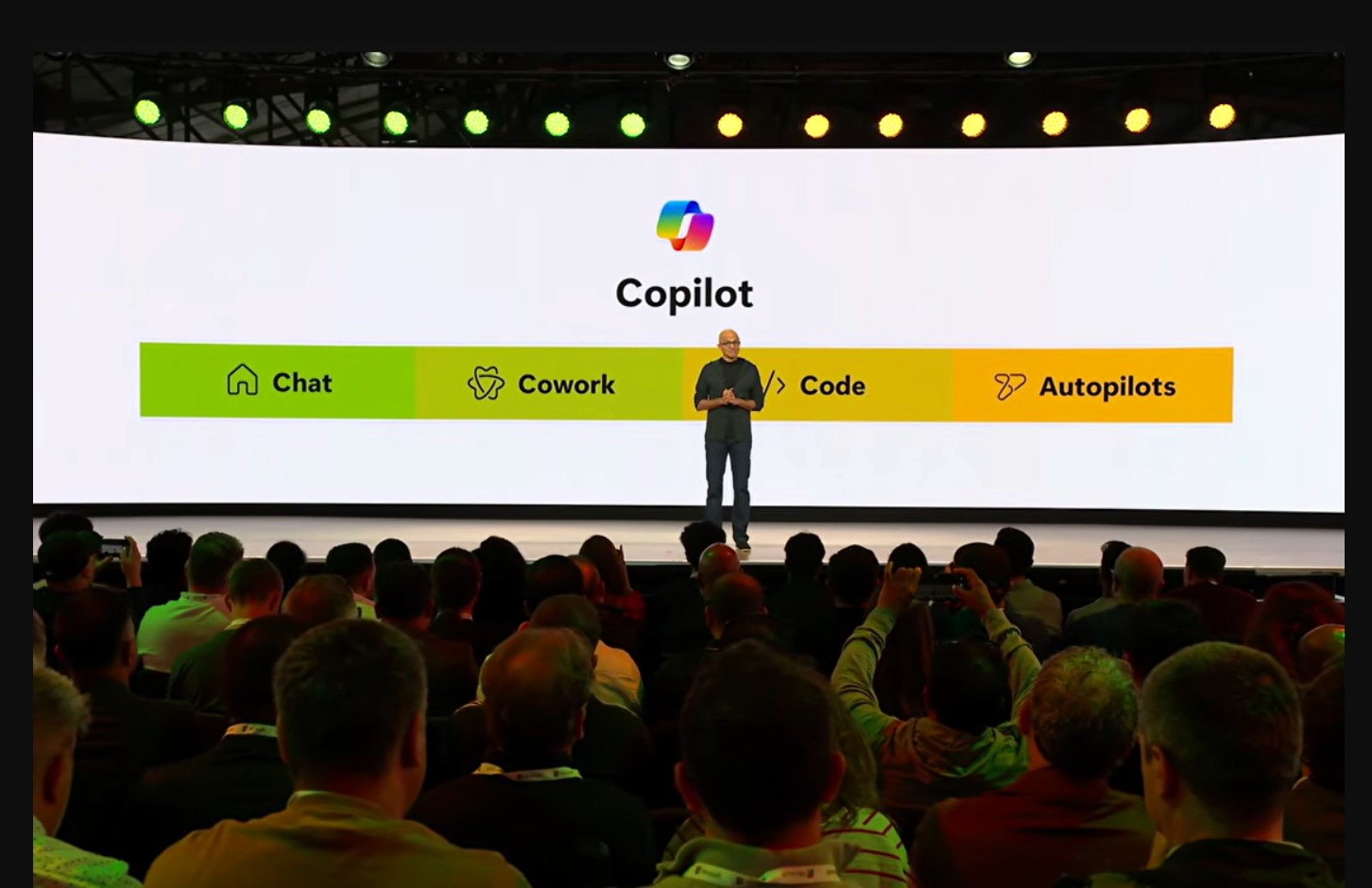
Microsoft’s Copilot 365’s Cowork feature, which is generally available worldwide as of June 16, will offer customers a choice of models and won’t be solely Anthropic-based as it is currently. Microsoft also is adding usage-based pricing to Cowork, on top of the Microsoft 365 Copilot license charges.
Microsoft made Copilot Cowork available to Frontier testing program customers in late March, 2026. Cowork, which allows customers to run complex, multi-tool tasks, supports Anthropic’s Opus 4.8 and Sonnet 4.6 today. For customers in the Frontier test program, there’s also an option to use OpenAI’s GPT 5.5. And “coming soon,” Microsoft plans to release an Azure-hosted model for Cowork that will “handle tasks at a substantially lower cost,” officials said. This Microsoft-developed model will be known as Cowork 1.
Microsoft CEO Satya Nadella spilled the beans on Microsoft’s plans to bring model choice to Cowork during an interview at Microsoft Build in early June. During that interview he said Cowork was a type of “form factor” for agents and it would be getting support for GPT in addition to Anthropic’s models. Nadella said the same way Microsoft 365 Copilot currently offers customers a choice of models, the same will be true of Cowork.
Copilot Cowork requires a paid Microsoft 365 Copilot user license, which retails for $30 USD per user per month. On top of that, Microsoft also will bill users for Cowork on a usage-based basis, with charges determined by the tasks they run. Users will be charged in Copilot Credits, with the price of each task calculated via four inputs: Model use, context retrieval, tool calls, and runtime.
There will be two payment options for Cowork: Pay As You Go (PAYG) and P3. P3 is for those who have a handle on cost projections and can commit to a usage volume in advance in exchange for a discount. Where multiple models are available, customers can use the model picker to manage cost-per-task, according to Microsoft.
Low Cost Provider
Microsoft’s strategy seemingly is to position its own models as the lower-cost option across its Copilot family as it evolves.
Microsoft is adding support for more models in its GitHub Copilot, as well. It is integrating its just-announced MAI-Code-1-Flash model to GitHub Copilot individual users and making it the default in the Auto picker there. (Currently, the default is OpenAI’s GPT 4.1.) Its plan is to continue to allow developers to select different models if they choose to do so. As of June 1, Microsoft is charging GitHub Copilot users on a usage basis.
Microsoft also is planning to release a Copilot “Super App” this summer, officials have said. That Super App will provide users with access to Copilot Chat, Copilot Cowork, Copilot Code, and Copilot Autopilots, which are agents that will run without user intervention (like its recently announced Scout personal agent, built on OpenClaw).
In related news, WorkIQ also is generally available as of today, June 16. And it also is adding consumption-based pricing to its model.
Work IQ is Microsoft’s “intelligence” layer built on top of the Microsoft Graph that mines customer data for Copilot. Starting June 16, the Work IQ API will require Copilot Credits and users will be charged directly when they build their own agents or apps calling the Work IQ APIs. They’ll also be billed if they use a third-party agent that uses Microsoft 365 data through the Work IQ APIs.

There is a question Microsoft Azure customers are only now beginning to ask. It comes after consumption data has been gathered, forecasts assembled, growth plans documented. A commitment figure sits on the table with a Microsoft offer attached. Then someone on the customer’s side asks about the capacity behind that number. If the customer commits its full spend and Microsoft cannot deliver the infrastructure to consume it, then what?
Silence.
Someone promises to take the question under advisement. The response is not evasion. It is unfamiliarity. Microsoft designed the Microsoft Azure Consumption Commitment (MACC) in a world where capacity was abundant, and forecasting consumption was an art customers were mastering. The capacity question never needed asking. But now that world is no more, and soon this will be the first question every customer asks.
Capacity Was the Answer. Now It Is the Question
On paper, the MACC is a simple bargain. You commit to consume a fixed dollar amount of Azure over a term, typically three to five years. Microsoft discounts the meter in exchange for revenue certainty. Microsoft created the model in an era of effectively unlimited cloud supply, when the only meaningful risk in the deal was the accuracy of your own forecast. Capacity was the unstated premise of the entire arrangement.
Now that premise is cracking. Microsoft’s own leadership has told investors, quarter after quarter, that demand for its cloud exceeds the supply it can provide. AI workloads are absorbing datacenter capacity faster than concrete can be poured, and chips can be racked.
The public evidence of strain is everywhere: Quota requests sitting in backlogs with no estimated fulfillment date, deployments struggling in flagship regions, customers redesigning architectures around regions they never intended to use. Customers are living it, and many have already paid for workarounds out of their own budgets.
Capacity isn’t only a pillar of the MACC. It was the founding answer of cloud computing itself, with the promise that cloud supply was more accessible and scalable than anything you could build yourself. The MACC simply converted that answer into a financial instrument. You could commit with confidence, because the cloud always has room.
Now scarcity is running that conversion in reverse. The MACC agreements under construction right now are still built for the old answer, not the new question.
No Actuary Would Approve This
Strip the MACC down to its economics, and it is an insurance contract, with the roles reversed from what you might expect. The customer underwrites Microsoft’s revenue certainty, and the discount is the premium Microsoft pays for that protection.
Viewed through that lens, customers are being asked to absorb dramatically more risk while collecting dramatically less premium. The structure asks you to forecast your consumption with precision at the very moment Microsoft cannot forecast its capacity with confidence. If capacity is unavailable, the financial obligation survives anyway; the commitment is owed whether or not the cloud shows up. Workarounds carry real costs, from standby architectures in alternate regions to engineering time spent routing around constraint, and none of it appears anywhere in the deal.
And displacement itself carries a price tag that Microsoft’s own published pricing quantifies with uncomfortable precision. A D16as v5 virtual machine that runs $68.80 per 100 hours in East US 2 runs $82.60 in South Central US. Same machine, same meter, 20 percent more. Across thousands of meters, the regions customers overflow into when flagship capacity runs out may carry premiums of 10 to 20 percent over the regions they leave, and some of the available alternates stock barely six of every ten meters that a flagship region sells. Your only choices may be to pay more, to re-architect, or to pay more and re-architect.
All the risk sits on your side, all the protection sits on Microsoft’s, and the committed dollars arrive in Redmond either way. No actuary would approve that policy, and no MACC proposal on a table today has this risk priced into it. The MACC negotiation has lawyers, architects, procurement, and IT in the room. It has never had an actuary, and that absence is about to become expensive.
The remedy is not a new hire. Most large companies already employ people who price risk for a living, in treasury, in insurance, in enterprise risk management. They have simply never been invited to this table. But in the era of scarcity, they belong there.
Risk professionals read price tags differently. To them, a number is not a price until the risk traveling with it is counted. Pay-as-you-go (PAYG) is the perfect example. PAYG has long been framed as the mark of an immature cloud customer, the thing from which a MACC uplevels you. But reweigh the equation with risk in it and the hierarchy inverts. List price is the only price on the menu that carries no commitment risk, as it gives you the freedom to redirect spend, to rebalance across regions or providers, to wait out a shortage without owing anyone for capacity that never arrived. Once risk is priced, retail can become the best price in the room. Customers running production workloads at scale without a commitment are not necessarily behind. Under the new economics, they may simply be early.
The Pause Is the Power Move
So is a MACC worth it at any discount? The honest answer is that nobody knows yet, including Microsoft. The economic principles underneath every commitment-style agreement have shifted, and the new equilibrium has not been found. The discounts have not adjusted to the risk. The contracts have not adjusted to the question. The institution selling the commitment has not yet absorbed how much the ground has moved beneath it. The answers are forming, on both sides of the table, in real time.
All of this means that if a MACC proposal is in front of you, or a commitment renewal is on your horizon, the most valuable move available right now costs nothing. Take a pause. A pause is not refusal, and not paralysis, but deliberate diligence in a moment when speed serves only the old playbook.
Before anything gets signed, certain questions deserve real answers. What happens, contractually, if you cannot consume because the capacity is not there? What is Microsoft actually committing in return, beyond a number on a meter? What is your pay-as-you-go position truly worth, both as leverage and as insurance? How should a commitment even be sized in a world where supply is as uncertain as demand?
Those questions deserve answers. This MACC blog series will work through them in turn: How to size a commitment against capacity nobody guarantees; what to demand from Microsoft in exchange for a MACC; when to decide paying retail is the smartest price on the table; how to understand the hidden geography tax built into Azure’s regional price map; how to price capacity risk before Microsoft prices it for you; and how to take into account that a supply-constrained vendor might quietly prefer that you not commit at all.
The MACC was built for a world of abundance, and that world is gone. Until the agreement catches up, treat every commitment proposal as what it has quietly become — an open question wearing the costume of a routine deal.
Azure MACConomics Series
Part 1: Is a MACC Worth It at Any Discount? (this article)
Build 2026 got me thinking, even more than usual, about Microsoft’s AI strategy.
Microsoft is not trying to win with the shiniest toys (although the Surface RTX Spark looks nice!). It’s working to position itself as the platform leader. Microsoft is building out an operating model, not a product portfolio. And it’s making a bet on the enterprise AI execution layer, not Copilot.
Why ROI Is the Wrong Lens
This bet may be surprising given the intense pressure Microsoft is under because Copilot adoption is lagging, CapEx expenditures are historically high and margins are under pressure, begging the question: How will Microsoft make money?
These questions reflect a short-term view, and Microsoft typically eschews short term gains for long term dominance. Windows, Office and Azure all followed the same pattern:
- Embed into the ecosystem
- Become default infrastructure
- Monetize at scale
Microsoft’s AI positioning is following the same playbook. Its approach is less about immediate profit and more about building platform lock-in that defines the enterprise for the foreseeable future. So, the lack of ROI at this point is simply a bump on the road towards its long-term strategy.
What Microsoft Is Actually Building
To understand the strategy, look at the system, not the products. At Build, Microsoft laid out a layered AI stack:
- Compute fabric: edge + cloud infrastructure
- Models: first‑party and partner models
- Context layer: enterprise data, semantics, knowledge graphs
- Runtime: agents executing workflows
- Control plane: identity, governance, security
This architecture was described in the keynote as a cohesive stack — from “compute fabric” to “security, compliance, and governance.” The key insight is that these capabilities are converging into a coordinated system. Microsoft is endeavoring to define how AI work is executed, not just enabling it.
From Partnership to Control
There is also a shift happening under the platform. Microsoft’s initial AI strategy relied heavily on OpenAI. Although that relationship remains important, it’s changing. And its evolving positioning is not about Anthropic.
At Build, Microsoft showcased seven of its own models and chips, emphasizing that they rivaled their partners on performance and costs. It also debuted new hardware with NVIDIA and Qualcomm, trying to capture the developer and frontline worker experience end-to-end.
This repeats Microsoft’s pattern of using partnerships to accelerate entry into the market, internalize critical layers and consolidate control over the platform. OpenAI and Anthropic remain critical partners of Microsoft, but Microsoft is moving to reduce dependency on them and step towards controlling the execution environment.
Where Lock‑In Actually Happens
Many enterprises think of vendor lock-in in terms of models and APIs. Microsoft’s strategy changes that view by focusing on lock-in on data, identity, governance and workflow.
Microsoft is building a “context layer” as a first‑class platform component with Microsoft IQ, and specifically the Fabric and Foundry knowledge bases. This defines how enterprise knowledge is structured and accessed for agentic use and extends dependencies beyond traditional storage and databases.
Agents are being treated as first-class identities, “requir(ing) their own identities, access controls… even when they’re working on your behalf.” Once agents are provisioned as identities inside Entra (Entra Agent ID), Microsoft controls who or what can act across your enterprise.
Governance is embedded into the execution layer of agents with Agent 365, Defender and Purview. “(E)very agent…needs to be managed with the same rigor as users, apps, and devices,” according to Microsoft. The potential scale of agents requires platform enforcement and can’t be done by policy alone.
AI is already being embedded where work happens. Once AI is embedded in Teams and Office workflows, switching platforms is a change in how work gets done across the organization.
As the keynote emphasized, agents rely on continuous loops of “storing, retrieving, reasoning, acting, and learning” against enterprise data. Once those loops are embedded into your systems, switching vendors is an operational exercise, not just a technical one.
A New Financial Model: Consumption Over Licenses
AI also shifts how software is paid for. Software is typically a predictable license cost, but AI is turning that concept on its head as it increasingly is based on variable consumption (tokens, compute, agent activity). Microsoft has made this explicit with its focus on optimization metrics like “tokens per dollar per watt”.
This change introduces a new set of risks with AI. Consumption based pricing is inherently volatile with little means to predict costs, making budgeting difficult. AI becomes more like cloud compute but potentially a higher order of magnitude because of autonomous agents. This is significant shift in cost management.
The role of M365 Copilot is perhaps the most misunderstood piece of the puzzle. Microsoft is constantly criticized for Copilot’s lack of adoption. However, what matters is not Copilot’s adoption as a standalone product per se, but it’s becoming the universal interface where work gets done — coordinating agents, accessing enterprise context and executing workflows. This aligns with what Microsoft described as moving from chat to “multi‑step tasks” and eventually to autonomous “autopilots” running in the enterprise.
The Real Executive Decision
Microsoft is raising the stakes on enterprises who are deciding on an AI stack by embedding its operating model, which pits a “better together” approach against “best of breed.” Customers’ decisions on their vendor of choice can have implications for years to come.
Choosing Microsoft’s AI platform (and its better together promise) could result in faster deployments, integrated governance and reduced integration hassles but at the cost of reduced flexibility and long-term dependency on Microsoft. This option may appeal to enterprises who benefit from using AI but not building AI.
Otherwise, enterprises can create their own AI stack with multiple vendors (best of breed). This gives them greater control over architecture and optimization but can lead to integration complexities, uneven governance, and reduced time to value. This choice may be appealing to enterprises whose business model depends on building AI tools and systems instead of just using them.
What to Watch Next
Microsoft is trying to define the default enterprise AI platform. Look for continued shifts toward first party control (Microsoft models), enterprise control planes (Agent 365 and Foundry Control Plane), more consumption-based and agent-as-user pricing and the strategic role of Copilot and the coming Copilot “super app.”
The companies that benefit most from AI will not be those with access to the best models. They will be those that make an explicit, well understood decision about who controls their platform and the long‑term consequences of that choice.
Last year’s Microsoft Build developer conference focused heavily on agents. But this year’s Build, which kicked off June 2, is almost entirely agent-focused.
Microsoft is working to position everything from the Windows OS itself to coming high-end Windows PCs and single-purpose agent devices built on Android as custom-built to enhance customers’ agent experiences and developers’ ability to build them.
Microsoft has been trying — and largely failing — to get customers excited about running AI locally, even though doing so could help cut cloud computing costs. (CEO Satya Nadella said the appeal of this local approach is that it brings “unmetered intelligence” to users.)
Windows Client Improvements In The Pipe
Microsoft’s attempt to make Recall, its searchable visual timeline feature, a reason to buy so-called “Copilot+” PCs stalled after experts warned Recall was a security risk. Microsoft ended up backing away from its Copilot+ PC branding campaign in late 2024 but continued to try to push Foundry Local (the rebranded Copilot runtime) as a compelling capability for developers.
At Build, Microsoft’s updated pitch is that Windows is the best platform for building agents, and not just agents for Windows.
It’s not about “Windows for ‘Windows developers,’” Microsoft says in its Build blog post. It’s “Windows for developers, period.”
Microsoft showed off at Build a new sandboxed agent runtime, new shell and terminal experience, new Windows Subsystem for Linux containers, and other Windows features it is counting on to attract agent/AI developers. Coreutils for Windows, which is a set of Linux-like command line utilities that run natively on Windows is now generally available, as well.
New High-End ARM-Based Windows PCs and New Dev Box On Tap
Just ahead of Build — at Computex on May 31 — Microsoft and Nvidia made announcements around Nvidia’s coming RTX Spark chip, which will power a new wave of high-end Windows PCs from Microsoft, ASUS, Dell, HP, Lenovo and MSI starting this fall. RTX Spark is an ARM-based integrated chip targeted at the same market that Apple targets with their Pro and Max Apple Silicon chip, although Nvidia also took pains to emphasize RTX Spark’s gaming credentials.
Microsoft showed off an early version of the coming Surface Laptop Ultra, its MacBook Pro competitor built on RTX Spark that is due this fall but provided no pricing and no full spec list. At Build, officials also announced there also will be a Surface RTX Spark Dev Box, designed for sustained workloads, long-running training, and agentic AI jobs, available later this year in the U.S. (orderable via Microsoft.com/devbox for some as-yet-unknown price).
While users can already run agents locally on certain Windows PCs, Microsoft is positioning the coming RTX Spark PCs as providing a more secure Windows platform for on-device agents. Details as to how these enhancements will show up in Windows 11 are vague, but Microsoft is promising to add new “Windows primitives” that will provide built-in identity, isolation and governance capabilities designed to make developing, testing, and running agents locally on Windows devices a better and safer task.
Android-Based Agent-First Devices; Private Pilot Coming Up
During the June 2 Build keynote, Microsoft also showed off some proof-of-concept enterprise-focused devices that it is developing as part of its “Project Solara” agent-first device platform. Microsoft is working with silicon partners on Android Open Source Project (AOSP)-based devices that could be tailored for healthcare, retail and financial customers.
Officials showed off a wearable badge concept device that could be used by information workers, frontline workers, nurses or anyone needing secure access to a space. The badge could provide users with a glanceable Priority Agent or the existing Microsoft Facilitator agent to record a hallway conversation. Microsoft also showed off a “desk concept” device (that’s similar to a standalone speaker) that would allow users to access their PCs/monitors and Windows 365 clients via voice.
Microsoft is planning a private pilot of the agent-first devices with AccuWeather, Best Buy, CVS, Levi’s, and Target “in the coming months,” officials said. And it is planning to work with silicon partners including MediaTek, Qualcomm, and others, on building a range of devices, officials said.
Clawing Ahead With OpenClaw
At Build, Microsoft took the wraps off the software development kit for the Microsoft Execution Containers (MXC) agent-native runtime, which is now in preview. MXC will give developers and admins an enterprise-grade sandboxed environment for agents, enforced by Windows everywhere that agents run.
Agent 365 native integration with MXC — which Microsoft says will bring Defender, Entra, Intune and Purview protections — to secure local agents and reduce risk, will be in preview in July. The MXC technology is now being used by OpenClaw on Windows, and Nvidia’s OpenShell runtime for Windows will be built on MXC, and includes policy management, inference routing and other features for agent developers.
On the topic of OpenClaw, Microsoft also is moving ahead with productizing an OpenClaw-based skunkworks project that has been in the works for a couple of months under the name “Microsoft Scout.” Scout, a personal assistant, meant to work across work data in Teams, SharePoint, OneDrive and more, with built-in enterprise-grade security controls. Scout has been in testing inside Microsoft since May; Microsoft now is opening a preview to those in the Frontier experimental channel.
Microsoft officials said Scout is the first of a category of agents it’s calling “Autopilots.” Autopilots are always-on agents that can work autonomously and have their own identities, so they can act on users’ behalf in the background, without needing to be prompted each time.
Microsoft also announced some new and updated Microsoft-built AI models, including its first reasoning model, known as MAI-Thinking-1, which Microsoft claims will come at a low-token cost. Officials said it was built “from the ground up on clean data, without distillation from third-party frontier models.” It’s available now to “select early partners.” And it unveiled a new GitHub Copilot desktop app (in preview), which it is pushing as being perfect for agentic development.

Unified Support has always been its own source of frustration: Expensive, opaque, and widely regarded as the one Microsoft line item that feels least like a choice. What has changed is the context. The November 2025 pricing changes that created the Financial Cliff also created something most customers have not yet calculated, namely a Unified Support cliff. Every dollar of price increase that flows through your Enterprise Agreement (EA) base flows through your Unified Support calculation as well. The EA cliff is visible. The Unified cliff is hidden and compounding.
How Microsoft Changed the Unified Game
Microsoft’s November 2025 pricing changes have been analyzed extensively in terms of their direct EA impact. What has received less attention is the downstream effect on Unified Support.
The Unified Support fee is calculated against your Appraised Product Spend, which is a baseline derived from your actual Microsoft purchases over the preceding period. When your licensing costs increase, that baseline will eventually increase. Your Unified fee recalculates against the higher number. The support tax inflates even if your consumption is flat, even if your headcount is unchanged, even if the only thing that moves is Microsoft’s price list.
This dynamic is not new. What is new is its magnitude. The November changes represent the largest structural repricing of the Microsoft commercial stack in years. For organizations whose Unified renewal is approaching, the compound effect of higher licensing costs flowing into a percentage-based support calculation deserves its own line in the financial model.
A second pressure is building alongside the pricing changes. The era of abundant, competitively priced cloud infrastructure is giving way to an environment of capacity constraint. Azure costs are no longer declining as a function of competitive pressure and scale economics. They are, in some categories, moving in the other direction. For organizations with significant Azure commitments, this means the Appraised Product Spend baseline is under pressure from two directions simultaneously — Microsoft’s pricing decisions and market-driven cost inflation. Both flow through to the Unified calculation.
The program itself has also changed. Microsoft’s Unified Support Services Description, the document that defines what the program actually covers and is incorporated by reference into every Unified agreement, was updated twice in the second half of 2025 and again in May 2026. The scope of included services has been quietly refined. The premium tier structure has expanded. The terms governing what customers receive for the base fee are not the same terms that governed agreements signed two or three years ago. Customers who have not reviewed the current document against the one in force at their last renewal are making decisions based on an incomplete picture.
Three New Pages for Your Playbook
Unified Support has never been a passive line item. Customers have negotiated it, debated it, and in many cases constructed sophisticated strategies for managing it. The playbook those strategies produced was not wrong. It was rational, built on a reasonable understanding of how the program worked and what alternatives existed.
What has changed is the underlying conditions that made the playbook rational. Here’s what you can do right now to make your approach more effective:
Maintain a living Unified support strategy. The conditions governing your support economics now change between renewal cycles, not just at them. Program terms shift. The alternative market moves. Your own spend profile evolves in ways that change where you sit in the rate structure. A strategy built once and revisited only at renewal is already behind the curve. The customers who are winning these negotiations are the ones who treat Unified support as an ongoing posture, not a periodic decision.
Negotiate your Unified agreement as part of your integrated Microsoft strategy. The base fee is progressive and calculated as a percentage of your Microsoft product spend, which means your EA and Azure commitment decisions have a direct downstream effect on your support cost. The form of any Microsoft investment in your renewal matters too. A consumption discount reduces the spend base your Unified fee is calculated against; a project funding commitment does not. Customers who bring all of these levers into a single negotiating conversation consistently extract better outcomes than those who sequence them separately.
Evaluate third-party support options as a formal part of your next renewal. The alternatives to Microsoft Unified Support have matured to the point where a credible market exists, and new models are showing early green shoots. What was once a binary choice between staying with Microsoft or taking a leap into the unknown is now a genuine spectrum of options at varying stages of market maturity. Getting the best possible outcome, whether that ultimately means staying with Microsoft, augmenting your agreement, or moving in a different direction entirely, begins with a rigorous evaluation of what that spectrum actually looks like today. This is not a theoretical exercise or a negotiating bluff. It is how you build leverage regardless of where you ultimately land.
New Players Are Also Changing the Game
The Unified Support conversation has always had more options than the conventional wisdom suggested. CSP partners, independent third-party providers, and hybrid arrangements have existed for years. What has changed is the maturity of those options, and the market conditions that make evaluating them not just reasonable but necessary.
While pay-per-incident support exists as an option for organizations with minimal support needs, the customers this blog-post series addresses require something more structured. The question is not whether to have a support strategy, it is which one to adopt. You now have a genuine spectrum, and choosing among them intelligently requires understanding what each one actually delivers today, not what it delivered three years ago. A customer who has genuinely considered that spectrum negotiates from a stronger position. Your options include:
Stay with Microsoft and Negotiate on New Terms. This remains a viable path, but the negotiation has new dimensions. Microsoft’s Unified Support pricing contains more flexibility than the program’s structure implies, and the existence of credible alternatives has created leverage that did not exist five years ago. Customers who approach the negotiation with a clear understanding of how the fee is calculated, what has changed in the program terms, and what the market actually offers are consistently extracting better outcomes. The information advantage is real, and it is available to anyone willing to build it.
The Hybrid Model: Keep Some, Replace Some. An emerging category of enterprise buyers is choosing to retain Unified Support for strategic cloud workloads while engaging independent third-party providers for mature, stable technologies where Microsoft’s cost premium is hardest to justify. This model preserves the Microsoft relationship for the services where it matters most while creating significant cost reduction on the portion of the estate where alternatives are fully capable. This approach is gaining traction among large enterprises with mixed environments and is now supported by a growing ecosystem of qualified providers.
The CSP Model: Support Built Into the Partner Relationship. For organizations whose Microsoft relationship is migrating toward the Cloud Solution Provider (CSP) model, support is not necessarily a separate procurement. CSP partners with meaningful Microsoft relationships can provide first-line support backed by Microsoft’s escalation infrastructure, effectively bundling support into the broader partner relationship. This is a different architecture than traditional Unified Support, with its own trade-offs, but it represents a genuine alternative that did not exist in its current form at the last major renewal cycle for many enterprise customers. One important nuance is that the CSP market is itself competitive, and both support capabilities and the range of add-on options vary considerably from one partner to the next. The partner already in your ecosystem is a starting point, not a default.
Pure Third-Party Replacement. This path has been documented extensively and the market for it has matured considerably. Independent providers have demonstrated the ability to handle enterprise-scale Microsoft support at a fraction of the Unified cost for the right customer profile. The quality of providers varies, and the evaluation process matters. What was speculative several years ago is now a legitimate, recognized category.
An Emerging Concierge Model. A nascent but logical extension of the hybrid concept may be beginning to surface: organizations that keep their Unified Support agreement intact but engage a third party to own the operational mechanics of managing it. The administrative burden of Unified Support is real, and there are early indications that the market is beginning to respond to demand for that burden to be absorbed by specialists. This model is early stage. At least one organization is known to be experimenting with it. Whether it matures into a mainstream category remains to be seen, but the conditions that would make it viable now exist.
Plays the Game Is Still Working Out
The plays outlined in this section are not yet standard moves at the renewal table. They are observations that sophisticated buyers are beginning to make, worth adding to your playbook now, while they still represent an advantage.
Know Where You Sit in the Rate Structure and Question How You Got There. Episode 4 of this series examined Modern Work workloads that surface as Azure meters: Purview, Entra, and others that are functionally M365 but billed as cloud consumption. The Unified Support rate structure adds another layer to that conversation. Modern Work spend and Azure spend follow different rate curves, and where a given workload lands within that structure has real financial consequences. If certain Modern Work workloads are being calculated against Azure rates rather than Modern Work rates, the direction of that impact depends entirely on where your total spend falls.
At lower spend levels, Azure rates run higher, a potential cost penalty. At higher spend levels, those same Azure rates eventually drop below their Modern Work equivalent, a potential advantage. The question worth asking is not just what you are spending, but how that spend is being categorized and whether that question has ever been examined carefully. The rate structure is knowable. How your specific workloads map against it may deserve a harder look than it has received.
The Form of Microsoft’s Investment Is Gaining New Importance. Not all Microsoft concessions reduce your Unified Support base. An Azure consumption discount reduces your Appraised Product Spend directly, which flows through to a lower Unified Support baseline. An End Customer Investment Funds (ECIF) commitment funds a specific project but does not touch the Unified calculation at all. When Microsoft’s investment in a renewal takes multiple forms, the real question is less about choosing one over the other and more about how to weight them deliberately. A mission-critical project may well be worth prioritizing over a marginal reduction in your support base. But that should be a conscious trade-off, not an invisible one.
With Microsoft’s pricing increases driving up the Unified Support baseline, the downstream consequences of how a concession is structured are now more meaningful than they have ever been. This is also why negotiating holistically matters: the more agreements you bring to the table simultaneously, the more flexibility you have to shape that balance in a way that optimizes across your total cost of ownership, not just one line item.
Your Unified Fee Is Calculated on Yesterday’s Spend. That Window Is Closing. Many customers currently find their Unified fee calculated against a spend baseline that predates the November 2025 pricing increases, a temporary reprieve that will close at their next recalculation. When it does, the increases flow through in full unless offset by something negotiated in the interim. Discounts negotiated into your EA and Microsoft Azure Consumption Commitment (MACC) today reduce the effective spend your next Unified calculation will be based on. The better the negotiation now, the smaller the blast radius when that recalculation arrives. The lag, in other words, is not just a limitation. It is a planning window. The question is whether you use it.
Your Move
The short-term imperative is straightforward. Update your playbook. Align your Unified negotiation with your EA and MACC wherever the timing allows. And engage the full spectrum of Unified alternatives with genuine intent, meaning real quotes, real conversations, real comparisons across the options. Whether you stay with Microsoft or move in a different direction, the intelligence that process produces is the foundation of a credible negotiating position. These three steps will produce better outcomes at your next renewal regardless of which path you ultimately choose.
The long-term imperative is less visible but equally important. The observations outlined above are not yet standard renewal conversation. They are the leading edge of a more sophisticated understanding of how Unified Support economics actually work and how they interact with your broader Microsoft commercial relationship. The customers who build that analytical muscle now will be the ones setting the terms of the conversation when these dynamics become mainstream.
The old playbook was built for a Microsoft that operated with relative commercial stability and an abundance of resources. The pricing structure was predictable. The program was what it said it was. The alternatives were limited. None of those conditions hold in the same way today.
The November 2025 changes did not just raise the price of your Microsoft licenses. They accelerated the obsolescence of an approach to Unified Support that was already showing its age. The customers who recognize that will build something better. The ones who don’t will keep running a strategy designed for conditions that no longer exist, and the gap between those two groups will widen with every renewal cycle.
Your Next EA Renewal Series
Part 1: How to Avoid the Financial Cliff
Part 2: Why the Microsoft Lens Matters
Part 3: Why Your M365 Roadmap Is the Key to Negotiation
Part 4: A Multidimensional Agreement Demands a New Strategy
Part 5: What’s Hiding in Your Azure Bill?
Part 6: Your Unified Support Playbook is Overdue for an Update (this article)
Microsoft no longer wants midsize enterprises on the Enterprise Agreement (EA). The de facto floor for an EA renewal has been creeping upward for years, and customers in the 2,500-to-10,000 user band. Microsoft has decided this group is too small to command the direct account management it reserves for its largest accounts and too operationally complex to fit a SaaS-only playbook. Microsoft is steering these customers toward the Microsoft Customer Agreement (MCA) purchased through a Cloud Solution Provider (CSP). For these customers, the move is not optional. An EA renewal may not be an option any longer and there’s likely no rep to whom to talk. (How far up-market this push extends in Microsoft FY27 is the next question.)
Many CSPs are doing their best to accommodate these EA transitions. However, Microsoft is guiding these customers into a channel it has not equipped to properly handle these migrations. There is no formal certification program for CSPs taking on EA migration work, no required training curriculum, no qualification standard, and no SKU parity between what’s available in the channel customers are leaving and the channel they are entering.
Clearly, Microsoft is trying to pull Software Assurance off life-support, but the CSP subscription alternatives are financially untenable. The institutional knowledge that the legacy Large Account Reseller (LAR) channel accumulated over 20-plus years of EA work doesn’t carry over into the latest pureplay CSP newcomers, and Microsoft has shown no urgency to close either the knowledge gap or the program gap with appropriate transition SKU tooling.
What Microsoft Built, and What It Didn’t
The MCA-through-CSP channel was designed for cloud-first customers buying SaaS subscriptions. For that population, it works adequately. For midsize enterprises with mixed estates — factory floor terminals running Windows by device, retail point-of-sale kiosks licensed for Microsoft 365 Apps per device and Office Standard LTSC licensing, Windows file and print servers covered by Software Assurance (SA), on-premises SQL Server with SA-enabled new version rights, Remote Desktop Services device CALs and the like — the channel has structural gaps that midsize customers will discover only after they sign.
Most CSPs cannot transact Software Assurance without side partnerships with resellers that sell Open Value or Microsoft Products and Services Agreement (MPSA)-type arrangements where SA and perpetual license-only purchases are still buying options. Per-device Microsoft 365 Apps for Enterprise, a SKU that legitimately exists for shared-device populations under the EA, does not exist in the CSP price list. From-SA pricing and step-up SKUs, both of which most midsize EA customers rely on, have no CSP equivalent. There is no annual true-up to reconcile usage uptick, and the order return window is five days.
These are not edge cases. They are the daily operational reality of the customers Microsoft is pushing into the channel.
In other partner ecosystems, such as Azure Expert Managed Service Provider (MSP), the Solutions Partner program, the AI Cloud Partner, Microsoft invests in partner enablement, technical certification, and ongoing assessment. For EA-to-CSP migration, there is no equivalent license knowledge certification. The work is being done, and the customers are being signed, but Microsoft has built no apparatus to ensure the quotes are accurate and compliant.
What This Looks Like in Practice
A recent advisory engagement involving a multinational client with thousands of users illustrates the consequences. The customer’s expiring EA was actually an EA-Subscription (EA-S), a less common cousin to the EA where even SA line items are purchased as ‘leased’ licenses, so no underlying perpetual licenses exist. Multiple quotes received by the customer from global systems integrators marketing themselves as EA-to-CSP specialists revealed two distinct flavors of compliance exposure, each traceable to a structural gap Microsoft has not closed.
In one approach, a CSP proposed continuing the customer’s SA line items through an Open Value agreement layered alongside the new CSP subscriptions, at a cost of roughly $982,000 in annual SA. But the proposal was non-compliant. EA-S is a rental construct in which no perpetual base licenses are ever acquired, so SA-only continuation is not a viable option. There were no base licenses to attach SA to, and Open Value could not manufacture them retroactively. Five material Teams line items were also omitted entirely, as if inconvenient or unavailable.
Had the customer signed, they would have paid nearly a million dollars for a benefit they could not legally exercise and would have entered the new term carrying a missing license component that a future Microsoft audit would value at approximately $3.9 million to cure.
In a second approach, a CSP regurgitated the customer’s existing EA-S bill of materials verbatim, attached CSP prices, and called it a quote. Among the line items was Microsoft 365 Apps for Enterprise By Device, which was the part name the customer had been using under their EA-S for shared worker kiosks. However, that SKU does not exist in the CSP price list even though it was parroted back on the quote. CSP allows Microsoft 365 Apps for Enterprise on a per-user basis only. Because the customer’s user population was roughly three times their kiosk device count, a per-user purchase sized to the device count would have left them short by thousands of user licenses, with an annual licensing shortfall exceeding $2.6 million once user provisioning outran the licenses ordered by device. The CSP return window is five days. After that, the order is final.
A third quote, from a legacy LAR-CSP, caught both issues, identified that SA could not be carried forward from an EA-S, flagged that per-device Microsoft 365 Apps for Enterprise has no CSP equivalent, and proposed a compliant, if more expensive, alternative structure. The LAR caught what the CSPs missed because the LAR channel still carries the institutional knowledge.
Unfortunately, LARs with this kind of expertise are becoming harder to find. Microsoft has systematically reduced LAR margins and incentives over the past several years, accelerating consolidation in a channel it once invested heavily in building. The knowledge exists, but the organizations that carry it are fewer in number and harder to access than they were a decade ago.
Your Four-Point Compliance Checklist
If your organization is in the midsize band and approaching an EA renewal that Microsoft will not offer, run the following checklist against every CSP quote you receive. A CSP that cannot answer all four in writing is not equipped to migrate your agreement.
On-premises servers and CALs. Inventory your Windows Server, SQL Server, Exchange Server, SharePoint Server, and Remote Desktop Services (RDS) deployments still running on-premises, and identify which are covered by SA. Pureplay CSPs cannot typically transact SA in-house. If you have a meaningful on-premises footprint, your CSP must partner with a LAR or you will need a parallel MPSA or Open Value Subscription. Keeping servers on a standalone Server and Cloud Enrollment (SCE) is also an option (often, not a great one). The quote should identify this explicitly.
Per-device licensing for shared workstations. Identify factory floor terminals, retail point-of-sale kiosks, call center hot-desks, or any other shared device population currently licensed by device. CSP offers Microsoft 365 Apps for Enterprise per user only. Confirm in writing how your CSP intends to handle this and what the cost differential looks like under per-user assumptions.
From-SA pricing and step-ups in your current EA. Review your EA Customer Price Sheet (CPS) and identify every line item priced with From-SA discounts or acquired via step-up. None of these constructs exist in CSP. Your CSP quote should explicitly identify replacement SKUs and acknowledge the price delta.
True-up posture and license position confidence. Assess how confident you are in your current license position. CSP has no annual true-up. There is no structured opportunity to clean up usage drift, and the order return window is five days. Your Software Asset Management (SAM) processes for license reconciliation and reporting must adapt. For midsize enterprises with on-premises sprawl, license position uncertainty is the default — commission a third-party software asset management review before you sign to consolidate, optimize and cross-check, not after.
What to Do Before You Sign
Treat the migration quote itself as a checklist .Ask every CSP candidate to respond to the four items listed above in writing, line by line, before any commercial discussion. A CSP that cannot answer them in detail is not equipped to migrate your agreement.
Remember: The audit exposure, the operational disruption, and the cost of curing problems introduced by the reseller all fall on you, not Microsoft and not the CSP. The onus has always been on the customer and the agreement says so explicitly.

Microsoft rarely releases a new enterprise suite. M365 E5 arrived almost a decade ago, and nothing of comparable significance has followed until now.
M365 E7 is not an incremental upgrade. It is a platform bet on AI at the exact moment AI is rewriting enterprise technology in ways for which no multi-year agreement can fully account. That combination makes whether or not to go M365 E7 the most consequential Microsoft licensing decision in a decade. Microsoft knows it. Their field teams have been briefed, their sales motion is running at full speed, and their fiscal year closes June 30. They are not calling timeout.
The Play: Turning AI FOMO into a Hasty Step-Up Decision
Microsoft’s approach to M365 E7 adoption is not subtle. Field teams are going directly to the C-suite with an AI vision story, bypassing the IT and procurement teams who would normally conduct the due diligence. The message seems compelling: AI is transforming every industry, reshaping workforces, and redefining what competitive advantage looks like. M365 E7 is Microsoft’s answer.
The C-suite gambit has been part of Microsoft’s playbook for decades. What makes this moment different is AI FOMO. Fear of Missing Out, or FOMO, is real in the AI era. The concern that competitors are moving faster, that the automation wave will leave your organization behind, that hesitation today means falling behind tomorrow. Microsoft is capitalizing on that anxiety deliberately, and they are very good at it.
C-suite leaders are scrambling to understand and employ AI to their competitive advantage. Microsoft arrives with a bold story that sounds good, and they may not be wrong. M365 E7 could well be part of the answer.
But Microsoft does not arrive with a comprehensive agreement framework. They arrive with a step-up amendment and a signing deadline. A decision that deserves months of preparation gets compressed into weeks. And the negotiation that deserves the full weight of a major commercial event gets treated as a routine administrative action.
Why a Step-Up Is an Unbalanced Full Negotiation
This is the part that matters most and gets the least attention.
A properly negotiated M365 E7 renewal is a major commercial event. It involves usage analysis, structural term negotiation, competitive scenario modeling, multiple rounds of offers, and independent validation of whether the economics actually work for your organization. Customers who go through that process understand what they are committing to and why.
A step-up feels like a minor administrative action. You are upgrading a tier on your existing Enterprise Agreement (EA). The paperwork is lighter, the timeline is shorter, and the urgency is Microsoft’s. The decision feels smaller than it is.
But the step-up is not a shortcut to M365 E7. It is the full E7 negotiation, conducted entirely on Microsoft’s terms and timeline. It sets the price. It locks in the structure. It establishes the baseline that everything gets measured against for the next renewal cycle. The concessions you secure– or fail to secure—in the step-up define the commercial relationship going forward. Microsoft understands this. The goal of compressing the timeline is to get you to bring step-up energy to what should be a full negotiation event. That asymmetry is not accidental.
The Three Major Step-Up Risks
Three risks deserve attention before any organization signs an M365 E7 step-up amendment.
The first is renewal leverage erosion. Whatever terms you accept today become the baseline Microsoft defends at your next full EA renewal. Pricing, structural provisions, support terms — every concession you give away under time pressure — is a concession that is difficult to recover in the negotiation that follows. A properly scoped E7 engagement would identify and address these leverage points explicitly. A compressed step-up rarely does.
The second is consumption exposure as an unmodeled variable. M365 E7 is a seat-based license sitting on top of a growing layer of Azure consumption meters that are not included in the seat price. A full E7 engagement would include analysis of that consumption exposure, including Azure meter implications, Unified Support cost impact, and protection against future model changes that shift costs from the seat to the meter. A step-up executed under deadline pressure skips that analysis entirely. You are accepting terms without a clear picture of what sits underneath them.
The third is pricing accepted without context. Microsoft evaluates your account holistically. Your Azure consumption trajectory, your Unified Support spend, your on-premises server footprint, your Dynamics investment, your cloud migration roadmap. All of it informs how they price and what they are willing to give. A well-timed M365 E7 decision is a moment to address all of those dimensions simultaneously. A Microsoft Azure Consumption Commitment (MACC) negotiation, a Unified Support restructure, a server licensing conversation. These all have more leverage attached to an E7 commitment than they do standing alone. A step-up amendment executed in thirty days under fiscal year pressure almost never captures that context. You are playing one square while Microsoft is looking at the whole board.
If You Have Not Received a Step-Up Offer Yet: Prepare Now
This is the better position to be in. Use the time.
Understand your current M365 E5 deployment reality before Microsoft does. What is your actual feature adoption across the E5 stack? What is your Copilot rollout status? How many of your users are genuinely positioned to derive value from M365 E7 capabilities today versus in twelve to eighteen months? That data shapes your negotiating position and your ability to push back on a uniform upgrade proposal.
Brief your leadership before Microsoft does. Not to say no to M365 E7, as the technology may well be the right direction, but to ensure that when the conversation happens at the C-suite level, enthusiasm gets channeled into preparation rather than commitment. The best outcome for your organization is a C-suite that says “we want this, let’s make sure we get it right” rather than one that says yes before the right people are in the room.
The step-up is the negotiation. Treating it as anything less is the costliest mistake you can make in the moment.
Take stock of your full Microsoft relationship before the conversation starts. Your Azure trajectory, your Unified Support terms, your on-premises footprint, your cloud migration roadmap. All of it has leverage value attached to an M365 E7 commitment. That leverage disappears the moment you sign a step-up without surfacing it. Do not let the step-up arrive before your preparation does.
If You Have Already Received a Step-Up Offer: Protect What Comes Next
The step-up amendment is coming. The CEO has committed and that is not a conversation you are going to reopen. What you can do is use the window between the handshake and the signature, however wide or narrow that window is, to protect what comes next.
The one thing that matters most is to make sure the step-up is a bridge to a full negotiation, not a replacement for one. That means ensuring the amendment does not automatically carry forward as the baseline for your next full EA renewal without the opportunity to renegotiate. The step-up terms may turn out to be favorable. They may not. What matters is that when your full renewal arrives, you have the right to find out. Not an assumption baked into the amendment that what you signed today is what you are living with tomorrow.
Microsoft may offer pricing protection as part of the step-up, meaning a discount schedule, a price protection clause, and a commitment that sounds generous. Read it carefully. The discount that makes the step-up look attractive today may be engineered to erode on a published timeline while your dependencies harden around the new stack. Directions analyst Steven Kelley examined exactly this mechanism in his recent analysis of Microsoft’s Multiple Equivalent Offer strategy. It is worth reading before you sign anything.
The step-up sets the table. Make sure you still have a seat at it when the full renewal arrives.
Your Move: Sound the Alarm
Spread the word inside your organization before Microsoft spreads theirs. Your IT leadership, your procurement team, your finance partners all need to know the E7 conversation is coming and what it means before it arrives at the C-suite.
The message is simple. This is not about saying no to M365 E7. It is about saying yes the right way, with the right terms, the right protections, and the right to renegotiate when the full renewal arrives.
The step-up is not a shortcut. It is the full E7 negotiation, conducted entirely on Microsoft’s terms and timeline, unless you decide otherwise.
Understanding M365 E7 Series
Part 1: Why E7 Is More Than Just a New Licensing Tier
Part 2: Beware the Step-Up Offer (this article)

In a move some may find surprising — and others not so much — Microsoft plans to make Azure Linux 4.0 a full, commercially available Linux distribution optimized for Azure. Microsoft officials revealed their new plans for Azure Linux on May 18 at the Open Source Summit North America 2026. The company is enabling those interested in test-driving a public preview of it on Azure Virtual Machines to register their interest via a form.
Because everything announced by Microsoft these days is obligated to have an AI angle, Microsoft is positioning Azure Linux 4.0 and the companion Azure Container Linux as a “hardened Linux distribution purpose-built for cloud native and AI workloads.”
Directions on Microsoft had inklings that Microsoft may have been moving to make Azure Linux a full Linux distribution back in 2024. At that time, we noted that Microsoft had no direct competitor to Amazon Linux. And as of April 2024, Microsoft’s LinkedIn division was running an earlier version of Azure Linux internally as a replacement for Red Hat’s CentOS7.
When we asked Microsoft then if Azure Linux might be on its way to full Linux distribution status, a spokesperson told us that “Azure Linux for VM or bare metal use is not available as a commercially supported offering today.”
Two Thirds of Azure Customer Cores Run Linux
Cut to 2026. Microsoft is still saying the majority (two-thirds) of customer cores in Azure run Linux (not Windows Server). Microsoft also says the platforms running Microsoft 365, GitHub and OpenAI’s ChatGPT “all sit on Linux foundations.” Microsoft has supported a wide variety of Linux distributions on Azure for years but never made its own available for commercial use by customers and partners prior to this week’s announcement.
In 2023, Microsoft rebranded its Common Base Linux (CBL)-Mariner distribution as “Azure Linux.” CBL-Mariner is Microsoft’s lightweight Linux distribution designed for Microsoft internal use only in its own first party services and edge-computing appliances. It is the base OS for Azure Kubernetes Service (AKS) container hosts, the base container OS in Azure Stack HCI (now known as Azure Local), and the graphical component of the Windows Subsystem for Linux.
Azure Linux 4.0 is derived from Fedora Linux, with Microsoft curating packages and supply-chain components for Azure. Azure Linux 4.0 will ship as a VM image, with Microsoft officials telling ZDNet that they plan to announce WSL images, as well. However, Microsoft also said there were no plans for Azure Linux 4.0 to be a desktop Linux with a graphical environment.
Update (May 21): For those wondering if they also have the option to install Azure Linux 4.0 on bare-metal servers, the answer is yes, according to a company spokesperson.
“Azure Linux 4.0 is supported across Azure environments, including virtual machines and in Azure products. While it can be installed on bare-metal or outside of Azure, support is focused on cloud-based scenarios,” the spokesperson said, in response to our question.
Microsoft services currently running on Azure Linux 3.0 will transition to the Fedora-derived 4.0 release as it becomes generally available, with ongoing support for 3.0 during a defined transition period.
Azure Container Linux (ACL) is Flatcar Container Linux productized as a hardened, immutable container host that will supersede the AKS host OS based on Azure Linux 3.0.
Microsoft claims this will give developers a more consistent experience, but the move also shows how important and widely-used Linux is within all of Microsoft’s hosted services.
If your Enterprise Agreement is up in the next twelve months, your Microsoft account team is going to put a Multiple Equivalent Offer (MEO) on the table. They will pitch this MEO (sometimes also called Multiple Equivalent Simultaneous Offer) as an upsell that the account team intends for you to perceive as more value at roughly the same cost.
That framing is the bait. It is also a category error. The MEO is not a pricing proposal. It is a leverage-removal mechanism, and the discount you see up front is paying for the disarming of your next renewal — the one after this one — when the price is at its peak in the exit year and your ability to walk away is gone.
What the MEO Actually Looks Like on the Table
Here’s the scenario: The Microsoft pitch deck arrives later than it should, and it’s crunch time with an expiring EA pending. Your team is frustrated and under pressure. Buzzwords appear throughout the deck: Digital Labor, Agentic AI, Frontier Firm, and Copilot Augmentation. They are the tell. Anything good for you, in the account team’s framing, is described in those terms; anything you actually asked for is described as your “historical footprint” and quoted at full Estimated Retail Price (ERP) Level A “equity” pricing, plus the 8%–35% post-July 2026 price increases fully baked in.
Your bill of materials is treated as a curiosity rather than a starting point. The amendment requirements you sent in writing get acknowledged but not addressed. The proposal does not respond to your stated requirements. It responds to the account team’s compensation plan.
Sitting next to that obligatory undiscounted “business as usual” tab are the “rational alternatives.” The MEO arrives with three columns: Your E3 renewal at zero discount, an E5 path at 40% initial discount, and an E7 path at 65%. (If you’re renewing E5, then that gets a goose-egg discount, and E7 is your next Frontier.)
The Year One total of the next higher E-tier is engineered against the price offered on your current estate and lands near your business-as-usual price. E7 lands near it too, just from a higher list price with greater discounts. You are supposed to look at the deck and feel like you have a choice. There are three offers, take your pick, all roughly equivalent at signing.
That equivalency is the first fabrication, and it’s a more sophisticated one than it used to be. The columns aren’t equivalent on any axis except the Year One number, and the Year One number is engineered to be equivalent across all three columns precisely so that the comparison stops there. The MEO’s first letter has come to mean what it says. There really are multiple equal offers now. But the trap they share is singular.
The Year One Math and Why It Is So Seductive
Take the deck at face value for a moment. The displacement story, meaning Microsoft’s pitch to replace an existing third-party solution with one of its own, is real. Defender for Endpoint can replace CrowdStrike. Entra ID P2 can replace Okta. Purview can replace your data loss prevention (DLP), eDiscovery, and records-management stack. Intune can replace your MDM. Mimecast and Zscaler can be rolled into the Microsoft security envelope. The third-party invoices and multiple vendor tentacles go away. As alternate vendor contracts run out, displacement savings, at least on paper, can not only fund the upgrade but eventually may produce a net reduction. Multiply that by five years of declining-but-still-present discount and the spreadsheet is enticing.
It is designed to be. The math is the bait. The point of an MEO is to make the Year One comparison clean enough that procurement can defend the decision in a one-page memo to the C-Suite. The buzzwords do the rest. Nobody at the table wants to be the one responsible for everyone coughing in the wake of the competition’s AI dust cloud.
Here is an example of a table the account team will walk you through, missing the last two columns:
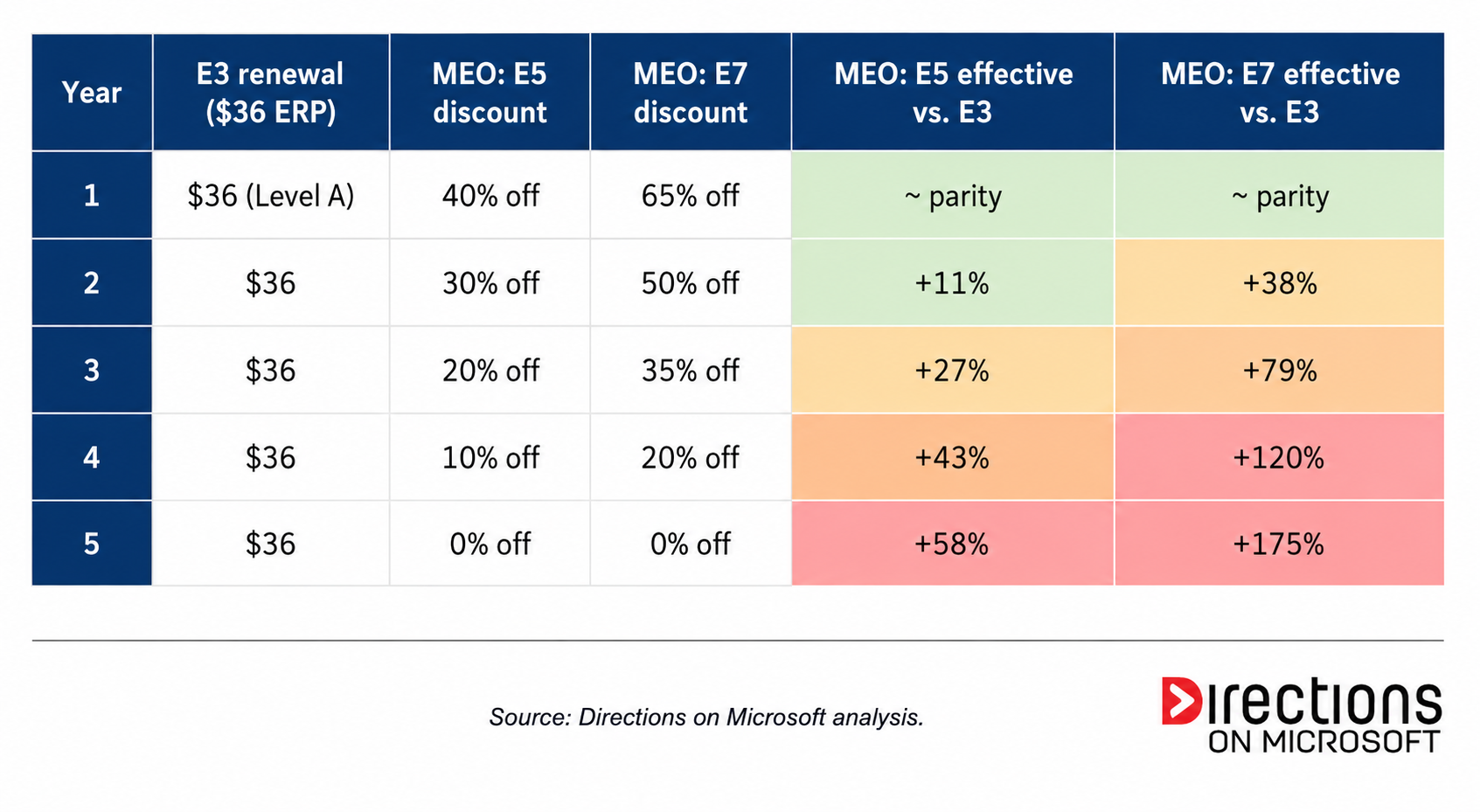
The whole proposal paints an ominous trajectory, and the last two columns are where the offers actually balloon. Both MEO paths look like deals in Year One (roughly E3 parity, by design) and both end the term materially above your current E3 ERP. By Year Five, the customer who took the E5 path is paying 58% more than their original E3, fully weaned off of any discount before the renewal even arrives. The customer who took the E7 path is paying 175% more, or almost three times the original E3 ERP, for a footprint they never evaluated on its merits, on a discount scheduled to vanish.
The technobabble is what stays. The deeper the Year One discount, the worse the Year Five reckoning. That is not a coincidence; it is the structure. And then the EA expires, and you renew, which is where the trap closes.
The Dependency Discount: The Contract Microsoft Is Actually Selling
While the bundle ramp is what you see, the dependency discount is what you buy. Each displacement under the MEO does two things at once. It eliminates a third-party vendor alternative, and it hardens a Microsoft-shaped dependency in its place.
Defender for Endpoint displaces CrowdStrike, and your Security Operations Center quietly retools its detection content, IR runbooks, and threat-hunting queries onto Microsoft’s stack. Entra ID P2 displaces Okta, and every SaaS integration in your tenant gets re-federated, and every Conditional Access policy gets reshaped around Microsoft Graph.
Every one of these displacements is defensible in isolation. If your team independently evaluated Defender against CrowdStrike on the merits and chose Defender, that is a legitimate decision. The MEO is not that decision. The MEO is six of those decisions wrapped in a single procurement signature, made simultaneously, on a five-year discount schedule, with no architectural review of the cumulative effect. It is an architectural Trojan horse, infiltrating one quarter at a time, paid for with a discount that erodes on a published schedule while the dependencies harden like curing cement.
It is worth being honest about merit. Defender has come a long way. Entra is fine for most organizations. But the MEO decision is not being made on any of these merits. The bundle is being chosen because it is cheap right now with eye-popping discounts applied, packaged as a single yes. Cheap right now, locked in later is a terrible basis for a decision that will outlast the EA term.
The Trap: The Renewal After This One
Now run the clock forward five years. The discount has eroded over the term to zero. Your renewal quote arrives at full Level A on E5 — or worse on E7. The Year One math that justified the MEO no longer exists. And the leverage you would normally use at this point, basically an assortment of best-of-breed alternative vendors, has been quietly removed during the term you just completed.
You are facing the highest price with the lowest leverage. That is not a coincidence. That is the product. The five-year discount was not a deal. It was the consideration Microsoft paid you to disarm your own negotiation at the renewal after this one. The MEO offers you multiple paths in. The outcome across all of them is singular, and it is not equivalent to anything you would have signed if you had seen it priced honestly.
And do not forget the tax applied to all of this: Unified Support, priced as a rolling 12-month look-back percentage computed against your new EA spend bar. Every dollar you add to the bar as the MEO discount erodes becomes a multiplier on a support contract that you cannot meaningfully decouple.
What Can a Customer Do?
The good news is that the MEO is defeatable, and not all of the moves require executive air cover or a full-blown architectural review board. Some of them just require doing work that procurement teams routinely skip. In rough order of how early in the cycle you should run them:
- Know your personas first
Most enterprises have not done a rigorous license-mix assessment of their actual user population in years, and the MEO works partly because that work always loses to other priorities. The account team is selling you a uniform bundle for all of your users because you can’t articulate why you shouldn’t buy one. If you actually segment your user base into categories like super users, knowledge workers, frontline workers, developers, contractors, you often discover certain combinations of subscriptions that will suffice for certain personas. The bundled MEO is wildly inefficient for that mix, and you cannot demonstrate that to your CFO without the user profiles work. Do this a year before you respond to the MEO, not after. Reconsider Google for your type of frontline workers as the “F3” plan necessitates tenant-wide security and compliance add-ons that catapult F-plans into the $22/month range.
- Reset the “business as usual” baseline before you compare anything
The MEO depends on the business-as-usual column being priced at full Level A so that the discounted alternatives look like deals. Refuse the premise. Demand that your waterfall discount or an equivalent discount off Level A, reflecting your actual volume and tenure, be reinstated on the Business As Usual (BAU) column. Then go further. Argue for renewal pricing that reflects a reasonable uptick over your exit price from the prior agreement, not retail. That is the honest comparison baseline.
This single move does not necessarily collapse the equivalency math. Microsoft can in principle pile enough discount on E5 and E7 to keep the columns aligned. But it forces the account team to decide whether they want to fund the discount levels required to keep the MEO game going against a more honestly priced baseline. Many won’t, because the deal-desk approval threshold for those discounts reaches upper limits, the MEO conversation pivots, and you can bring it back to your particular roadmap requirements. That is the outcome you want.
- For the CIO: Refuse the category
An MEO is not a pricing proposal. It is an architecture proposal with a procurement deadline stapled to it, and it should be evaluated by whoever in your organization actually owns architecture, including your architecture review board, your security architecture function, your enterprise architecture group, whatever it is called. Demand a multi-year total cost model that includes Year Five at full ERP, exit cost, and the cost to rebuild displaced capabilities if you ever need to. If your architecture function would not approve a five-year, six-vendor displacement plan on its merits in any other context, it should not approve it because procurement has a signature deadline.
- For procurement and software asset management: Decouple the displacements
Each displacement is its own decision, with its own business case, its own timeline, its own Proof of Concept, and its own contract. Do not let a bundle discount paper over numerous independent vendor evaluations. Stagger your third-party renewal dates so that at the next EA, at least some of those alternatives are live, contracted, and ready to scale and are not just theoretical. Model the exit cost from Microsoft alongside the entry price into Microsoft, because the cheapest deal at signing is the most expensive deal at the next renewal if you cannot credibly walk away.
- If you are signing anyway, negotiate the erosion rate and demand a Not-to-Exceed
Some MEOs will get signed regardless of what is in the prior four sections because procurement was overwhelmed, the persona work didn’t get done, the architecture function wasn’t asked in time, or, most commonly, leadership rests securely that “nobody got fired for buying the whole Microsoft stack” and the MEO is the path of least organizational resistance. If that is your situation, the conversation shifts from refocusing the requirements conversation to harm reduction, and there are still two contractual moves worth making.
First, negotiate the erosion rate. The 40 / 30 / 20 / 10 / 0 schedule (or its E7 equivalent) is a starting point computed on equivalency declining to zero over the term; it is a structure the account team proposed because it maximizes the trap. Argue for a flatter curve, which means a sustained discount across the term, ideally one that does not fully decay, or anchor on a flat discount for the full term, given some amount of determined value is indeed present.
Second, and more importantly, insist on a Not-to-Exceed (NTE) cap on the subsequent renewal, written into this contract. The NTE should contractually limit how much the per-user price can move at the renewal after the MEO term ends, capped at a small premium on the exit price and written very meticulously. This is the single contractual provision that directly addresses the thesis of this piece. It does not eliminate the dependency hardening, but it removes the pricing power that the MEO discount table was buying Microsoft.
If Microsoft refuses the NTE, that refusal is meaningful. Document it, escalate it to your executive sponsor, and use it. An account team unwilling to commit to bounded pricing at the next renewal is telling you what they intend to do at the next renewal, and you have just witnessed how that works.
The Discount Is Real; The Trap Is Real
The MEO is a playbook owned by Microsoft’s Sales Excellence organization, and it is being run on every enterprise renewal in FY27. The discount is real. The trap is real. Both are true at the same time, and a customer who only sees one of them is going to sign a deal whose true cost does not arrive until that next EA is on the horizon.
The work required by you is unglamorous: Persona analysis, baseline resets, architecture reviews, contract clauses. None of it is rhetorically satisfying. But all of it is the difference between signing a five-year discount and signing the disarmament of your next negotiation.
Don’t get defanged. A Directions on Microsoft advisor brings the persona analysis, the architectural lens, and the negotiation playbook to the conversation before the MEO does.
Microsoft 365 used to be one bill. It isn’t anymore.
Most organizations treat their Enterprise Agreement (EA) and their Azure agreement as two separate ledgers. Different contracts, different cycles, different teams with different skills. But no one designed that separation. It was the natural outcome of two agreements that evolved independently while the workloads beneath them quietly converged.
A growing share of what your organization actually consumes from Microsoft 365, particularly its security, compliance, analytics, and AI workloads, no longer bills against the M365 invoice at all. It bills against your Azure agreement, on a meter, by usage. Some of it always did. A great deal more of it now does or will soon. And almost none of it surfaces in the EA negotiation.
This is not a future trend. It is current, structural, and accelerating. Without a common framework that spans both agreements, organizations cannot see their true M365 footprint. What they cannot see, they cannot negotiate.
The Cost Reduction That Isn’t
Consider a scenario nearly every large Microsoft 365 customer goes through at some point.
Power BI Premium, historically purchased as P-SKUs on the EA, is being phased out and replaced by Microsoft Fabric capacities. The replacement F-SKUs bill as Azure consumption, not as a defined EA license. Microsoft will tell you that Fabric capacity under Azure offers more flexibility than the P-SKUs it replaces. You can pause your capacity when you don’t need it, scale up when you do, and reserved instances offer built-in discounts to help lower the cost. That framing is accurate as far as it goes.
What it doesn’t say is that even with reserved instance discounts, Fabric capacity is meaningfully more expensive than the Power BI Premium it replaces. When the P-SKU drops off the EA, that line item disappears cleanly from the EA bottom line. When the F-SKU lands in Azure, it lands at a higher number. The Azure bill rises by more than the EA bill fell. Across both ledgers the organization is paying more. The EA renewal will be negotiated against a number that no longer reflects the full picture.
This isn’t a cost reduction. It’s a cost migration, and a more expensive one. Every cost migration from your EA to your Azure agreement also weakens the baseline you will defend at your next EA renewal, because the EA renewal is sized against EA spend, not total Microsoft spend.
What Else Is Hiding in Your Azure Bill?
Power BI to Fabric is the most visible example. It is far from the only one. The categories below all bill on the Azure side already, and most large EA estates have exposure to several of them today.
Microsoft Sentinel and Azure Monitor. Microsoft 365 E5 includes a Sentinel data ingestion benefit, but it is a dollar-value credit, not unlimited capacity. The standard M365 security and audit data fits inside the credit. Anything beyond that meters fully against Azure: additional log sources, longer retention, advanced analytics, and any M365 data routed into Log Analytics for compliance reporting. Mature security programs routinely overshoot the entitlement, sometimes by an order of magnitude. Organizations that assumed E5 had this covered find out otherwise from the Azure bill.
Microsoft Purview. Several Purview capabilities, particularly the newer Data Governance and Data Security functions, have shifted to Azure consumption pricing layered on top of the E5 Compliance entitlement. The licensed seat gets you baseline access. Heavy scanning, classification, and analytics meter against Azure.
Copilot Studio and the agent layer. Microsoft 365 Copilot, the per-user license, is M365-billed. Custom agents, workflows, and integrations built through Copilot Studio are not. They consume Copilot Credits, purchasable as M365 packs or as Azure Pay-As-You-Go. Custom Copilot extensions calling Azure OpenAI directly bill against Azure as well.
Power Platform consumption modes. Power Apps, Power Automate, and Power Pages each support traditional per-user licensing and pay-as-you-go models tied directly to an Azure subscription. Once organizations move into higher-scale automation, AI features, or larger data environments, Azure consumption grows through overages, capacity expansion, and AI workloads. As Microsoft routes more agent and AI functionality through the Power Platform, the consumption share grows quarter over quarter.
Teams Phone via Azure Communication Services. Some Teams calling is straightforward. You buy a Microsoft Calling Plan, and it shows up on your M365 invoice. Other paths route through third-party carriers who bill you separately for the minutes. The Azure piece enters around the edges: call recording, contact center capabilities, AI-powered voice features, automated SMS campaigns, custom voice apps. Those all bill Azure. Most large enterprises carry three separate bills for their telephony estate. EA for the licensing, carrier for the minutes, Azure for everything that surrounds them. Without a unified view, the true cost of Microsoft telephony is rarely visible to the team negotiating the EA.
The Microsoft 365 service edge. Microsoft 365 Backup, Microsoft 365 Archive, SharePoint Embedded, Microsoft Graph Data Connect, and the Teams Export API are all Microsoft 365 services that bill against your Azure subscription. Some you buy directly. Others power third-party backup, archival, and analytics tools that also bill Azure on your behalf. Either way, your EA team may never see the cost. This list covers the most common categories. The full inventory is longer, and it grows with every product cycle.
The Negotiation Blind Spot That Azure Creates
Your EA governs your M365 licensing. Your Azure agreement governs your Azure consumption. These are different agreements, often negotiated by different teams, with different commitment structures, different incentive mechanisms, and different renewal timelines. When workloads generate adjacent Azure consumption alongside M365 services, the question of which set of terms applies, at which rate, with which protections, regularly gets lost.
You may be paying one rate for a workload on the EA and a different rate for the adjacent Azure consumption that extends it. Price protection negotiated on the EA does not follow usage into Azure. Azure spending commitments sized today may be undersized tomorrow as more M365 capabilities grow their Azure footprint.
Which set of terms governs which spend? Most organizations have never had to ask that question. At the next renewal, they will need an answer.
Illuminate the Blind Spot Before Your Next Renewal
The data exists. Azure Cost Management tracks consumption at the meter level and can be filtered and analyzed by service category. If your organization uses a FinOps platform, ask your vendor for a breakdown of M365-adjacent Azure consumption. The categories above are a starting point. The reports will not label this spend as M365-adjacent. You will need to know what to look for, or work with someone who does.
Three concrete moves:
Reframe your renewal scope. The EA renewal conversation needs to include Azure consumption that is functionally an extension of your M365 investment. Otherwise you are negotiating against a baseline that reflects only part of what your organization actually runs on Microsoft 365 today.
Question every proposed migration. When Microsoft proposes moving a capability from an EA SKU to an Azure meter, Power BI Premium to Fabric is the clearest current example, model the full cost across both agreements before accepting the framing. For capabilities that aren’t moving but are growing adjacent Azure consumption, ask which Azure meters are active today and what drives their growth. A discount on the EA line item means nothing if the adjacent Azure spend is growing faster.
Quantify your full Microsoft footprint. Pull your Azure billing data, yourself or through your FinOps provider, and identify the M365-adjacent meters that are actively running. Add that number to your EA commitment. That combined figure is what your organization actually spends with Microsoft today, and it is the only baseline that gives your next EA negotiation its full context.
Negotiate the Full Microsoft Commitment
Your next EA renewal should open with a complete ledger, one that spans both agreements and reflects the full cost of everything your organization runs on Microsoft 365 today. The EA side alone no longer tells that story.
Walk in with the renewal scope reframed, the M365-adjacent Azure spend quantified, and the discipline to examine every line item for what it actually costs across both agreements. Not just what it costs on the EA. Two agreements. One Microsoft relationship. One number that should reflect both.
Your Next EA Renewal Series
Part 1: How to Avoid the Financial Cliff
Part 2: Why the Microsoft Lens Matters
Part 3: Why Your M365 Roadmap Is the Key to Negotiation
Part 4: A Multidimensional Agreement Demands a New Strategy
Part 5: What’s Hiding in Your Azure Bill? (This article)

Somewhere along the way, the software asset management (SAM) industry sold organizations a comforting story: Buy the right tool, push the button, and your Microsoft licensing position will magically reveal itself. Compliance handled. Audit risk gone. Optimization opportunities highlighted in tidy little dashboards.
It’s a great pitch. It’s also, in most cases, fiction.
After two decades in Microsoft licensing across reconciliations, audit defenses, and enterprise agreement negotiations, I can tell you with confidence that the tool is the easy part. It has always been the easy part. The hard part is what happens after the data lands.
Data Collection Was Solved a Long Time Ago
Walk into any mid-to-large enterprise today and you’ll likely find they already own multiple sources of inventory data. SCCM. Intune. Azure Resource Graph. Microsoft 365 admin centers. Active Directory. Maybe a Flexera or ServiceNow instance someone deployed three CIOs ago. The data is there, and there’s often more of it than anyone realizes.
And if it isn’t? There’s no shortage of capable tools on the market. Block64, Flexera, License Dashboard, Snow, USU all collect inventory effectively. Pick one, deploy it, point it at your environment, and you’ll get plenty of data back.
That’s the problem. You’ll get plenty of data back.
The Real Problem Isn’t Collection. It’s Interpretation
Microsoft licensing isn’t a data problem. It’s a rules problem.
It’s knowing how SQL Server core rights actually map across an Enterprise Agreement versus a Cloud Solution Provider (CSP) subscription — a comparison Microsoft just reshaped in the April 2026 Product Terms update, when Software Assurance (SA)-equivalent subscription rights were consolidated into each product’s main SA benefits table. If your SAM tool’s compliance logic was built before that update, it’s already telling you a slightly different story than the contract does.
It’s understanding which Windows Server workloads can ride along on existing licenses through dual-use rights, and which can’t. It’s recognizing that an M365 E5 assignment to a kiosk-class user is almost certainly a waste, while the same SKU on a knowledge worker might be underutilized for a different reason entirely. It’s reading a Product Terms document released last quarter and knowing exactly which client agreements it impacts.
A tool can tell you what’s installed. It cannot tell you whether what’s installed is licensed correctly under your specific agreements, in your specific deployment topology, against this month’s specific Microsoft rules.
The gap between raw data and a defensible license position is where audit findings live. And it’s where every “we bought a SAM tool” story I’ve watched go sideways has gone sideways.
When the Easy Button Makes Things Worse
Here’s the pattern I’ve seen repeatedly:
An organization buys a SAM tool. They deploy it. The dashboards light up with red flags, green checks, and a compliance percentage that feels authoritative. Leadership relaxes. The IT asset manager points at the screen during quarterly reviews.
Then the audit letter arrives.
And suddenly nobody can explain why the tool said the org is 96% compliant when Microsoft’s letter says they owe seven figures. The dashboard didn’t account for their Server/CAL versus per-core mix on a specific cluster. It miscategorized 400 users in a subsidiary that joined via a legal entity restructure. It had no visibility into a Citrix farm running on hardware the network scanner couldn’t reach.
The tool wasn’t lying. It was just answering a different question than the one Microsoft was about to ask.
The organization doesn’t end up in a better position than they started. They end up in a worse one because now they have to unwind both the audit and the false confidence the tool gave them along the way.
What Actually Works
A real Microsoft license reconciliation starts with a conversation, not a software install. It starts with questions like:
- What agreements do you actually have, and what are their effective dates?
- What does your hybrid topology look like on-prem, Azure, third-party clouds?
- Which of your existing systems can we pull inventory from before deploying anything new?
- Where are the known blind spots, such as acquired entities, legacy environments, shadow IT?
- What’s the purpose of this exercise: A true-up, audit response, optimization, EA renewal?
The answers to those questions drive how data should be collected. Sometimes that means leveraging tools you already own. Sometimes it means deploying a targeted, lightweight script designed for a specific gap. Occasionally, when the environment genuinely warrants it, it means bringing in a partner tool. The approach is shaped by the environment, not the other way around.
And once the data is collected, the actual work begins: Applying Microsoft’s licensing rules, your specific contract terms, and current product-use rights to arrive at a position you can defend in front of an auditor or use to negotiate your next agreement.
That’s not something a dashboard does. That’s something an experienced licensing analyst does.
The Honest Pitch
If a vendor tells you their SAM tool will solve your Microsoft licensing problem, they’re either selling you something or they don’t fully understand the problem. Probably both.
The right question isn’t which tool should I buy? The right question is who’s going to make sense of the data once we have it?
Get that part right, and the tool question often answers itself and frequently costs a lot less than the easy button you almost bought.

The people you’ve known inside Microsoft who have a knack for getting concessions and discounts approved may not be around much longer. Some are weighing whether to take the new “Rule of 70” voluntary retirement package Microsoft is offering its more senior U.S. workforce in May.
Whether the slow replies and unanswered contract amendments during your negotiation are deliberate, stalling, or the symptom of a demoralized, understaffed, Copilot-quota-crushed sales org doesn’t really matter. You’ll feel ghosted, then quoted Estimated Retail Price (ERP), then guided into the E5 & Copilot upsell their compensation plan rewards. If you try to stick to your actual requirements, the conversation likely curdles — no discount on the renewal you actually need, just escalating reminders that the clock is ticking and bad things happen if you don’t sign on time.
The Empty Chair: Tactic, Malaise, or Both
The negotiation kickoff request goes to Microsoft about four months from your Enterprise Agreement (EA) renewal date. Then the silence begins.
You don’t hear back. One week goes by. You send another email. Two weeks go by. Your request finally gets acknowledged, and a meeting is set for another week out to “start discussing” your renewal. You ask for a renewal proposal. Nothing comes back.
You finally meet to kick off negotiations with the account team, and they stymie. They need your final true-up counts. They need roadmap discussions to “understand the right proposal parameters.” They have to get with their Commercial rep (the person who actually creates pricing) to “put something together.” It takes three weeks just to get the undiscounted quote, not a customer-focused proposal. These are all stall tactics.
Every subsequent counter-proposal cycle ends with “I need to take this to my reviewers,” with negotiators citing limited approval authorization and “less flexibility than we’ve had in the past.” You’re invited to a Redmond Executive Briefing Center engagement or regional Microsoft Technology Center to align teams, or asked to participate in a road mapping exercise, four months from your renewal date, which is something that should have happened in year one of your current EA if appropriate, not the final months of it.
Every one of these is a clock-burning maneuver by the desperate account managers to demonstrate to their sales leadership that they attempted to implement the prescribed consultative sales playbook. By the time you’re inside 30 days of expiration, you’ve made no meaningful progress, and you’re being told there’s no time left to effectively negotiate further.
The honest question is why. It could indeed be a deliberate playbook rule, such as don’t engage until they get angry. It could just as easily be the natural output of a perfect storm in the sales org where the account manager’s E5 and Copilot quota numbers are mathematically unreachable this year, the account manager is privately weighing the Rule of 70 buyout, the deal-desk reviewer is now covering three territories because the person next to her/him is retiring, and nobody up the chain has the bandwidth to approve a concession that doesn’t move someone’s comp number in a positive direction.
The actual reason probably doesn’t matter. The customer experience is identical either way: The clock burns itself, and the empty chair is empty whether by design or by attrition. Naming what’s happening out loud is the first step in not being controlled by it.
The Brain Drain: Why the Chair Is Empty
On April 23, 2026, Microsoft announced the first voluntary retirement program in its 51-year history. The Rule of 70 buyout offers severance to roughly 8,750 U.S. employees, which is about 7% of the U.S. workforce who are at the senior director level and below, where age plus tenure equals 70 or more. Notifications go out May 7. Decisions close around June 6.
The official program has a specific carve-out: Employees on sales incentive plans are not eligible to participate. On paper, that protects the account managers who handle your EA. In practice, it doesn’t tell the whole story. The broader signal across Microsoft’s sales organization, captured publicly in LinkedIn posts and Reddit chatter, is that comparable reductions are coming for sales roles regardless of the voluntary program, just without the package, applied through Performance Improvement Plan pressure instead. The implicit message many tenured employees are receiving is take the offer if you have it, because the alternative is being cut without one.
What this means for customers is concrete. The account manager you’ve worked with leading up to this renewal may be gone with no succession plan to transfer familiarity of your business. The deal desk representative who had reviewed hundreds of past EA concessions and was intimately familiar with the Microsoft amendments catalog is no longer there. The tribal knowledge that quietly lubricated EA renewals walks out the door with the people who carried it.
This isn’t a future risk. It’s the explanation why the previous section is happening right now. The empty chair is empty in part because the people who used to fill it are halfway out the door, and the people replacing them don’t have the institutional memory, empowered authority, or internal support to negotiate the way their predecessors did. Possibly, they won’t be replaced at all, because you’re not a strategic enough account to warrant a dedicated team anymore.
The ‘Strategic’ 500
Microsoft has signaled that it will continue to directly manage its top tier “S500” strategic accounts. It’s not a literal 500, but these are what Microsoft considers to be the most important accounts worth a justifiable amount of Sales, General and Administrative expense for a reasonable ROI.
For everyone else, there are credible reports that administrative oversight of EAs migrating to Microsoft Customer Agreements (MCAs) is being pushed toward Big 4 firms and self-service. Meanwhile, the Licensing Solution Provider (LSP) channel itself is now charging EA customers tens of thousands of dollars in administrative fees that, a cycle ago, were subsidized through the last vestiges of Enterprise Software Advisor (ESA) fees. There’s no money in EAs for the channel anymore. If they’re your channel partner, they need to make profits elsewhere on your account.
The question for any customer outside the S500 is straightforward: Who is your renewal counterparty actually going to be in 18 months if not an Agentic AI sales bot named Clippy? Still an empty chair.
How Microsoft Makes the Empty Chair Effective
The empty chair only works because of what’s happening on the other side of the negotiating table. Microsoft’s account team may not engage with you meaningfully on the negotiation, but Microsoft’s contract engages with you on its deadline. The two are decoupled. The side that’s slow is staffed by humans; the side that’s fast is automated. You’re being squeezed by a calendar Microsoft set, while the people Microsoft assigned to negotiate with you are demoralized by layoffs, unempowered in the field, abandoned by short-staffed inexperienced deal desks, and facing burdensome quotas with their jobs on the line.
The threats, sometimes stated explicitly, more often implied, start landing inside 90 days when someone finally occupies that chair:
— If you don’t renew on time, all proposed concessions and discounts come off the table.
— You’ll start receiving full-rate, undiscounted monthly invoices the day after expiration.
— Your users will see a red compliance banner in Word, Excel, and Outlook, which is a particularly effective threat because every CIO knows exactly how many helpdesk tickets follow.
— Your tenant will be flagged as out of compliance, and you may be subject to audit.
Microsoft is telling you simultaneously that your back is against the wall to sign on time, and that they will not professionally engage to negotiate with timely, quality, relevant, or thoughtful counter-proposals. The two messages are designed to work together. Recognizing that they’re a pair is what breaks them.
How to Negotiate When Games Are Being Played
You don’t beat the empty chair by waiting. Your EA expiration is inevitable. You beat it by bringing your own leverage and escalating early, hard, and in writing. The primary lever differs by segment, but both segments should use both.
For small and mid-tier enterprises (roughly the 1,000-to-15,000-seat range), your primary lever is competitive bids through the partner channel. Microsoft is increasingly indifferent to this segment, and Cloud Solution Provider (CSP) partners are actively competing for the business. Get real, comparable quotes from at least three partners, in writing, with the same SKU mix and term. A credible alternative will tell you quickly whether Microsoft really wants to engage with you meaningfully, or whether your EA isn’t critical to their scorecard. The bid doesn’t have to be perfect, but it has to be actionable.
For the largest enterprises (the S500 and adjacent), your primary lever is executive relationships and escalation. Microsoft will assign senior account leadership when an enterprise customer makes clear that the working-level relationship has failed. Use this to advantage.
When the account manager goes AWOL or is slow to reply, document the silence and escalate to the skip-level manager the second time it happens, not the fifth.
When proposals contain errors, ignore your stated bill of materials, dismiss your amendment requirements, or fail to address counter-proposed elements, name the quality deficiency in writing and demand rapid resource insertion to fix it.
When you need to call on named Microsoft executive sponsorship, meaning a VP or GM who owns the outcome, not just a Customer Success Account Manager (CSAM) with a calendar.
When you’re not getting it, take the conversation up another level, including to your Microsoft-side relationships outside the account team — engineering leadership, industry teams, security organization contacts. Have your assertive — even confrontational — executive warming up in the bullpen.
Both segments use both levers. Mid-market customers should escalate when they’re being ghosted; the account team’s manager exists, has email, and answers it. If you have no account manager, no one with a quota goal tied to your account, you’re arguably no longer an EA customer in any meaningful sense. You have an empty chair and no one who cares. It’s time to solicit license bids on the CSP marketplace. And even larger enterprises with an assigned account team negotiate stronger when they have a credible competitive bid in their back pocket. Even if you ultimately stay direct, the existence of a quoted alternative is what makes the executive escalation produce a result.
The empty chair only works if you let yourself be alone in the room with it. Directions on Microsoft advisors have worked at Microsoft and have seen all of this from the inside. We bring that knowledge — and a lot more — to your next EA renewal or alternative licensing decision.
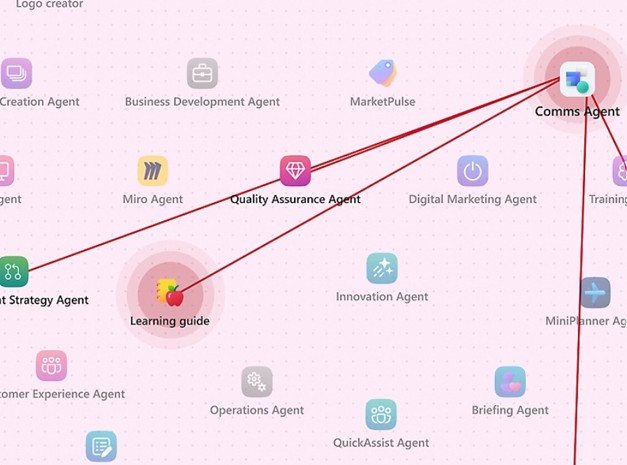
Microsoft officials have said repeatedly that they believe customers one day will license software agents the same way they do humans. But during Microsoft’s Q3 FY26 earnings call on April 29, Microsoft’s leaders made it clear that consumption-based pricing isn’t a distant goal; it’s on the near-term horizon.
“Any per-user business of ours, whether it’s productivity, coding, security, will become a per-user and usage business,” CEO Satya Nadella told analysts on the call. That means Microsoft expects companies to continue to license many of its products per seat/user, but supplement that with per-agent and/or metered usage fees.
Microsoft already announced earlier this week that GitHub Copilot is moving to usage-based pricing as of June 1. Additionally, Microsoft already is seeing 60 percent of its customer service customers in the business-app segment purchasing usage-based credits, execs said. And its Agent 365 control plane, which will be generally available on May 1, will likely add some kind of consumption-based pricing to its current per user licensing, based on Microsoft’s A365 Frequently Asked Question document.
Microsoft reported revenues of $82.9 billion and net income of $31.8 billion for Q3 FY26. With its solid Azure growth at 40 percent in Q3 FY26, Microsoft largely appeased investors who’ve been watching closely the growth of Microsoft’s cloud services. Microsoft expects Azure growth to continue at that pace in the coming quarter. They acknowledged that their planned capacity break-even date, which was supposed to be the end of fiscal 2026 in June, is now looking more like the end of this calendar year.
The company’s capex spending will continue to grow at a rapid clip to fuel continued cloud and AI demand. In Q4 FY26, Microsoft is projecting capex to hit $40 billion, and its total for calendar 2026 to reach $190 billion. Of that latter figure, $25 billion will be attributable to higher component pricing, officials said.
Microsoft officials said there are now 20 million paid Microsoft 365 Copilot seats (up from 15 million last quarter). Unsurprisingly, Microsoft officials did not mention the substantial discounting that is now the norm with M365 Copilot; many customers are paying 20 to 40 percent off the $30 per user per month retail price.
What About That OpenAI Deal?
During the earnings call, there was only a single analyst question about Microsoft’s updated relationship terms with OpenAI. As of April 27, the exclusivity clause between Microsoft and OpenAI is no more; OpenAI now has Microsoft’s official permission to provide all of its services to customers across any cloud provider.
Nadella noted that Microsoft continues to have access to OpenAI’s IP rights and its frontier model, royalty free (since Microsoft no longer has to pay a revenue share to OpenAI), through 2032. OpenAI also remains an Azure compute customer, and Microsoft still has equity in OpenAI, he said. He also maintained that Microsoft doesn’t want all its eggs in one basket.
“Our customers also have different expectations in terms of their model diversity” these days, he said.
During last quarter’s earnings, Microsoft officials disclosed that its backlog of cloud orders more than doubled in Q2, to a whopping $625 billion. Of this total, 45 percent was attributable to OpenAI’s Azure commitments over multiple years. The Q3 backlog is now $627 billion, but there was no talk of OpenAI’s share.
Meanwhile, Microsoft continues to look for ways to cut costs to pump money back into datacenter spending. Officials emphasized the various efficiency gains it has achieved using its own silicon, like its Maia 200 chip.
Microsoft announced its first-ever voluntary employee retirement program earlier this month. Currently, overall headcount at the company is down, year-over-year, officials said, without specifying a new total. In Q4 FY26, Microsoft is predicting it will pay $900 million in one-time costs for the program. An estimated seven percent of the 125,000-person U.S. workforce, totaling roughly 8,750 employees, are eligible based on the number of years they’ve been employed by Microsoft and their ages.

There are three words you should never say to a Microsoft auditor: “I don’t know.”
Not because honesty is bad. But in a Microsoft audit, those three words don’t just leave a question unanswered. They hand the auditor permission to fill in the blank with the worst-case interpretation. And in Microsoft licensing, the worst-case interpretation is almost always “license everyone.”
After two decades of audit defense engagements, I’ve watched “I don’t know” turn small licensing questions into seven-figure problems. Here’s why it happens, and what to say instead.
Microsoft Licenses Potential, Not Use
Potential use vs. actual use is the single most misunderstood concept in enterprise licensing, and it’s the foundation of nearly every audit shortfall I’ve ever seen.
When clients think about their licensing position, they think about who is actually using a product. When Microsoft thinks about your licensing position, they think about who could use a product based on how it’s provisioned. These are not the same thing. They are rarely even close.
If 50 employees actively use a SQL Server and 5,000 are technically capable of authenticating against it, Microsoft’s default assumption is that you owe licenses for the population that could access it. The burden is on you to demonstrate otherwise. And “I don’t know” isn’t a demonstration. It’s a concession.
A few examples will make this concrete.
The SQL Server That Just Got Re-Licensed by Core
Picture a SQL Server instance with 32 cores supporting an internal application. The auditor asks: How many users access this server?
If your answer is “I don’t know,” you have just lost the right to license that server under the Server + CAL model, assuming Server + CAL was even on the table for this workload to begin with. Microsoft will tell you (correctly, by their rules) that without a defensible user count, the only remaining licensing option is per-core. And per-core licensing on a 32-core box isn’t a rounding error. It’s a six-figure conversation.
Worse, that “I don’t know” can metastasize. If you couldn’t articulate user access for that server, the auditor has every reason to ask the same question about your other SQL servers. Suddenly you’re not facing one re-licensing event. You’re facing a portfolio review.
The right answer when the auditor asks who accesses that SQL Server is something like: “That instance supports our internal expense reporting application. It serves 87 users in the finance organization. We license it under the Server + CAL model and have CALs assigned for those users.”
The honest reality is that for many SQL Servers today, per-core is the only available licensing model. SQL Server Enterprise has been core-only since 2012. Broad-access systems and public-facing applications can’t be bounded by user count, and most clients no longer hold the legacy Server + CAL entitlements that would even make the question relevant. But where Server + CAL is still a viable model for a given workload — typically SQL Server Standard supporting a defined user population — you need to know it’s viable and be able to say so out loud. Otherwise, you’ll pay for the more expensive model by default, on a server where you didn’t have to do so.
The RDS CAL Trap
Remote Desktop Services (RDS) is where this gets really painful, and it’s a trap that catches even sophisticated customers.
Here’s the scenario. Somewhere along the way, an admin assigned the Domain Users group to an RDS server. Maybe it was a temporary fix that became permanent. Maybe nobody remembers who did it. The auditor finds that group membership and says: “Every member of Domain Users is authorized to access this RDS server. You owe an RDS CAL for each of them.”
If you have 8,000 employees in Domain Users, that math gets ugly quickly. And if your response is “I don’t know who actually uses the RDS server,” congratulations: You just bought 8,000 RDS CALs.
But do you actually owe them? Not necessarily.
If that RDS server sits behind Citrix, and many do, and you’re enforcing user-level access through Citrix policies that only publish RDS resources to a defined subset of users, then that is your defensible position. The Domain Users group on the RDS server itself becomes a red herring, because the only path to actually launch an RDS session runs through a Citrix layer that gates access to a known, named user population.
The auditor’s argument is “this group has access.” Your counterargument has to be “this group has theoretical access, but here is the access control layer that enforces who can actually use it, here is the user list that layer permits, and here are the licenses we hold for those users.” That is an articulated compliance position. It’s defensible. It might save you 7,500 CALs.
The vMotion Question
Here’s a virtualization version of the same trap, and it shows up the moment any Microsoft workload is running in a VMware or Hyper-V cluster.
The auditor asks: “Can these VMs move between hosts?”
If you say “I don’t know” (or worse, “yes” without context), you’ve just opened the door to one of the most expensive licensing rules Microsoft has on the books. Their position is straightforward: If a VM running a licensed Microsoft product could move to another host, that host has to be licensed too. Every host the VM is eligible to land on. Whether it has ever actually run there or not.
For a SQL Server or Windows Server workload sitting on a 12-host vSphere cluster, that math gets ugly fast. You don’t owe licensing for the one host the VM lives on today. You owe licensing for every host in the cluster.
There are two ways out of that situation, and you need to know up front which one applies to you:
Software Assurance (SA) with License Mobility rights. SA on those licenses gives you mobility rights that allow the VM to roam without re-licensing every host. If you have SA, say so, clearly and on the record.
Pinning the VMs. If you’ve configured Distributed Resource Scheduler (DRS) rules, anti-affinity rules, or host affinity that prevents the VMs from moving outside a defined subset of hosts, that becomes your defensible position. You only owe licensing for the hosts the VMs are actually permitted to run on, not the entire cluster.
You’re Not Out of Compliance. You Just Can’t Articulate It
This is a theme I come back to over and over with clients. Most organizations I work with are not actually out of compliance. They just don’t know how to articulate the compliance they already have.
The licenses are usually there. The access controls are usually there. The architectural justifications are usually there. What’s missing is the ability to walk an auditor through them in real time, with confidence, with documentation, and in language that maps to Microsoft’s rules.
That gap between actually being compliant and being able to demonstrate compliance is where almost all audit dollars get lost. Not in genuine non-compliance, but in defensible positions the client never managed to defend.
What Preparedness Actually Looks Like
Before any Microsoft audit — or honestly, before any internal license review — you should be able to answer three questions for every server and service in scope:
What does this support? What application, what business function, what user population.
Who has access, and how is that access enforced? Group memberships, Citrix policies, application-layer authentication, network segmentation — whatever is actually controlling who lands on the server.
What licensing model are we using, and why is it the right one for this server?
If you can answer those three questions, you can defend almost any reasonable Microsoft licensing position. If you can’t answer them, you’re negotiating with one hand behind your back — and Microsoft’s auditors are very good at sensing exactly when that’s happening.
The Bottom Line
Audit defense isn’t really about having the right licenses. It’s about being able to prove you have the right licenses, in the auditor’s language, with the documentation to back it up.
The next time someone from Microsoft (or any auditor) asks you a license-impacting question, the answer is never “I don’t know.” The answer is “let me come back to you on that with specifics” — and then you go find the specifics. Because in a Microsoft audit, the words you don’t say are often worth more than the licenses you do own.
At Directions on Microsoft, we help clients articulate compliance positions they often already have, before an auditor asks the question. Because the difference between a defensible answer and a seven-figure surprise isn’t usually about licenses. It’s about preparation.

Microsoft is changing the way GitHub Copilot pricing works starting on June 1, 2026. Rather than basing billing on premium requests, every Copilot plan will have a monthly allotment of GitHub AI Credits, with the option to purchase additional ones.
The move will mean usage will be calculated based on token consumption — including input, output and cached tokens based on the listed API rates for each model — explained Microsoft in an April 27 blog post about the GitHub pricing changes.
Microsoft plans to provide GitHub Copilot users a preview bill (available on the Billing Overview page at login) in early May so they can see what projected costs will look like before the June 1 transition.
The switch to usage-based pricing is not completely unexpected. In March, Microsoft rolled out changes to Copilot individual plans and paused purchases of certain plans ahead of the pricing change.
Copilots and agents have been passing usage thresholds that cannot be sustained with “all you can use” per-user licensing, so Pay As You Go (PAYG) pricing is becoming the norm. However, PAYG pricing units, like GitHub AI Credits and Copilot Credits, are consumed based on factors that are difficult to predict and govern, such as the number of tokens processed, explained Directions on Microsoft analyst Rob Sanfilippo.
“Customers should closely monitor the cost impact as the pricing model shifts to PAYG to determine any deployment or governance changes that are necessary to stay within budgets,” Sanfilippo said.
Microsoft officials said the change in GitHub Copilot pricing will result in “an important step toward a sustainable, reliable Copilot business and experience for all users.” (That’s a nod to a number of GitHub service disruptions earlier in the year that officials said were, in part, attributable to issues with high-volume clients and increased demand.)
Microsoft officials added that the GitHub Copilot of a year ago has evolved substantially, and agentic usage “is becoming the default,” which causes higher compute and inference demands (and costs).
How the New GitHub Copilot Pricing Model Will Work
Starting June 1, premium request units (PRUs) are being replaced with GitHub AI Credits. The base-plan pricing will remain as is, with Copilot Pro costing $10 USD; Pro+, $39 USD; Business, $19 USD; and Enterprise, $39 USD per user per month. Microsoft will include an allotment of monthly AI Credits in each plan. Additionally, Copilot Business and Enterprise customers are getting promotional credits ($30 per month for Business and $70 per month for Enterprise) for June, July and August.
One GitHub AI Credit is $0.01 USD. Microsoft explains:
“The cost of an interaction depends on two things: the model and the number of tokens consumed. A quick chat question using a lightweight model might cost a fraction of a credit. A long coding agent session using a frontier model across multiple files will cost more, because it’s doing more work.”
The new GitHub pricing model is just one piece of Microsoft’s growing effort to move to usage-based pricing. The Microsoft Agent Pre-Purchase Plan (P3) enables customers access more than 30 services across GitHub Copilot, Copilot Studio, Foundry and Fabric through one pool of funds using Agent Commit Units (ACUs).
Microsoft and OpenAI have amended their partnership agreement yet again. While Microsoft will remain OpenAI’s primary cloud partner and OpenAI products will ship first on Azure unless Microsoft is unable or unwilling to supply necessary capabilities, OpenAI now has Microsoft’s official permission to provide all of its services to customers across any cloud provider.
OpenAI already had deals in place with AWS and Google Cloud, so the new deal, announced April 27, seems to give what was already happening Microsoft’s official blessing.
Last summer, Google and OpenAI struck a deal via which OpenAI would use Google’s cloud for running its services. In February 2026, AWS and OpenAI announced that AWS would be the exclusive third-party cloud distribution provider for OpenAI Frontier, which is OpenAI’s platform for building, deploying and managing teams of AI agents. And OpenAI said it planned to buy 2 gigawatts of Trainium (Amazon’s purpose-built chip for AI) capacity for certain workloads. In return, Amazon said it planned to invest $50 billion in OpenAI. Microsoft made some noises about disputing the AWS-OpenAI deal, but didn’t take legal action.
Under the latest arrangement, Microsoft continues to have a license to OpenAI IP for models and products through 2032. But Microsoft’s license is no longer exclusive, and it no longer has to pay a revenue share to OpenAI. However, OpenAI does have to continue to make capped revenue-share payments at the same percentage to Microsoft through 2030, “independent of OpenAI’s technology progress,” (which means the “until AGI has achieved” clause is gone).
Late last year, Microsoft and OpenAI had amended their partnership so that OpenAI could turn itself into a for-profit business. Microsoft and OpenAI agreed Microsoft would no longer have right of first refusal for cloud workloads, even though OpenAI said it would spend $250 billion on Azure services. Microsoft also had exclusive access to OpenAI’s IP and models until OpenAI and Microsoft deemed that OpenAI hit the loosely defined artificial general intelligence (AGI) milestone.
A Good or Bad Deal for Microsoft and Customers? It Depends.
Microsoft used OpenAI to achieve a strong AI presence, riding the popularity of OpenAI’s GPT model by incorporating it into its own products, such as Azure OpenAI. Lately, however, its OpenAI partnership benefits have seemed a lot less clear-cut.
The latest update to the pair’s agreement “should help distract regulators who have been concerned about Microsoft pushing classic lock-in up to this point,” said Directions on Microsoft analyst Wes Miller. “I also think it’s also a bit of mutual acknowledgement (like it or not) that neither Microsoft nor OpenAI are actually in a clear leadership position anymore.”
Directions’ analyst David Berry had a somewhat different take.
“There is a general shift to multi-model/multi-vendor to reduce lock-in risks. While both benefit in that regard, Microsoft can pick the best of the best models to offer while OpenAI has to be the best of the best to attract cloud providers,” Berry said.
“Microsoft is reducing its exposure to OpenAI and is working with Anthropic, which arguably is the industry leader now,” he added.
To date, Microsoft has invested $13 billion in OpenAI. It had been serving as its exclusive cloud provider for the past several years.
During its second quarter FY’26 earnings call, Microsoft officials disclosed that its backlog of cloud orders more than doubled in Q2, to a whopping $625 billion. Of this total, 45 percent was attributable to OpenAI’s Azure commitments over multiple years, which worried some market watchers who have been cautious about OpenAI’s plans to become profitable.
Microsoft has rebranded Viva Connections as part of SharePoint, according to Executive Vice President and longtime SharePoint leader Jeff Teper. It’s an on-trend change, because Microsoft has been systematically dropping parts of Viva since 2023, and I expect more this year.
Why? The short answer is that the Viva brand has done its work: It gave Microsoft a toehold in the Employee Experience (EX) tech market and prevented any competitor from emerging that might compete with Microsoft collaboration products.
To see why that might be a concern, go back to Feb. 2021, when Viva was announced. That was roughly a year after the start of the COVID-19 pandemic. Executives and HR departments were focused on EX, trying to find effective ways to get messages to employees, monitor their behavior, and keep them collaborating effectively while many were working from home. SharePoint was traditionally Microsoft’s keystone product for those tasks, but Teams had emerged as Microsoft’s main communications channel, and products acquired with LinkedIn, VoloMetrix, and Yammer continued to pursue their own corners of the EX puzzle.
The solution: Create a brand to give the appearance of a unified platform and use licensing to bundle the actual disparate grab-bag of products with SharePoint and Teams, in the Microsoft 365 suites. Both tactics weaken the apparent value of competitors because Microsoft 365 customers just keep asking themselves, “Don’t I already own half of Microsoft’s EX solution already?”
Now, thanks to vaccines and hybrid work, the immediate crisis is over. Generative AI looks like the next place competitors to Microsoft 365 products could emerge. In five years, Microsoft has done the technical work to give Viva parts connections with Teams and SharePoint. It also has done an increasing amount of work to tie Viva with Microsoft 365 Copilot. And multiple Viva premium add-on licenses have popped up to pay for all that integration.
Microsoft could now remove the Viva brand, but it probably won’t. After all, anything that costs US$12 per user per month probably needs a name.

For most large organizations, the Enterprise Agreement (EA) renewal has always demanded serious preparation: commercial modeling, usage analysis, and negotiation strategy. Within a familiar framework, that work was hard enough. The agreement family had variations, such as a companion Server and Cloud Enrollment here, some transactional Microsoft Products and Services Agreement (MPSA) volume there. But the economics favored keeping the bulk of your investment inside the EA stack. The alternatives were not worth evaluating seriously.
That calculus shifted in November 2025. Microsoft’s elimination of programmatic volume discounts for online services removed one of the structural advantages that made the EA the obvious choice for large organizations. The pricing gap between EA and the alternatives closed materially. The result? For the first time in decades, the agreement landscape itself deserves a fresh look.
The Agreement Landscape Is Now Multi-Dimensional
Most organizations approach renewal thinking about a fixed set of decision criteria, including acceptable price points, amended terms and conditions, and a prioritized list of requirements to negotiate within the EA family. Because of the 2025 changes, the landscape now has new potential outcomes that must be actively considered — and not all of them are yours to choose.
On the voluntary side, two paths exist. You renew your EA on negotiated terms, as you always have. Or you migrate to a Cloud Solution Provider, known as CSP, a partner-managed program that has quietly become a legitimate enterprise consideration.
On the involuntary side, three scenarios are increasingly real. Microsoft may move you into its Enterprise Direct Services program, sometimes called MS-EDS or the S500 program, where the Licensing Solution Partner (LSP, formerly Large Account Reseller) is removed and Microsoft manages the relationship directly. Microsoft may position you for a Microsoft Customer Agreement – Enterprise (MCA-E), its own version of the CSP model, where Microsoft acts as both the agreement counterparty and the service provider. Or Microsoft may inform you that EA renewal is no longer an option and transition you to an MCA-based agreement outright. This last scenario is already happening to organizations below Microsoft’s evolving EA user-count eligibility thresholds.
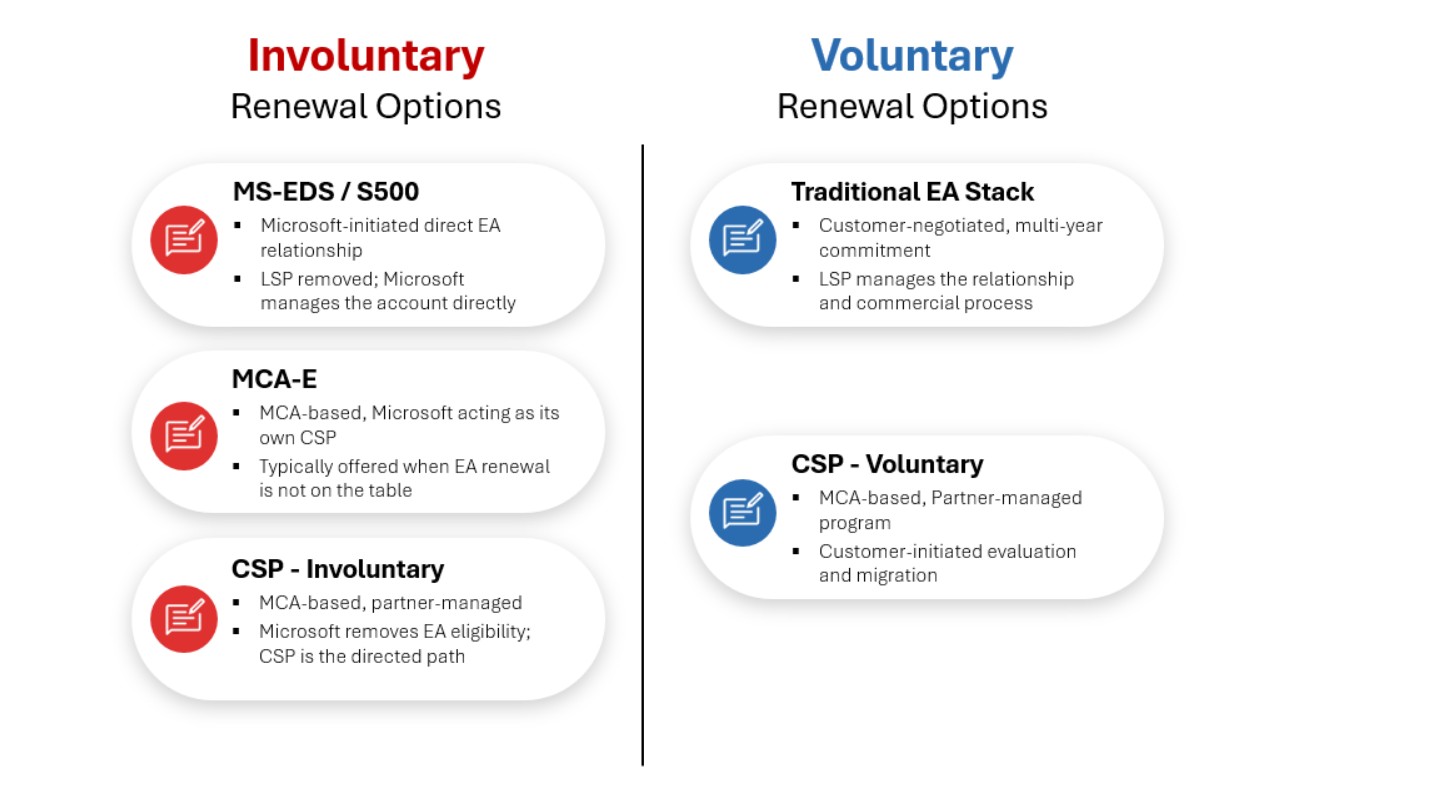
The contractual foundation matters here. The traditional EA sits on a contract stack you have likely been operating under for years: the MBSA, the Enterprise Agreement, the Enterprise Enrollment, and the Product Terms. MS-EDS operates on that same foundation, with a different relationship model.
CSP, MCA-E, and a forced MCA migration all sit on a different foundation entirely: The Microsoft Customer Agreement, or MCA. The MCA is evergreen, carries no fixed term, has no true-up mechanism, offers no Customer Price Sheet with step-ups or future pricing, and includes product use rights that can be updated multiple times per year.
Understanding what actually governs your agreement, and what is merely reference material, is the work that separates customers who negotiate from customers who comply. Directions on Microsoft is publishing and podcasting extensively on the EA-to-MCA comparables. If any of these scenarios are on your horizon, that research belongs in your preparation.
CSP: The Cheat Code
You do not need to master every lane. If Microsoft is pushing you into the MS-EDS direct model, you are still negotiating a traditional EA stack just with a different support structure and no LSP in the room. That shift can create its own leverage. Customers who find the direct model inferior to what their LSP provided have a real grievance, and some LSPs will now offer traditional EA support services independently for a fee. That new cost is a negotiating data point.
The wildcard is MCA. And the practical entry point for understanding this new dimension of the agreement landscape is CSP. Understanding CSP unlocks more of the new agreement landscape than any other single workstream and it pays dividends in renewal preparation that extend well beyond agreement selection. Master CSP, and the rest follows naturally.
First, CSP educates you on the MCA. Because CSP is MCA-based, working through a serious CSP evaluation forces you to understand the agreement vehicle that sits beneath two of the five outcomes above. MCA-E is simply Microsoft using its own platform to deliver the same model. If Microsoft initiates either conversation, you will already know what you are looking at.
Second, it positions you as a credible alternative shopper. A well-documented CSP evaluation, with real pricing from capable partners, changes the dynamic with Microsoft’s commercial team. The alternative does not need to be your destination. It needs to be credible. Enterprise-grade CSP, evaluated seriously and priced competitively, clears that bar.
Third, it gives you something to negotiate with if Microsoft initiates the conversation. A customer who understands CSP, has relationships with qualified partners, and has modeled the economics has options. A customer who has never looked at it is negotiating from a single data point: whatever Microsoft just handed them.
Fourth, and perhaps most practically, working through a CSP evaluation forces you to confront the real licensing differences between EA and MCA-based programs. The From-SA discount mechanism, device licensing options, server application license rights, and other EA-specific constructs do not have direct equivalents in CSP. Some of those gaps are meaningful. Some have workable alternatives. Some will not matter for your specific environment. But you can only assess which is which if you do the work before the clock is running on your renewal.
What Enterprise-Grade CSP Actually Requires
CSP is not the program your reseller uses to provision your Microsoft 365 seats. Enterprise-grade CSP is a different discipline, and the distinction matters.
A qualified enterprise CSP partner brings transition methodology, multi-program licensing expertise, and operational maturity across the full Microsoft stack. The support model is different from what EA customers are accustomed to. The billing mechanics are different. The compliance posture is different. And the transition itself carries operational complexity that is easy to underestimate.
Consider one example. An EA customer who moves to CSP and does not execute a formal opt-out of their expiring EA can find themselves receiving unexpected invoices from Microsoft as the EA rolls into extended payment terms, even after the CSP relationship is active. That is not an edge case. It is the kind of operational detail that surfaces after the fact in transitions that were treated as administrative rather than strategic. Proper migration off an EA, including license reassignment and formal transition steps, is not optional.
The CSP market is wide open and competitive. That is good for pricing discovery. This means the quality gap between providers is significant. Not every CSP that can quote enterprise volume has the infrastructure to support it.
Building the Muscle
CSP readiness is not a capability you develop in the final quarter before renewal. The work has four components, none of which compresses well under deadline pressure.
Partner evaluation comes first. Understanding which CSPs operate at genuine enterprise scale, and what their transition methodology actually looks like, requires conversations that happen well outside the urgency of a renewal cycle.
Economic modeling comes next. Your specific scenario matters: your From-SA exposure, your server licensing posture, your Azure footprint, your support model dependencies. A CSP quote without that holistic consideration is a number, not an analysis.
MCA term awareness runs in parallel. Before any MCA-based agreement is on the table, your legal and licensing teams need to understand what is in it and what has changed from the EA construct you have been operating under. The details live in the contract documents, not in the service descriptions and reference materials that are easier to read but do not govern your obligations.
Gap assessment ties it together. Which EA-specific constructs matter for your environment? Which gaps have viable workarounds? Which represent real cost exposure? Those answers shape your negotiating position regardless of which path you ultimately take.
The organizations that will have genuine optionality at their next renewal are the ones doing this work now and considering the full licensing program mix available to them.
Your Move
CSP may or may not be the right outcome for your organization. That is almost beside the point. Understanding it is the fastest path to understanding the entire new agreement landscape, and to showing up at your next renewal prepared for whichever conversation Microsoft decides to start.
The agreement landscape has changed. Your preparation should, too.
Your Next EA Renewal Series
Part 1: How to Avoid the Financial Cliff
Part 2: Why the Microsoft Lens Matters
Part 3: Why Your M365 Roadmap Is the Key to Negotiation
Part 4: A Multidimensional Agreement Demands a New Strategy (this article)
In the United States, police officers can legally lie to you. They can claim to have evidence they don’t have, assert that a co-defendant already confessed, or promise leniency they have no authority to deliver. It’s all perfectly legal, and courts have upheld it repeatedly. Most people don’t know this, and that ignorance is exactly what makes the tactic effective.
Microsoft software license audits operate in a strikingly similar dynamic. The stakes can reach millions of dollars. The rules are written entirely by one side. And the people sitting across the table may be pressing a position they cannot actually support — or may simply not understand — regarding the licensing terms they are being paid to enforce. Whether the cause is incompetence or pressure to produce findings, the bill that lands on your desk looks exactly the same. Documented cases include a $14 million public sector shortfall negotiated down to $700,000, and a $6 million Services Provider License Agreement (SPLA) claim reduced to $300,000. These are not anomalies.
Who Is Actually Auditing You?
Most organizations assume they are being audited by Microsoft. They are not. Microsoft contracts third-party firms, typically Big 4 accounting firms such as Deloitte, PwC, KPMG, or EY, to conduct license compliance reviews on its behalf. These firms are compensated by Microsoft. Their continued engagement depends on producing findings. That conflict of interest is never disclosed to the organization being audited.
The auditors assigned to these engagements are frequently generalist accounting professionals with limited Microsoft licensing expertise. There is no licensing certification required to conduct a Microsoft audit. No regulatory body governs the process. No licensing board sets standards of accuracy. Any firm Microsoft authorizes can review your environment and assert a multi-million dollar shortfall without being correct.
There is also a financial exposure of which most organizations are unaware: If an audit determines non-compliance exceeding 5% for any given product, the organization can be required to bear the full cost of the audit itself. You may end up paying a firm engaged by and accountable to Microsoft to get your licensing wrong and then be billed for it.
The Interrogation Room Has No Oversight
Microsoft authors the Product Terms. Microsoft interprets the Product Terms. Microsoft selects the auditor. Microsoft reviews the findings. In no other compliance context would a single party simultaneously occupy the roles of rule-maker, interpreter, enforcement authority, and final arbiter with no independent oversight body available to the organization being audited. The Microsoft contract refers to an “independent third-party auditor.” Do not confuse this with impartial or fair.
Compounding the structural problem is a talent one. Microsoft has significantly reduced its internal workforce of seasoned licensing professionals, replacing experienced staff with personnel who have limited grounding in the company’s own Product Terms and their long, evolving history. When an under-qualified Microsoft compliance representative works alongside an equally inexperienced auditor, the result is predictable: confidently stated positions that don’t survive scrutiny, and organizations that pay for them anyway, because no one in the room pushed back.
The Patterns That Repeat
One of the most consistent features of Microsoft audits is the disconnect between what auditors assert verbally and what they are willing to commit to in writing. Bold claims are made on Teams calls about what a license covers, what triggers a compliance requirement, what you owe. And those same claims routinely fail to appear in any subsequent written communication. No citation. No documentation. No record. Verbal pressure leaves no transcript. The pattern suggests experienced auditors understand that too.
Three documented engagements illustrate what this looks like in practice:
In one case, a public sector organization fully licensed with Microsoft 365 G3 was told repeatedly that those licenses did not include SharePoint CALs for on-premises use. The claim is flatly incorrect; the Product Terms are unambiguous on this point. Neither the auditor nor the Microsoft compliance representative ever provided written substantiation. When challenged, Microsoft promised a SharePoint subject matter expert would appear on a future call to validate the position. That expert was never produced. Without independent representation, the organization would have purchased licensing it already owned: A $2 million invoice of taxpayer dollars.
In a second case, an auditor used “last known user” inventory data to assert that unlicensed users had accessed Project and Visio installations. The logic ignores how user-based licensing actually works: the compliance trigger is actual use, not proximity to a device, and Microsoft’s own authentication architecture ensures only the licensed user can run the software. When written substantiation was requested, the finding quietly disappeared from the next draft report.
In a third case, a seven-figure shortfall evaporated when independent counsel identified the free fix: Swap the wrong Office installer for the correct Microsoft 365 client. The auditor accepted the remediation, then immediately requested a new script to identify users who had accessed the affected devices during the audit period. The data collection window had already closed. The request was a fishing expedition for a replacement finding. It was declined. The auditor dropped it.
In every case, the methodology was structured to produce the largest possible number. Auditors reliably choose the license allocation approach that generates the greatest shortfall, and they do not proactively identify remediation paths that would reduce it. Finding the shortfall is the engagement. Resolving it cheaply is not.
What To Do When the Letter Arrives
The audit notification is designed to be intimidating. It implies the process is Microsoft’s to conduct and yours to accept. It is not.
Before responding to anything, engage an independent Software Asset Management (SAM) specialist — one with no relationship to Microsoft, its resellers, or the auditing firm. Demand written substantiation with a specific Product Terms citation for every claim made verbally. Treat the data collection window as fixed. You are not obligated to provide additional data on demand, particularly after a finding has been resolved.
Challenge how licenses were allocated and ask directly whether remediation paths exist that would close gaps without purchasing new licenses. Document everything yourself and follow every call with a summary email that establishes the record.
The gap between what Microsoft’s auditors claim you owe and what you actually owe is rarely small. It is frequently measured in hundreds of thousands of dollars, and sometimes in millions. That gap does not close on its own. It closes when someone in the room knows the Product Terms as well as, or better than, the auditor does. Before you respond to anything, make sure that person is on your side of the table.

Your costs are about to shoot straight to the Moon — and unlike the astronauts, they’re not coming back.
On April 1, 2026, four astronauts aboard NASA’s Orion spacecraft departed Earth orbit for the first crewed lunar mission in over 50 years. On April 6, they flew past the Moon at 4,067 miles above the surface, which is the closest humans have come to the lunar surface since Apollo 17 in 1972. They are on their way home now, splashing down Friday.
Your Microsoft Enterprise Agreement renewal costs are also heading to the Moon. The difference is they aren’t coming back.
Three forces are converging at EA renewal tables right now, simultaneously, in a way they never have before. If your renewal lands after July 1, 2026, all three apply to you.
Force one: the end of volume discounts
For 25 years, Microsoft’s EA offered tiered pricing based on seat count. Level D customers (those with the largest deployments) received a 12% discount from list price. These weren’t perks. They were the pricing structure enterprise IT budgets were built around.
On November 1, 2025, Microsoft eliminated this structure entirely for online services under a policy called “Online Services Pricing Consistency.” Every EA customer now pays Level A, list price, regardless of seat count. For a Level D customer, losing a 12% discount is a 13.64% base price increase before anything else changes. It arrived without a press release most finance teams ever saw.
Force two: the compliance reckoning
This one doesn’t arrive in an announcement. It arrives during your renewal conversation.
Organizations running mixed environments, such as Enterprise users on M365 E3 or E5 alongside Frontline Workers on F1 or F3, are increasingly being informed that their Frontline users have access to security and compliance features they aren’t licensed for. The exposure occurs at the tenant level. The remedy is a mandatory add-on: the Defender and Purview Suite Frontline add-on at $13.00 per user per month — effectively doubling Frontline Worker costs.
This requirement isn’t new. The enforcement is. And it surfaces at the renewal table, where you have the least room to respond to it.
A 12,500-seat manufacturer I advised recently had 12,000 Frontline Worker F3 licenses alongside their Enterprise users. The compliance gap surfaced mid-renewal. The three-year cost: $5.6 million for a requirement that had existed throughout their previous agreement without ever being raised.
Force three: the July 2026 price increases
Effective July 1, 2026: M365 E3 increases 8%, from $36.00 to $39.00 per user per month. M365 E5 increases 5%, from $57.00 to $60.00. Frontline F1 increases 33%. F3 increases 25%.
For organizations renewing after July 1, all three forces apply simultaneously. The math compounds in one direction.
What to do before your renewal conversation begins
Three actions matter most, and all three require time you may not have if you wait until the quote arrives.
Demand price transparency: base price, discount applied, resulting price, in writing, line by line, before you sign. If your representative cannot produce this, that is information.
Audit your Frontline Worker licensing configuration against Microsoft’s current tenant compliance requirements now. By the time it surfaces at the renewal table, your leverage to negotiate it has largely passed.
Test the market. Microsoft licensing is transactable through hundreds of authorized Cloud Solution Providers. Competitive bids from the channel produce material differences in the post-volume-discount environment. Run the process before you sit down at the EA table, not after.
Microsoft licensing is a seven- or eight-figure procurement decision. It deserves the same competitive rigor applied to every other spend category at this scale. The renewal quote will be reassuring. The math may not be.
It wasn’t that long ago that everybody, including your correspondent, was hailing Satya Nadella as the “philosopher-king” of technology: Microsoft had seemingly beaten all the others to the punch as the first mover in enterprise AI. FOMO-driven companies signed huge contracts for Microsoft 365 Copilot and Azure’s AI features. The stock price soared.
Now, Microsoft’s stock is down 25%; Copilot is roundly accused (unfairly, to some extent: we’ll get into that in a moment) of being overhyped; and Anthropic and Google and others have produced remarkable, useful, and addictive innovations like Claude Code, Gemini, and NotebookLM. “AI is killing Microsoft,” shouts a somewhat hysterical article in Futurism. And Microsoft’s latest marketing push to brand their customers and partners as “frontier” firms (meaning, as I understand it, they’ve bought lots ‘o Copilot and AI from the Redmond giant) feels, well, desperate.
What’s the truth in all this?
If you listened to my latest podcast with George Gilbert and Peter O’Kelly, then you know we have at least a suspicion that Microsoft, and in particular Office, is approaching an existential moment. Here’s the proposition:
The modalities behind which people create content and make decisions is changing – for the first time in forty years. For decades, it was Word and PowerPoint and Excel. Axiomatic. Paradigmatic. The way it always was.
But remember: they’re separate applications – ultimately – because of the 640k limit of the original IBM PC; relics of the days when they competed with WordPerfect and Lotus 1-2-3. There’s nothing intrinsic about the distinction: you can write text in PowerPoint, create a graphic in Excel, add a table in Word. Functionally, they (now) overlap.
Now there are no limits.
You can use Gemini or Claude (or Copilot) to do all your research. Then tell them to create whatever output you need: a PowerPoint or PDF for the CEO, a spreadsheet for the CFO, a Word doc for marketing. The format is the end result, not the tool.
Or, as Peter said, it’s model-view-controller for the human. (Good one: I wish I’d thought of that.)
Therefore: is Microsoft 365 Copilot just a bolt-on? A desperate attempt to keep the old modality alive?

Hey, I’m writing this in Word. I wrote my latest novel in Word (how’s that for sneaking in a plug?) Office is the single most entrenched application suite in history and it will stay so for a good while to come. And look, Microsoft 365 Copilot has come a long way since its way, way overhyped introduction – it’s quite useful now after multiple releases. (No, I’m not using it for this post.)
But one cannot help but wonder if the writing (yes, a pun) is on the wall, if still somewhat faint, for the Office applications. Will the well-scrubbed kids in school today start with PowerPoint to write their presentations – or converse with ChatGPT and have it output some amalgam of different kinds, the most effective kinds, of human communication there are, whatever we or they determine those to be?
Conclusion: archetypal models of content will change: a new model will emerge. To what, yet, we don’t know: we only have early hints, anecdotal tales of new things that hold promise. A thousand flowers are blooming.
This is a time of reinvention, an extraordinary moment of discovering the most efficient and effective ways of information synthesis, of content creation, of presentation, of decision-making. Perhaps soon – and, I predict, sooner than you think – all information on the internet, all the trained data in LLMs, all the graph and relational and unstructured databases in your enterprise, managed, safe, and secure, will surface before you in…what? Some sort of blank canvas? A friendly human-looking face waiting to converse with you?
Anyway, I don’t know. But whatever the UI, odds are, it will know what you want to create, and how, before you do.
Don’t believe me? Listen: paradigm shifts happen. There was a time before PCs, before the internet. Microsoft has, somewhat amazingly in my opinion, been able to cross chasms again and again; but the potential obsolescence of Office – there, I said it – is a big one. Will Copilot Pages, or Loop, or some derivative, become the “front end” for Office, with the traditional apps relegated to, in effect, DLLs?
Or do the Microsoft execs have their collective heads in the sand?
Or are Word and PowerPoint and Excel immortal?
Where will they be in five years?
What will you use to create content?
I know: it’s been a while since my last blog post; sorry about that. I’ve been working on a really cool, awesome, and hush-hush new project for Directions which we hope to introduce to you in the next few months. I can’t wait to show you: stay tuned!
And of course, you can always reach me at bbriggs@directionsonmicrosoft.com.
Microsoft 365 is not simply the largest licensing component of the Enterprise Agreement (EA). It also is the place where Microsoft can most clearly read where you are heading — what you are adopting, what you are ignoring, and how committed you are to the broader ecosystem. Every workload deployed, every capability left unused, every third-party tool sitting alongside the platform sends a signal. Taken together, those signals form a picture of you as a customer that Microsoft carries into every negotiation.
That picture is your M365 roadmap, whether you built it intentionally or not. If you have not defined your own story, Microsoft will form one based on what they can observe. And what Microsoft observes without context rarely works in your favor.
The License Is Not the Foundation. Your Feature Roadmap Is
In most EA conversations, the discussion starts with licensing. What tier are we on? Where do we need to be? What will it cost to get there?
That is the wrong starting point.
Microsoft 365 is not a single product. It is a collection of individual features and capabilities. Microsoft packages those features into products, groups products into bundles, and groups bundles into suites like E3, E5, and E7. Those suites, bundles, and products do not determine your roadmap. Your feature usage does, and that usage determines what licensing configuration you actually need.
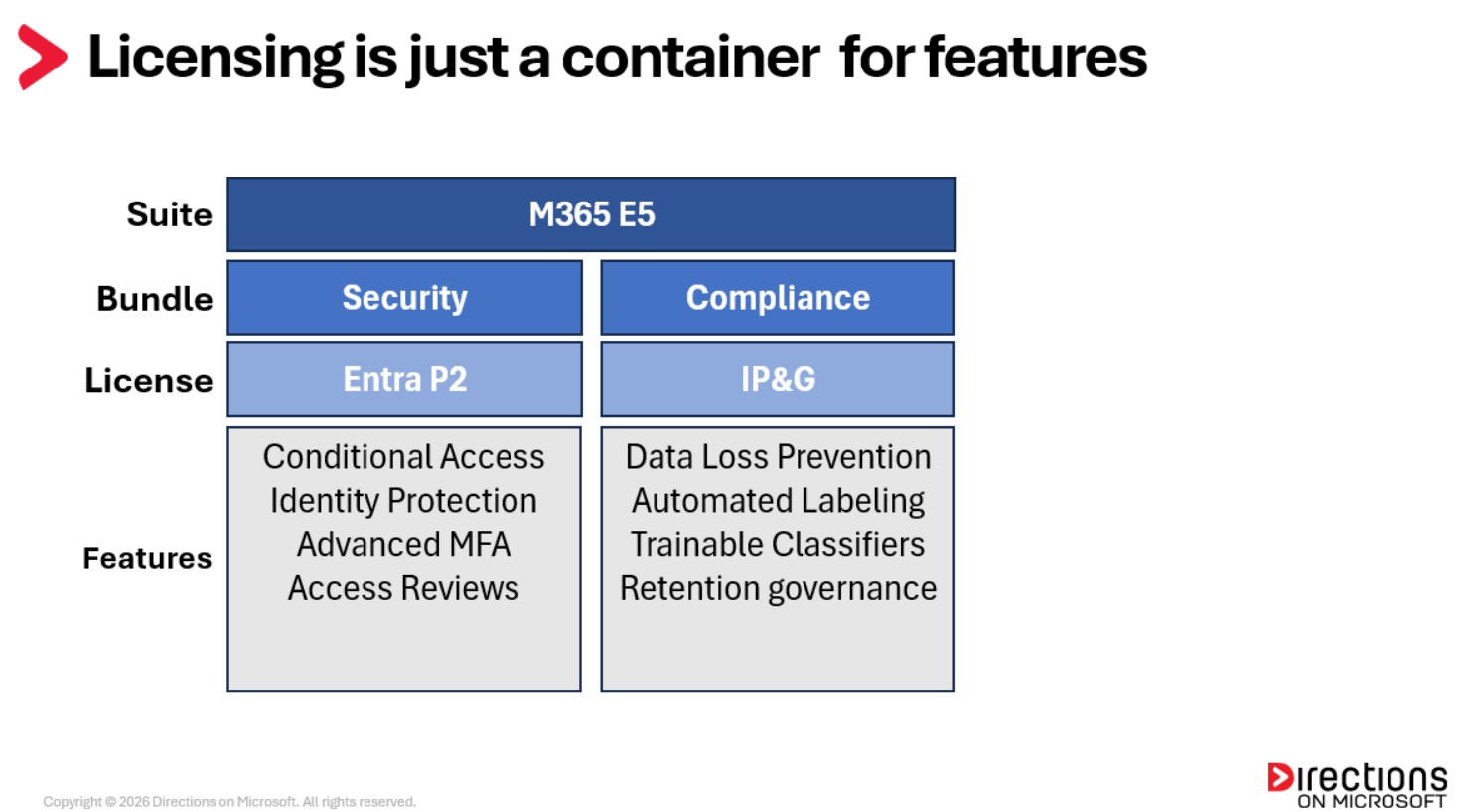
This means your leverage comes from which features are being adopted, how those features form a roadmap, and what story that roadmap tells. The right questions to be asking are:
- What features are we actively using today?
- What are we planning to expand in the near term?
- What capabilities are on the horizon, directionally relevant to where we are heading?
- Are we considering non-Microsoft alternatives for any part of the platform?
These questions uncover your true picture of M365 value and become the roadmap that anchors your negotiating position. With the right feature roadmap, you can tell the right licensing story, and that story is your most powerful asset at the negotiation table.
Build Your M365 Feature Roadmap
Work through the M365 platform capability by capability and assign each one to a horizon: Now, Next, or Future.
Now reflects what you have actively deployed today across your organization. This is your baseline and the foundation of your current licensing requirements.
Next reflects what you are planning to adopt — capabilities with real intent and a place on your roadmap.
Future reflects what you are considering, meaning directionally relevant capabilities that are on your radar but not yet planned. These are the nice-to-have workloads you would welcome if they came in the box at the right price but would not pay for independently today.
Playing the Licensing Tetris Game
Once you have that picture, the real work begins: Finding the optimal combination of licenses that covers what you need without paying for what you don’t. Think of it as a Tetris game. The goal is to rotate the available licensing blocks until they fit your feature roadmap as cleanly as possible. Sometimes you clear four rows at once. Sometimes you just survive until the next piece.
This is where bottlenecks emerge, and where the most consequential decisions are made.
Consider a common example. Your security team wants Data Loss Prevention (DLP) for Microsoft Teams chat and channels. That capability lives inside the Information Protection and Governance (IP&G) license, which is part of the E5 and E7 bundles.
The cheapest standalone path to that one feature is the IP&G add-on. But IP&G comes bundled with a significant set of additional capabilities: automated labeling, trainable classifiers, retention governance, and more. If DLP for Teams is the only thing you have deployed or planned from that license, your value realization from IP&G is going to be very low relative to what you are paying for it.
That is a bottleneck. And it forces a question that sits at the heart of every EA negotiation. How do you justify paying full price for something you are only getting fractional value from?
But bottlenecks can work in your favor too. Suppose DLP for Teams is on your Next list, but data classification and automated retention policies are sitting in Future. When you look at IP&G as a block, you realize those Future capabilities are already included. Suddenly it makes sense to pull them forward, move them from Future to Next, and build a broader data governance adoption story around the full IP&G capability set. Now you are not just buying a license for one feature. You are telling Microsoft a story about accelerating your data governance journey, and you can ask them to fund that rollout as part of the deal. What started as a bottleneck becomes a give-and-get opportunity.
That is the Tetris game. You rotate the blocks, you look at what fits, and sometimes what looked like an obstacle turns into an advantage.
Rationalize Your Technology Portfolio
One dimension that belongs on every roadmap is third-party technology overlap. Most organizations carry a mix of Microsoft and non-Microsoft solutions across identity, security, endpoint management, collaboration, and compliance. For years, the economics of running both side by side were manageable. That is becoming harder to sustain. As Microsoft pricing continues to reset upward with each renewal cycle, the cost of maintaining parallel solutions means paying for Microsoft capabilities you own but don’t use because a third party is doing the job. That is increasingly difficult to justify.
Knowing where those overlaps exist, and when the competing contracts expire, is not just good housekeeping. It is negotiating leverage. A third-party contract coming up for renewal is a signal Microsoft can act on, a specific and time-anchored reason to invest in your roadmap. And the same analysis cuts the other way. Walking into a renewal knowing exactly where Microsoft can replace a third-party solution gives you something to negotiate with those vendors too. Credible Microsoft alternatives have a way of making incumbent vendors suddenly more flexible on price.
Organizations that do this work and truly understand their feature roadmap enter the negotiation with something invaluable, namely, a strategy grounded in their own data, built around their own priorities, and defended on their own terms.
From Roadmap to Winning Strategy
Over the course of my career I have helped hundreds of organizations build feature roadmaps like the one described in this article. The ones that do it well walk into their EA negotiation knowing exactly what they need, why they need it, and what they are willing to pay for it. That clarity changes everything about how the negotiation unfolds.
Here is what that looks like in practice. Your roadmap analysis tells you that at your core you are an M365 E3 organization, with strong intent around IP&G and early consideration of elements of the Defender stack. Your optimal licensing configuration is E3 plus IP&G, which are the right Tetris blocks for where you are and where you are heading.
Then Microsoft walks in with E5 or E7.
Because you have done the work, you know exactly how to respond. You are not caught off guard and you are not guessing. You can say with confidence that while E5 is appealing and would allow you to pull some Future capabilities forward, the value realization in the near to medium term does not justify the cost. If Microsoft wants to change that calculus, they know what they need to do.
That is leverage. Not bluster, not posturing — just a clear, grounded position that Microsoft has to work around rather than through.
Your roadmap leads you to the optimal licensing configuration for your organization: The right Tetris blocks, assembled around your own data and your own priorities. That configuration becomes your anchor going into the negotiation. What you ultimately sign may look different. Microsoft will push, concessions will be made, and the final agreement will reflect the reality of the negotiating table. But if you have done your roadmap correctly, the outcome will be yours to shape. And whatever you sign, you will know it was the right call.
Your Next EA Renewal Series
Part 1: How to Avoid the Financial Cliff
Part 2: Why the Microsoft Lens Matters
Part 3: Why Your M365 Roadmap Is the Key to Negotiation (This article)
If you use M365 Copilot, or more specifically Copilot Chat, get ready for a number of changes on April 15.
Microsoft announced in the M365 Admin Message Center two significant changes to Copilot Chat, coinciding with general availability of advanced reasoning for the service. Microsoft will be updating the names of M365 Copilot and Copilot Chat, tying each to performance. It also is pulling back some features of Copilot Chat from enterprise organizations.
The impacts of these changes are still being explored so some of the details could change. But here’s what’s new this month:
In MC 1253863, dated March 17, Microsoft announced plans for the new naming scheme for Copilot. In MC1253858, dated March 17 — and seemingly only viewable by organizations with more than 2,000 M365 users — Microsoft announced restrictions coming on April 15 to Copilot Chat for unlicensed users.
We asked Microsoft to confirm whether the company planned to restrict Copilot in its Office apps for Basic/Unlicensed users, and a spokesperson told us that the information in the Microsoft Support article about this topic was “the source of truth.” However, that article did not mention anything about the coming restrictions. We asked again for clarification and received no response from Microsoft.
Premium and Basic Distinctions Coming
It’s good news that Microsoft added a naming convention to M365 Copilot and Copilot Chat to clear up some of the confusion and ambiguity surrounding the versions of Copilot Chat versus the chat feature itself.
“M365 Copilot (Premium)” will refer to the $30 USD per user per month add-on license, and “Copilot Chat (Basic)” will become the new name for the service not requiring an add-on license. The name changes also will come with designated performance levels. It’s long been assumed that Microsoft applied some kind of throttling to the Copilot service, and now it’s documented, although not quantifiable.
“Priority access” for Premium will provide consistent and faster response times including during peak usage times. “Standard access” for Basic can experience fluctuations in the service throughout the day where capabilities may be temporarily restricted. This is by design to support the priority access of premium users. You’ll be notified if a service isn’t available.
Bigger Orgs to Face Bigger Restrictions
Microsoft plans to remove Basic Copilot from the Office apps for customers with over 2000 M365 seats. This will affect Word, Excel, PowerPoint and OneNote. Basic Copilot still will be available through the M365 Copilot app and in Outlook. Customers with fewer than 2000 M365 users will not be affected. Affected users who up until now had access to Basic Copilot will lose it and access to the new advanced reasoning capabilities in Office, including the ability to interactively generate and modify content within the apps (previously known as Agent Mode) and access to Anthropic models.
Microsoft hasn’t explained the reasoning behind removing Basic Copilot from enterprises, however, a drive for more licenses is likely. Larger customers typically have more capital (and more leverage to negotiate) than smaller companies. If Microsoft’s calculation is successful, and enterprises decide they will pay for add-on M365 Copilot licenses to keep the lost functionality this change could potentially drive up Microsoft’s adoption numbers for the end of its fiscal year (June 2026).
It isn’t surprising that something had to change. The fixed fee model for M365 Copilot may not be viable due to ongoing feature updates, capabilities shifting to the base service, and increased costs from new partnerships like Anthropic. While removing features from Basic Copilot doesn’t affect pricing, we’ll find out if customers think Copilot’s Office integration is worth the expense.
Pavan Davuluri, executive vice president, Windows + Devices, has declared new priorities for Windows development in a March 20 letter to the company’s “Insider” beta testers. If the promises pan out, the Windows division and its customer just got an AI tax break. It’s good news for those who manage PCs for large organizations.
The AI tax is the hit every Microsoft product group is taking to promote the company’s AI strategy. Each team has had to devote money, engineers and screen space to create AI features, often promoted by in-app ads. Microsoft believes these kinds of additions help show investors that Microsoft’s massive investments in AI data centers and software has a path to breakeven.
The tax landed hard on the Windows team. What people actually want out of Windows is performance, reliability, and the OS to just get out of their way, providing fast access to their own apps and data.
Two events at the start of 2026 might have pushed the Windows org to finally do the right thing:
1. A very bad Windows update broke numerous PCs and required a recall – twice. This just reinforced users’ perception that Windows 11 is still less reliable than Windows 10 was.
2. Financial data came in for the holiday shopping season and confirmed that AI features and Copilot+ PCs did not budge Windows sales on new PCs. AI, like every other “transformative” technology since the Internet, couldn’t move the needle.
Among the quality commitments Davuluri announced:
- Removing unnecessary Copilot additions to Snipping Tool, Photos, Widgets and Notepad
- Reducing the number of forced Windows Updates and giving users more control over their timing
- Providing more taskbar customization permissions
- Making improvements to File Explorer around performance and navigation
- Introducing changes to the Windows Insider test program around channel definition, access to new features, better quality builds
Microsoft will focus on making Windows 11 performance better in a number of areas such as reducing resource usage by Windows; reducing interaction latency; and improving the performance, reliability and integration of the Windows Subsystem for Linux, he said. And it also will improve the reliability of drivers, apps and Windows Hello, Davuluri added.
If Windows + Devices is really allowed to focus on performance, reliability, and software quality over AI flash, anyone managing a PC fleet can hope for a quieter start to 2027 than they got in 2026.
Enterprise Agreement negotiations with Microsoft have always been shaped by two forces: numbers and narrative.
Numbers reflect the economic scale of the relationship, and include metrics such as how many users are licensed, how quickly the environment is growing, and the overall size of the deal. Narrative reflects how Microsoft interprets where your organization is heading within the broader Microsoft ecosystem.
Both have always mattered. But as Microsoft’s portfolio has expanded from individual products into an integrated ecosystem of platforms, the way Microsoft evaluates customers has become more holistic and more narrative driven.
Today, negotiations are influenced not just by the scale of the agreement, but by the signals Microsoft interprets from how your organization adopts its technology. These signals collectively form the lens through which Microsoft determines your strategic value as a customer, and ultimately how it approaches the negotiation. Understanding this Microsoft lens is the first step in shaping your negotiation strategy.
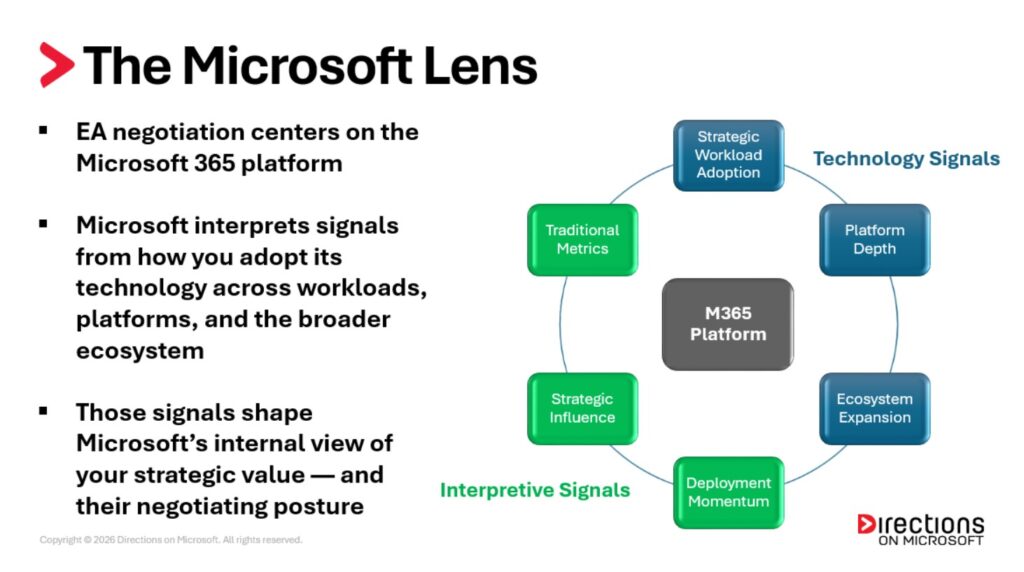
The signals Microsoft interprets generally fall into two categories, namely technology signals and interpretive signals.
Technology Signals
Technology signals reflect what you are adopting.
Strategic Workload Adoption: Signals whether the organization is adopting Microsoft’s priority capabilities.
Examples:
• Copilot(s)
• Power Platform
• Advanced Security Workloads: Entra Suite, Advanced Purview, Sentinel
These indicate whether your organization is moving toward Microsoft’s strategic workloads.
Platform Depth: Signals how deeply the organization has committed to the M365 platform.
Examples:
• Microsoft 365 suite level (E3 → E5 → E7)
• Frontline worker expansion
• Security portfolio rationalization (Microsoft vs. third-party tools)
These signals indicate whether the M365 platform is becoming foundational within the organization’s environment.
Ecosystem Expansion: Signals whether Microsoft’s footprint is expanding beyond the core M365 platform.
Examples:
• Azure workload adoption
• Dynamics deployments
• Unified Support agreements
These indicate whether the organization is moving toward broader adoption of the Microsoft ecosystem
Interpretive Signals
Interpretive signals reflect how Microsoft interprets your strategic trajectory relative to their overall vision.
Deployment Momentum: Signals how quickly new capabilities move from evaluation to production deployment.
Examples:
• Copilot pilots expanding into enterprise rollout
• Defender deployments replacing existing security tools
• Automation capabilities scaling across departments
Momentum signals whether platform adoption is likely to accelerate over time.
Strategic Influence: Signals your potential value in influencing other customers.
Examples:
• Iconic brand
• Reference customer potential
• Reference case studies for strategic workloads
These signals can influence Microsoft’s willingness to invest strategically in the relationship.
Traditional Metrics: Signals related to the economic scale of the agreement.
Examples:
• Deal size
• Environment growth trajectory
• Renewal timing
Traditional metrics still matter, but they now represent only one category of signals Microsoft interprets when evaluating a customer.
The Amplifying Effect of Specificity
All of these signals become more powerful when they are specific and actionable. An abstract signal says: “We plan to evaluate Microsoft security,” whereas a specific signal says: “Our Okta, SailPoint, and CrowdStrike contracts expire within the next 12 months, and we intend to evaluate whether Microsoft can replace those platforms.”
Specific signals are easier for the Microsoft account team to communicate internally and easier for the business desk to evaluate. As negotiations lean more heavily toward narrative, clear and specific signals carry greater influence than abstract intent.
It is also important to recognize that customers rarely interact directly with the final commercial decision makers inside Microsoft. Pricing concessions and investment decisions typically flow through the business desk, which evaluates deals based on the narrative carried internally by the account team. The clearer the signals are, the easier it is for that narrative to be communicated internally.
Together, these signals form the internal narrative Microsoft builds about your organization. That narrative shapes how Microsoft evaluates you and ultimately influences the negotiating posture you encounter as you approach your next EA renewal.
The E7 Wildcard
The framework in the previous section helps explain how Microsoft interprets signals about a customer’s trajectory within the ecosystem. But it assumes something important: that the structure of the platform itself remains relatively stable.
For years, the Microsoft 365 platform had a predictable ceiling. Most enterprise customers sat somewhere along a spectrum that ran from Microsoft 365 E3 to E5, with negotiating leverage shaped by how early or deeply an organization aligned with the top licensing tier.
Microsoft 365 E7 introduces a new variable. By adding a strategic tier above E5, Microsoft has effectively raised the ceiling for platform alignment. When the top of the platform stack moves upward, the leverage bands beneath it shift downward. What previously represented the leading edge of platform alignment may now sit one step lower on the curve.
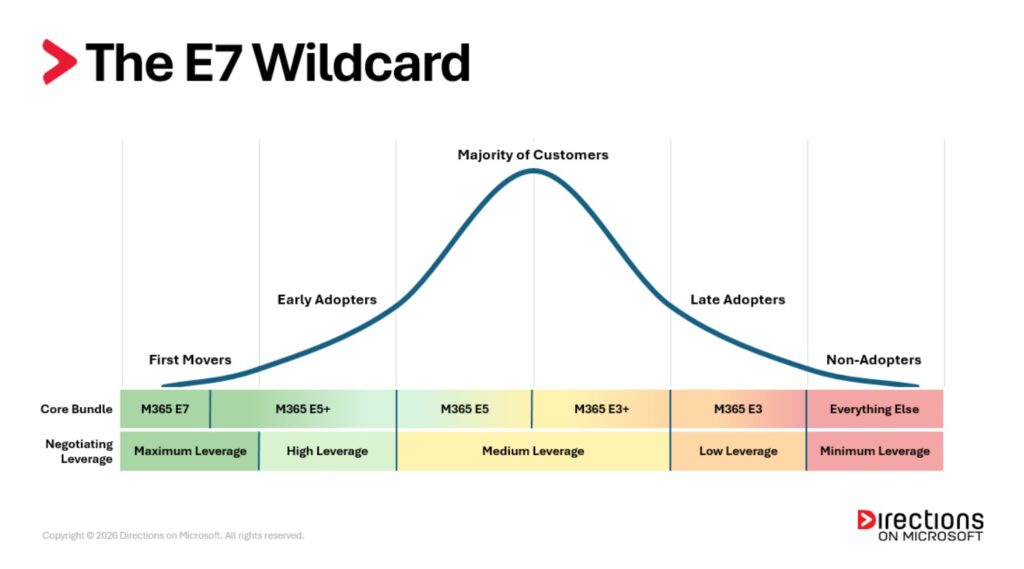
Organizations that adopt the new E7 tier will sit at the front edge of the adoption lifecycle, where negotiating leverage is strongest. Customers positioned just behind that tier running a broad E5 ecosystem may still have strong leverage, but they no longer represent the leading edge. Organizations further down the curve may find that little negotiating leverage remains if they choose not to move up the stack.
How do I put this to use?
By this point, you’ve seen how Microsoft evaluates you: through a combination of signals, interpreted through the lens of the Microsoft 365 platform and the broader ecosystem. You’ve also seen how the introduction of E7 will shift the leverage landscape. But understanding Microsoft’s lens is only half of the equation.
The lens that ultimately determines whether a negotiation succeeds is your own. Negotiation leverage ultimately emerges from the gap between your roadmap and Microsoft’s. Microsoft is evaluating where it believes your organization is heading within its ecosystem. You need to evaluate where your organization actually needs to go.
In the next article, we’ll shift the perspective and look at the negotiation through your lens: how to evaluate the long-term value of Microsoft 365 across your environment, and how to build a roadmap that positions you for your next EA renewal.
Your Next EA Renewal Series
Part 1: How to Avoid the Financial Cliff
Part 2: Why the Microsoft Lens Matters (This article)
Part 3: Why Your M365 Roadmap Is the Key to Negotiation

In late Feb. 2026, Microsoft added a notice in the Microsoft 365 Admin Center (MC949965) about a delay in the rollout of its New Outlook for Windows.
“The opt-out phase for Enterprise environments will now begin in March 2027 (previously April 2026), providing organizations with 12 months of lead time to prepare.”
(Microsoft’s update noted that the GCC High and DoD rollout timelines will be provided at some later date.
Microsoft’s update claimed the company is seeing “strong and accelerating adoption of new Outlook.” But it added that Microsoft is pushing to expand capabilities and address “feedback from customers who want to go further with the new Outlook.”
The Long, Slow March to New Outlook
Microsoft has told customers to expect a handful of milestones as it moves to replace the current Outlook with the new Outlook. Microsoft had designated the New Outlook as “Opt-in” and off by default in Mar. 2024. Microsoft declared New Outlook to be generally available shortly thereafter, on Aug. 1, 2024.
New Outlook was scheduled to hit the “Opt-out”/on-by-default milestone in April 2026. But now Opt-out isn’t slated until March 2027. After opt-out, managed customers will receive a minimum of 12-month notice before the “Cutover” stage begins — now, no earlier than March 2028. After Cutover, customers won’t be able to switch back to Classic Outlook, and new deployments of Outlook with Microsoft 365 subscriptions will come with the New Outlook.
However, in 2024, Microsoft admitted that existing classic Outlook installations — both perpetual and subscription — will continue to be supported until at least 2029. After Directions on Microsoft asked, Microsoft said that existing enterprise customers with a Microsoft 365 subscription or license that includes desktop apps will be able to download classic Outlook separately and use for no additional fee.
New Outlook has missing features and annoyances, the same as any Office app in beta testing. The trouble is, it’s not in beta testing. It’s generally available and it was about to land on the desktop of every Microsoft 365 Apps for enterprise user, unless their enterprise opted out.
Many will opt out, some until 2029, the earliest date that classic Outlook could be retired. These companies now have 11 more months to adjust their Office deployment and updating processes to keep New Outlook out.
And If You Don’t Want to Delay…
What about companies that want New Outlook? There will be some, although they might not know it yet. Outlook already uses machine learning and other AI methods for things like spam filtering and scheduling. Generative AI is accelerating improvements, and the improvements will mostly come to New Outlook, not Classic.
Companies that see payoff from AI in apps like Outlook can’t cling to Classic for long. For these companies, the delay means more time to clear away migration blockers, like classic Outlook extensions that don’t work on New Outlook.
There’s also possibly the biggest migration blocker of all: Exchange on-premises or in third-party hosting . New Outlook treats these Exchange systems like any other Internet mail service, with no more calendar integration or other features than you would get with Yahoo or Google. That means companies that want the coming AI capabilities of New Outlook will have to move to Exchange Online. Unless, of course, Microsoft changes its plans.
For more details on the evolution of e-mail and collaboration at Microsoft, see the Directions Business Applications Roadmap.

Microsoft will launch a new, high-end Microsoft 365 licensing tier, Microsoft 365 E7, on May 1, priced at US$99 per user per month. For that price, customers will get all the features in Microsoft 365 E5, Microsoft 365 Copilot and Agent 365 — as well as all the network access, identity protection and governance features in the Entra Suite — in a single bundle.
In addition to including its Agent 365 control plane in E7, Microsoft also plans to make Agent 365 available to IT and security professionals on May 1 as a separate add-on, priced at US$15 per user per month. Microsoft’s current top-of-the-line M365 licensing bundle is E5, which as of July 1, will be $60 per user per month and does not include the US $30 per user per month M365 Copilot. To date, only three percent of Microsoft’s 450 million commercial M365 customers have purchased Microsoft 365 Copilot.
Microsoft did not disclose any details about how or if agents will be licensed as part of M365 E7. Sources had said Microsoft was looking at some kind of hybrid per-user and consumption, or metered, licensing model for E7. So far, however, the company has not talked about the details for providing agents with their own Teams, OneDrive, and e-mail accounts, as Microsoft officials have indicated will be necessary for at least some agents, (We asked Microsoft for more information on the licensing for digital agents, but no word back so far.)
Microsoft announced its E7 and Agent 365 plans on March 9, a week after Directions on Microsoft and others heard from our contacts that the new E7 bundle was coming soon.
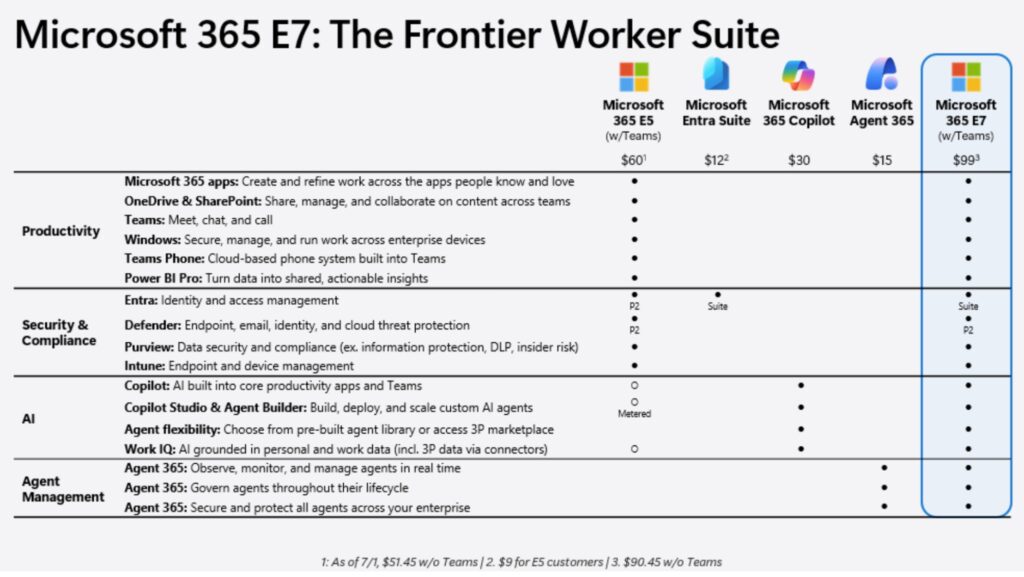
On March 4, CEO Satya Nadella did touch on this topic during his appearance at a Morgan Stanley tech conference.
When it comes to “digital workers,” Nadella said, “I think the combination of subscriptions with some limits of usage plus a meter is where I think we will end up. And it doesn’t matter if it’s a person or an agent. And I think the first place where this is happening already with the business models is in coding. And I think information work also will happen. So from a TAM (total addressable market) expansive perspective, for us, I look at all agents as users and with maybe more flexibility on how people license that.”
Agent 365 is one key to this coming subscription model. Agent 365 — which is currently in preview as part of Microsoft’s “Frontier” test program — is not a service. It’s a set of features including identity management using Entra, compliance controls using Purview, and security infrastructure using Defender XDR. Agent 365 supports agents built using Microsoft tools, third-party and open-source frameworks, and those running in partner clouds.
Copilot Cowork: Claude Cowork Meets M365 Copilot
On March 9, Microsoft also took the wraps off plans for a new feature coming to Microsoft 365 Copilot called “Copilot Cowork.” Copilot Cowork is built on the technology that powers Claude Cowork and was co-developed by Microsoft and Anthropic. Copilot Cowork will help customers handle “long-running, multi-step tasks,” Microsoft officials said. Copilot Cowork is currently in private pilot with select customers and will be available later in March as a research preview via Microsoft’‘s Frontier test program.
Last fall, Anthropic announced a connector for Claude and Microsoft 365. But this new integration between the two product families doesn’t require separate connectors or integration.
Copilot Cowork will work in conjunction with the built-in “agentic experiences” (technology Microsoft previously referred to as “Agent Mode”) in Word, Excel, PowerPoint and Outlook that also are meant to assist with multi-step tasks. Both Claude and Open AI models are available in Copilot Chat, and can work alongside Microsoft’s own dedicated Word, Excel and PowerPoint agents, which are meant to help specifically with document creation inside those applications.
Even though Microsoft has a long-standing partnership with OpenAI to build products and services on top of OpenAI’s GPT technology, it has been hedging its AI bets by working more closely with and investing in Anthropic in recent months. Earlier this year, Anthropic made Claude Cowork available on Windows, leading some industry watchers to wonder whether Claude Cowork might prove to be more useful than Microsoft’s own M365 Copilot and agents for helping automate tasks for knowledge workers.
Initial reports around the expected new Microsoft 365 E7 have focused on pricing and packaging, presenting it as a higher-end bundle that includes AI features and carries a higher price tag. That framing makes sense. Microsoft has long relied on expanding bundles at expanding price points. But that perspective misses the more important story.
If the reports are directionally accurate, E7 is not simply “E5 plus AI for more money.” It represents a structural move in how Microsoft intends to anchor AI inside the enterprise: By turning it into a platform. Building scalable, enterprise-grade platforms is where Microsoft has always been strongest.
Assuming E7 bundles Copilot and Agent 365 into a single subscription, as we’re hearing, that signals something larger than monetization. It suggests Microsoft is formalizing AI as a platform layer across its enterprise stack. That is why E7 appears less like a new suite and more like a next-generation platform.
The Control Plane for Digital Workers
Microsoft is positioning AI agents alongside human users. That is why identity architecture is foundational. Entra is no longer simply directory and access management. Purview is no longer just compliance tooling. Defender is not merely a security suite. Together, Entra, Purview, and Defender form the enterprise control plane.
AI agents operating at scale require structured identity, conditional access, telemetry, and governance guardrails. That is not optional infrastructure. It is prerequisite infrastructure. If digital workers are going to operate inside enterprise workflows, they must be governed with the same rigor as human workers.
Microsoft has already been strengthening the governance and security components of that control plane. Purview has expanded into AI governance scenarios. Intune Suite capabilities and Security Copilot have been drawn more tightly into core bundles. The direction is clear: advanced governance and security capabilities are moving toward the center of the platform.
If E7 is intended to represent a true enterprise-grade AI tier, Entra would logically need to elevate identity alongside Purview and Defender. In a world where humans and digital agents operate side by side, Entra, Purview, and Defender must function as a unified, advanced layer — not as mismatched tiers of capability.
That is what a complete enterprise AI control plane would require.
Seat Licensing Meets Consumption Economics
Early reporting also mentions the possibility of E7 using hybrid licensing, blending per-seat subscription with consumption-based components. That reinforces a trend we have been watching closely: the convergence of Microsoft 365 licensing and Azure economics.
Traditional M365 licensing is seat-based. You pay a fixed price per user per month. If you have 10,000 employees licensed for E5, you know what that line item will be. The cost scales with headcount.
Consumption pricing works differently. Instead of paying per user, you pay for activity. That may mean compute cycles, AI inference calls, storage processed, or data analyzed. Azure already operates this way. The meter runs when workloads run.
We are already seeing these models converge. Power BI Pro is licensed per user, but Fabric capacity is metered. Purview capabilities inside E5 are user-based, yet extended data scanning and cross-cloud governance rely on Azure consumption. The boundary between seat licensing and metered activity is already blurring.
AI introduces a new dynamic. Organizations have hesitated to deploy Copilot broadly as a per-user add-on because the cost of entry is visible and immediate. But enterprise AI scale is expensive. Microsoft must monetize that reality, and Azure provides the mechanism to do so. A hybrid licensing model would enable Microsoft to turn on advanced AI capabilities broadly while charging based on activity. Turn it on. Pay for what runs.
Microsoft 365 E7 consumption billing could take multiple forms. E7 could provide a base user entitlement, with advanced AI workloads metered through Azure, similar to Fabric and extended Purview scenarios. Or Microsoft could think even bigger.
What if E7 shifts materially toward Azure-based metering? Imagine a model where the full AI-integrated stack is broadly enabled, but cost scales with activity rather than headcount. For years, enterprises have paid for features they rarely use. A metered model changes that equation. It lowers the barrier to adoption. It allows organizations to scale AI gradually instead of committing large upfront license expansion. It aligns cost with actual workload intensity.
At the same time, it shifts the model toward activity-based economics, reducing shelfware risk while allowing AI scale to grow in proportion to adoption. If E7 moves in this direction, it would not simply expand Microsoft’s AI footprint. It would reshape how enterprises evaluate licensing in an AI-driven world.
Regardless of the final structure, the signal is clear. The licensing model itself is evolving to accommodate AI at scale. Organizations should prepare to manage seat-based licensing and metered consumption as a unified strategy rather than as separate budget lines.
E7 as Microsoft’s Next Big Bet
For years, Microsoft has owned the core enterprise productivity surface area: identity, collaboration, endpoint management, compliance, and security. That installed base gives Microsoft deep integration into enterprise operations. If E7 formalizes AI as part of that control fabric, this becomes less about upselling E5 customers and more about securing Microsoft’s long-term role at the center of enterprise AI operations.
The companies that win the AI era may not be those with the most advanced models. They may be those that control the operating environment in which those models run. If the early signals are accurate, E7 could represent Microsoft placing that bet.

Microsoft is expected to introduce a new Microsoft 365 subscription sometime in the next few months: The long-rumored E7. But M365 E7 isn’t simply Microsoft 365 E5 plus M365 Copilot, according to sources. The coming E7 will be key to Microsoft’s plan to license “agentic” workers like human employees, Directions on Microsoft hears.
Like Business Insider, Directions is hearing that the E7 subscription will include Microsoft 365 Copilot, as well as the company’s recently introduced Agent 365 agent-management control plane. The E7 licensing tier also could include Entra features that are not currently part of Microsoft 365 E5 as part of a broader push to integrate digital identity and governance.
Agent 365 — which is currently in preview as part of Microsoft’s “Frontier” test program — is not a service. It’s a set of features including identity management using Entra, compliance controls using Purview, and security infrastructure using Defender XDR. Agent 365 supports agents built using Microsoft tools, third-party and open-source frameworks, and those running in partner clouds. These agents can be built using Copilot Studio, Microsoft Foundry, the M365 Agents Toolkit, the Agent Framework, and the Agent 365 SDK.
We asked Microsoft for comment on M365 E7, but no word back so far. Update (March 3): “Microsoft does not have anything to share at this time,” a spokesperson told us.
M365 E7: First New Enterprise Subscription Since 2015
Microsoft’s decision to go ahead with an E7 subscription is surprising in some ways, and not so much in others.
M365 E7 will be the first new M365 licensing tier for enterprises that Microsoft has introduced since it launched M365 E5 in 2015. In spite of Microsoft’s constant pressure on customers to move users to M365 E5, uptake has been gradual, though picking up steam in recent months. (In 2022, the last time Microsoft disclosed publicly an E5 subscriber count, officials said 12 percent of its Office 365/Microsoft 365 installed base were E5 subscribers.)
In recent years, Microsoft has been introducing pricey security, governance and collaboration add-ons to M365 E5 rather than integrating these features into its existing enterprise subscriptions. Late last year, however, Microsoft announced plans to fold some previously separately priced add-ons — such as Defender for Office Plan 1’s enhanced email security features and certain advanced Intune capabilities — into its E3 and E5 plans.
Because Microsoft 365 Copilot’s adoption to date has been modest, with just over three percent of Microsoft’s 450 million M365 business subscribers purchasing seats, Microsoft no doubt is looking for ways to try to entice more business customers to purchase and use Microsoft 365 Copilot. In recent months, the company has been discounting M365 Copilot, the list price of which remains US$30 per user per month for enterprises, in its licensing deals with some customers, but the price reduction seemingly has not moved the needle much.
Starting July 1, Microsoft will be increasing its Office and Microsoft 365 suite prices across the board. M365 E3 will go from US$36 to US$39 per user per month. And E5 will jump to US$60 per user per month from its current US$57 price. It would make sense for Microsoft to introduce E7 around that time at a price that would make it interesting to those facing these coming price hikes.
What About E7 Pricing?
The biggest question for many when it comes to E7 is the price. Business Insider’s sources say the new E7 subscription could be priced at US$99 per user per month. But E7 needs to be priced very competitively to win over those who’ve been largely fence-sitting during Microsoft’s M365 Copilot AI push.
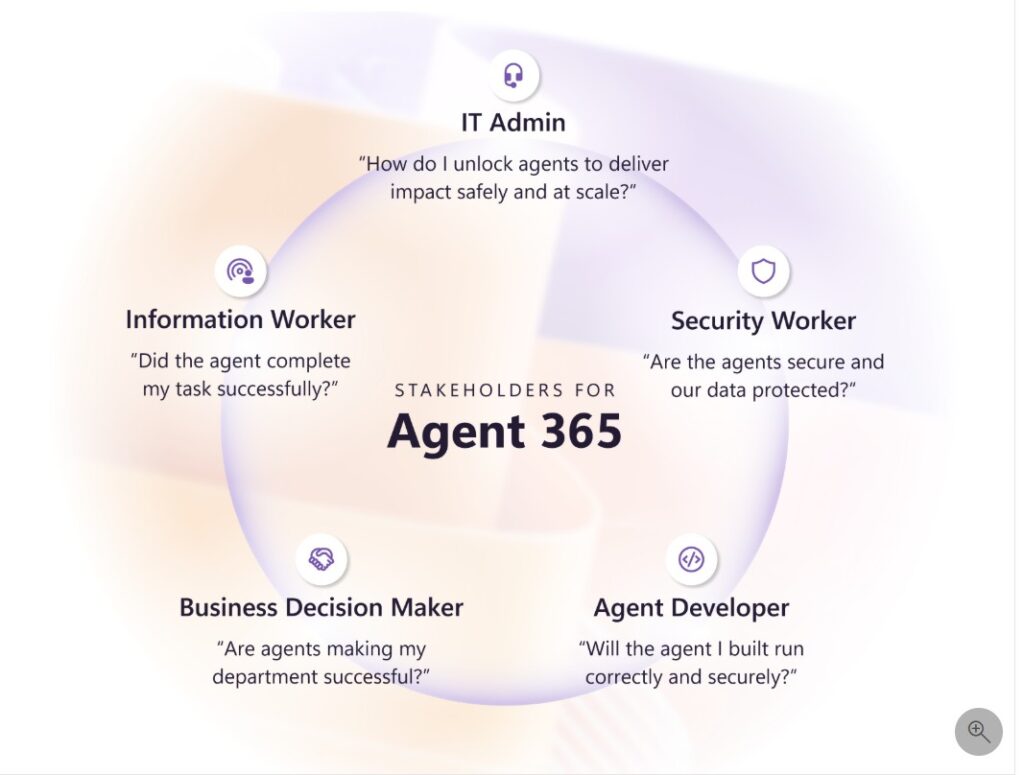
Microsoft officials have said to expect agents, as they proliferate in the enterprise, to need to be licensed in ways similar to human employees. They’ll need Entra IDs, email accounts, OneDrive accounts, Teams accounts, and more. If the inclusion of Agent 365 in E7 gives customers a simple and affordable way to license digital agents, it might be worth more than simply E5 (at $60 per user per month) plus M365 Copilot (at $30 per user per month) combined.
We hear Microsoft could be planning to switch up how E7 is priced. Instead of simply going with a per-user subscription fee, Microsoft could be looking at some kind of hybrid user- and consumption-based pricing as the way to go here.
“Potential consumption-based pricing reinforces the convergence between M365 licensing and Azure economics. That would align AI workloads more directly with Azure revenue models and deepen the M365/Azure integration story,” said Directions’ Director of Advisory Services Lane Shelton.
Shelton added: “This isn’t about a new licensing tier. It’s about Microsoft positioning itself as the enterprise AI control plane for the emerging digital worker.”
For years, Enterprise Agreement (EA) renewals have been high-stakes exercises. They required preparation, modeling, and disciplined negotiation. Even in their difficulty, renewals followed a familiar rhythm. Controlling costs required real work. You anticipated pricing pressure. You expected negotiation friction. Renewal season was a battle, but it was a battle you had seen before. You understood the terrain.
Now the terrain itself has changed.
Over the past several years — and especially since the November 2025 elimination of subscription volume discounts — the commercial structure underneath EA renewals has shifted. What used to be a gradual slope of increases is now a sharper step. The ladder customers once climbed, trading deeper platform alignment for improved leverage, has fewer rungs.
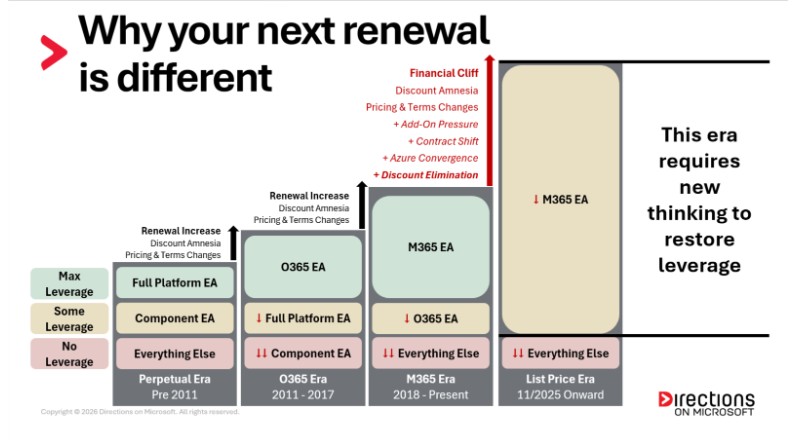
Consider the pattern many enterprises have lived through. Imagine your EA cost $100 per year in the perpetual era. You negotiated a Full Platform EA because it offered the most leverage available. When renewal came, Microsoft introduced Office 365. You were told the Full Platform construct no longer carried the same commercial weight. You could keep it, but it would now cost $130. Or you could move into the subscription model for $115. You moved. At the next renewal, Microsoft introduced M365. O365 would now be $145, but M365 could be had for $130. You moved again.
Later, M365 E5 became the new strategic tier. Discounts on E3 softened; E5 became the lever. You traded up. Each time, the increase felt manageable because there was something to move toward. There was always another rung on the ladder. Today, many organizations have reached the top of that ladder, and in the post–volume discount era, there may not be another rung to trade for leverage.
The New Layers of Pressure
All the usual negotiating challenges still exist. But over the past few years, Microsoft has layered on new ones.
- Add-On Pressure
M365 E5 was positioned as the flagship — the suite that had “everything.” But over the past several years, Microsoft has increasingly introduced high-value capabilities as paid add-ons rather than bundled enhancements. Teams Premium, Intune Suite, Copilot, Entra ID Governance, Power Platform capacity, Viva modules. And the list continues to expand. Even organizations already on E5 often find that experiencing the full M365 ecosystem now requires E5 plus significant incremental spend.
- Contract Shift
Agreement structure is no longer a background detail. Microsoft has been encouraging some customers toward Cloud Solution Provider (CSP), while moving others into direct Microsoft Customer Agreement for Enterprise (MCA-E) agreements, and reshaping engagement models for large enterprises. These agreement vehicles carry different pricing mechanics, partner dynamics, and usage implications. Renewing into “another EA” is no longer automatic, and structure itself has become a strategic lever.
- Azure Convergence
More functionality is now monetized through Azure consumption meters rather than traditional licensing. Expanded capacity, AI workloads, security telemetry, and data governance capabilities often flow into variable, usage-based billing. These costs are harder to forecast and easier to underestimate, especially when they originate inside the M365 ecosystem but surface in Azure spend.
None of these layers alone creates a crisis. But when you stack them on top of traditional renewal pressures, and then remove the structural volume discount tiers, as Microsoft did in November 2025, the math changes. For many organizations, especially large enterprises, it could feel like a steep change. A material shift in annual Microsoft run rate that cannot be absorbed casually.
That is the Financial Cliff. The first step in navigating it is knowing your number.
How do you measure your potential Financial Cliff?
The Financial Cliff is the gap between your current annualized Microsoft run rate and your projected post-renewal run rate under the new model. Most organizations don’t know this number until late in the cycle. That’s a mistake. You cannot negotiate what you have not quantified. Here’s how to compute it:
1. Model your current annualized run rate.
Use your current license quantities and the pricing from your existing EA. This tells you what your renewal would look like if you could simply extend your current agreement for another cycle.
2. Model your projected renewal run rate.
Apply post–November 2025 pricing — and, where relevant, post–July 2026 pricing — to those same quantities. Remove past pricing concessions. Remove waterfall discount tiers. Apply any pricing protections you have, such as Not-to-Exceed clauses.
Pro move: If you’re already evaluating major add-ons at scale, or you can quantify Azure consumption tied to M365 workloads, layer that in. But start with the structural reset first.
3. That delta is your Financial Cliff.
Think of it as a ledger. On the left side is what you would pay if you could preserve today’s pricing. On the right side is what you’ll likely pay at renewal under the new structure. That gap is what you are negotiating.
How Not to Fall Off the Cliff
Historically, customers could rely on structural levers like scale, tenure, and platform alignment to soften renewal impact. In the post–volume discount era, those levers function differently. Microsoft now evaluates customers holistically. Volume still matters, but alignment, consumption trajectory, workload adoption, and strategic posture matter more.
There are new variables at play, but they can be turned into new leverage if applied correctly. In the posts that follow, we’ll unpack how to prepare — how Microsoft evaluates you as a customer, how M365 now anchors your leverage, how agreement strategy has become multidimensional, how Azure increasingly influences your EA, and how to position your organization for maximum leverage.
For now, compute your Financial Cliff. Have the conversation early. Nothing else matters if you don’t start with the number.
Your Next EA Renewal Series
Part 1: How to Avoid the Financial Cliff (This article)
Part 2: Why the Microsoft Lens Matters
Part 3: Why Your M365 Roadmap Is the Key to Negotiation

Microsoft is releasing two different versions of Windows this year: Windows 11 26H1 and Windows 11 26H2. For the vast majority of business customers, 26H1 is going to be a nothing- burger; it only will run on Qualcomm Snapdragon X2-based devices — plus some other non-specified “select new silicon” — that will come to market in early 2026.
This means for the vast majority of enterprises, the one and only new Windows release that will matter in 2026 is Windows 11 26H2, which will be out later this year, most likely around Oct.
“Organizations should continue to purchase, deploy, and manage devices running broadly released versions of Windows 11 (e.g. versions 24H2 and 25H2) with confidence,” according to guidance in a Feb. 10 Microsoft blog post.
The post adds:
“In short: Windows 11, version 26H1 should not impact your current Windows deployment and purchasing strategy. There is no benefit to waiting or deferring plans based on version 26H1, unless you are specifically targeting adoption of devices with silicon that requires such.”
What Windows 11 26H1 Is … and Mostly Isn’t
Microsoft won’t make 26H1 available to existing Windows 11 users through the usual distribution channels, as it’s not a feature update to Windows 11 25H2. There will be no 26H2 update for those who get 26H1 because Windows 11 26H1 is based on a different Windows core than Windows 11 24H2, 25H2 and the coming 26H2.
(For those who have followed along with Microsoft’s Periodic-table-inspired Windows codenames, Windows 11 24H2, 25H2 and 26H2 are based on the “Germanium” platform release, while 26H1 is based on the release codenamed “Bromine,” as Windows Central explains.)
Microsoft notes that devices that run 26H1 will have “a path to update in a future Windows release,” which many company watchers are assuming will be Windows 11 27H2. Some are wondering if that release might be marketed as “Windows 12” — or maybe some other Copilot- and/or AI-themed name of the moment.
Windows 11 26H1 will not support hotpatch updates, though it will work with Windows Autopatch, Intune and Configuration Manager, Microsoft has said. However, 26H1 will get monthly security, quality, and feature updates on a regular basis, officials said.
Microsoft added entries for Windows 1 26H1 to its lifecycle product pages on February 10. For enterprises and education, the end of support date for 26H1 is March 13, 2029; for Home and Pro customers, the end of support for 26H1 is March 14, 2028. Additionally, the Microsoft Release Health Dashboard, which also now includes an entry for 26H1, notes that starting with Windows 11 26H1, .NET Framework 3.5 is no longer a Windows Feature on Demand optional component, and support for it ends Jan. 9, 2029.
Going Back to Windows Basics
Microsoft’s disclosure about cleaving Windows, at least temporarily, into two branches comes at an interesting time.
Following months of Windows customer complaints about Microsoft prioritizing AI over operating-system fundamentals (as evidenced by a number of recent problematic Windows patches), company officials said earlier this month that they plan to get back to basics with Windows and focus on quality and reliability.
Shortly thereafter, Microsoft announced via a blog post some changes it is making in Windows around transparency and consent. As part of this work, the company plans to add a “Windows Baseline Security Mode,” which will ensure that only properly signed apps, services, and drivers are allowed to run, with the option for users and IT admins to override these settings for specific apps when needed. Microsoft also said Windows will now prompt users when trying to access sensitive resources like files, cameras or microphones, or install other unintended software. In addition, apps and AI agents will give users and IT admins better visibility into their behaviors. All of these changes will “roll out through a phased approach,” officials said, without providing a specific timeline.
Separately, Microsoft is starting to roll out new Secure Boot certificates for older PCs as part of the regular monthly Windows updates (or via organizations’ own update processes). The Secure Boot Certificates, stored inside PC firmware, are set to start expiring in June 2026. Secure Boot technology is meant to block untrusted code at the earliest stages of the boot process.
Microsoft has released for the first time an AI adoption number about which many had been curious. During its Q2 FY26 earnings call on January 28, officials said the company now has 15 million paid seats of Microsoft 365 Copilot among its 450 million Microsoft 365 commercial subscribers.
This 15 million figure does not include consumer Copilot subscriptions. Nor does it include the Microsoft M365 and Office 365 subscribers using Copilot Chat who do not have an additional paid M365 Copilot subscription; Microsoft says there are “multiples more” of those enterprise Chat users. In other words, only 3.33 percent of M365/O365 commercial customers have bought Microsoft 365 Copilot licenses for $30 per user per month — or less, based on recent discounting of the service.
Microsoft 365 Copilot has been generally available to commercial customers since Nov. 2023. Even though M365 Copilot is powered by OpenAI’s GPT technology, Microsoft has begun including Anthropic’s Claude models in M365 Copilot to give users more choice and reduce its dependency on OpenAI. It also has added a couple of Microsoft-developed agents, the Researcher and Analyst agents, to M365 Copilot for no additional charge to try to sweeten the value proposition. By integrating Copilot Chat into M365 and O365 subscriptions for no additional charge, Microsoft has tried to show Office users the value of the tool. But it seems even a built-in freebie hasn’t resulted in a guaranteed mass upgrades to the paid Microsoft 365 Copilot.
“For comparison, OpenAI claimed roughly 35 million paying users (albeit laregly consumers, not enterprises) as of last summer, and they don’t have anything other than the core product to draw them in,” said Directions on Microsoft analyst Greg DeMichillie. “My conclusion is that Office isn’t much of an advantage, at least in terms of getting people to shell out money for AI. Of course, you could argue they just haven’t done a good job integrating into Office yet.”
Microsoft has a history of relying on suites and bundles to power it through until it eventually “wins,” noted Directions‘ analyst Jim Gaynor. But “the old cash cows may no longer have the juice to cover the massive costs of AI,” Gaynor added.
“Microsoft is struggling mightily to be a leading-edge player here and not to become the ‘utility service provider’ of infrastructure (Azure). After all, there’s no hockey-stick growth in that. But the very things that have carried them in the past may be a disadvantage now,” Gaynor said.
About That $625 Billion Backlog…
Unsurprisingly, Microsoft officials don’t see things that way.
“Even in these early innings, we have built an AI business that is larger than some of our biggest franchises that took decades to build,” said Microsoft CEO Satya Nadella during the earnings call.
Revenue for the quarter was $81.3 billion; net income, $38.5 billion; and earnings per share $4.14, ahead of expectations. Azure and related services grew 39 percent in the second fiscal quarter, compared to 40 percent in Q1.
Microsoft is continuing to invest in supporting cloud and AI workloads at a breakneck pace. Officials said capital expenditures for the quarter were $37.5 billion, up 66 percent year-over year (and up from $34.9 billion in Q1 FY26). Roughly two-thirds of the $37.5 billion were primarily for GPUs and CPUs for Azure and AI solutions; the remainder was for “long-lived” assets like datacenter leases. Officials said that customer demand is still continuing to exceed supply, but are expecting capex spending to decrease next quarter.
Microsoft officials also acknowledged that its backlog of cloud orders more than doubled in Q2, to a whopping $625 billion. Of this total, 45 percent is attributable to OpenAI’s Azure commitments over multiple years, which worries some market watchers who have been cautious about OpenAI’s plans to become profitable.
Another new data point shared during the call: Microsoft says it now has 1 billion Windows 11 users, up 45 percent year-over-year. The end of support for Windows 10 in Oct. 2025 fueled this growth.
The New Microsoft Tech Stack
Nadella outlined the three layers of its new tech stack where Microsoft is expecting growth in the years to come. Remaking GitHub Copilot into a broader, agent-centric platform is a big part of the plan. The three layers:
- Cloud and token factory
- Agent platform
- Agentic experiences
Cloud and token factory is the layer where Microsoft is working to build out the underlying cloud infrastructure powering first- and third-party apps. The company is optimizing for “tokens per watt per dollar” using silicon, systems and software, Nadella said. He highlighted the Fairwater “AI superfactory” datacenters that Microsoft is building, as well as its own Maia 200 AI accelerator processor as areas of investment here.
Nadella said Microsoft’s view is “all software is being rewritten,” and “agents are the new apps.” Microsoft is positioning Microsoft Foundry and Copilot Studio as its hubs for customers building apps and agents. And the company is betting on its recently introduced IQ brands across Fabric, Foundry and Microsoft 365 to connect agents to systems of record and all kinds of data, he said. He claimed that Foundry is not just an AI driver, but a driver for other Azure developer, database and app services.
To further its agentic ambitions – and hopefully thwart those of its AI-coding competitors — Microsoft is working to turn GitHub Copilot into “an ecosystem of agents that collaborate across the entire development lifecycle from coding and code review to security, debugging, deployment, and maintenance.”
Microsoft has big ambitions in the AI space, but its approach requires customers to change the way they work and to build agents/apps from scratch. The big questions: Will customers buy in? To what extent, and when?
It’s only January, but already 2026 is shaping up to be a critical year for Microsoft AI, the tech industry, and everyone who depends on Microsoft products.
Directions on Microsoft‘s VP of Research Barry Briggs breaks down Microsoft’s AI strategy and long-term bets in this video. He details how AI could reshape business, productivity, and the workforce, along with the opportunities and risks of this new industrial revolution.
Microsoft’s AI deliverables this year look quite a bit different than it did last year. The big question: Will Microsoft’s AI strategy pay off?

The last three years have seen Microsoft pivot to a hard focus on AI, similar to how the company turned to the web browser and internet in the late 1990s or tried to shoulder up to Apple and Google in mobile in the late 2000s. These days, it seems like every product and group in Microsoft is either finding a way to co-opt the Copilot brand, or forcibly bolting Copilot to some otherwise unrelated technology in an effort to ride the AI wave and be relevant. But unlike those earlier pivots, the AI tsunami comes with the massive expense of building out datacenter infrastructure with expensive servers, thereby forcing Microsoft to cut costs and try to increase revenue elsewhere to feed the beast.
It’s understandable from a business strategy perspective. Microsoft views AI as an existential development and so do investors looking for the Next Big Thing to move the line and up and to the right. Microsoft’s own lore tells the company it can dominate if it just focuses enough, as it did against Netscape in the “browser wars,” and also warns of the high cost of losing out, as it did with mobile (and Nokia).
But for the millions of customers that rely on Microsoft for stable, predictable technology, especially the businesses that view tech as a reliable tool for more traditional markets, Microsoft’s focus on AI comes as a heavy tax on the more “boring” technologies they depend on.
This isn’t entirely new. Customers are used to being pushed in Microsoft’s strategic directions—whether it’s the transition from on-premises Office software to hosted Microsoft 365 services, or changes from perpetual licenses to subscriptions. It usually comes with a mix of carrot and stick, with Microsoft cajoling customers forward with new features or temporarily lower prices and pushing from the rear by withholding features from legacy products and reducing interoperability with newer services.
However, the focus on AI is having a greater impact than Microsoft’s previous obsessions strategic pivots.
The Impact of Betting the Company
In 2025 Microsoft laid off more than 15,000 across the company. Combined with RTO mandates designed in part to encourage remote workers to resign, many teams were drastically reduced or eliminated. This has scaled back or delayed roadmap milestones on several services, and Microsoft has been even more aggressive at culling long-running “previews” and sunsetting software (just look at our Roadmaps for the growing list of deprecations and retirements.)
Meanwhile, several long-standing products suffer from benign neglect – still supported but without new features – while reports of quality issues with staple software like Windows client seem to grow. Other groups have been given aggressive revenue goals or sales targets, forcing them to focus on increasing average revenue per user (ARPU) with new add-on licenses and reducing the avenues for customers to negotiate discounts or even directly do business with Microsoft. This includes the broad move of smaller Enterprise Agreement (EA) customers to the Microsoft Customer Agreement (MCA), and the discontinuation of existing discounts for online services provided across all of its EA tiers.
And although there are undeniable use cases for AI, Microsoft’s relentless rebranding, repackaging, and false starts (Windows Recall, for example) have left customers confused. To make matters worse, heavily marketed new AI capabilities are often attached to Microsoft’s Frontier program which, similar to the older Windows Insider program, provides preview access to features that are unfinished and may never actually ship in a finished state.
All of this makes doing business more complex for customers operating in an already uncertain environment, and can force unwanted change and uncertainty in places where organizations would prefer stability. But it pushes customers to where Microsoft wants them to be and helps move their AI efforts forward.
What’s a Disgruntled Customer to Do?
However, quitting Microsoft isn’t what most customers want either; nobody looking for stability wants that kind of complex change. The current situation emphasizes the importance of not taking the Microsoft relationship for granted or leaving it on “cruise control”, and not assuming that Microsoft will develop their products with your needs first and foremost in mind, especially if your company doesn’t fit the mold of AI-forward “Frontier Firms.”
Customers need to take an active approach to managing their relationships with Microsoft around the services and software they use, focusing relentlessly on what benefits their own businesses even if it doesn’t align with Microsoft’s strategy. Research and analysis from independent sources (yes, like Directions on Microsoft) can be an invaluable tool. But it’s just as important to internalize that what your business needs and what Microsoft wants are probably not one and the same.
Strategies exist that you can leverage, even if you’re not fully aligned with what Microsoft wants:
Give a little, get a little. Microsoft’s sales force is getting high pressure to sell AI services. Use that to your advantage when negotiating your contracts. Maybe buy more M365 Copilot than you planned, in exchange for concessions on things you need like ESUs, exceptions for special use cases, or credits for services that your business already relies on.
Avoid the FOMO. Yes, there are plenty of white papers and customer cases that Microsoft will tout, and maybe a magic quadrant or two. But there are lies, damned lies, and statistics. When Microsoft says everyone is using Copilot, do they mean the expensive M365 Copilot, or that every search typed into Edge is technically a “Copilot search?” Keep clear of false urgency, and focus on what best benefits your business needs.
Let some of the dust settle. The landscape is still rapidly changing, even if M365 Copilot technically went GA in late 2023 (as Copilot for Microsoft 365!) Rebranding and repackaging is ongoing, agents have become the newest hot thing, many heavily promoted features are only previews, and industry alliances are still shifting. Act judiciously and focus on solutions with real benefit—the cost of adopting too early based on promises and previews can be higher than a missed opportunity.
You can learn more about making the best of your relationship with Microsoft from the Directions on Microsoft Briefing podcast, or the Directions YouTube channel.
What challenges is Microsoft’s AI monomania creating for your business, and how are you handling it? Email me at jgaynor@directionsonmicrosoft.com.
Microsoft will be increasing pricing for its commercial Microsoft 365 and Office 365 suites beginning July 1, 2026.
Company officials attributed the increase to the inclusion of AI capabilities such as Copilot Chat, along with security and management add-ons it is bringing to the Office and Microsoft 365 commercial suites.
Microsoft 365 E3’s list price will increase from $36 USD per user per month to $39 USD per user pe month. Microsoft 365 E5 also will increase by $3 USD per user per month — from $57 USD to $60 USD. The Microsoft 365 F1 SKU is going from $2.25 USD to $3 USD per user per month; F3 is going from $8 USD to $10 USD per user per month. Officials said nonprofit pricing will be “adjusted in line with commercial pricing, as it is tied to commercial rates through a fixed percentage discount.” Government Office suite pricing is going up, as well; in some cases phased over two years.
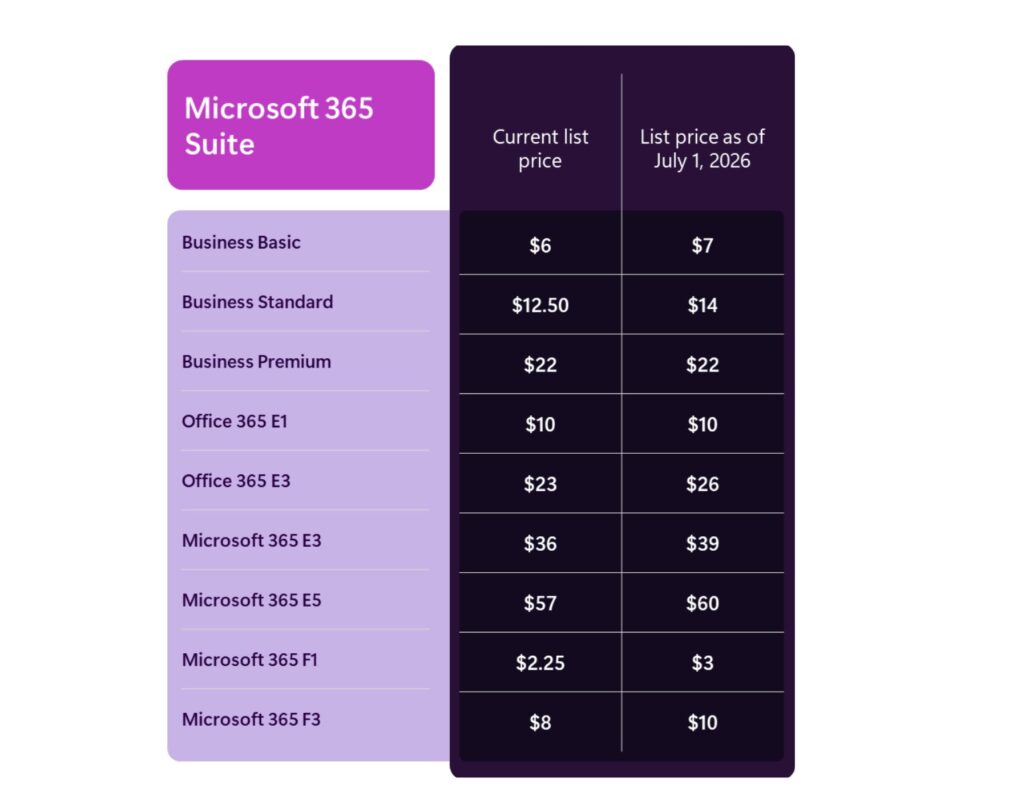
Update (Feb. 25, 2026): A Microsoft spokesperson had told us last month thathe company had no comment when we asked for a more complete updated price chart. But on Feb. 16, 2026, Microsoft posted a full list of the coming M365/O365 pricing and packaging changes.
In 2022, Microsoft increased prices of most of its Office 365/Microsoft 365 subscriptions, also citing the expansion of features as the reason. At that time, E3 went from $32 USD to $36 USD per user per month, but held the price of E5 steady at $57 USD per user per month to try to increase usage of that particular version. In 2024, Microsoft also increased prices of its on-premises Office servers by 10%.
More Built-In Features
In a Dec. 4 blog post, Microsoft officials detailed some of the features the company recently added and/or planned to add to Microsoft 365 suites for no additional charge. Among those features:
- M365 plans now include Copilot Chat Word, Excel, PowerPoint, Outlook, and OneNote. Microsoft will still contine to charge an additional $30 USD per user per month for a full M365 Copilot license (on top of the more expensive Office subscriptions).
- Microsoft 365 E3 and Office 365 E3 are getting Defender for Office Plan 1’s enhanced email security features.
- Microsoft 365 E3 and E5 are getting certain Intune capabilities, including Intune Remote Help, Intune Advanced Analytics and Intune Plan 2. E5 customers also get Intune Endpoint Privilege Management, Enterprise Application Management and Microsoft Cloud PKI. (These capabilities will continue to be available as separately priced add-ons.)
- Microsoft 365 E5 customers are getting Security Copilot features. (Currently, only M365 E5 customers who purchased Security Copilot are getting these, but the plan is to make them available to all M365 E5 users “in the coming months.)
Teams Pricing Tweaks
In other related pricing news, Microsoft recently tweaked its availability and pricing for its Microsoft 365 suites with and without Teams.
Starting Nov. 1, as the result of an agreement with the European Commission, new customers worldwide were able again to purchase M365 and Office Enterprise suites that include Teams. And per European Commission requirements, Microsoft increased the delta between the price of M365 and Office 365 suites with and without Teams.
The new pricing:
- M365 E3 (with Teams) is $36 USD per user per month
- M365 E3 (no Teams) is $27.45 USD per user per month.
- M365 E5 (no Teams) is $48.45 USD per user per month
- M365 E5 (with Teams) is $57 USD per user per month
- M365 F3 (no Teams) is $6.93 USD per user per month
- M365 F3 (with Teams) is $8 USD per user per month
(Note: These prices will all be increasing as of July 1, 2026, as noted above.)
Microsoft also agreed to provide better interoperability and data portability as part of its agreement with the European Commission. The company said it will allow third-party communication and collaboration solution providers to access M365 and Teams the same way other software companies developing add-ins do.
Microsoft also said it plans to make available application programming interfaces (APIs) that enable access to customer data from Entra ID, Exchange Online, SharePoint Online and OneDrive in a way that is “effectively equivalent” to what Teams accesses from these services. And it will provide APIs and tools to help customers export their information from Teams for use in other third-party solutions, if desired. Microsoft didn’t provide timing for any of these commitments.
Let the semantic-layer wars begin!
A little over a month ago, I made the less-than-prescient claim that “Microsoft has done little to nothing about a semantic layer.” But – in fairness to me – I also mentioned “rumors of a stealth mega-project underway at Microsoft to build some sort of ‘semantic layer’” that might compete with leaders in the field like Palantir, Celonis, AtScale, and others.
At Ignite two weeks ago, a succession of speakers elaborated upon a new brand, called “IQ,” that purportedly brings new intelligent capabilities to Fabric, Microsoft 365, and Azure AI Search, called, respectively, Fabric IQ, Work IQ, and Foundry IQ. (These appear to supersede an earlier capability called Context IQ, introduced in 2021.)
Let’s unpack these important announcements. First, we’ll discuss what they are and what they can do for you; then we’ll compare and contrast them with other offerings in the industry, notably Palantir, and what it means for them; and lastly, what’s likely to come next.
The Three IQs
As I mentioned, at Ignite Microsoft announced three new features under the IQ brand; each of these layer on top of existing products with the goal of further empowering both end users and the AI agents that Microsoft expects will become prevalent. Each, in different ways, builds a “knowledge graph” of the underlying data store – that is, links and relationships between disconnected pieces of data. Such a graph might, for example, connect a database of employees with a facilities database, enabling insights for how well office space is used, if teams are collocated, and so on.
In each of the three new capabilities Microsoft builds on existing layers.
Work IQ unsurprisingly leverages Microsoft 365’s Graph API – which already maintains many such relationships – and adds so-called “memory” features, learning and recalling users’ actions and habits. Thus a user might ask Microsoft 365 Copilot to “find the email from Susan a few weeks ago, put in the pricing she suggests into a contract like the one we did with Acme, customize the logos appropriately, and generate a Word document,” or “create a detailed financial model of the proposed acquisition of Contoso” in Excel.
In Fabric IQ, Microsoft again leverages an existing capability, in this case the semantic models created in support of Power BI applications, to create a knowledge graph of the department or enterprise. Alternatively, data professionals can create their own ontologies (maps or blueprints of the relationships between key subject areas); for example, product > part > supplier > contract > terms, using a new Fabric ontology tool (in preview).
Microsoft claims that Fabric IQ helps resolve core business concepts (“customer,” etc.) and illuminates relationships to other entities. (As we’ll see, this is harder than it sounds.)
Moreover, with two new agent types, Data Agents and Operations Agents (the former being in preview all year), enterprises can deploy sophisticated chatbots and even operational (IoT) agents that monitor devices in real time and predict and prevent failures, respectively. (Note that both of these agents are designed to work without Fabric IQ but have more capabilities with Fabric IQ.)
Finally, Foundry IQ, based on Azure AI Search (and built by that team), helps developers quickly index enterprise data sources and make them available to whatever agent might need them. Instead of a RAG application querying a single data source, Foundry IQ simplifies the ability for such apps to examine a range of sources.
The New New Application Stack
Back in April, I posited that Microsoft’s vision for the AI-centric application stack consisted of a UI layer (Copilot); logic (AI agents); data (Fabric, et.al.); and hardware (massive data centers).
We need to tweak the stack a bit: Microsoft has added a new “semantic layer” to its data sources, with the goal of enabling agents (and humans) to make increasingly better decisions. (I say “increasingly” because over time agents – in theory – learn and fine-tune their actions.)
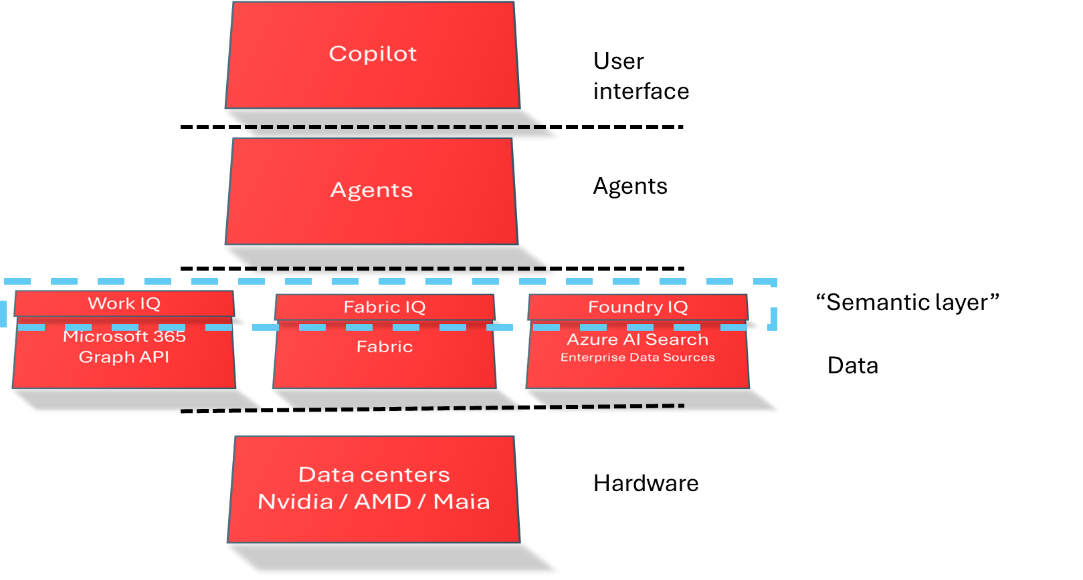
What Could Possibly Go Wrong?
It’s a compelling vision, but it’s likely that the pesky realities of enterprise data will slow adoption. Few enterprises have a well-architected enterprise data model (EDM), as we discussed in our previous blog post. So – for example – what happens when the carefully designed definition for “customer” created in the ontology tool conflicts (say, in something as trivial as the number of address lines) with that in one or another system? Or when a salesperson insists on one definition and the finance analyst, another?
Creating an ontology, in Fabric or elsewhere, is a major effort and requires on-going maintenance, so there’s no getting out of the hard work. For example, the Fabric ontology tool can discover Azure hosted data and build the foundation of an ontology on what it sees, but bringing in external data sources like an Oracle cloud database takes manual effort.
Even with auto-discovery, the people you charge with building and maintaining the ontology will face a hill of challenges, determining how one data source relates to another, what column names to use, how to resolve ownership of data that appears in two sources, creating additional dimensions (data from data) to address a business demand, and configuring triggers that allow data in one source to act on data in another source. And what happens when one of the external data sources inevitably changes? And, they have to do all this while following the security requirements and data sovereignty of each data source.
Still, the appearance of semantic-layer technologies across Microsoft’s portfolio can enable some powerful usage scenarios – yet another reason, perhaps, for enterprises to embark on data hygiene projects. (I recommend, based on experience, to start at the department level before taking on something as massive as a full EDM: quick wins to show value and focusing on where the data is created can accelerate adoption and convince skeptics.)
The Semantic Wars: Who Do You Back?
Since the announcement of the “IQs,” lots of virtual ink has been spilled comparing them to established vendors, most notably Palantir. Here’s a quick summary of the situation as it stands today:
- Work IQ, Fabric IQ, and Foundry IQ are new (with many of the features still in preview) and not yet widely adopted; however, for Microsoft-centric enterprises they’re likely the right choice, since they build upon and leverage existing features in the underlying platforms and services.
- The IQs are three disconnected services which – frankly – highlight Microsoft’s organization chart and will add complexity to creating agents that must span all enterprise data.
- Palantir’s Foundry (yes, the same name) is more mature and widely adopted, particularly in operational IoT scenarios. Its strategic focus is to help enterprises build a “digital twin” of their operations.
- Palantir’s metamodel consisting of entities and relationships (semantic layer); actions and functions (kinetic layer); and security and permissions (dynamic layer) is well thought out and cohesive. But Palantir relies on a hands-on consulting engagement with their own “forward-deployed engineers” or Accenture, Deloitte, and/or others to create the specific instances of the metamodel, which can be expensive and time-consuming.
What’s Next?
There’s undoubtedly more to come in the world of IQ. I’d hardly be surprised to learn of a “Purview IQ” which could leverage Purview’s Unified Data Catalog to reach into non-Microsoft data like Snowflake or Databricks, or even data in other clouds.
Similarly, I’d also expect IQs on each of the Dynamics 365 applications – Finance, Supply Chain Management, HR, and so on, with a Copilot UI on each of them. (Let’s just hope the “IQ” brand doesn’t get quite a dilute as “Copilot.”)
Are Systems of Intelligence Here?
Whew!
My personal opinion is that of all the announcements at Ignite, the IQs will become the most important and consequential. Perhaps indeed we are at the dawn of what Geoffrey Moore and George Gilbert called (all the way back in 2015) “systems of intelligence” that can “[mine] engagements in real-time to anticipate, influence, and optimize customer experiences. In their most advanced form, these systems learn both from the user’s interactions as well as external observations such as an extended network of relationships.”
Do I need an IQ layer? Drop me a line at bbriggs@directionsonmicrosoft.com.

Microsoft’s annual Ignite conference for IT professionals, developers, and partners, is kicking off this week in San Francisco. CEO Satya Nadella is not the lead keynoter this year; instead, the newly minted CEO of Microsoft’s Commercial business, Judson Althoff, is doing the honors. (Nadella is busy extolling the virtues of Microsoft’s sprawling network of “fungible fleets” in its new AI superfactories.)
To no one’s surprise, this year’s Ignite will focus on all things AI-related — and especially agent-related.
Microsoft announced ahead of the start of Ignite on Nov. 18 that it is adding Anthropic’s models to Microsoft Foundry (the rebranded Azure Foundry), giving the company bragging rights to being “the only cloud providing access to both Claude and GPT frontier models to customers on one platform.” Microsoft execs said they will provide access to Claude across Microsoft’s Copilot family, including GitHub Copilot, Microsoft 365 Copilot, and Copilot Studio. Microsoft committed to invest up to $5 billion in Anthropic; Anthropic committed to purchase $30 billion in Azure compute capacity from Microsoft.
Directions‘ Top Ten Ignite Picks
Here are our picks for the top 10 announcements that could impact enterprise customers and partners moving forward into 2026. In no particular order:
1. The Agent 365 control plane: Microsoft inadvertently published some information about Agent 365 a week ago. As anticipated, this “control plane” is all about making autonomous agents more centrally manageable and secure by treating them more like user accounts. Agent 365 includes the Agent SDK, which is required to build Agent 365-aware agents and publish them to the Agent Store. These Agent 365-aware agents will integrate with Microsoft security controls, policies, compliance capabilities, and Office apps without needing custom integrations, Microsoft says. The Entra Agent ID piece is available in the Microsoft 365 admin center for those in the “Frontier” early-access program. We’ve asked Microsoft about any additional licensing and pricing required for Agent 365, but no word back so far.
2. Work IQ links agents to work data: Microsoft has been working on adding AI smarts to its Office apps since 2021, if not before, under the “Context IQ” program. Work IQ looks to be either a rebrand or an evolution of Microsoft’s Context IQ technology. Like Context IQ, Work IQ is a layer that connects to organizational and personal data such as files, emails, meetings, etc. and can “build memory” based on users’ preferences, habits, and workflows. As Context IQ is already part of the Microsoft 365 stack, Work IQ already is built in, as well. But now developers can access Work IQ to build agents via APIs.
3. Even more IQ madness — Fabric IQ and Foundry IQ: There are other “IQ” branded layers in the Microsoft AI stack that are meant to help agents understand what users are doing, where to find information, and what the business data means. Fabric IQ, now in preview, extends the unified semantic layer already provided in Power BI across 20 million models to business operations, Microsoft says. Foundry IQ, also in preview, is built on top of Azure AI Search and is meant to be the “next generation of retrieval-augmented generation (RAG),” according to the company, providing a way to connect agents with data from a single knowledge base. Microsoft is rebranding its family of Azure AI services, Logic App Connectors, and MCP servers as “Foundry Tools.”
To understand why these IQ pieces matters at a higher level, Directions analyst Barry Briggs recently blogged about why a semantic layer is so crucial to making AI useful.
4. Microsoft 365 E5 users get Security Copilot: Security Copilot will be included for all Microsoft 365 E5 customers. Eligible E5 customers will get 400 Security Compute Units (SCUs) per month for every 1,000 licensed users (US$1,600 in value), up to 10,000 SCUs per month (US$40,000 in value, with 25,000 E5-licensed users). If you need more, it’ll be $6 per SCU on a Pay-As-You-Go basis.) Microsoft will begin offering this bundle starting today for existing E5 customers who already have Security Copilot and for all other E5 customers “in the upcoming months.” Security Copilot will continue to be available for customers without E5 separately.
5. “Agent Factory” plan bundles Microsoft Foundry, Copilot Studio: As Microsoft has continued to add more “pro” capabilities to its Copilot Studio agent-building platform, it’s also been building out agent creation and management features in Microsoft Foundry. It is introducing a new “metered” Agent Factory plan that will allow developers to build and manage agents in Foundry and/or Copilot Studio and deploy their agents anywhere, including Microsoft 365 Copilot. We’ve asked for more details on how this new plan will be licensed and priced, but no word back so far. Update (Nov. 18): A Microsoft spokesperson said the company had “nothing to share” on how the new metered plan will be priced/licensed or if it will be required for developers who want to tie into Work/Fabric/Foundry IQ.
Update (Nov. 18): Aha! It looks like Microsoft’s recently announced Agent Pre-Purchase Plan (P3) is key to how Agent Factory service will be priced. P3 will let customers access both Copilot Studio and Foundry services through one pool of funds. Customers will be able to buy Agent (ACUs) up front in a one-year metered plan.
6. A cheaper Microsoft 365 Copilot plan for SMBs: Microsoft quietly has been offering some hefty volume discounts to its largest customers interested in Microsoft 365 Copilot, priced at $30 per user per month. Starting in Dec. 2025, it also will offer a monthly $21 per user option for customers with fewer than 300 users. The new plan is called Microsoft 365 Copilot Business.
7. New Dedicated Word, Excel, PowerPoint agents: Microsoft 365 Copilot will feature dedicated Word, Excel and PowerPoint Agents — first available through the Frontier test program — that can create Office content directly from Microsoft 365 Copilot Chat. If you’re confused about the difference between the existing Office Agent, these new single-app agents and the existing “Agent Modes” in various Office apps, join the club. We’ve asked Microsoft to explain what’s what. No word back so far. Update (Nov. 18): Microsoft’s blog post about the coming Office agents sheds (very little) light on what these things are. But it seems the new Anthropic-based agents are going to be available with M365 Copilot Chat, rather than in the individual Office apps, as the “Agent Modes” are. Microsoft believes customers will start in Chat with the agents and then move to the Modes to complete tasks.
8. Windows 365 to become an agent destination: Windows 365 for Agents will allow developers to build and deploy agents that can do things like open apps, process data and automate tasks on Cloud PCs. Developers can access Copilot Studio in Windows or the Researcher agent in Linux in their secure Cloud PCs. Developers interested in trying out Windows 365 for Agents can join a waiting list.
9. SQL Server 2025 is GA: The latest version of SQL Server, which Microsoft calls “the AI-ready enterprise database,” is now generally available. This release provides advanced semantic search and improved natural-language access. It also features updated identity and encryption integration, GitHub Copilot integration, and support for database mirroring in Fabric. Microsoft says the 2025 release is the most significant SQL Server release in a decade for developers. In other database news, Microsoft says Azure DocumentDB (at one point called “Azure Cosmos DB:) is now GA and and Azure HorizonDB, a new PostgreSQL cloud database service for building or modernizing mission-critical apps, is now in private preview.
10. Windows as an “agentic OS”: Because no Microsoft product can advance without an AI story, Windows 11 is in the process of becoming an “agentic OS” — much to the opposition of many long-time Windows loyalists. Microsoft is adding its own agents and an “Ask Copilot” link to the Windows taskbar to try to increase Copilot usage. It’s also building in agent connectors (like a File Explorer and Windows Settings connector); and testing in private preview an Agent workspace where agents can interact with software in an isolated, policy-controlled, auditable environment. Model Context Protocol (MCP) support in Windows 11, in preview, will let agents to access those connectors to complete tasks for users.
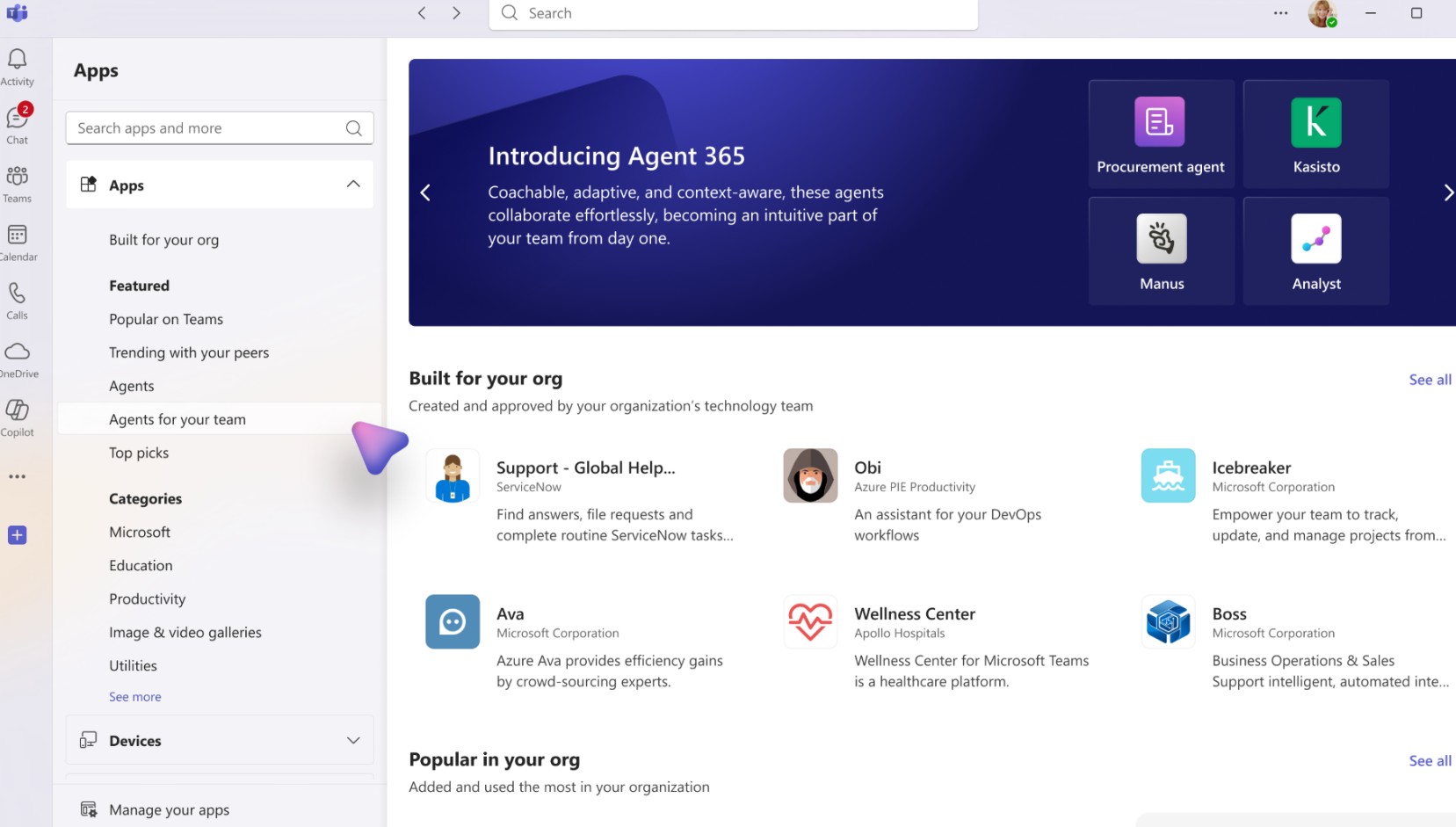
Ahead of Microsoft’s Ignite conference next week, rumors are swirling about Microsoft launching an “Agent 365” platform. If the tips pan out, Agent 365 could become a way for Microsoft to unify how the increasing number of autonomous agents will be managed, licensed and priced across Microsoft 365, Dynamics 365 and the Power Platform, going forward.
Microsoft seemingly inadvertently published a screen shot featuring the “Agent 365” branding earlier this month as part of a Microsoft 365 Admin Center post (which the company has subsequently unpublished). Microsoft also removed the connected roadmap entry (518220) about agentic users from its Microsoft 365 Roadmap.
The screen shot was featured in MC1183300, which Microsoft initially published on Nov. 6 (and a copy of which is here). That message described “agentic users” as “a new class of AI powered digital entities designed to function as autonomous, enterprise-grade virtual colleagues.” Agentic users, unlike bots, will be provisioned as “full-fledged user objects,” with identities in the organization’s directory (via Entra ID or Azure AD), email addresses, Teams accounts and presence in the org chart.
Agent templates, which are preconfigured digital worker profiles, will be available in Microsoft Teams and the Microsoft 365 Agent Store, according to the message. Targeted rollout of these agentic users is supposed to begin in mid-November on the desktop platform for Teams and Microsoft 365 Copilot, the message says. And admins will be the ones assigning the required “A365” license at the time of approval, with “no additional Microsoft 365 or Teams license required.”
In early Oct. 2025, Microsoft announced the Microsoft Agent Framework, which is an open-source software development kit and runtime for building and managing multi-agent systems. And this past spring, Microsoft took the wraps off another piece of the supporting puzzle: Microsoft Entra Agent ID, which is designed to help manage agents’ identities, lifecycles and permissions across Microsoft Copilot Studio, Azure AI Foundry, and later, Security Copilot, Microsoft 365 Copilot and third-party solutions.
Pricing and Licensing Details Not Yet Clear
While Microsoft has priced Microsoft 365 Copilot at a flat $30 per user per month, it hasn’t delivered a clear, consistent approach to licensing and pricing agents.
It has folded some of its agents, like Researcher and Analyst, into Microsoft 365 Copilot for no additional charge. But in the case of SharePoint Agents and Copilot Studio, which customers can use to build agents, agents are priced based on a number of factors. Agents are charged via meters that count the consumption of a Microsoft-defined unit called Copilot Credits (formerly “messages”). Copilot Credits are billed on a pay-as-you-go (PAYG) basis or by purchasing capacity packs up front for a discount. In Oct. 2025 (called Pre-Purchase Plan or sometimes P3) allows upfront purchasing of Copilot Credits on an annual basis with discounts that increase with the number of Copilot Credits purchased.
It does seem as though the new Agent 365 licensing model could apply to both Microsoft-built and custom agents. And under the new model, every agent would need a license, in the way that every user needs one now.
Rich Gibbons, of Cloudy with a Chance of Licensing fame, has wondered whether Microsoft is planning to price and license its agents by role, meaning there could be an Agent 365 for HR, for Sales, etc. Or maybe Microsoft is looking to enable agent pricing and licensing based on more granular job functions with certain industry domains, like booking patient appointments in the healthcare field, as Dynamics 365 Consultant Muhammad Hammad Wali suggested in a post on LinkedIn.
Hopefully Ignite will bring answers to at least some of our Agent 365 questions.
Microsoft’s continued huge and growing capital expenditure spending was the big story this week. For customers, the key take-away from Microsoft’s Q1 FY’26 earnings is Microsoft is still in a supply-constrained state for cloud compute, with its executives saying they don’t see the situation changing until sometime after June 2026. The extent to which this will affect current and future Azure customers isn’t clear.
Microsoft’s Q1 revenue was $77.7 billion, up 18 percent, and net income at $27.7 billion. The Intelligent Cloud business, which includes Azure, brought in $30.9 billion, up 28 percent. Microsoft rarely discusses Azure revenue figures, though last quarter execs did say Azure and related cloud services surpassed $75 billion in fiscal 2025. Microsoft also no longer publicly discloses the point contribution of AI to its Azure numbers.
Last quarter, Chief Financial Officer Amy Hood said Microsoft expected supply constraints to ease in fiscal 2026. But that’s no longer the case.
“We know we’re behind. We do need to spend,” said Hood.
In fiscal 2026, which began July 1, Microsoft plans to increase AI capacity by 80 percent and nearly double its datacenter footprint over the next two years, CEO Satya Nadella said. Microsoft currently has more than 400 datacenters; its newest ones tend to be larger, square-footage-wise.
Hood said Microsoft will increase its spending on GPUs, CPUs, and datacenter leases in fiscal 2026. In Q1, Microsoft’s capital expenditures were $34.9 billion, higher than the $30 billion officials were predicting last quarter.
Hood said roughly half of Q1 capex spending went toward CPUs and GPUs that support increasing Azure platform demand, first-party apps and AI solutions and R&D by its product teams, plus replacement for end-of-life server and networking equipment. The other half was for “long-lived” assets that will support the platform for the next 15 years and beyond, including finance leases for large datacenter sites.
Still No M365 Copilot Sales Disclosures
Commercial bookings were up a whopping 112 percent this quarter — “significantly ahead of expectations,” Hood said. A substantial part of this is from Azure commitments from OpenAI, she said, as well as continued growth in the number of 100-million-dollar-plus contracts for both Azure and Microsoft 365. (It’s worth noting these numbers do not include the $250 billion Azure commitments from OpenAI that the two companies announced earlier this week, as part of the details of their new partnership agreement.)
Unsurprisingly, Microsoft still did not disclose sales numbers for Microsoft 365 Copilot during its Oct. 29 earnings call. Officials said the company’s “family of Copilots and agents” surpassed 150 million monthly active users across Microsoft 365 Copilot, GitHub Copilot, Security Copilot and other “high-value domains.” Last quarter, officials said that number was 100 million.
For what it’s worth, officials also claim that Microsoft now has 900 million monthly active users of our AI features across its products.
Microsoft-OpenAI: A Bit More Peace of Mind
Speaking of the updated Microsoft-OpenAI partnership deal, there seems to be little new that will affect Microsoft customers directly, beyond some possible peace of mind that Microsoft will continue to have access to OpenAI IP for several more years.
Microsoft is getting a 27 percent equity stake in OpenAI’s new for-profit entity. Microsoft no longer has a “right of first refusal” on new OpenAI cloud workloads, but it will retain IP rights to OpenAI models and products through 2032. OpenAI can jointly develop some products with other companies, but API products are exclusive to Azure. And once OpenAI declares it has achieved the elusive Artificial General Intelligence (AGI) mark, which affects Microsoft’s access to its technology, a panel of unnamed experts will have to verify that claim.
“This punts into the long grass the idea that Microsoft might lose its exclusive access to OpenAI’s fundamental models. Specifically, OpenAI can no longer just declare it has reached AGI and use that to bring on other API providers,” said Directions on Microsoft analyst Greg DeMichillie.
“If you are using Azure OpenAI but were afraid that somehow OpenAI would pull the rug out from under you and you’d be left stranded, that doesn’t seem like a concern anymore,” DeMichillie added.
Microsoft disclosed that its investment in OpenAI resulted in a $3.1 billion ding to net income in the quarter. By The Register’s calculations, that could mean that OpenAI itself lost $11.5 billion for the quarter.

This blog post is a little different. I’m not going to tell you about the pros and cons of a Microsoft technology – rather, I’m going to talk about a missing Microsoft piece of the puzzle.
Maybe it’s even the Redmond giant’s Achilles’ heel.
As AI transforms practically everything about how we work, it’s become clear that a well-managed and well-governed data estate is critical for its success in the enterprise (see my video). But even with data that’s appropriately secured, and whose regulatory compliance is constantly monitored with Purview and other tools, the question remains: how can AI put all this data work?
Sisyphus and the Enterprise Data Model
We in IT have struggled for decades with so-called “islands of data,” that is, incompatible clumps of information squirreled away in ERP, CRM, Support, Legal, IoT, e-Commerce, and other systems. One application’s “customer” is another’s “contact” or yet another’s “client,” or “lead,” or “account.” Some keep two address lines for the individual, some four; some have a 5-digit ZIP code (in the US), some nine; and keeping them all in sync is, in a word, a nightmare that can cost enterprises millions.
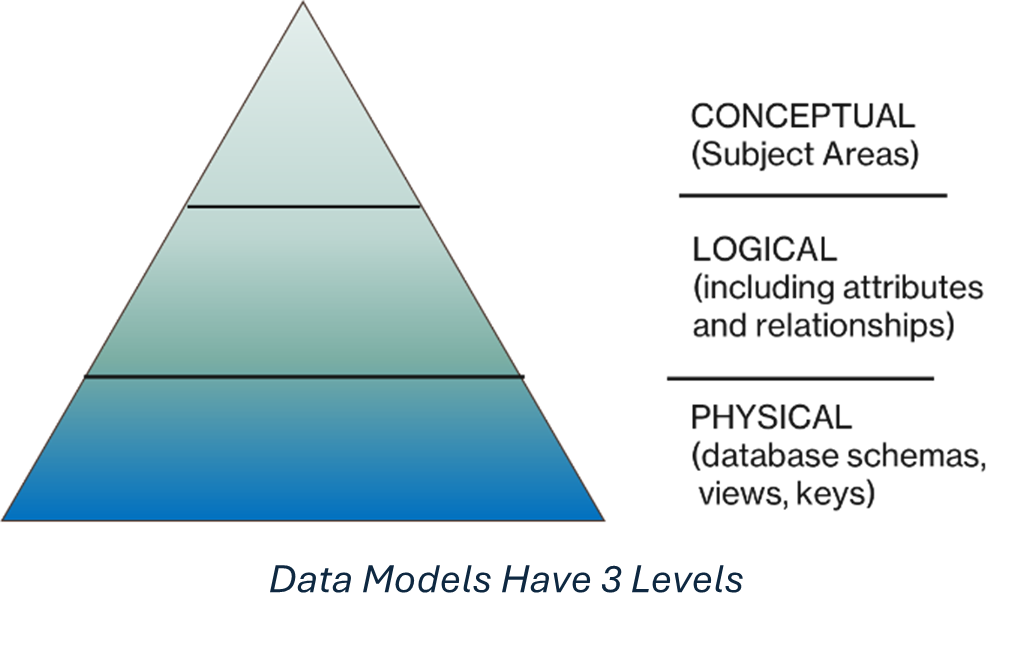
To simplify this, information architects and data managers have struggled for years to build an “enterprise data model:” common definitions of key subject areas (“customer,” “product,” etc.). With such common definitions – a blueprint, if you will – all departments and applications can have a shared understanding of the subject area, can better achieve compliance goals, can improve communications, and can streamline application integration efforts.
And there have been many attempts to create industry-standard models, and some have been useful. But there’s a key missing point here, which is that data models encapsulate a company’s competitive differentiation. (Think about it. It’s true.) Standardize the data model, eliminate your differentiation.
Because of that, data models that affect competitive differentiation – how a company thinks of customers, products, pricing, discounts, and so on – necessarily change rapidly, much faster than an EDM could track.
Yet…the dream remains…wouldn’t it be nice if there were one single data model for each subject to which all applications aligned?
Well, yes. But it’s been an uphill battle (thus Sisyphus). Why? Creating and deploying an EDM is excruciatingly expensive, painful, and difficult, both in terms of the human cost of negotiating common models as well as the technical costs. While potentially streamlining integration (no more “T” in ETL!), simplifying process modeling, and other cost-saving benefits, the cost and risk of updating applications schemas is so high that it’s never been seen as a worthy effort.
Until now, maybe?
Maybe, Just Maybe, the Enterprise Data Model is Possible
But imagine – just for a moment – if you could describe, even at a very high level, your core business entities. (A quick note on terminology. When we (and vendors) say “subject area,” “business object,” and “business entity” we mean pretty much the same thing: the nouns that run your business, as in a customer buys a product. See how hard it is to agree on terminology?)
Say business folks and IT staff can come together and decide, “here’s the authoritative definition of a retail customer” for our company.
Then (keep imagining) you push a button and automagically, using automated connectors, software reaches out to applications and maps your definition to real data in the real world. And maybe it (perhaps with human help) creates relationships (a retail customer “is a” kind of customer, “has an” account manager, and so on).
Companies like Celonis, Palantir and AtScale propose to do just this. On top of the oceans of data collected in Snowflake, Databricks, or Fabric, then, these models form the foundation of what my friends George Gilbert and Peter O’Kelly call a “semantic layer,” imposing order on chaos.
The Enterprise Digital Twin: Stir in AI, and Magic Happens
The vision for both companies: to create an AI-powered “digital twin” of the entire enterprise. Think of it as the organization’s automated pan-intelligent COO: you can issue it commands, you can ask questions of it, and expect it to know everything that’s going on, everywhere in your business.
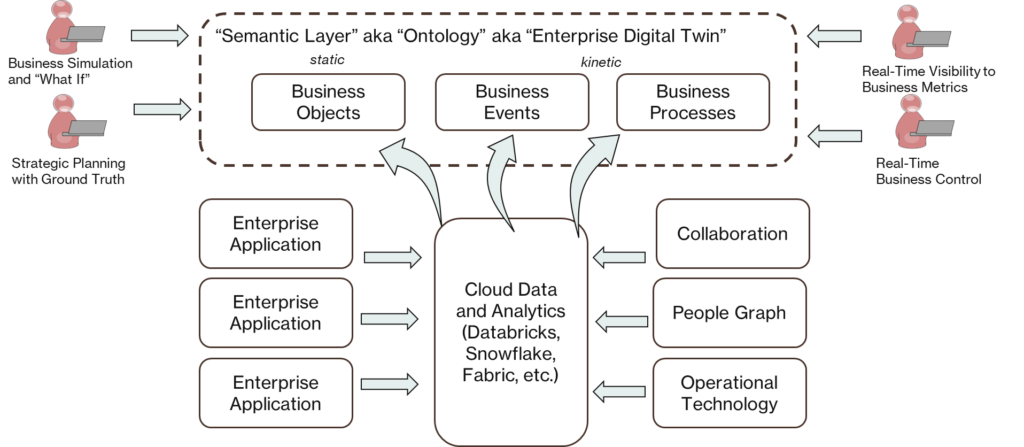
Greatly Simplified View of Enterprise Ontology
Celonis uses sophisticated process mining to discover both how data is used in processes, and the often myriad variations of processes hidden in the data. By shining a light on enterprise processes — remember, a company is nothing less, nothing more than a collection of processes – you can optimize them. Where are the bottlenecks? Why, for example, when a customer orders a widget does it sometimes take weeks to fulfill?
Whereas Palantir focuses on prediction, simulation, and coordination based on holistically linked real (and real-time) data. So if CEO wants to know “how will raising the price of a widget by 5% in Japan affect revenue and profitability?” – in theory with such a digital twin those sorts of questions could be answered.
Color Me Skeptical
Now at this point I have to inject some personal experience and opinion. I’ve been involved with efforts to build an EDM in large enterprises; it’s unspeakably hard, for all the reasons noted above. It’s very labor-intensive and detail-oriented: at one company I recall seeing a model for “customer” printed on a plotter that stretched out across an entire conference room table (in 8-point font!). Fundamentally: useless.
I’m willing to keep an open mind – but for any such endeavor like this I would caution all: show ROI quickly. Do pilots. Look for quick wins. Focus on department processes, not the full enterprise to start. Demonstrate the value as quickly as possible!
Where is Microsoft?
Now I’m sure you’re saying: Barry, this is the Directions on Microsoft blog, and you’ve barely mentioned Microsoft!
True! Microsoft, of course, has made massive investments in data management, most recently with Fabric, its answer to Snowflake and Databricks (and others). And let’s be clear, what’s different about today is the presence of these massive data lakes, lakehouses, and so on, that consolidate data in ways we were never able to before.
But, to date, Microsoft has done little to nothing about a semantic model. Purview does have a Business Glossary of common business terms – but it’s not linked to real data in any way. Mary Jo reminds me that they bought a process mining company called Minit back in 2022 – it, however, seems to have been folded into Power Automate. And (just to confuse matters) there’s Flow Builder, which industry watcher Jukka Niiranen speculates could replace Power Automate. But Power Automate – like the Power Platform generally – isn’t targeted at enterprise-scale, enterprise-class scenarios. And it doesn’t pretend to create a “semantic layer.”
And yet this semantic layer may be the thing that truly unlocks the power of AI in the enterprise.
I’ve heard rumors of a stealth mega-project underway at Microsoft to build some sort of “semantic layer” that competes with Palantir and Celonis. Is it real? Is it good? Is it Minit reborn? (If you know, drop me a line). We’ll see.
For now, it seems like a gap. And it may be a big one.
Do I have gaps in my thinking? Drop me a line at bbriggs@directionsonmicrosoft.com. And if you haven’t read The Laws of Business Process, well, you really must.